
opscale-co / nova-dynamic-resources

Config-based rendering for Nova resources
Package info
github.com/opscale-co/nova-dynamic-resources
pkg:composer/opscale-co/nova-dynamic-resources
Requires
- php: ^8.3
- opscale-co/actions: ^4.0
- opscale-co/nova-bpmn-field: ^1.0
- opscale-co/nova-catalogs: ^1.3.1
- opscale-co/nova-dbml-field: ^1.0
- opscale-co/nova-geospatial-fields: ^1.1
- opscale-co/nova-package-tools: ^1.1
- opscale-co/validations: ^1.0
Requires (Dev)
- driftingly/rector-laravel: ^2.5
- larastan/larastan: ^3.10
- laravel/nova: ^5.9
- laravel/nova-devtool: ^1.10
- mockery/mockery: ^1.6
- opscale-co/strict-rules: ^1.3
- orchestra/testbench-dusk: ^10.10
- pestphp/pest: ^4.7
- pestphp/pest-plugin-laravel: ^4.1
- phpunit/phpunit: ^12.5
- rector/rector: ^2.5
- tightenco/duster: ^3.4
Suggests
None
Provides
None
Conflicts
None
Replaces
None
README
At Opscale, we’re passionate about contributing to the open-source community by providing solutions that help businesses scale efficiently. If you’ve found our tools helpful, here are a few ways you can show your support:
⭐ Star this repository to help others discover our work and be part of our growing community. Every star makes a difference!
💬 Share your experience by leaving a review on Trustpilot or sharing your thoughts on social media. Your feedback helps us improve and grow!
📧 Send us feedback on what we can improve at feedback@opscale.co. We value your input to make our tools even better for everyone.
🙏 Get involved by actively contributing to our open-source repositories. Your participation benefits the entire community and helps push the boundaries of what’s possible.
💼 Hire us if you need custom dashboards, admin panels, internal tools or MVPs tailored to your business. With our expertise, we can help you systematize operations or enhance your existing product. Contact us at hire@opscale.co to discuss your project needs.
Thanks for helping Opscale continue to scale! 🚀
Description
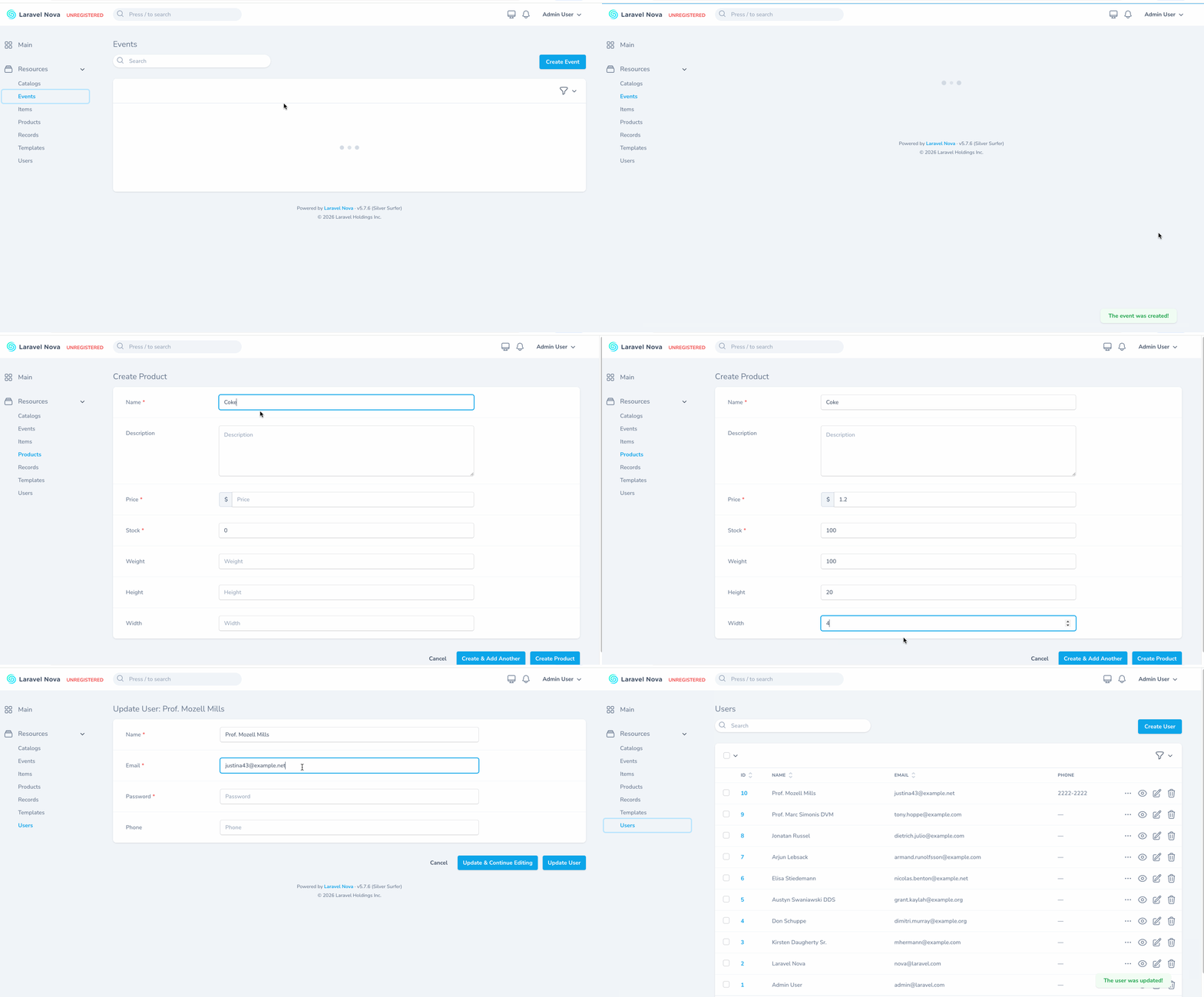
Create Nova resources UI (tables and forms) based on dynamic configuration stored in the database. Perfect for quick prototyping when you need to rapidly create and iterate on data structures without writing code.
Important
This package is experimental and it's not inteded to be used in production (yet)
Installation
You can install the package in to a Laravel app that uses Nova via composer:
composer require opscale-co/nova-dynamic-resources
Next up, you must register the tool with Nova. This is typically done in the tools method of the NovaServiceProvider.
// in app/Providers/NovaServiceProvider.php
// ...
public function tools()
{
    return [
        // ...
        new \Opscale\NovaDynamicResources\Package(),
    ];
}
Usage
This package provides three different approaches to create dynamic resources, each suited for different use cases:
| Type | Use Case | Model | Nova Resource | Fields |
|---|---|---|---|---|
| Dynamic | Fully dynamic resources | Uses Record model |
Auto-generated | All from template |
| Inherited | Own model/table with template_id |
Custom with UsesTemplate |
Custom with UsesTemplate |
Static + template |
| Composited | Add dynamic fields to existing models | Existing model with UsesTemplate |
Existing resource with UsesTemplate |
Static + template |
1. Dynamic Type
Best for: Rapid prototyping, admin-configurable resources, or when you don't need custom business logic.
Dynamic templates create fully dynamic resources where both the model and Nova resource are generated automatically. All data is stored in the dynamic_resources_records table.
Setup
Simply create a template in Nova or via seeder:
use Opscale\NovaDynamicResources\Models\Template;
use Opscale\NovaDynamicResources\Models\Enums\TemplateType;

Template::create([
    'label' => 'Events',
    'singular_label' => 'Event',
    'uri_key' => 'events',
    'title' => 'name',
    'type' => TemplateType::Dynamic,
    'related_class' => null,
]);
Then add fields to the template:
$template->fields()->createMany([
    ['type' => 'name', 'label' => 'Name', 'name' => 'name', 'required' => true],
    ['type' => 'description', 'label' => 'Description', 'name' => 'description'],
    ['type' => 'address', 'label' => 'Address', 'name' => 'address'],
    ['type' => 'date', 'label' => 'Date', 'name' => 'date', 'required' => true],
]);
The resource will appear automatically in Nova's sidebar.
2. Inherited Type
Best for: When you have a base model that needs different dynamic fields depending on conditions. Each record can reference a different template, allowing varied field configurations per record.
Inherited templates use your own Eloquent model with a template_id foreign key. This allows you to have a dedicated table for your records while still leveraging dynamic fields from templates.
1. Database Migration
Create a migration for your model's table with a template_id foreign key, your static columns, and a data JSON column for dynamic template fields:
Schema::create('products', function (Blueprint $table) {
    $table->id();
    $table->foreignId('template_id')->constrained('dynamic_resources_templates')->cascadeOnDelete();
    // Static columns
    $table->string('name');
    $table->text('description')->nullable();
    $table->decimal('price', 10, 2);
    $table->unsignedInteger('stock')->default(0);
    // Dynamic template fields stored here
    $table->json('data')->nullable();
    $table->timestamps();
});
2. Model Setup
Create your model with the UsesTemplate trait:
namespace App\Models;

use Illuminate\Database\Eloquent\Model;
use Opscale\NovaDynamicResources\Models\Concerns\UsesTemplate;

class Product extends Model
{
    use UsesTemplate;

    protected $fillable = [
        'template_id',
        'name',
        'description',
        'price',
        'stock',
        'data',
    ];

    protected $casts = [
        'price' => 'decimal:2',
        'stock' => 'integer',
        'data' => 'array',
    ];
}
The UsesTemplate trait automatically detects the template_id field and uses a belongsTo relationship to the template.
3. Create the Template
use Opscale\NovaDynamicResources\Models\Template;
use Opscale\NovaDynamicResources\Models\Enums\TemplateType;

Template::create([
    'label' => 'Products',
    'singular_label' => 'Product',
    'uri_key' => 'products',
    'title' => 'name',
    'type' => TemplateType::Inherited,
    'related_class' => \App\Nova\Product::class,
]);
4. Add Template Fields
Add dynamic fields that will be stored in the data JSON column:
$template->fields()->createMany([
    ['type' => 'quantity', 'label' => 'Weight', 'name' => 'weight'],
    ['type' => 'quantity', 'label' => 'Height', 'name' => 'height'],
    ['type' => 'quantity', 'label' => 'Width', 'name' => 'width'],
]);
5. Nova Resource Integration
Create a Nova resource with the UsesTemplate trait. You can define static fields before the dynamic template fields:
namespace App\Nova;

use Laravel\Nova\Fields\BelongsTo;
use Laravel\Nova\Fields\Currency;
use Laravel\Nova\Fields\ID;
use Laravel\Nova\Fields\Number;
use Laravel\Nova\Fields\Text;
use Laravel\Nova\Fields\Textarea;
use Laravel\Nova\Http\Requests\NovaRequest;
use Laravel\Nova\Resource;
use Opscale\NovaDynamicResources\Nova\Concerns\UsesTemplate;

class Product extends Resource
{
    use UsesTemplate;

    public static $model = \App\Models\Product::class;

    public static $title = 'name';

    public function fields(NovaRequest $request): array
    {
        return [
            ID::make()->sortable(),

            BelongsTo::make(__('Template'), 'template', \Opscale\NovaDynamicResources\Nova\Template::class)
                ->searchable()
                ->withoutTrashed(),

            // Static fields defined in the Nova resource
            Text::make(__('Name'), 'name')
                ->sortable()
                ->rules('required', 'string', 'max:255'),

            Textarea::make(__('Description'), 'description')
                ->rules('nullable', 'string')
                ->hideFromIndex(),

            Currency::make(__('Price'), 'price')
                ->sortable()
                ->rules('required', 'numeric', 'min:0'),

            Number::make(__('Stock'), 'stock')
                ->sortable()
                ->rules('required', 'integer', 'min:0')
                ->default(0),

            // Dynamic fields from the associated template
            ...$this->renderTemplateFields(),
        ];
    }
}
The Product resource will display the static database fields (name, description, price, stock) followed by any dynamic fields defined in the template (weight, height, width) which are stored in the data JSON column.
Predefined Template Data
Inherited templates support predefined values via the template's data JSON column. When a template has a value stored in its data for a given field name, that field will be rendered as a hidden field with the predefined value instead of a visible input.
This is useful when you want certain field values to be fixed by the template rather than entered by the user:
$template = Template::create([
    'label' => 'Electronics',
    'singular_label' => 'Electronic',
    'uri_key' => 'electronics',
    'title' => 'name',
    'type' => TemplateType::Inherited,
    'related_class' => \App\Nova\Product::class,
]);

// Set predefined data on the template
$template->setData('category', 'electronics');
$template->save();

// Add fields — 'category' will be auto-filled and hidden
$template->fields()->createMany([
    ['type' => 'name', 'label' => 'Category', 'name' => 'category', 'required' => true],
    ['type' => 'quantity', 'label' => 'Weight', 'name' => 'weight'],
]);
In this example, the "Category" field will be automatically set to "electronics" as a hidden field, while "Weight" remains a regular visible input.
3. Composited Type
Best for: When you need the same extra dynamic fields for all records of an existing model. All records share the same template, linked via the Nova resource class.
Composited templates attach dynamic fields to existing models (like User, Order, etc.) and Nova resources. The dynamic field values are stored in a data JSON column on the existing table.
1. Database Migration
Add a data column to your existing table:
Schema::table('users', function (Blueprint $table) {
    $table->json('data')->nullable();
});
2. Model Setup
Add the UsesTemplate trait to your model:
use Opscale\NovaDynamicResources\Models\Concerns\UsesTemplate;

class User extends Authenticatable
{
    use UsesTemplate;

    protected $fillable = [
        'name',
        'email',
        'password',
        'data', // Add this
    ];
}
The UsesTemplate trait provides:
- A
template()relationship to access the model's template configuration - A
fields()relationship to access the template's fields - Dynamic data storage and retrieval via the
dataJSON column - Automatic eager loading of template and fields
3. Create the Template
use Opscale\NovaDynamicResources\Models\Template;
use Opscale\NovaDynamicResources\Models\Enums\TemplateType;

Template::create([
    'label' => 'Users',
    'singular_label' => 'User',
    'uri_key' => 'users',
    'title' => 'name',
    'type' => TemplateType::Composited,
    'related_class' => \App\Nova\User::class,
]);
4. Add Template Fields
$template->fields()->createMany([
    ['type' => 'phone', 'label' => 'Phone', 'name' => 'phone'],
]);
5. Nova Resource Integration
Add the UsesTemplate trait to your Nova resource and use renderTemplateFields() to render the dynamic fields:
use Opscale\NovaDynamicResources\Nova\Concerns\UsesTemplate;

class User extends Resource
{
    use UsesTemplate;

    public function fields(NovaRequest $request): array
    {
        return [
            // Your existing static fields...
            ID::make()->sortable(),
            Text::make('Name'),
            Text::make('Email'),
            Password::make('Password')->onlyOnForms(),

            // Render dynamic fields from template
            ...$this->renderTemplateFields(),
        ];
    }
}
This approach allows you to extend existing models with configurable fields without modifying the database schema beyond the data column.
Field Configuration
Each field in your dynamic resource consists of:
- Label: The display name for the field
- Name: The database column name
- Type: The business field type (see available types below)
- Required: Whether the field is mandatory
- Validation Rules: Additional Laravel validation rules
- Config: Field-specific configuration options
- Hooks: Action classes that process config values before applying them to fields
Available Field Types
Field types are based on business logic and can be found in the config/nova-dynamic-resources.php configuration file. Each type maps to a specific Nova field class with predefined behavior.
You can add more field types by extending the configuration file. The available types include common business field patterns like text, email, phone, address, etc. Business types are used instead of technical field types because they carry implicit validation rules and configuration - for example, an "email" type automatically includes email format validation, while a "phone" type includes phone number pattern validation.
Bundled Opscale field packages
The default config also exposes types backed by sibling Opscale Nova field packages, all pulled in automatically as dependencies:
| Type(s) | Package |
|---|---|
bpmn |
opscale-co/nova-bpmn-field — BPMN 2.0 process diagrams |
dbml |
opscale-co/nova-dbml-field — DBML data-model diagrams |
location, place, geofence, area, route |
opscale-co/nova-geospatial-fields — Leaflet-backed geospatial fields |
Field Configuration Options
The Config section allows you to call specific methods on the Nova field instance. For example:
required => trueis equivalent to calling->required(true)on the fieldplaceholder => "Enter your name"calls->placeholder("Enter your name")help => "This field is important"calls->help("This field is important")
This approach provides flexibility to configure Nova fields dynamically while maintaining type safety and IDE support.
Field Hooks Options
The Hooks section allows you to intercept and transform config values before they are applied to the field. Hooks are action classes that extend Opscale\Actions\Action and process the config value dynamically.
For example, when a field type has:
'config' => [
    'options' => 'gender',
],
'hooks' => [
    'options' => \Opscale\NovaDynamicResources\Services\Actions\SelectOptions::class,
]
The SelectOptions hook will be called with the value 'gender' and will fetch the actual options from a catalog, returning them to be passed to the ->options() method on the field.
This is useful for:
- Fetching dynamic data from the database (e.g., select options from catalogs)
- Transforming values before applying them to fields
- Running custom logic based on field configuration
Relationships
In addition to fields, templates can define relationships to other templates. This enables hierarchical structures (parent/children), ownership references, and links between dynamic resources without writing model code. Relationships are stored in the dynamic_resources_relationships table and resolved at runtime.
Relationship Cardinalities
Three cardinalities are supported, each backed by a Nova relation field configured in config/nova-dynamic-resources.php under the relationships key:
| Cardinality | Nova Field | Description |
|---|---|---|
BelongsTo |
BelongsTo |
Owns a single related record (the foreign key lives on this side) |
HasOne |
HasOne |
Inverse single-record relationship; the related record holds the foreign key |
HasMany |
HasMany |
Collection of related records; each related record holds the foreign key |
Defining Relationships
Use the relationships() method on a template and provide the cardinality, related template, and foreign key. The example below creates a self-referential parent/children relationship:
use Opscale\NovaDynamicResources\Models\Enums\RelationshipCardinality;

$template->relationships()->create([
    'name' => 'parent',
    'label' => 'Parent',
    'cardinality' => RelationshipCardinality::BelongsTo,
    'related_template_id' => $template->id, // self-referential
    'foreign_key' => 'parent_id',
    'inverse_name' => 'children',
    'required' => false,
]);
Available attributes:
- name: Relationship name on the source template (also the Nova field name)
- label: Display label in Nova
- cardinality:
RelationshipCardinality::BelongsTo,HasOne, orHasMany - related_template_id: ID of the target template
- foreign_key: Column that stores the relationship key
- inverse_name: Optional name used to expose the inverse side on the related template
- required: Whether the relationship is mandatory
- rules / config: Extra Laravel validation rules and Nova field config (merged with the defaults from
config/nova-dynamic-resources.php)
Relationships whose related Nova resource is not yet registered are skipped silently when rendering.
Layout
On the dynamic Record resource, relationships are laid out around the template fields based on their cardinality:
BelongsTorelationships render before the template fields, so the parent reference is the first thing the user sees.HasOneandHasManyrelationships render after the template fields. When at least one is present, the form is split into Nova tabs: aFieldstab containing theBelongsTorelationships and the template fields, plus one tab perHasOne/HasManyrelationship using itslabel.
For example, an Author template with a HasMany relationship to Books will render as a Fields tab plus a Books tab. A Book template with a BelongsTo relationship to Author renders the author selector before the book's own fields, with no extra tabs.
Templated Repeater
For HasMany scenarios where each child row should be rendered as one of several Composited templates targeting the same Nova resource, the package ships a TemplatedRepeater field. It wraps Nova's Repeater and auto-populates its repeatables from the Composited templates whose related_class matches the child resource — Nova's "+ Add" menu then lists one block type per template.
use Opscale\NovaDynamicResources\Nova\Fields\TemplatedRepeater;

TemplatedRepeater::make(__('Items'), 'items')
    ->forResource(\App\Nova\LineItem::class)
    ->asHasMany(\App\Nova\LineItem::class)
    ->uniqueField('uuid');
Requirements on the child model:
- A foreign key back to the parent (e.g.
bundle_id). - A
uuidcolumn (or whichever column you pass touniqueField()) so Nova's HasMany preset can diff added/removed/updated rows across submissions. - The
UsesTemplatetrait, plus atemplate_idcolumn and adataJSON column — exactly as for any Composited resource.
Each row persists its own template_id plus the inline values of that template's dynamic fields. Detail/edit of existing rows happens on the child's own Nova resource.
For advanced wiring (custom Composited filter, hand-built repeatables list) the underlying class is Opscale\NovaDynamicResources\Nova\Repeatables\Record — TemplatedRepeater::forResource() is just a thin sugar around Record::repeatablesFor().
Testing
npm run test
Changelog
Please see CHANGELOG for more information on what has changed recently.
Contributing
Please see CONTRIBUTING for details.
Security
If you discover any security related issues, please email development@opscale.co instead of using the issue tracker.
Credits
License
The MIT License (MIT). Please see License File for more information.