
joshuavanderpoll / laravel-captchas

No-JavaScript, click-to-solve image captchas for Laravel that work with scripting disabled.
Package info
github.com/joshuavanderpoll/laravel-captchas
pkg:composer/joshuavanderpoll/laravel-captchas
Requires
- php: ^8.2
- ext-gd: *
- geoip2/geoip2: ^2.13|^3.0
- guzzlehttp/guzzle: ^7.5
- illuminate/contracts: ^10.0|^11.0|^12.0|^13.0
- illuminate/http: ^10.0|^11.0|^12.0|^13.0
- illuminate/support: ^10.0|^11.0|^12.0|^13.0
Requires (Dev)
- larastan/larastan: ^2.9|^3.0
- laravel/pint: ^1.18
- orchestra/testbench: ^8.0|^9.0|^10.0|^11.0
- phpunit/phpunit: ^10.5|^11.0|^12.0
Suggests
None
Provides
None
Conflicts
None
Replaces
None
README
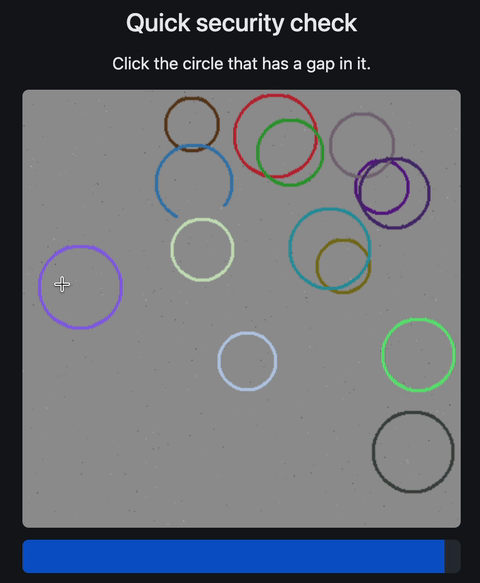 broken_circle · click the circle with a gap |
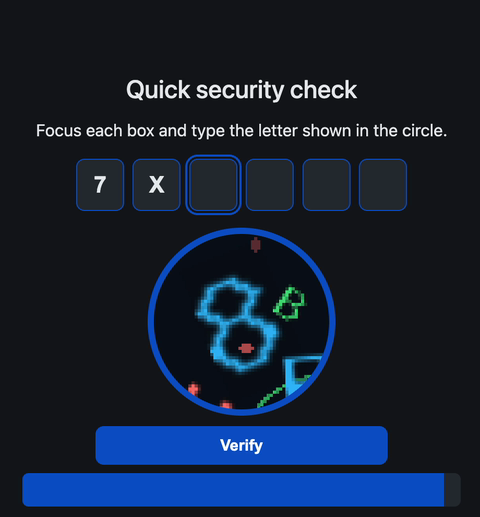 scatter · read the highlighted letters |
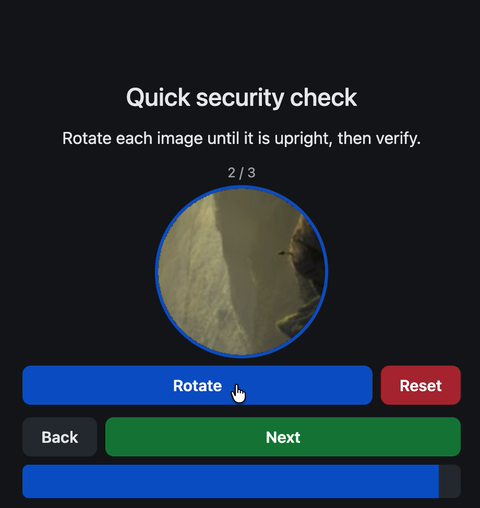 rotate · turn each image upright |
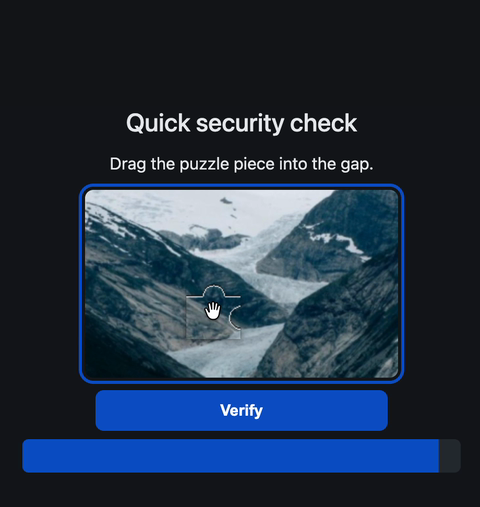 slider · drag the piece into the gap |
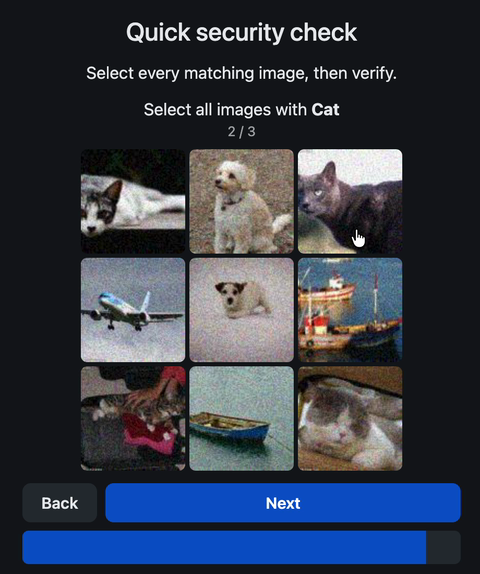 grid · select every matching image |
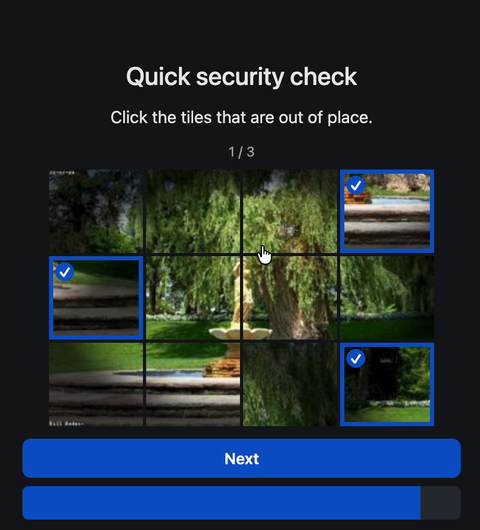 tiles · click the tiles out of place |
Animated demos of each challenge are in the docs.
Image captchas for Laravel that work with JavaScript fully disabled. Every challenge is drawn server-side with GD and solved with plain HTML and CSS, and the answer is validated against a secret kept in the cache. You can drop a captcha into your own form, render a standalone page, or put a full-page gate (with an optional waiting queue) in front of any route.
Why this package
- No JavaScript. Works with scripting fully disabled (plain HTML and CSS).
- No API tokens or third-party services. Nothing leaves your server.
- Highly configurable. Config, views, translations and images are all publishable and editable.
- Bring your own images. Point any image challenge at your own set.
- Gate mode. An optional waiting queue, then a captcha, in front of any route.
- Choose who is challenged. Gate VPN / Tor / datacenter and let verified search engines straight through, so SEO is never hurt.
- Accessible and translated. WCAG AA conscious, 19 languages, RTL supported.
- Laravel 10 to 13, PHP 8.2+. GD only, no front-end build.
Challenges
Six challenge types ship. Each has its own page with a screenshot and all its options.
| Challenge | What the visitor does | Docs |
|---|---|---|
broken_circle (default) |
Click the circle that has a gap | docs |
scatter |
Read the highlighted letters and type them | docs |
rotate |
Turn each image upright | docs |
slider |
Drag the puzzle piece into the gap | docs |
grid |
Select every image that matches a word | docs |
tiles |
Click the tiles that are out of place | docs |
Pick one with default, or per gate with gate.challenge:
'default' => 'tiles', // or 'broken_circle', 'scatter', 'rotate', 'slider', 'grid'
You can also pass a list to serve a random mix, a different challenge is chosen each time a captcha is generated:
'default' => ['tiles', 'scatter', 'rotate'],
// or per gate:
'gate' => ['challenge' => ['tiles', 'scatter', 'rotate']],
Which one to pick
Ratings are relative within this package and deliberately conservative. No client-side captcha is unbeatable, so treat the visual challenge as one layer and lean on the gate's rate limiting, attempt limits and conditions for the real defence.
| Challenge | vs scripted bots | vs AI / ML bots | Server cost | Human effort | Good for |
|---|---|---|---|---|---|
broken_circle |
Low-Medium | Low | Very low | Very easy | Cheap, high-traffic gates against simple bots |
scatter |
High | Medium | Medium | Medium | Text-style challenge that resists naive OCR |
rotate |
Medium-High | Medium | Medium-High | Easy | Orientation task; raise noise against ML |
slider |
Medium | Low-Medium | Medium | Easy | Familiar drag UX; weakest to template matching |
grid |
High | Low | High | Medium | Familiar "pick the X", but classifiers beat it |
tiles |
High | Medium-High | Medium-High | Medium | Hardest for off-the-shelf AI |
Classification (grid) and template matching (slider, broken_circle) are what
off-the-shelf models do well, so they rate lowest against AI. tiles needs
spatial reasoning and scatter/rotate fight OCR and orientation models, which is
harder to automate, more so with noise turned up and your own images. Mixing
challenges forces a bot to handle several mechanisms instead of specialising in
one.
Use your own images for the image challenges.
rotate,slider,gridandtilesship with a small set of CC-licensed placeholder images so the package works out of the box. That set is tiny and easy for a bot to fingerprint, so for any real deployment point these at your own (ideally private, rotating) images. See Using your own images.
Requirements
- PHP 8.2+
ext-gd- Laravel 10, 11, 12 or 13
Installation
composer require joshuavanderpoll/laravel-captchas
The service provider is auto-discovered. Publish the config, views or translations if you want to tweak them:
php artisan vendor:publish --tag=captchas-config
php artisan vendor:publish --tag=captchas-views
php artisan vendor:publish --tag=captchas-lang
Gate data (if you use the gate's IP conditions)
The gate's IP conditions (Tor, datacenter, VPN, country) need their data downloaded first. Run this once after install, and on every deploy:
php artisan captchas:refresh-lists
Wire it into your deploy and schedule it so the data stays fresh:
// routes/console.php (or app/Console/Kernel.php)
use Illuminate\Support\Facades\Schedule;

Schedule::command('captchas:refresh-lists')->daily();
// composer.json - refresh on every composer install/update
"scripts": {
    "post-update-cmd": [
        "@php artisan captchas:refresh-lists --ansi"
    ]
}
This is only needed for the gate's IP/country conditions; a plain captcha in your own form does not need it.
Usage
In your own form
<form action="{{ route('register.store') }}" method="post">
    @csrf

    {{-- your fields --}}

    @include('captchas::field')

    <button type="submit">Continue</button>
</form>
Validate on submit with the rule:
$request->validate([
    'cap_token' => 'required|captcha',
]);
As a standalone page
Route::get('/gate', fn () => view('captchas::captcha', ['action' => route('gate.check')]))->name('gate');

Route::post('/gate', function (Illuminate\Http\Request $request) {
    $request->validate(['cap_token' => 'required|captcha']);
    session(['human' => true]);

    return redirect()->intended('/');
})->name('gate.check');
On failure, re-render with a fresh captcha and a message:
return view('captchas::captcha', [
    'action' => route('gate.check'),
    'error'  => __('captchas::captchas.failed'),
]);
As a full-page gate (queue + captcha)
Put a gate in front of any route with the captcha.gate middleware:
Route::middleware('captcha.gate')->group(function () {
    Route::get('/', HomeController::class);
});
The gate has a lot of options: an optional waiting queue, who has to pass it (VPN / Tor / datacenter / blocklists / AbuseIPDB) with an SEO-safe good-bot bypass, pluggable list storage and VPN detection, lifecycle events, and DDoS notes. It is all on its own page: The gate.
Using the manager directly
use JoshuaVanderpoll\Captchas\Facades\Captcha;

$captcha = Captcha::make();   // GeneratedCaptcha { token, image, prompt, ttl }

$ok = Captcha::verify($captcha->token, $request->all());
The same captcha works as a website entry gate and as a form-submit check at the same time; they share the manager, config and events.
Using your own images
The rotate, slider, tiles and grid challenges draw from an image pool, and
broken_circle can use background photos. Pointing a challenge at your own folder
replaces the bundled demo set, so in production you control the whole thing.
'challenges' => [
    'tiles' => ['paths' => [resource_path('captcha/landscapes')]],
    'grid'  => ['path'  => resource_path('captcha/grid')], // sub-folder per word
],
The bundled images are demo material only. For which config key each challenge uses, accepted formats, recommended sizes, how many to add and how to optimise them, see the custom images guide.
Documentation
- Challenges: broken_circle, scatter, rotate, slider, grid, tiles
- Configuration
- The gate (queue, conditions, events, DDoS)
- Using your own images
- Translations
- Accessibility
Changelog
See CHANGELOG.md for what has changed recently.
Contributing
See CONTRIBUTING.md for the workflow: Conventional Commits,
pull requests, keeping all language files in sync, using __() for every
user-facing string, and the accessibility rules.
Security
If you discover a security issue, please review our security policy and report it privately by email rather than opening a public issue.
Credits
- Joshua van der Poll
- All Contributors
- Country data from the DB-IP Lite database (CC BY 4.0)
License
The MIT License (MIT). See LICENSE.md for details.