
ivanmercedes / flex-fields

ACF-like Custom Entities & Custom Fields plugin for Laravel + Filament
Requires
- php: ^8.3
- filament/filament: ^4.0 || ^5.0
- intervention/image: ^3.0 || ^4.0
- laravel/prompts: ^0.1.18|^0.2.0|^0.3.0
Requires (Dev)
- laravel/ai: ^0.11.2 || ^1.0.0
- laravel/pint: ^1.29
- orchestra/testbench: ^11.1
Suggests
- bezhansalleh/filament-shield: Manage the per-entity permissions (flex:permissions --sync) from a UI.
- filament/spatie-laravel-media-library-plugin: Required to store image/file fields with Spatie Media Library (media.driver = spatie).
- laravel/ai: Required to enable AI tools and Laravel AI SDK integration.
- laravel/sanctum: Recommended to authenticate the optional headless REST API (default middleware: auth:sanctum).
Provides
None
Conflicts
None
Replaces
None
README

FlexFields brings the power of dynamic schemas to Laravel and the Filament admin panel. Think of it as Advanced Custom Fields (ACF) adapted to the Filament ecosystem. It allows you to create Custom Entities (like post types: "Products", "Employees", "Events") and attach customizable fields to them on the fly—without having to modify your database schema every time.
Features
- Custom Entities: Define any data structure (like post types) without touching database migrations.
- 21 Custom Field Types: Support for text, textarea, number, email, URL, date, datetime, boolean/toggle, select, multiselect, color, file, image, rich text, JSON, tags, dynamic repeaters, phone (with masks), structured addresses, links (URL, title and target) and relationships to records of other entities.
- Advanced Field Behavior: Conditional visibility (
showWhen), translatable fields ({"en": "Hello", "es": "Hola"}) and a visual validation rule builder. - Field Groups / Sections: Organize fields into labeled, collapsible form sections.
- CSV Export & CSV/Excel Import: Export records (all, filtered or selected) and bulk import with a downloadable template and a validated preview before confirming.
- Record History / Audit Log: Who changed what and when, with a visual diff and one-click version restore.
- Headless REST API: Optional
GET/POST/PUT/DELETE /api/flex/{entity}endpoints with Laravel Sanctum, token abilities and customizable JSON transformers. - Permissions per Entity: Gate-based permissions per entity (compatible with Filament Shield / spatie-permission), enforced in the panel, the API and AI tools.
- Spatie Media Library Integration: Optionally store image and file fields with
spatie/laravel-medialibrary. - Laravel AI SDK Integration: First-party tools for AI agents to introspect schemas, read, create, mutate, publish content, and safely execute destructive actions with human approvals.
HasFlexFieldsEloquent Trait: Attach dynamic flex fields directly to any existing model (Product,User, etc.).FlexFieldsFacade: Fluent global access:FlexFields::entity('product')->records(),createRecord(),status(),clearCache().- Field Caching: High-performance active field caching with automatic invalidation on save/delete.
- Form Builder Macros: Register custom field component handlers via
DynamicFormBuilder::macro(...). flex:statusArtisan Command: Display entity, field, record, multi-tenancy, and cache configuration overview in the terminal.- Multi-Tenancy Support: Full compatibility with Filament's multi-tenancy system, allowing scoped entities, fields, and records per tenant.
- Dynamic Forms & Tables: Forms for each entity are generated automatically from its field definitions. Tables are populated dynamically with fields marked as "Show in list".
- Drag-and-Drop Reordering: Easily rearrange custom fields within an entity.
- Entity Categories: Create hierarchical categories and subcategories per entity, and categorize your records easily.
- EAV Storage: Robust and scalable Entity-Attribute-Value storage pattern natively adapted for Eloquent.
- Built-in Dashboard & Widget: Visual overview of all entities, fields, and records, plus an embeddable stats widget.
See it in Action
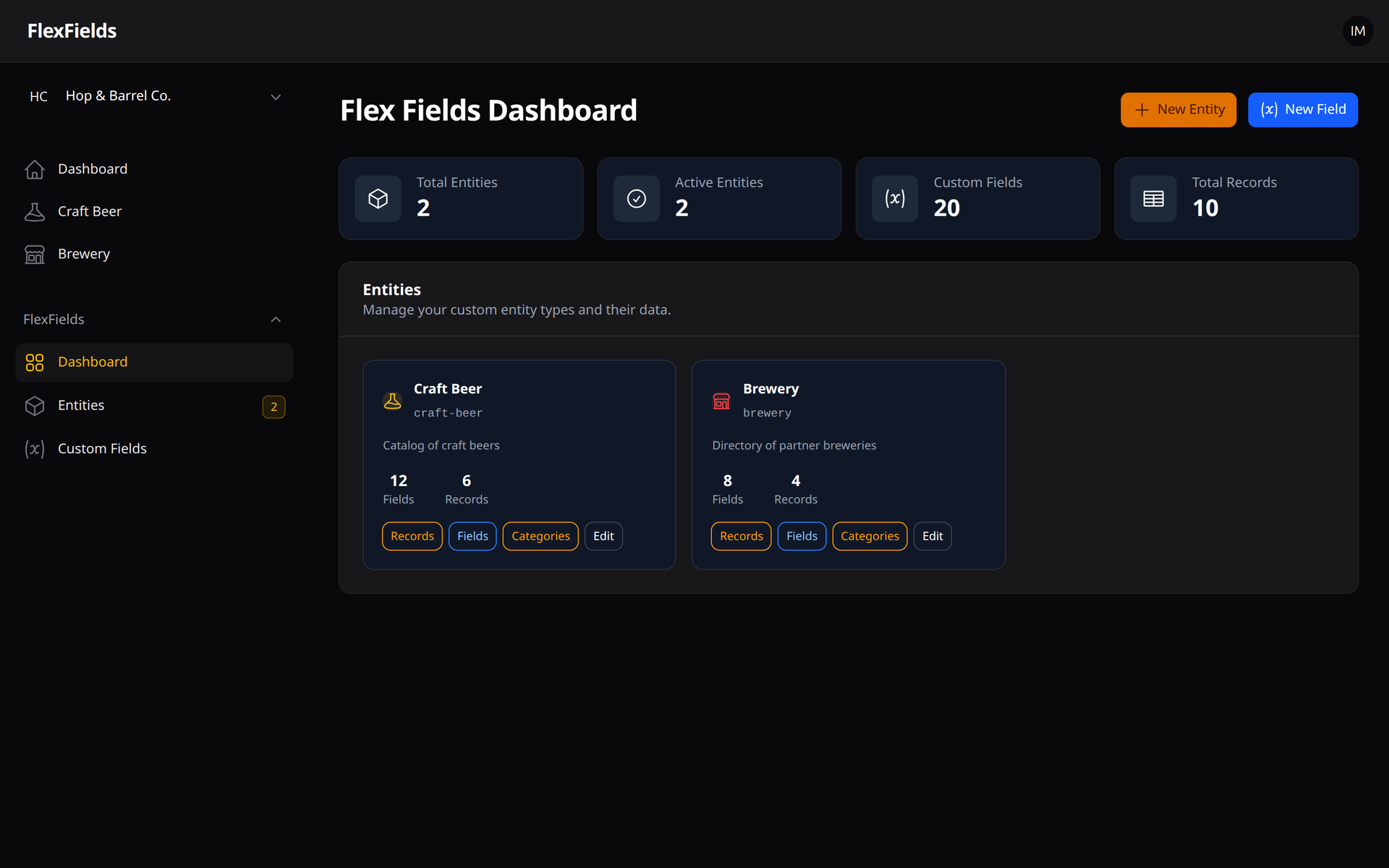
1. The Global Dashboard
Visual overview of all your dynamic entities, custom fields and records.
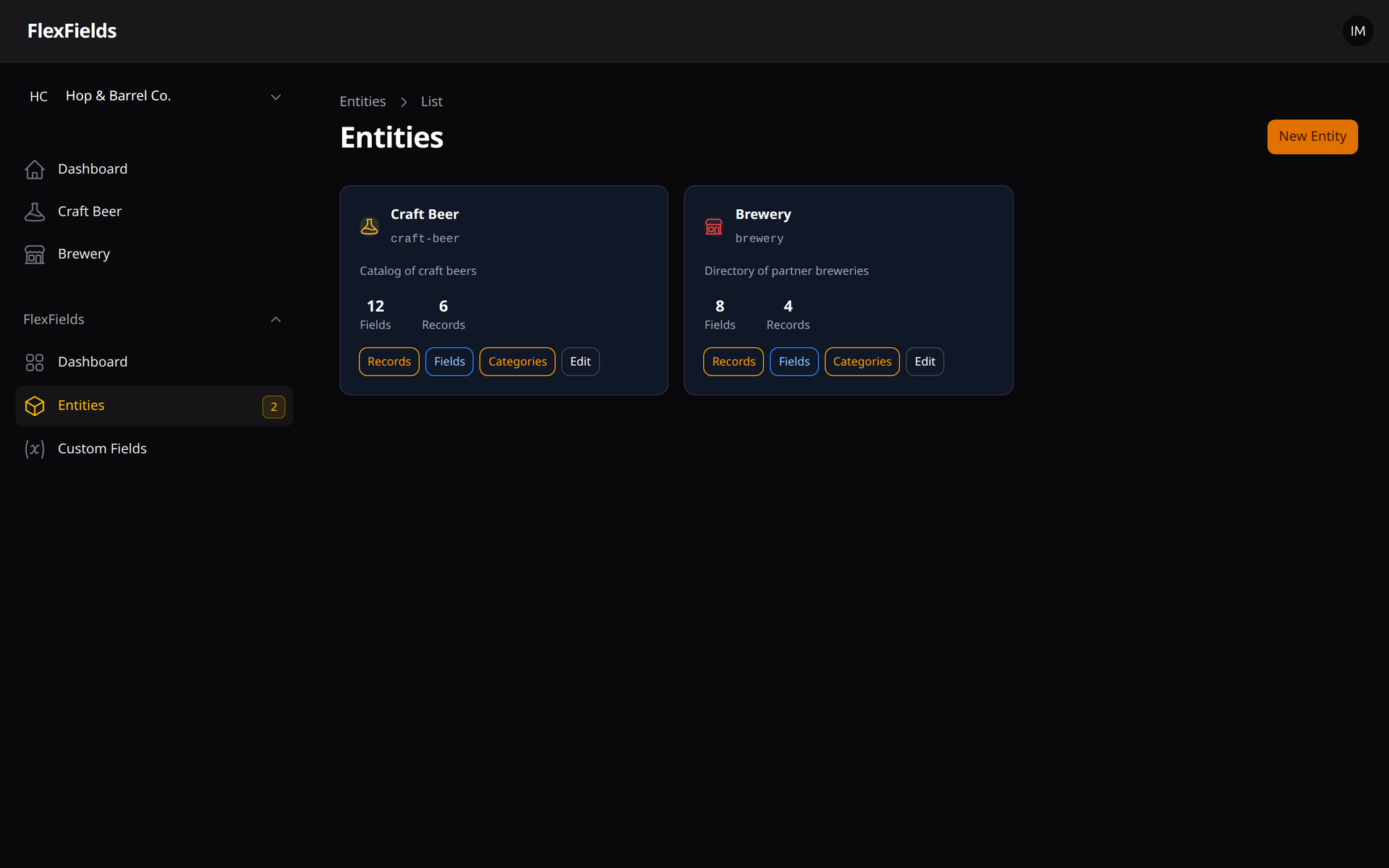
2. Entity Management
Define your custom data types (like "Craft Beer" or "Brewery").
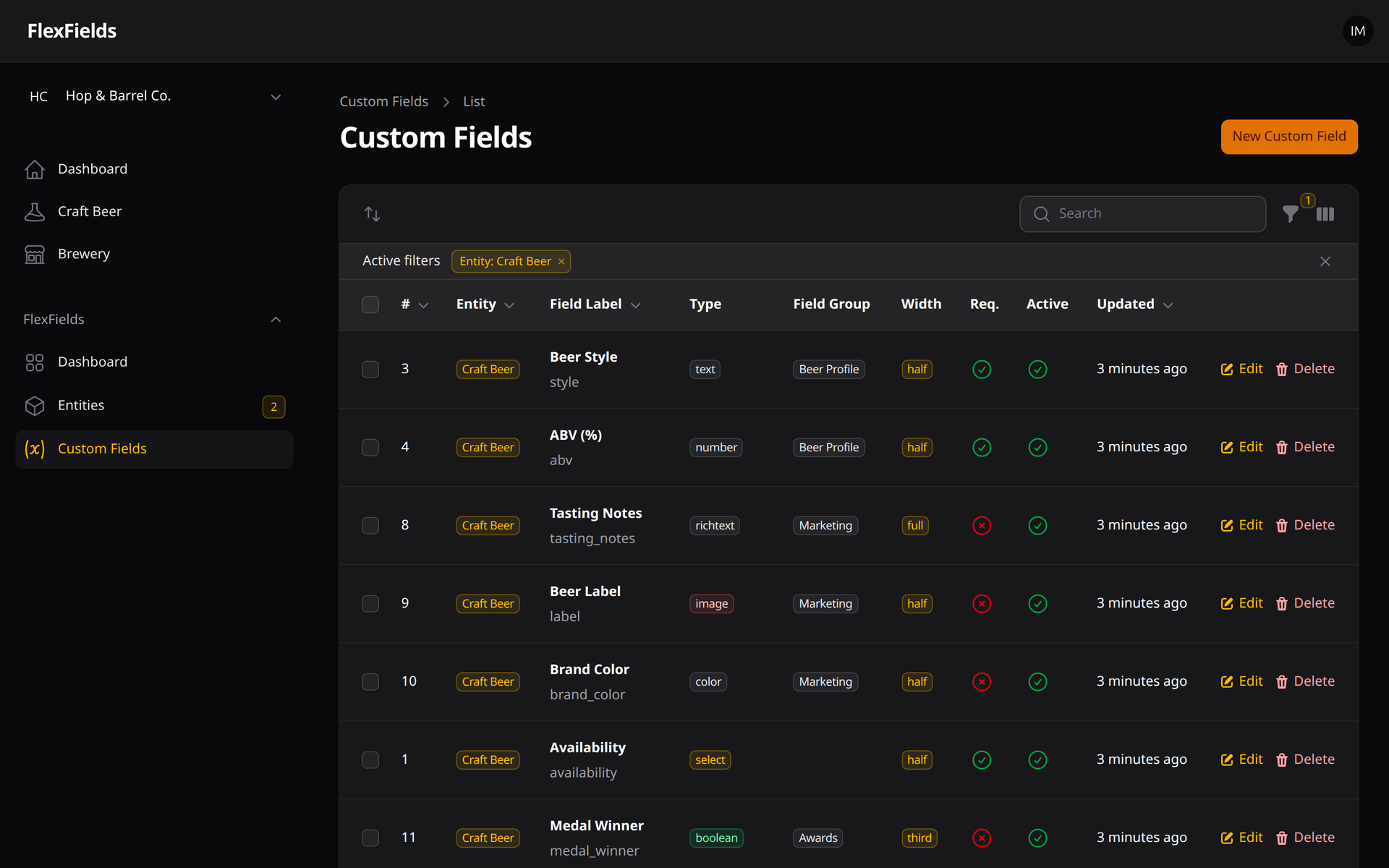
3. Custom Fields Builder
Easily add, configure, group and reorder fields for each entity.
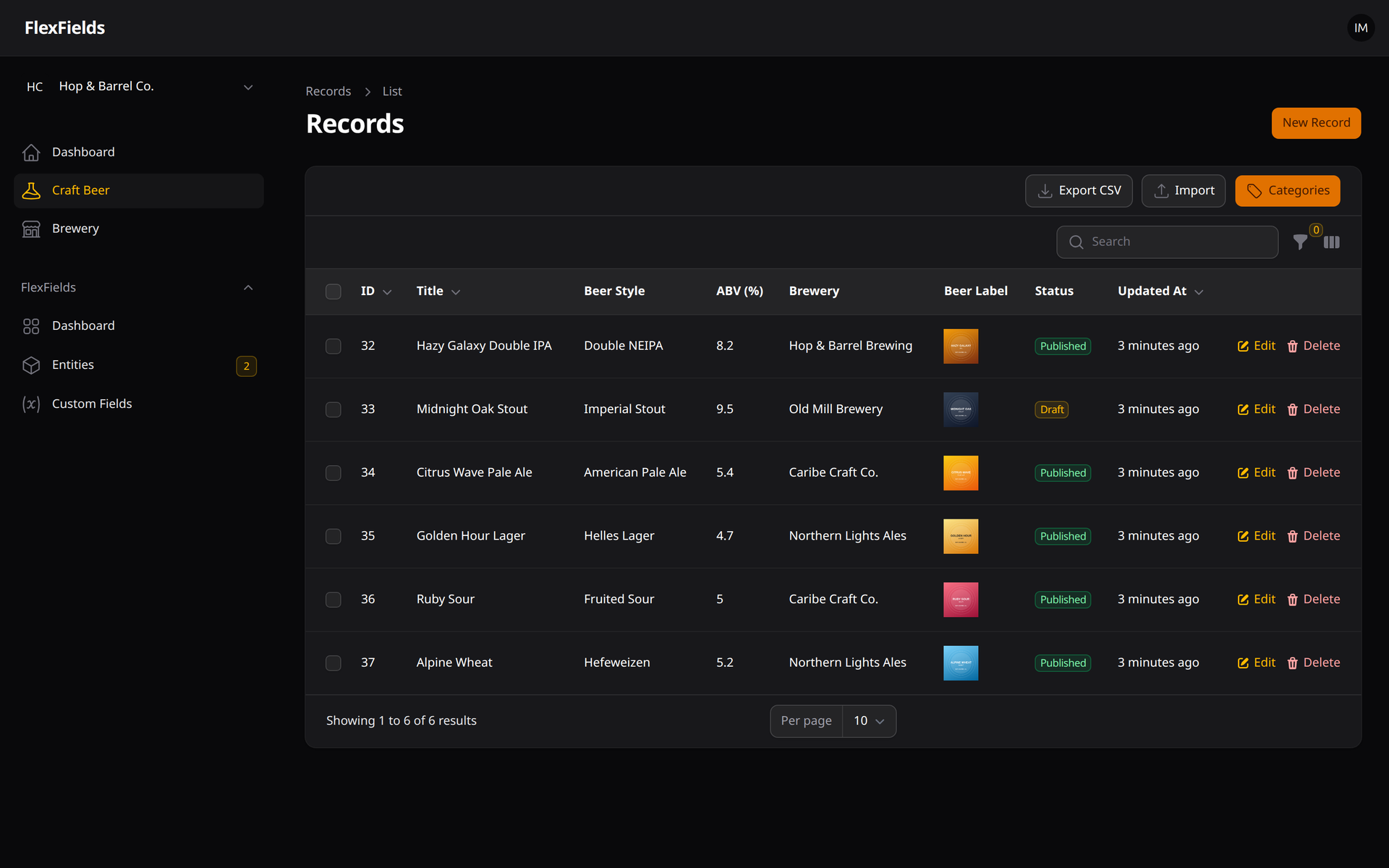
4. Dynamic Records Table
Fields marked as "Show in table" become columns automatically — including images, relationships and translated values. Export to CSV or import from CSV/Excel right from the table.
5. Dynamic Forms with Field Groups & Relationships
Forms are generated from your field definitions and organized into collapsible sections. Relationship fields link records across entities.
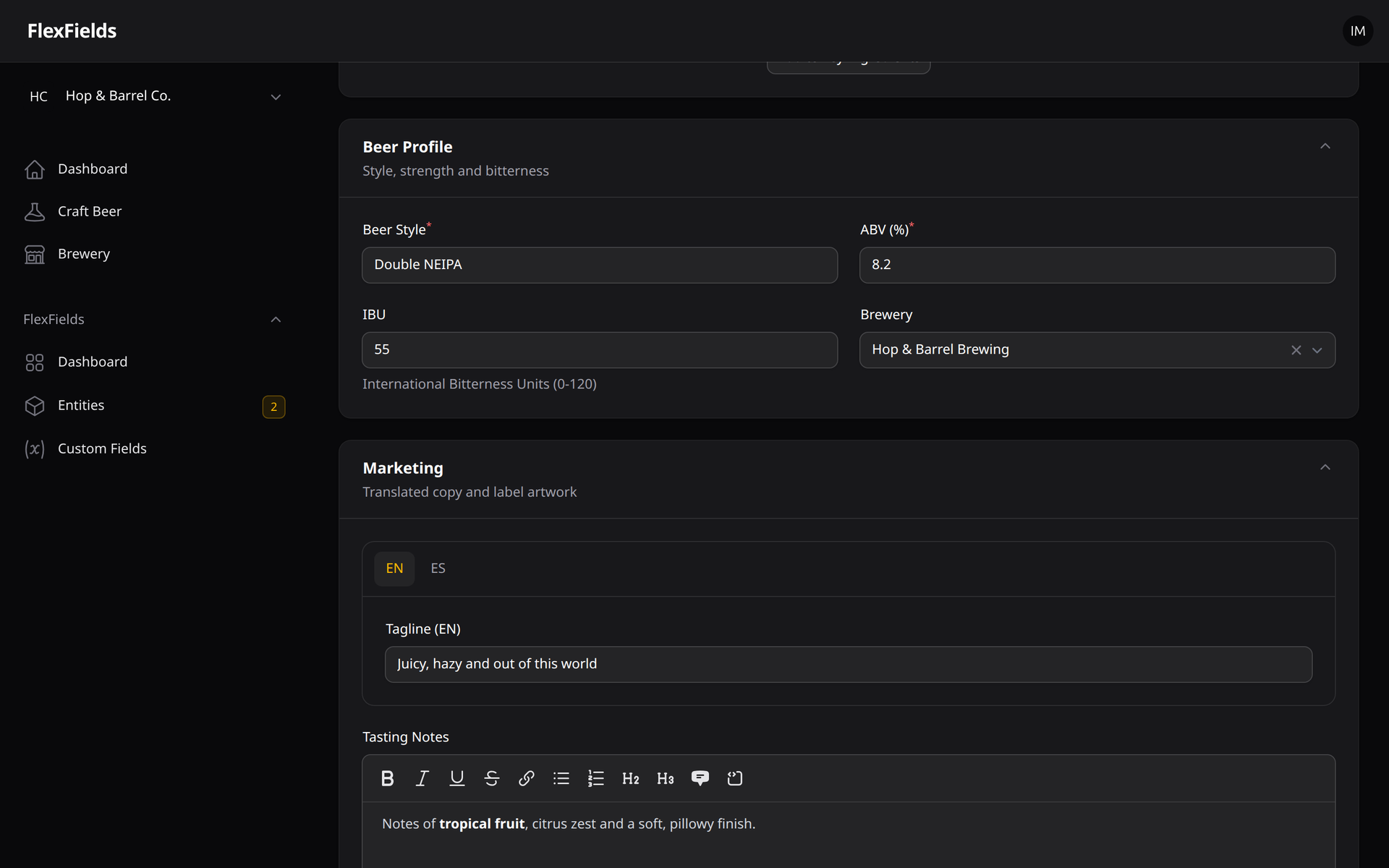
6. Translatable Fields
Store one value per locale ({"en": "...", "es": "..."}) with a tab per language.
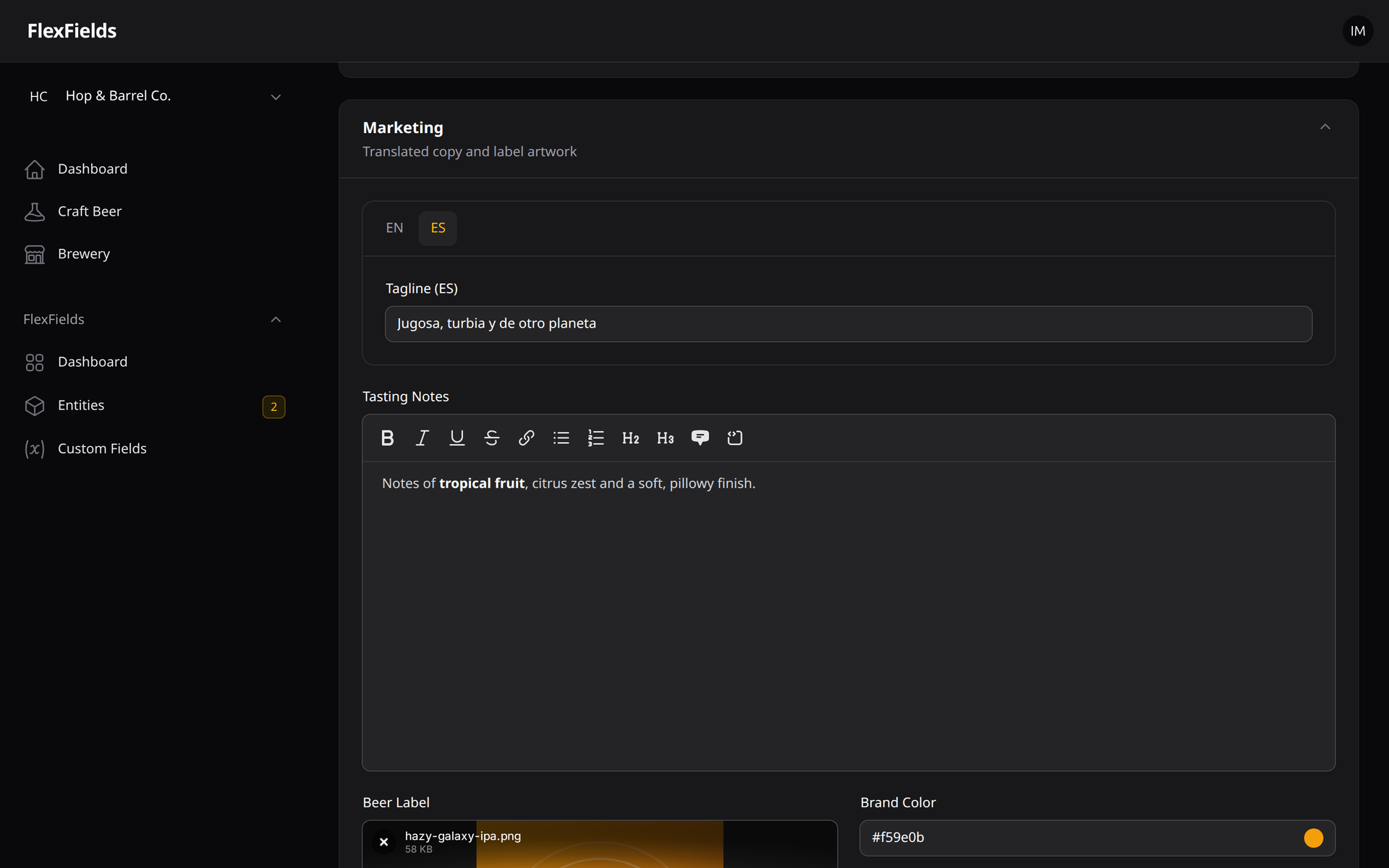
7. Conditional Visibility
Show fields only when other fields match a condition (here, "Award" only appears for medal winners).
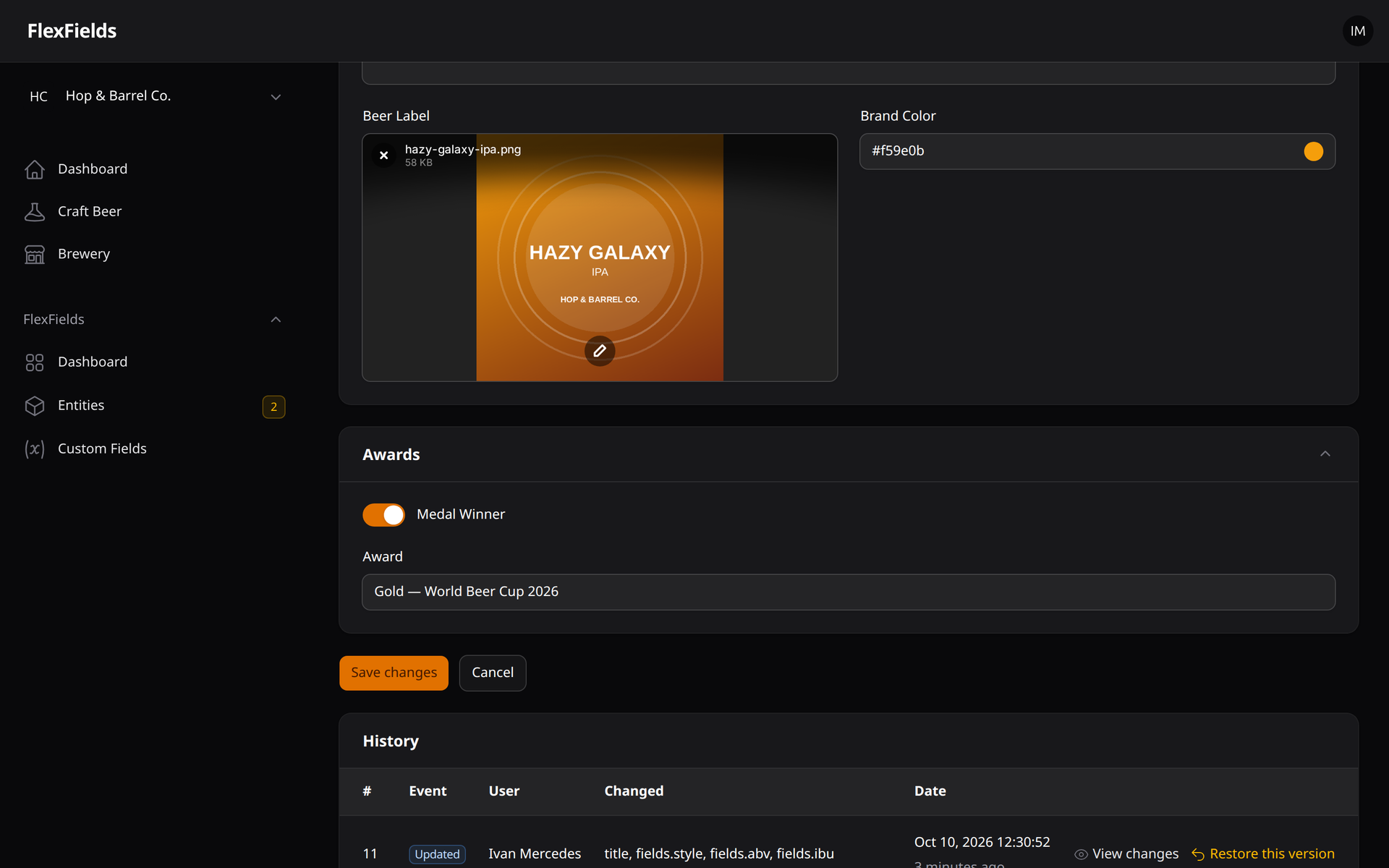
8. Visual Validation & Conditional Logic Builder
Add validation rules and "show when" conditions without writing JSON.
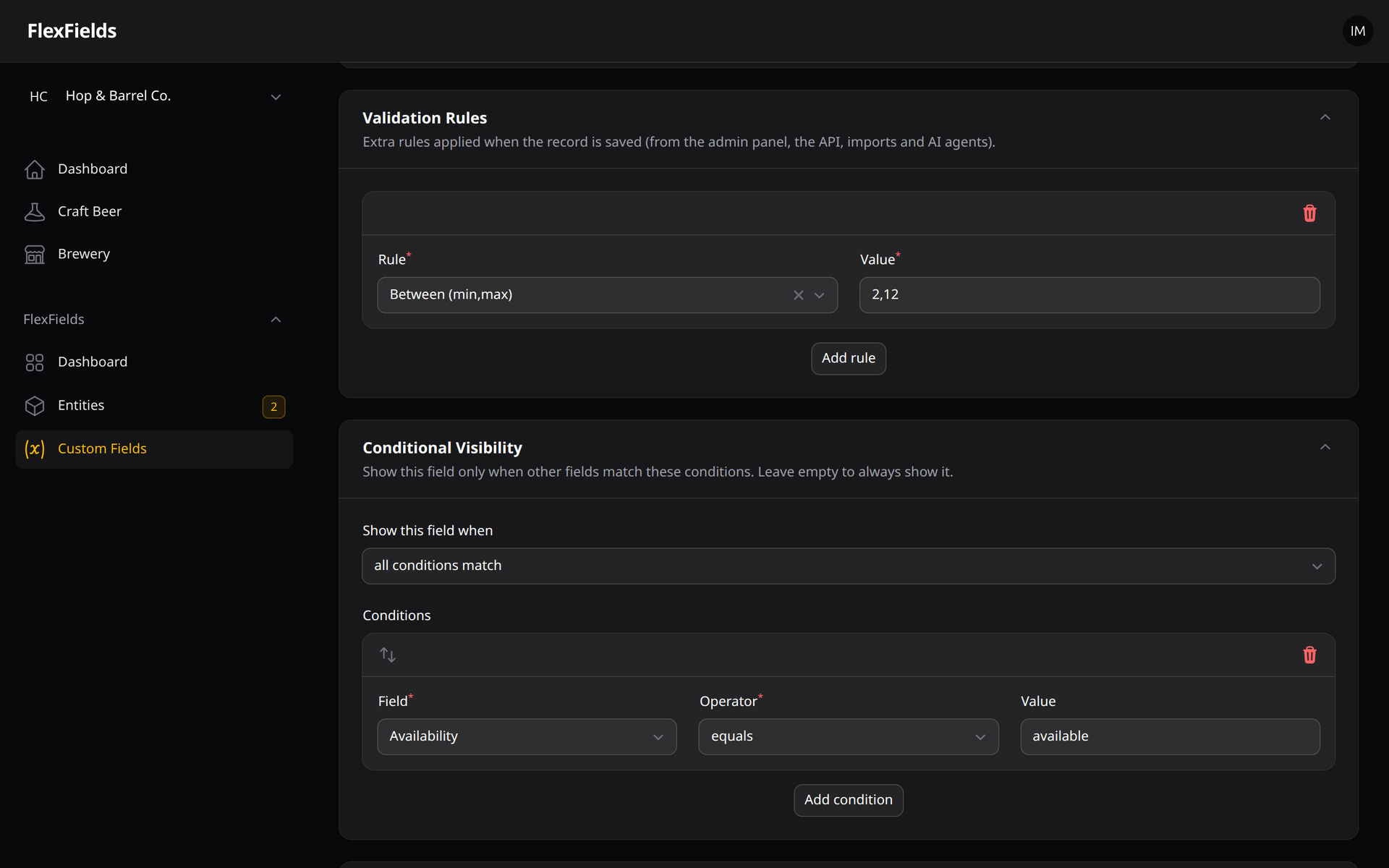
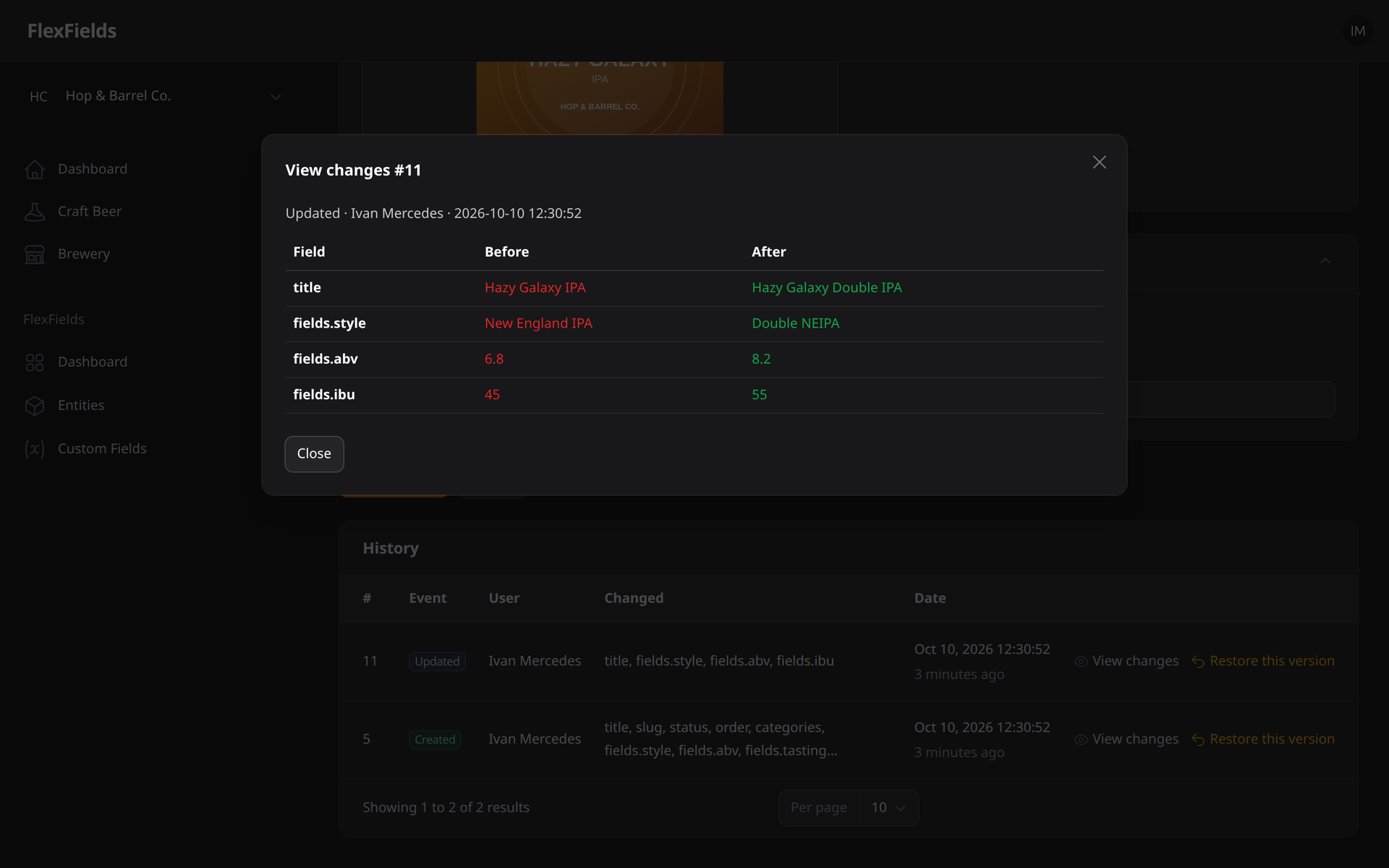
9. Record History & One-Click Restore
Every change is audited with a before/after diff, the user and the date — and any version can be restored.
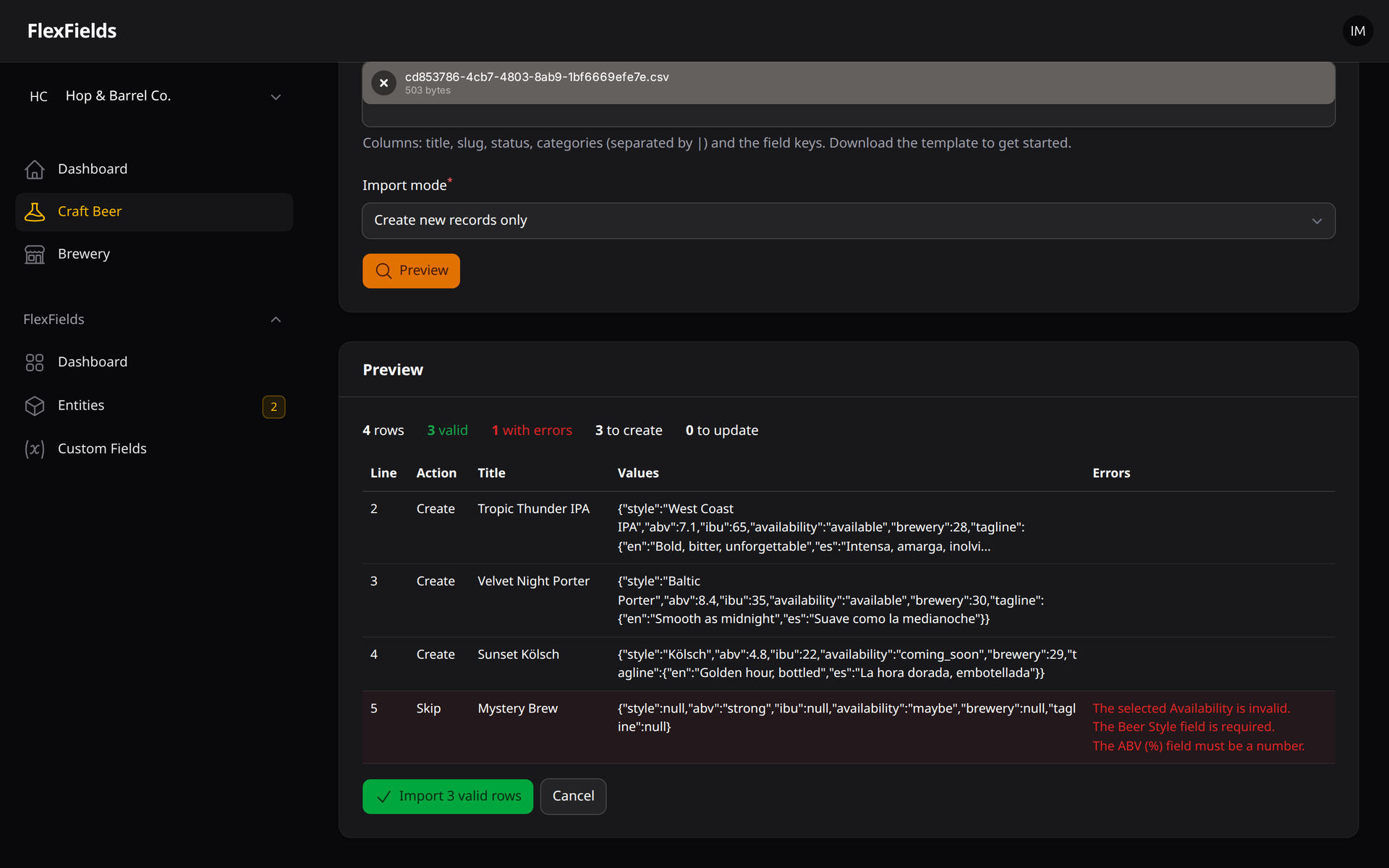
10. CSV / Excel Import with Preview
Upload a file, review the validated preview (errors per row) and confirm the import.
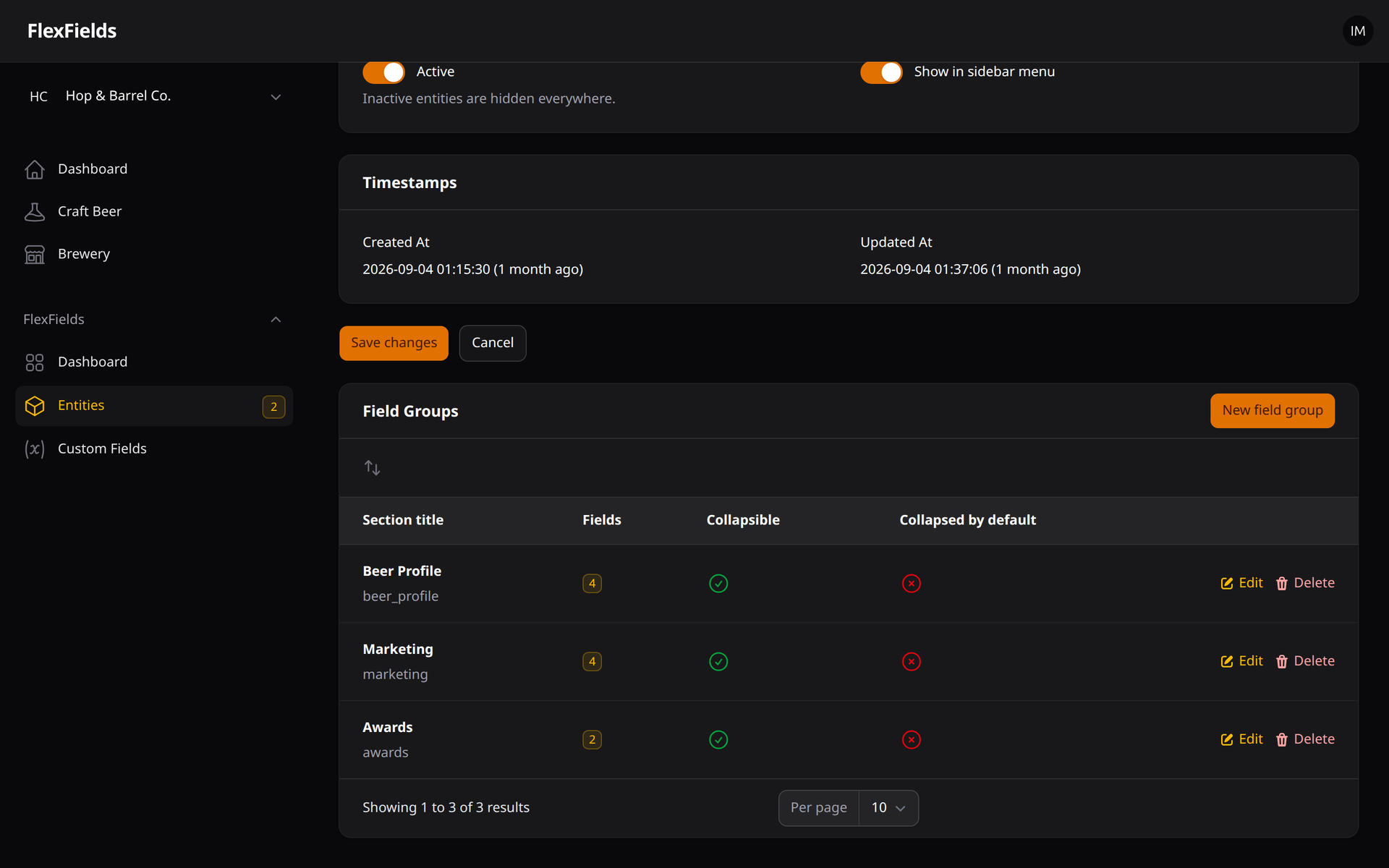
11. Field Groups Manager
Create, reorder and configure the collapsible sections of each entity's form.
Requirements
- PHP 8.3 or higher
- Filament 4.x / 5.x
Installation
You can install the package via composer:
composer require ivanmercedes/flex-fields
After requiring the package, run the installation command. This will publish the necessary migrations and configuration files:
php artisan flex-fields:install
Then, run the migrations:
php artisan migrate
Register the Plugin
Add the FlexFieldsPlugin to your Filament panel configuration (usually inside app/Providers/Filament/AdminPanelProvider.php):
use IvanMercedes\FlexFields\FlexFieldsPlugin;

public function panel(Panel $panel): Panel
{
    return $panel
        // ...
        ->plugins([
            FlexFieldsPlugin::make()
                ->showDashboardPage(true)
                ->showOverviewWidget(true)
                ->showEntitiesInMenu(true), // Globally toggle entities in the sidebar
        ]);
}
How It Works
Entities
An Entity represents a custom data type. For example: Product (slug: product), Employee, or Event. Each entity manages its own isolated form, with records seamlessly stored in a shared ff_entity_records table.
Custom Fields
A Custom Field is attached to an Entity. It defines the type of data, a unique machine-readable key (auto-generated from the label), layout formatting (order, width), and behavior toggles (searchable, required, shown in list).
Entity Categories
Entities support isolated Categories and Subcategories. You can build hierarchical taxonomies specific to an entity and assign them dynamically to your records.
Entity Records
When adding records to an entity, the form elements and structure are dynamically built via the Filament form builder using the definitions from your custom fields. All input is securely stored using the EAV pattern in ff_field_values.
Field Groups
Fields can be organized into Field Groups: labeled, collapsible sections of the record form, managed from the entity edit page.
Record History
Every change to a record is stored as a revision (snapshot + diff + user). The History tab of a record lets you inspect the changes and restore any previous version.
Guides
- Upgrade Guide — read before upgrading (run
php artisan migrate) - Advanced Field Types — relationship, conditional visibility, validation builder, phone, address, translatable fields
- Data Management — CSV export, CSV/Excel import, field groups, record history
- Headless REST API — endpoints, Sanctum, tenancy, transformers
- Permissions & Integrations — per-entity permissions, Filament Shield, Spatie Media Library
- Schema Builder — code-first entities
- Facade & Developer Experience
- Laravel AI SDK Integration
Schema Builder (Code-First Entities)
FlexFields includes a Schema Builder that allows you to define your Entities and Custom Fields programmatically, similar to Laravel migrations.
php artisan flex:make-schema Product
php artisan flex:migrate
php artisan flex:rollback
For full details, read the Schema Builder Documentation.
Developer Experience & Facade Usage
FlexFields Facade
use IvanMercedes\FlexFields\Facades\FlexFields;

// Fluent entity access
$entity = FlexFields::entity('product');
$fields = $entity->fields(); // Cached active fields
$records = $entity->records()->where('status', 'published')->get();

// Create record with field values
$record = $entity->createRecord([
    'title' => 'Sample Product',
], [
    'price' => 99.99,
    'color' => '#00ff00',
]);
HasFlexFields Trait
Attach flex fields directly to any model:
use Illuminate\Database\Eloquent\Model;
use IvanMercedes\FlexFields\Models\Traits\HasFlexFields;

class Product extends Model
{
    use HasFlexFields;
}

$product = Product::find(1);
$product->setFlexValue('price', 199.99);
$price = $product->getFlexValue('price');
System Status Command
php artisan flex:status
Permissions Command
php artisan flex:permissions          # list per-entity permissions
php artisan flex:permissions --sync   # create them with spatie/laravel-permission (Filament Shield)
For full details, read the Facade & Developer Experience Documentation.
Laravel AI SDK Integration (AI-Ready)
FlexFields includes native Tools and a complete out-of-the-box Agent for the official Laravel AI SDK (laravel/ai), enabling conversational agents to discover schemas, manage entities, and perform CRUD and publishing operations on records.
Interactive CLI:
php artisan flex:agent
Pre-built Agent:
use IvanMercedes\FlexFields\Ai\Agents\FlexFieldsAssistant;

$agent = new FlexFieldsAssistant;
$response = $agent->prompt('Show schema for products');
Or plug individual tool groups into your own custom agents:
use IvanMercedes\FlexFields\Ai\FlexFieldsAi;
use Laravel\Ai\Agent;

class ContentAgent extends Agent
{
    public function tools(): array
    {
        return [
            // All tools or filtered by categories: read, structure, content, publishing, destructive
            ...FlexFieldsAi::tools(['read', 'content', 'publishing']),
        ];
    }
}
For full details, read the Laravel AI SDK Integration Documentation.
Headless REST API
Enable the optional JSON API to use your entities from any frontend or mobile app:
FLEX_FIELDS_API_ENABLED=true
curl -H "Authorization: Bearer $TOKEN" https://your-app.test/api/flex/products?status=published
All endpoints are protected by Laravel Sanctum by default and reuse the same domain services (validation, history, tenancy, permissions) as the admin panel. For full details, read the REST API Documentation.
Customizing
Manage Config Settings
To customize the default settings, publish the configuration file to your project:
php artisan vendor:publish --tag="flex-fields-config"
In config/flex-fields.php, you can configure Multi-Tenancy, Field Caching, Upload path patterns, and more:
return [
    'tenancy' => [
        'enabled' => true,
        'tenant_model' => App\Models\Team::class,
        'tenant_column' => 'tenant_id',
    ],

    'cache' => [
        'enabled' => true,
        'ttl' => 86400,
    ],

    'navigation_group' => 'Content',
];
Navigation Structure overview
By default, the plugin registers the following navigation resources under the FlexFields group:
FlexFields (group)
├── Dashboard       → Overview of all active entities and stats
├── Entities        → Create, config, and manage entity types
├── Custom Fields   → Manage fields logically grouped per entity
└── Entity Data     → Add or edit entries/records for your entities
Database Architecture
ff_entities: Defines the "type" of the data grouping (e.g., Products, Services).ff_custom_fields: Serves as the "columns/attributes" logic mapped to an entity.ff_entity_categories: Stores hierarchical categories specifically scoped to an entity.ff_entity_records: A master identifier that holds one row per recorded entry.ff_entity_record_category: Pivot table mapping records to their assigned categories.ff_field_values: Holds the individual data values mapped. Effectively one row per (record × field) pair.ff_field_groups: Labeled form sections that group the custom fields of an entity.ff_record_revisions: Audit log of records (event, user, full snapshot and diff per change).
Roadmap
All the scheduled roadmap milestones (Data Management, Advanced Field Types, Headless & Integrations) are implemented. Check out the ROADMAP.md for details and the ideas under consideration.
License
The MIT License (MIT). Please see License File for more information.