
fahiem / filament-pinpoint

Google Maps location picker component for Filament 4 & 5 with search, draggable marker, and reverse geocoding
Package info
github.com/fahiem152/filament-pinpoint
Language:Blade
pkg:composer/fahiem/filament-pinpoint
Requires
- php: ^8.1
- filament/filament: ^4.0|^5.0
- spatie/laravel-package-tools: ^1.16
Requires (Dev)
- orchestra/testbench: ^9.0
- pestphp/pest: ^2.0
Suggests
None
Provides
None
Conflicts
None
Replaces
None
README
📍 A location picker component for Filament 4 & 5 supporting Google Maps and Leaflet.js (OpenStreetMap) — with search, draggable marker, and reverse geocoding support.
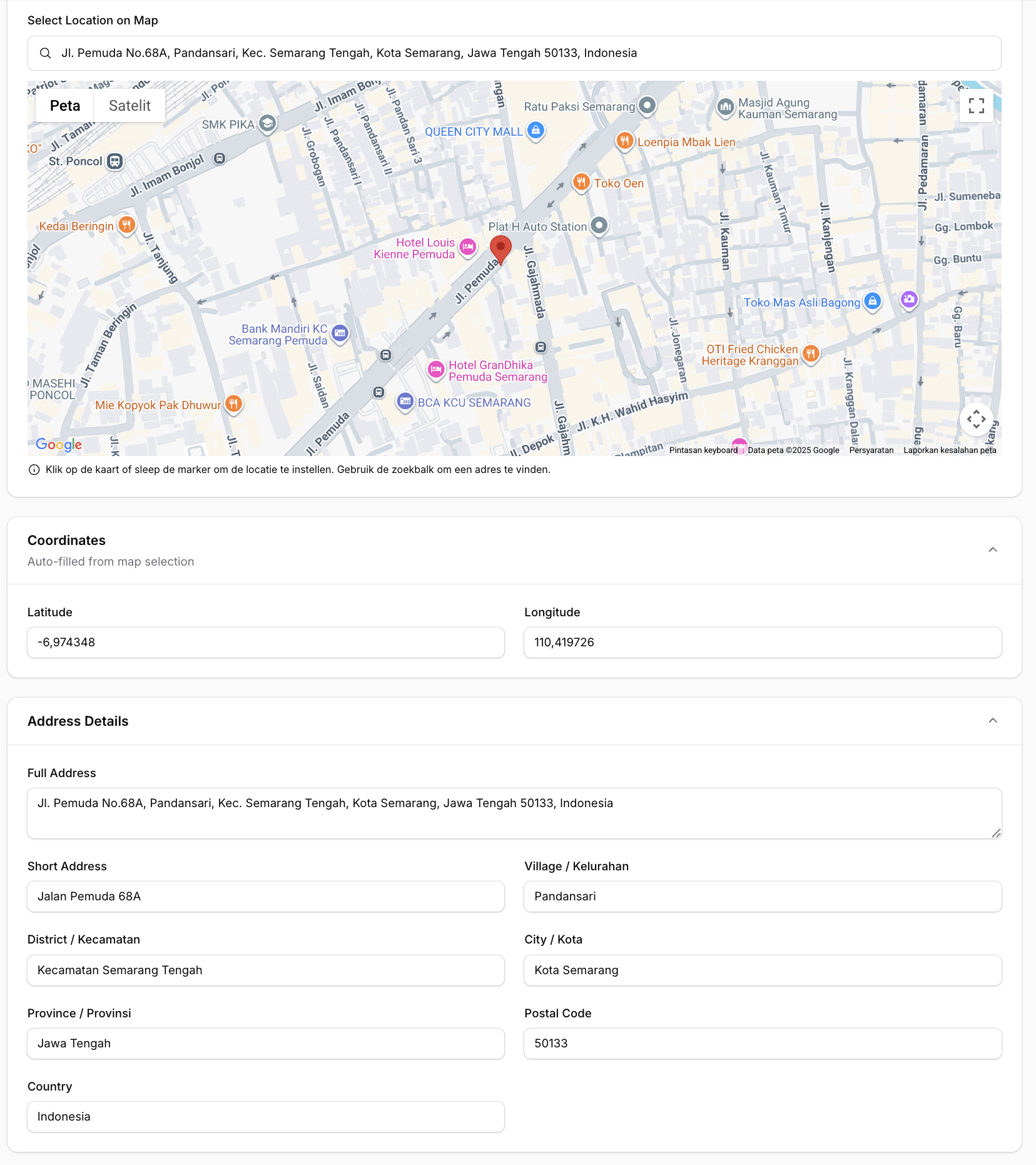
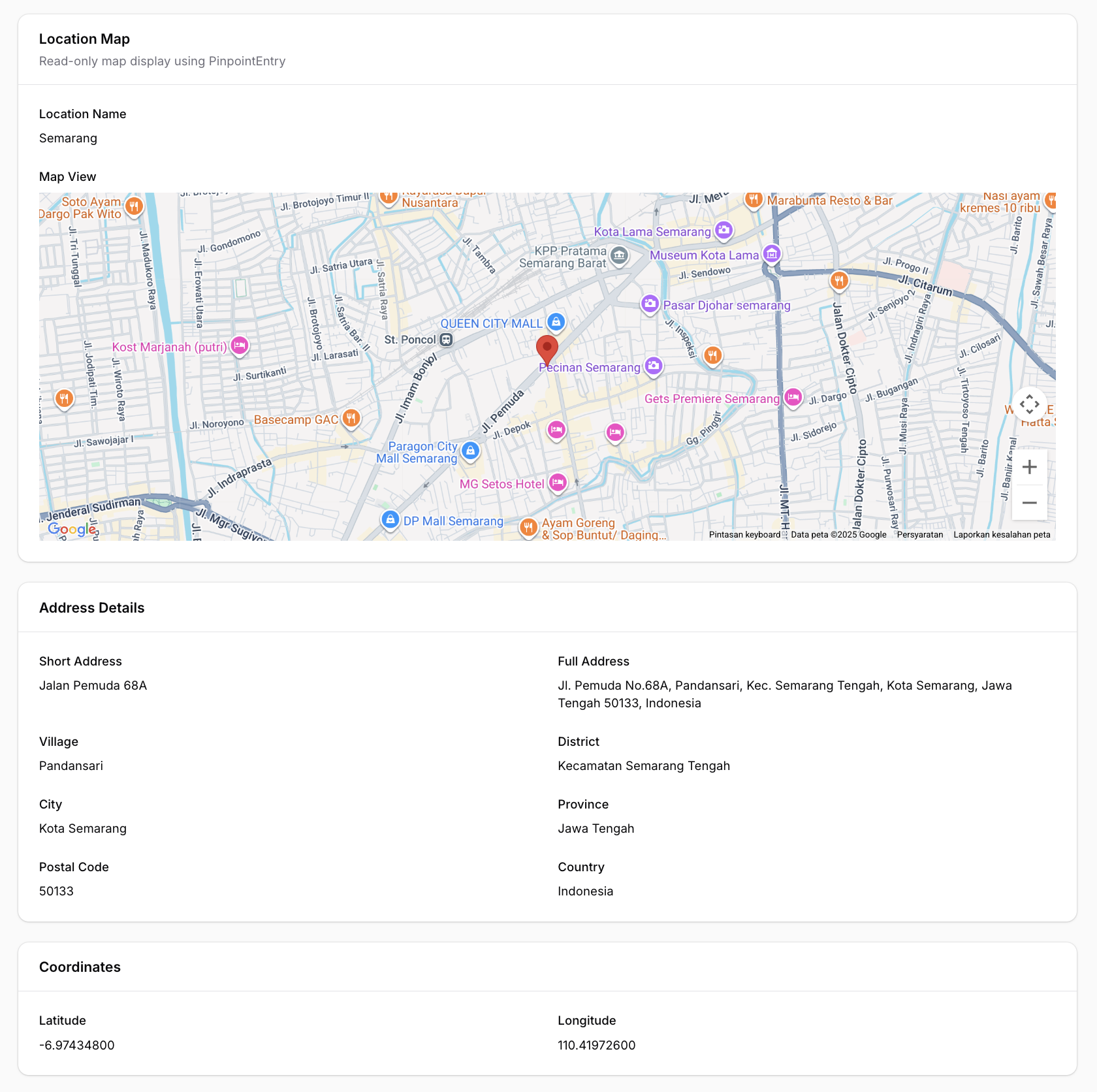
Features
- 🗺️ Two map providers — Google Maps (default) or Leaflet.js / OpenStreetMap (free, no API key)
- 🔍 Search location — Google Places Autocomplete (Google) or Nominatim (Leaflet)
- 📍 Click to set marker — Click anywhere on the map to place a marker
- ✋ Draggable marker — Drag the marker to fine-tune the location
- 📱 Current location — Get user's current device location
- ⭕ Radius support — Display and edit radius around the location
- 🏠 Reverse geocoding — Auto-fill address fields from coordinates
- 🌙 Dark mode support — Fully compatible with Filament's dark mode
- 🌐 Multi-language support — Translations for EN, AR, NL, ID, ES
- ⚙️ Fully configurable — Customize height, zoom, default location, and more
Requirements
- PHP 8.1+
- Laravel 10+ / 11+ / 12+
- Filament 4.0+ / 5.0+
- Google Maps provider (default): API Key with Maps JavaScript API, Places API, and Geocoding API enabled
- Leaflet provider: No API key required
Installation
Install the package via Composer:
composer require fahiem/filament-pinpoint
Configuration
1. Choose a map provider
The default provider is Google Maps. To use Leaflet.js (OpenStreetMap) instead, set in your .env:
PINPOINT_PROVIDER=leaflet
You can also override the provider per field instance:
Pinpoint::make('location')->provider('leaflet')
2. Google Maps — set your API Key
Required only when using provider = google:
GOOGLE_MAPS_API_KEY=your_api_key_here
3. Leaflet — optional configuration
Leaflet works out of the box with OpenStreetMap tiles. Optionally customize:
# Custom tile server (default: OpenStreetMap)
LEAFLET_TILE_URL=https://{s}.tile.openstreetmap.org/{z}/{x}/{y}.png

# Optional dark mode tile URL (e.g. CartoDB Dark)
LEAFLET_TILE_URL_DARK=https://{s}.basemaps.cartocdn.com/dark_all/{z}/{x}/{y}{r}.png

# Nominatim base URL for search & reverse geocoding (default: nominatim.openstreetmap.org)
NOMINATIM_URL=https://nominatim.openstreetmap.org
4. Publish the config file (optional)
php artisan vendor:publish --tag="filament-pinpoint-config"
You can also set default map values via environment variables:
GOOGLE_MAPS_DEFAULT_LAT=-6.200000
GOOGLE_MAPS_DEFAULT_LNG=106.816666
GOOGLE_MAPS_DEFAULT_ZOOM=15
GOOGLE_MAPS_DEFAULT_HEIGHT=500
Usage
Basic Usage (Google Maps)
use Fahiem\FilamentPinpoint\Pinpoint;

public static function form(Form $form): Form
{
    return $form
        ->schema([
            Pinpoint::make('location')
                ->label('Location')
                ->latField('lat')
                ->lngField('lng'),

            TextInput::make('lat')
                ->label('Latitude')
                ->readOnly(),

            TextInput::make('lng')
                ->label('Longitude')
                ->readOnly(),
        ]);
}
Using Leaflet (Free / No API Key)
Set the provider globally via .env:
PINPOINT_PROVIDER=leaflet
Or per field instance:
Pinpoint::make('location')
    ->provider('leaflet')
    ->latField('lat')
    ->lngField('lng')
    ->addressField('address')
    ->draggable()
    ->searchable()
Same API, same methods — Leaflet uses OpenStreetMap tiles and Nominatim for search and reverse geocoding. No API key needed.
For PinpointEntry (infolist):
PinpointEntry::make('location')
    ->provider('leaflet')
    ->latField('lat')
    ->lngField('lng')
    ->columnSpanFull()
Full Example with All Options
use Fahiem\FilamentPinpoint\Pinpoint;

Pinpoint::make('location')
    ->label('Business Location')
    ->defaultLocation(-6.200000, 106.816666) // Jakarta
    ->defaultZoom(15)
    ->height(400)
    ->draggable()
    ->searchable()
    ->latField('lat')
    ->lngField('lng')
    ->addressField('address')            // Auto-fill address field
    ->shortAddressField('short_address') // Auto-fill short address field (exclude province, city, district, village, and postal code)
    ->provinceField('province')          // Auto-fill province field
    ->cityField('city')                  // Auto-fill city/county field
    ->districtField('district')          // Auto-fill district field
    ->villageField('village')            // Auto-fill village/district field
    ->postalCodeField('postal_code')     // Auto-fill postal/zip code field
    ->countryField('country')            // Auto-fill country field
    ->streetField('street')              // Auto-fill street field
    ->streetNumberField('street_number') // Auto-fill street number field
    ->columnSpanFull()
Radius Support
You can enable radius support by using radiusField():
Pinpoint::make('location')
    ->radiusField('radius') // 'radius' is the column name in your database
    ->defaultRadius(500)    // Default 500 meters
When radiusField is configured, an interactive blue circle will appear on the map. You can:
- Resize the radius by dragging the small white handle on the circle's edge
- View the radius visually on the map
- The radius value (in meters) is automatically saved to your database field in real-time
- The circle uses proper z-index layering so the marker always appears on top
Visual hierarchy:
- Marker (pin): zIndex 200 - always on top
- Circle (radius): zIndex 100 - below the marker
Disable Features
Pinpoint::make('location')
    ->draggable(false)  // Disable marker dragging
    ->searchable(false) // Hide search box
Read-Only Mode (New in v1.1.9)
Make the map display-only while keeping it visible in your form. The map remains pannable and zoomable for viewing, but all editing interactions are disabled.
// Always read-only
Pinpoint::make('location')
    ->readOnly()

// Conditional read-only
Pinpoint::make('location')
    ->readOnly(fn () => auth()->user()->cannot('edit-location'))

// Read-only on specific operations (e.g., view page only)
Pinpoint::make('location')
    ->readOnlyOn('view')
When read-only is active:
- Marker cannot be dragged
- Clicking the map does not move the marker
- Search box is hidden
- "Use My Location" button is hidden
- Radius circle is displayed but cannot be resized
- Helper text is hidden
Using with Repeater
Pinpoint fully supports Filament's Repeater component. Each repeater item gets its own independent map and fields:
use Fahiem\FilamentPinpoint\Pinpoint;
use Filament\Forms\Components\Repeater;
use Filament\Forms\Components\TextInput;

Repeater::make('branches')
    ->schema([
        TextInput::make('branch_name')
            ->label('Branch Name')
            ->required(),

        Pinpoint::make('location')
            ->label('Location')
            ->latField('latitude')
            ->lngField('longitude')
            ->addressField('address')
            ->draggable()
            ->searchable()
            ->height(300),

        TextInput::make('latitude')
            ->label('Latitude')
            ->readOnly(),

        TextInput::make('longitude')
            ->label('Longitude')
            ->readOnly(),

        TextInput::make('address')
            ->label('Address')
            ->readOnly()
            ->columnSpanFull(),
    ])
    ->columns(2)
    ->columnSpanFull()
Note: When using with Repeater, the field paths are automatically calculated (e.g.,
data.branches.0.latitudefor the first item).
Infolist Entry (Read-Only Display)
For displaying locations in infolists (view mode), use the PinpointEntry component. It displays a clean, read-only map with a marker at the specified coordinates.
Single Marker
use Fahiem\FilamentPinpoint\PinpointEntry;

public static function infolist(Infolist $infolist): Infolist
{
    return $infolist
        ->schema([
            PinpointEntry::make('location')
                ->label('Location')
                ->latField('lat')
                ->lngField('lng')
                ->columnSpanFull(),
        ]);
}
Multiple Markers (New in v1.1.3)
Display multiple locations on a single map:
PinpointEntry::make('branches')
    ->label('Branch Locations')
    ->pins([
        [
            'lat' => -6.200000,
            'lng' => 106.816666,
            'label' => 'Jakarta Office',
            'color' => 'red',
        ],
        [
            'lat' => -6.914744,
            'lng' => 107.609810,
            'label' => 'Bandung Office',
            'color' => 'blue',
        ],
        [
            'lat' => -7.797068,
            'lng' => 110.370529,
            'label' => 'Yogyakarta Office',
            'color' => 'green',
        ],
    ])
    ->fitBounds() // Auto-zoom to show all markers
    ->height(500)
    ->columnSpanFull()
Pin Customization Options
Each pin in the pins() array supports:
| Option | Type | Description |
|---|---|---|
lat |
float |
Required. Latitude coordinate |
lng |
float |
Required. Longitude coordinate |
label |
string |
Optional. Marker title (shows on hover and in info window) |
color |
string |
Optional. Predefined color: red, blue, green, yellow, purple, pink, orange, ltblue |
icon |
string |
Optional. Custom marker icon URL (overrides color) |
info |
string |
Optional. Custom HTML content for info window (overrides default label) |
Custom Marker Icons
PinpointEntry::make('locations')
    ->pins([
        [
            'lat' => -6.200000,
            'lng' => 106.816666,
            'label' => 'Main Office',
            'icon' => 'https://example.com/custom-marker.png', // Custom icon URL
        ],
        [
            'lat' => -6.914744,
            'lng' => 107.609810,
            'label' => 'Warehouse',
            'info' => '<div style="padding: 10px;"><strong>Warehouse A</strong><br>Open 24/7</div>', // Custom HTML
        ],
    ])
    ->columnSpanFull()
Customization Options
PinpointEntry::make('location')
    ->label('Business Location')
    ->defaultLocation(-6.200000, 106.816666) // Jakarta
    ->defaultZoom(15)
    ->height(400)
    ->latField('lat')
    ->lngField('lng')
    ->fitBounds(false) // Disable auto-fit bounds
    ->columnSpanFull()
The PinpointEntry displays:
- A read-only map (Google Maps or Leaflet) with single or multiple markers
- Optional info windows / popups with labels or custom HTML content
- Auto-fit bounds to display all markers
- Full dark mode support
Available Methods
Pinpoint (Form Field)
| Method | Description | Default |
|---|---|---|
provider(string $provider) |
Map provider: 'google' or 'leaflet' |
config value |
defaultLocation(float $lat, float $lng) |
Set default center location | -0.5050, 117.1500 |
defaultZoom(int $zoom) |
Set default zoom level | 13 |
height(int $height) |
Set map height in pixels | 400 |
latField(string $field) |
Field name for latitude | 'lat' |
lngField(string $field) |
Field name for longitude | 'lng' |
addressField(string $field) |
Field name for auto-fill address | null |
shortAddressField(string $field) |
Field name for auto-fill short address | null |
provinceField(string $field) |
Field name for auto-fill province | null |
cityField(string $field) |
Field name for auto-fill city/county | null |
districtField(string $field) |
Field name for auto-fill district | null |
villageField(string $field) |
Field name for auto-fill village/sub-district | null |
postalCodeField(string $field) |
Field name for auto-fill postal/zip code | null |
countryField(string $field) |
Field name for auto-fill country | null |
streetField(string $field) |
Field name for auto-fill street | null |
streetNumberField(string $field) |
Field name for auto-fill street number | null |
radiusField(string $field) |
Field name for auto-fill radius | null |
defaultRadius(int $radius) |
Set default radius in meters | 500 |
draggable(bool $draggable) |
Enable/disable marker dragging | true |
searchable(bool $searchable) |
Enable/disable search box | true |
readOnly(bool|Closure $condition) |
Make the map display-only | false |
readOnlyOn(string|array $operations) |
Read-only on specific operations | null |
PinpointEntry (Infolist Entry)
| Method | Description | Default |
|---|---|---|
provider(string $provider) |
Map provider: 'google' or 'leaflet' |
config value |
defaultLocation(float $lat, float $lng) |
Set default center location | -0.5050, 117.1500 |
defaultZoom(int $zoom) |
Set default zoom level | 13 |
height(int $height) |
Set map height in pixels | 400 |
latField(string $field) |
Field name for latitude | 'lat' |
lngField(string $field) |
Field name for longitude | 'lng' |
radiusField(string $field) |
Field name for radius | null |
pins(array $pins) |
Set array of multiple markers with lat, lng, label, color, icon, info | null |
fitBounds(bool $fit) |
Auto-zoom map to show all markers | true |
getLat() |
Get latitude from record | Returns field value or default |
getLng() |
Get longitude from record | Returns field value or default |
getPins() |
Get pins array | Returns pins or null |
hasPins() |
Check if pins are set | Returns boolean |
Getting a Google Maps API Key (Google provider only)
- Go to Google Cloud Console
- Create a new project or select an existing one
- Enable the following APIs:
- Maps JavaScript API
- Places API
- Geocoding API
- Go to Credentials and create an API key
- (Recommended) Restrict your API key to specific domains
Database Migration
Make sure your table has columns for latitude and longitude:
Schema::create('locations', function (Blueprint $table) {
    $table->id();
    $table->string('name');
    $table->decimal('lat', 10, 7)->nullable();
    $table->decimal('lng', 10, 7)->nullable();
    $table->text('address')->nullable();
    $table->text('short_address')->nullable();
    $table->string('province')->nullable();
    $table->string('city')->nullable();
    $table->string('district')->nullable();
    $table->string('village')->nullable();
    $table->string('postal_code')->nullable();
    $table->string('country')->nullable();
    $table->string('street')->nullable();
    $table->string('street_number')->nullable();
    $table->timestamps();
});
Translations
This package supports multiple languages out of the box:
| Language | Code |
|---|---|
| English | en |
| Arabic | ar |
| Dutch | nl |
| Indonesian | id |
| Spanish | es |
Publishing Translations
To customize the translations, publish them to your application:
php artisan vendor:publish --tag="filament-pinpoint-translations"
This will publish the translation files to lang/vendor/filament-pinpoint/.
Adding New Languages
Create a new folder in lang/vendor/filament-pinpoint/{locale}/ with a pinpoint.php file:
<?php

return [
    'search' => 'Your translation...',
    'use_my_location' => 'Your translation...',
    'instructions' => 'Your translation...',
    'loading_map' => 'Your translation...',
];
Changelog
Please see CHANGELOG for more information on what has changed recently.
Contributing
Please see CONTRIBUTING for details.
Security
If you discover any security-related issues, please email amfahiem010502@gmail.com instead of using the issue tracker.
Credits
License
The MIT License (MIT). Please see License File for more information.