
carljanzell / filament-feedback

In-app feedback for Filament panels: people tag the modules they mean and how they feel, the team replies in a thread, and a board shows how a release landed.
Requires
- php: ^8.2
- filament/filament: ^3.3.53|^4.13.2|^5.8.2
Requires (Dev)
- laravel/pint: ^1.27
- livewire/livewire: ^3.5|^4.0
- orchestra/testbench: ^10.0|^11.0
- pestphp/pest: ^4.0
Suggests
None
Provides
None
Conflicts
None
Replaces
None
README
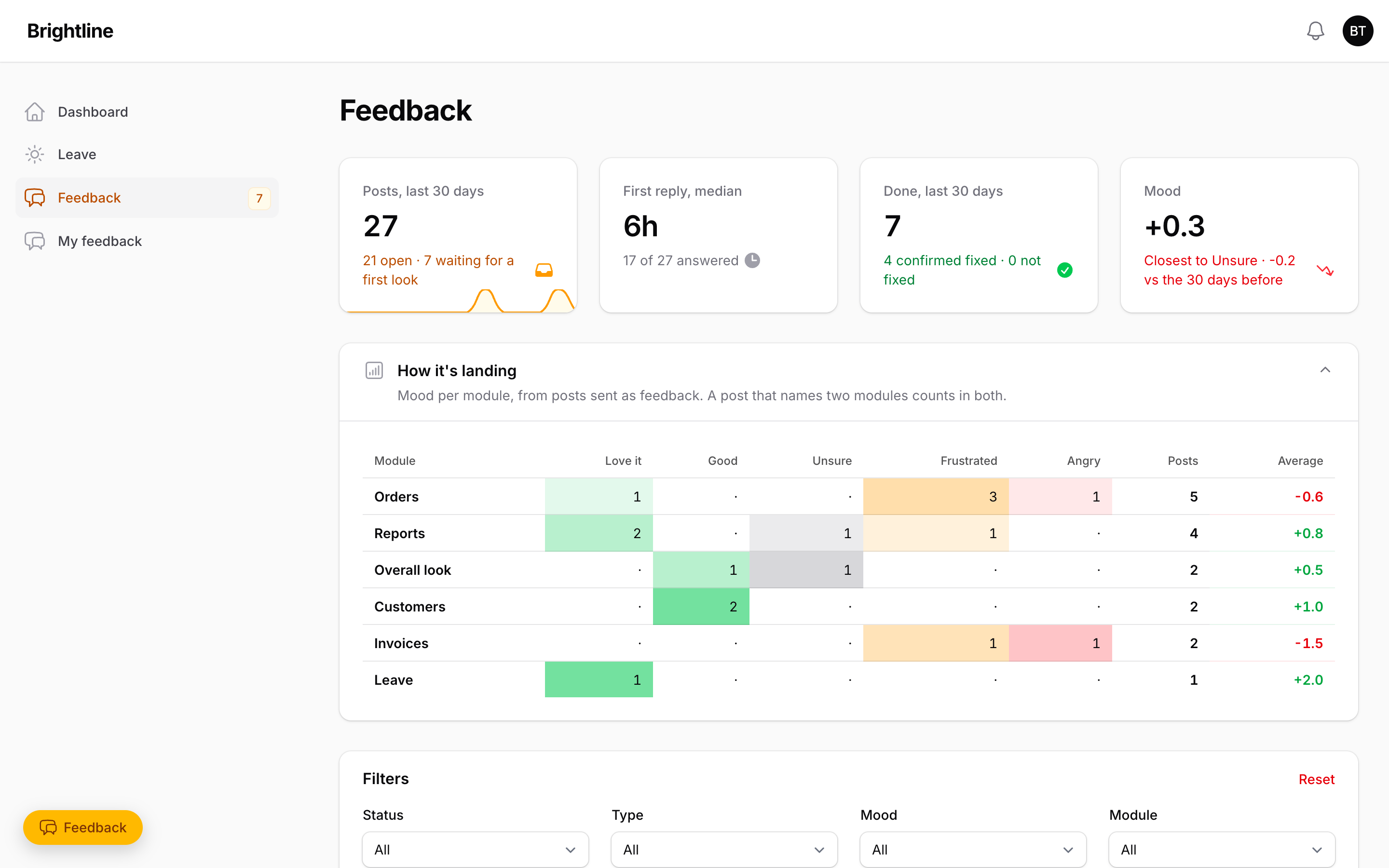
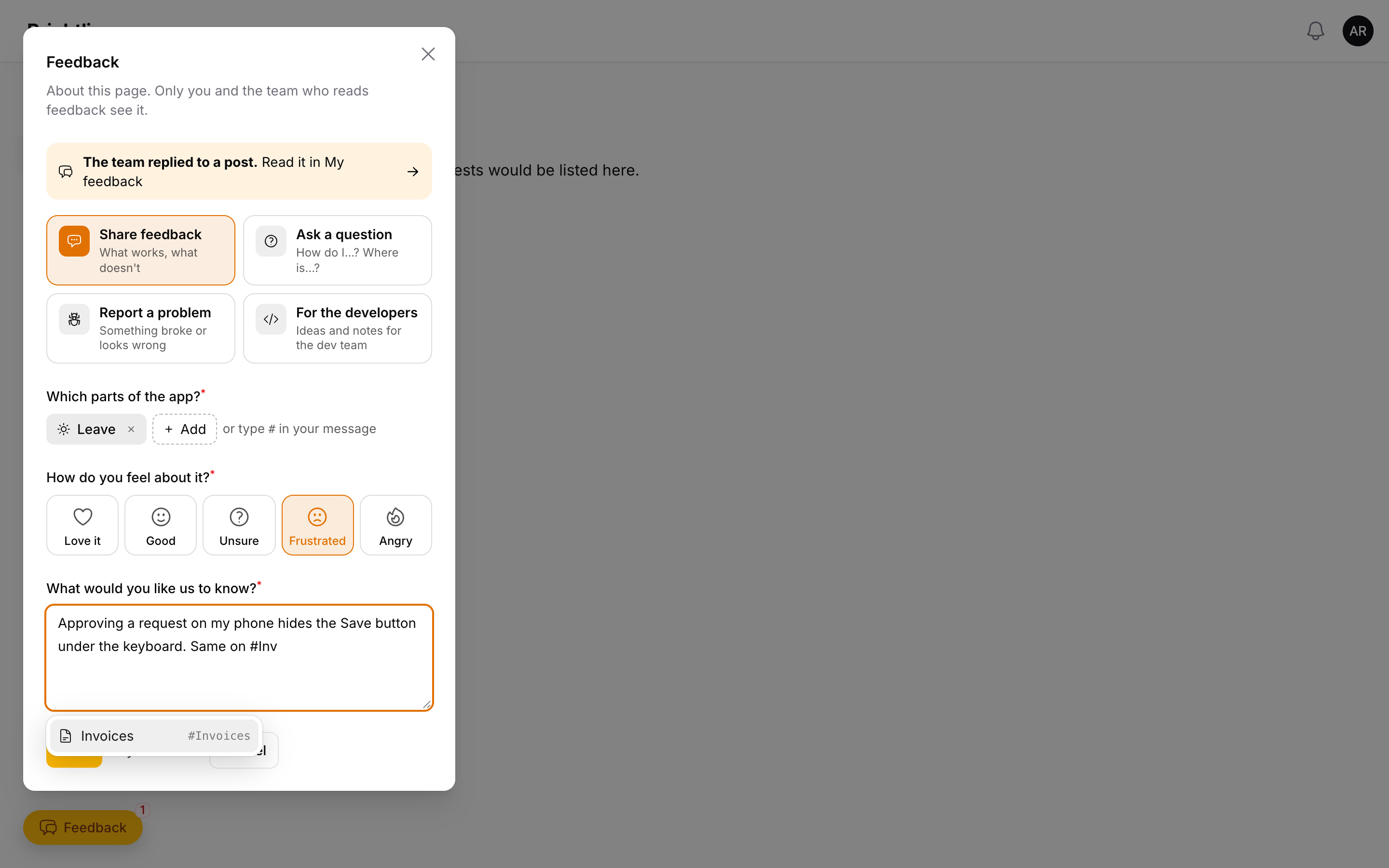
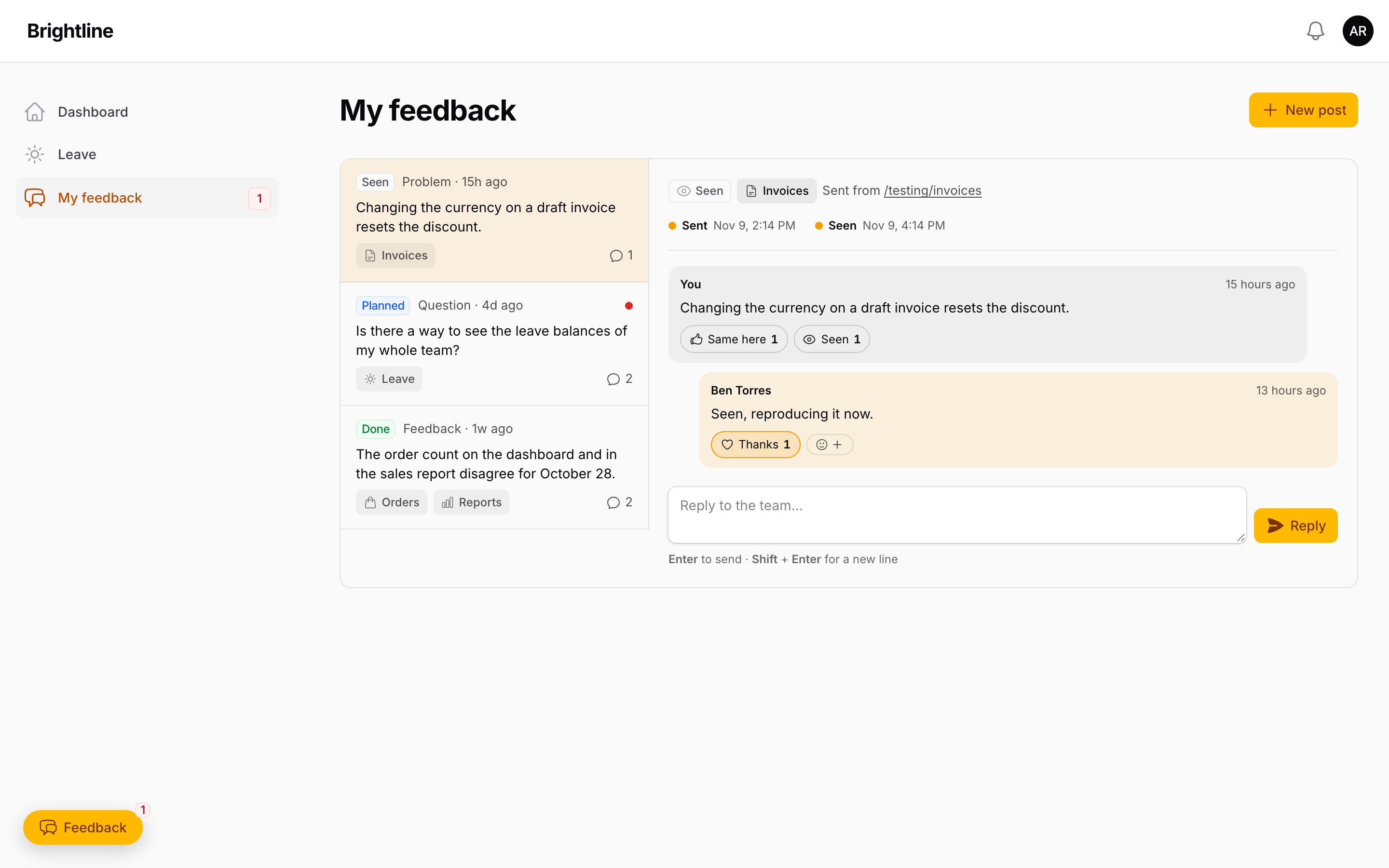
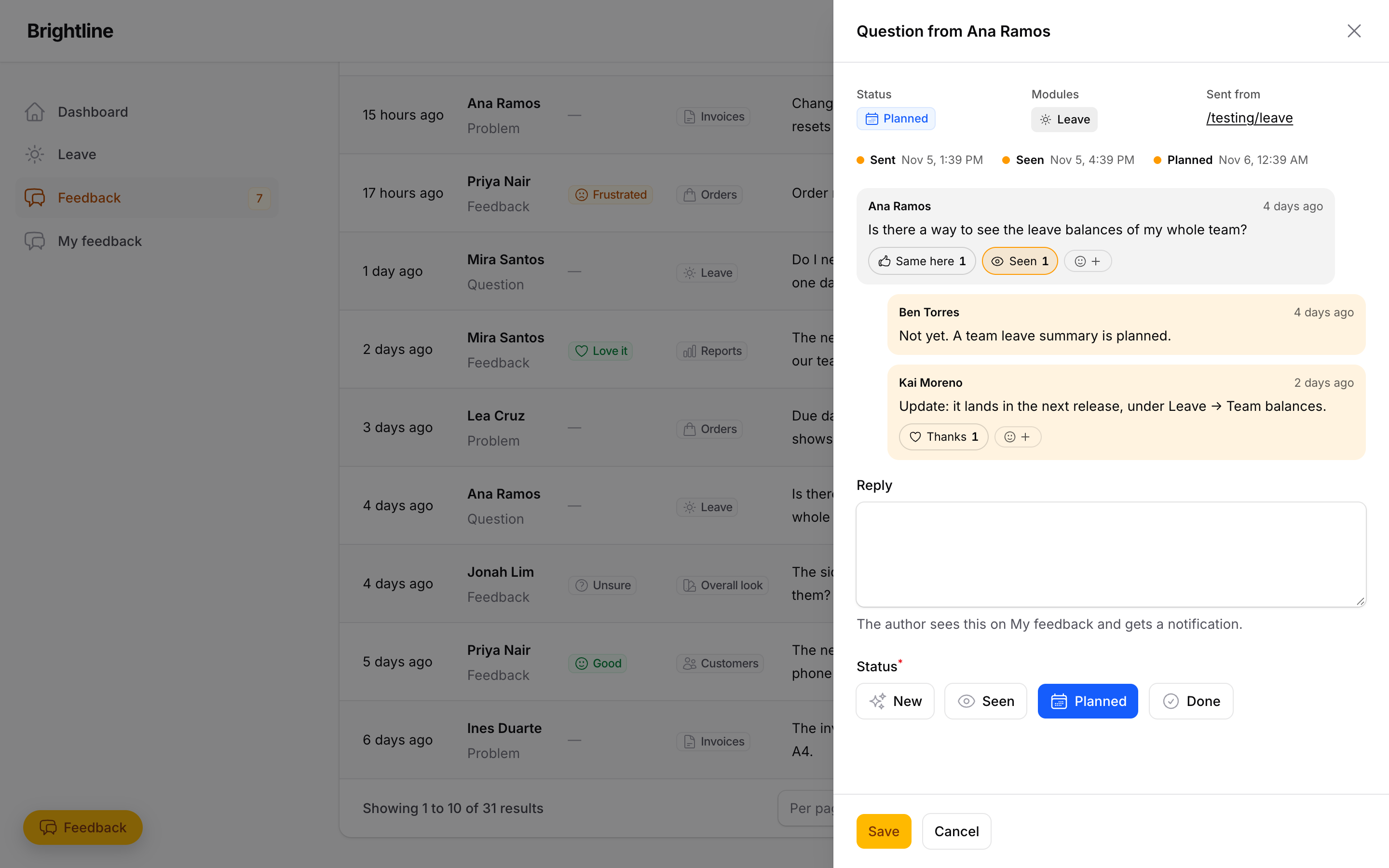
In-app feedback for Filament panels. People press Feedback on any page, and a small sheet opens above the button: pick the parts of the app they mean and how they feel, and write. Their threads live on a My feedback page, with the team's replies, reactions and a Sent → Seen → Planned → Done timeline. The team reads every post in an inbox, replies and sets a status. A board shows the mood for each module, so you can see how a release landed.
- Works on Filament 3.3, 4 and 5 from one codebase.
- Four kinds of post: feedback, a question, a problem, or a note for the developers (which can be limited to the dev team and ping its own Chat space).
- Private by default: a post is seen by its author and the people you let triage.
- Modules stay compact: the page's module is pre-picked, the rest sit behind a search, and
typing
#DTR(or#BreakRoom,#dtr, …) in the message tags one with autocomplete. - Module chips use your app's own navigation icons.
- Reactions (Thanks, Same here, Seen, Fixed) and a "Did this fix it?" check once a post is Done.
- Replies send on Enter (Shift+Enter for a new line), and can be unsent (
allowUnsend()). - Stats on the inbox: posts, median first-reply time, what got done, and mood against the 30 days before.
- Motion by anime.js, loaded only when the viewer allows motion.
- Optional Google Chat ping for every new post.
Full documentation: https://darkify19.github.io/filament-feedback/
Pre-release. See ROADMAP.md for what's in, what's next and what 1.0 means.
Screenshots
Install
composer require carljanzell/filament-feedback:^0.4
php artisan migrate
php artisan filament:assets
Set up
Register the plugin on each panel that needs it. A typical app has one panel everyone uses (the button) and an admin panel (the inbox):
use CarlJanzell\FilamentFeedback\FilamentFeedbackPlugin;

$modules = [
    'dtr' => 'DTR',
    'leave' => 'Leave',
    'design' => ['label' => 'Overall look', 'icon' => 'heroicon-o-swatch'],
];

// The panel staff use: the floating Feedback button and My feedback, no inbox.
$panel->plugin(
    FilamentFeedbackPlugin::make()
        ->modules($modules)
        ->moduleFromRoute(fn (?string $route): ?string => str_contains((string) $route, 'leave') ? 'leave' : null)
        ->inbox(false)
        ->chatWebhook(env('FEEDBACK_CHAT_WEBHOOK')),
);

// The admin panel: the inbox, no button.
$panel->plugin(
    FilamentFeedbackPlugin::make()
        ->modules($modules)
        ->button(false)
        ->canTriage(fn (): bool => auth()->user()?->hasRole('admin') ?? false)
        ->navigationGroup('System'),
);
A one-panel app keeps both on (the default) and only sets canTriage().
| Method | Default | What it does |
|---|---|---|
modules(array|Closure) |
[] |
The parts of the app people can tag: slug => label, or slug => ['label' => …, 'icon' => …]. With none, the field is hidden. |
moduleFromRoute(Closure) |
none | Pre-selects a module. Receives $route and $url and returns a slug or null. |
canTriage(bool|Closure) |
false |
Who opens the inbox and replies as the team. |
button(bool|Closure) |
true |
The floating Feedback button on every page, and the My feedback page. A closure is checked on each page and hides only the button. |
inbox(bool) |
true |
The Feedback inbox page. |
launcherAttributes(array) |
[] |
Extra attributes on the button's wrapper, for your own CSS. |
impersonateUsing(?Closure $callback, bool|Closure $can = true) |
off | "View as" on an inbox thread: sign in as the author and open the page they wrote from. The callback does the impersonating with the app's own package (no dependency here), gets $author, $post, $url (on this app and still routed, else null: fall back to their home) and $guard, and returns a redirect, or false. $can gets $author; triagers only. |
chatWebhook(?string) |
none | A Google Chat space webhook. Each new post sends it one line. |
developerPosts(bool $enabled, bool|Closure $canRead, ?string $chatWebhook) |
on, every triager reads | The "For the developers" box. canRead limits who sees those posts in the inbox; chatWebhook pings the dev team's own space. |
allowUnsend(team: bool|Closure, authors: bool|Closure) |
team true, authors false |
Who may unsend their own replies. An unsent reply stays as "… unsent a message". |
navigationGroup(?string) |
none | Where the inbox sits in the navigation. |
Set it on the panel that has the button: posts are created there.
Module icons
A module without an icon borrows one from your navigation: the plugin runs each page's and
resource's route through moduleFromRoute(), and the first page that maps to a module lends
it its navigation icon. So if moduleFromRoute() maps your DTR resource to dtr, the DTR
chip shows the same icon as the DTR item in the sidebar. An 'icon' in modules() wins.
Moving the button
It sits bottom-left, and the sheet opens just above it. Shift both with CSS variables on
:root:
:root { --ffb-launcher-bottom: 5rem; --ffb-launcher-left: 1rem; }
View as the author
The package doesn't impersonate anyone itself. Wire it to the package your app already uses; for example stechstudio/filament-impersonate:
use STS\FilamentImpersonate\Tables\Actions\Impersonate; // Actions\Impersonate on v4+

FilamentFeedbackPlugin::make()
    ->impersonateUsing(
        fn (Model $author, ?string $url, string $guard) => Impersonate::make()
            ->guard($guard)
            ->redirectTo($url ?? '/')
            ->impersonate($author),
        can: fn (): bool => auth()->user()?->hasRole(['hr', 'super_admin']) ?? false,
    );
The button shows in the thread only for triagers who pass $can, never on their own posts.
While you're signed in as someone, the Feedback button would post as them. Hide it on the author's panel:
FilamentFeedbackPlugin::make()
    ->button(fn (): bool => ! app(\Lab404\Impersonate\Services\ImpersonateManager::class)->isImpersonating())
    // filament-impersonate v4+: ! \STS\FilamentImpersonate\Facades\Impersonation::isImpersonating()
Google Chat ping
In a Chat space: space name → Apps & integrations → Webhooks → add one, then copy
its URL into chatWebhook(). The app only calls out, so this works from a server Google
can't reach, and it needs no Cloud project. If the option is missing, your Workspace admin
has turned off webhooks.
Stats
The inbox opens with CarlJanzell\FilamentFeedback\Widgets\FeedbackStats: posts in the last
30 days (with a 14-day sparkline), the median time to the team's first reply, posts done and
whether authors confirmed the fix, and the average mood against the 30 days before. Only
triagers see it. It is a plain Filament stats widget, so a dashboard can use it too, for
example filament-insights'
->widgets([FeedbackStats::class]).
Hooking in
CarlJanzell\FilamentFeedback\Events\FeedbackPostedfires with$poston every new post. Listen to it to notify your triagers.CarlJanzell\FilamentFeedback\Events\ReplyPostedfires with$replyon both sides of a thread.$reply->is_from_teamtells you which side.- The author gets a Filament database notification when the team replies. Its link opens
that thread on My feedback (
/my-feedback?post=…). Turn on->databaseNotifications()on that panel.notifyAuthorUsing()receives the same$url. - A link to
#feedbackon any page of the button's panel opens the sheet.
Data
Three tables: feedback_posts, feedback_replies and feedback_reactions. Authors are
polymorphic (morphs()), so any authenticatable model works, UUID keys included.
For AI agents
The package ships an agent guide at
resources/boost/guidelines/core.blade.php: setup,
every plugin method, events, data and common tasks. Apps using
Laravel Boost pick it up automatically on
php artisan boost:install (or boost:update). Without Boost, point your agent at that file.
Working on the plugin itself: AGENTS.md.
Testing
composer test
License
MIT. See LICENSE.