
brimham / filament-backup-monitor

Filament panel for brimham/backup-monitor — run history and last-backup-per-destination health for spatie/laravel-backup.
Package info
github.com/brimham/filament-backup-monitor
pkg:composer/brimham/filament-backup-monitor
Requires
- php: ^8.3
- brimham/backup-monitor: ^0.1.1
- filament/filament: ^3.0 || ^4.0 || ^5.0
- illuminate/contracts: ^12.0 || ^13.0
- illuminate/support: ^12.0 || ^13.0
Requires (Dev)
- larastan/larastan: ^3.10
- laravel/pint: ^1.29
- orchestra/testbench: ^10.0 || ^11.0
- pestphp/pest: ^3.0 || ^4.0
- pestphp/pest-plugin-laravel: ^3.0 || ^4.0
Suggests
- brimham/backup-monitor-pro: Missed-backup detection and multi-channel alerts on top of this run history (paid)
Provides
None
Conflicts
None
Replaces
None
README
Filament Backup Monitor
A Filament panel for brimham/backup-monitor — see the history of every spatie/laravel-backup run and the last backup per destination at a glance.
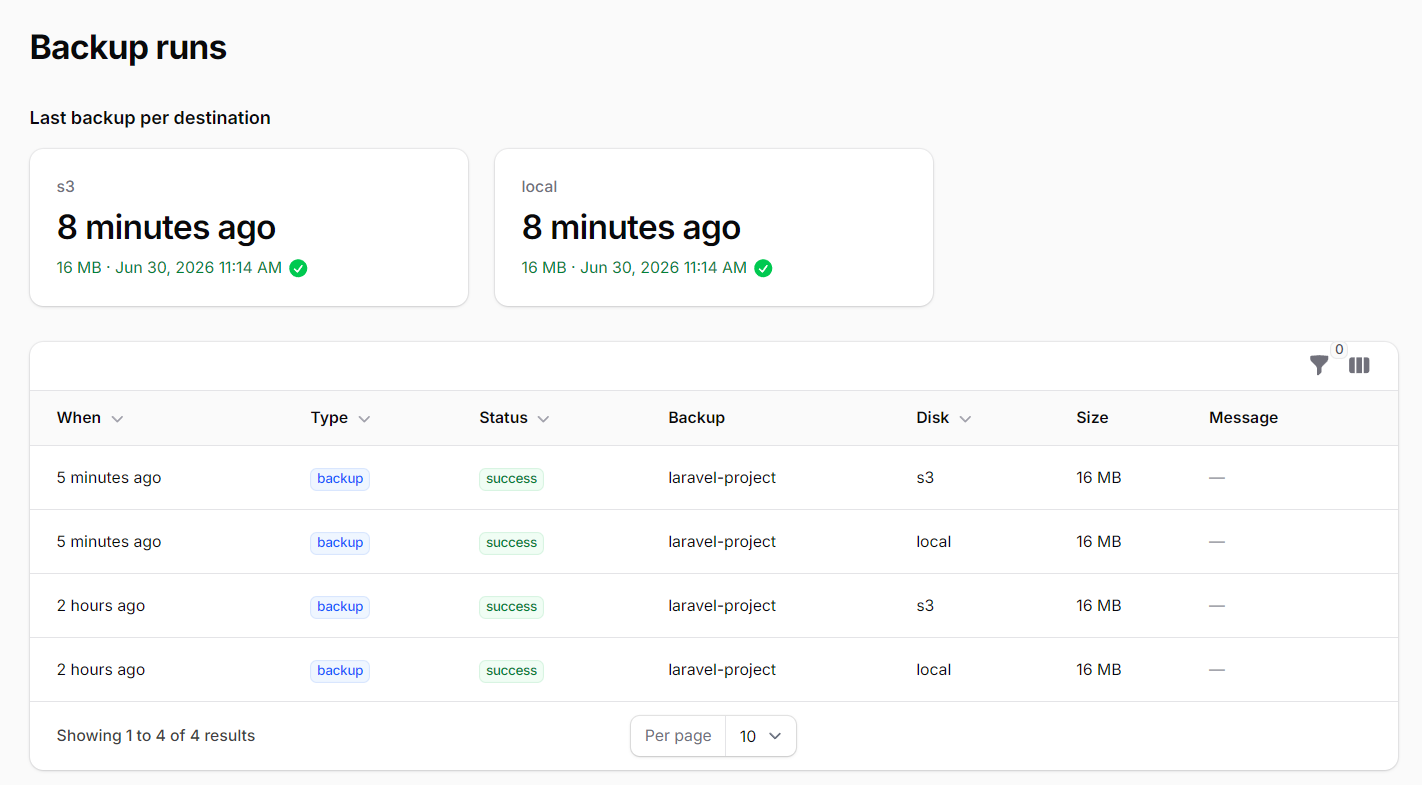
The core brimham/backup-monitor package records each backup run to a backup_runs table. This package surfaces that history inside your Filament admin panel:
- a run-history table — every backup, health-check and cleanup with its status, destination, size and timestamp
- a "last backup per destination" health panel — the most recent run for each disk, so a silently failing destination is obvious
This is the free core. Proactive alerting on missed/silent failures and a multi-site dashboard live in Pro — see Upgrade to Pro.
Screenshot
Requirements
- PHP 8.3+
- Laravel 12 or 13
- Filament 3, 4 or 5
- brimham/backup-monitor (installed automatically)
Installation
composer require brimham/filament-backup-monitor
Run the core package's migration if you haven't already:
php artisan migrate
Usage
Register the plugin on the panel where you want the backup history to appear:
use Brimham\FilamentBackupMonitor\FilamentBackupMonitorPlugin;
use Filament\Panel;

public function panel(Panel $panel): Panel
{
    return $panel
        // ...
        ->plugin(FilamentBackupMonitorPlugin::make());
}
A Backups item appears in the panel navigation, linking to the run-history page with the health panel at the top.
Upgrade to Pro
This panel shows you the history of backups that ran. It can't show you the backup that silently stopped running — there's no event to record, so a destination that quietly dies just stops updating while everything still looks fine. That's the failure that actually loses data. Brimham Backup Monitor Pro closes that gap:
- Missed / overdue detection — a dead-man's-switch that flags any destination whose last successful backup is older than its expected cadence (or has never run).
- Multi-channel alerting — mail, Slack, Discord, Teams, and webhooks, de-duplicated and escalating, with recovery notifications.
- External heartbeat — ping healthchecks.io / Cronitor as backups run, catching an outage even if the whole app and scheduler are down.
Running backups across many sites? The Filament Backup Monitor Collector is a companion Filament plugin that ingests every install's health snapshot into a single multi-site dashboard — overdue destinations, last successful backup, and installs that have gone quiet, all in one panel.
License
MIT. See LICENSE.