
bpmore / statamic-scholarly

Publication matching and review for researcher profiles, with ORCID, PubMed, imports and approved-only output.
Package info
github.com/bpmore/statamic-scholarly
Type:statamic-addon
pkg:composer/bpmore/statamic-scholarly
Fund package maintenance!
Requires
- php: ^8.2
- ext-dom: *
- ext-json: *
- ext-libxml: *
- statamic/cms: ^6.27
Requires (Dev)
- orchestra/testbench: ^10.11 || ^11.0
- pestphp/pest: ^3.8 || ^4.0
- statamic/eloquent-driver: ^5.11
Suggests
None
Provides
None
Conflicts
None
Replaces
None
This package is auto-updated.
Last update: 2026-11-03 04:44:51 UTC
README
Match publications to researcher profiles in Statamic, review possible matches, and publish approved lists.
Publications are pulled from ORCID and PubMed, de-duplicated across sources, scored, and queued for review. With automatic approval on, an ORCID claim or a calibrated score can also approve a paper without a person. The hard part is not fetching: it is knowing which of the many people sharing a name actually wrote the paper.
Status: 0.x. The data model may still change while the major version is 0. See the changelog. Once it is 1, the publication entry shape will not change without a migration path, because sites will have verified entries by hand and cannot re-verify them.
What it does
- Fetches from ORCID and PubMed, with author affiliations, author ORCID iDs and abstracts where the sources supply them. Scopus and Web of Science are not included.
- De-duplicates on DOI, then PMID. A title match is flagged for a person rather than merged, because an erratum and the paper it corrects share a title and are different works. Scoped ORCID work IDs keep repeated fetches from creating extra copies when a work has neither DOI nor PMID.
- Scores every candidate with a breakdown that says why, and states plainly whether the number is certain, an uncalibrated ordering, or a calibrated probability. Calibrates from your verifiers' decisions when there are enough.
- Routes candidates through a review queue in the control panel. A paper can be approved by a person or, with automatic approval on, by an ORCID claim or a calibrated score at the configured threshold. Automatic approvals say so on the entry and can be reversed. Both the paper and researcher must also be published before they appear in public output.
- Imports BibTeX and CSV, renders through an Antlers tag with citation styles, serves a JSON feed, and mails (or webhooks) verifiers a digest.
What it looks like
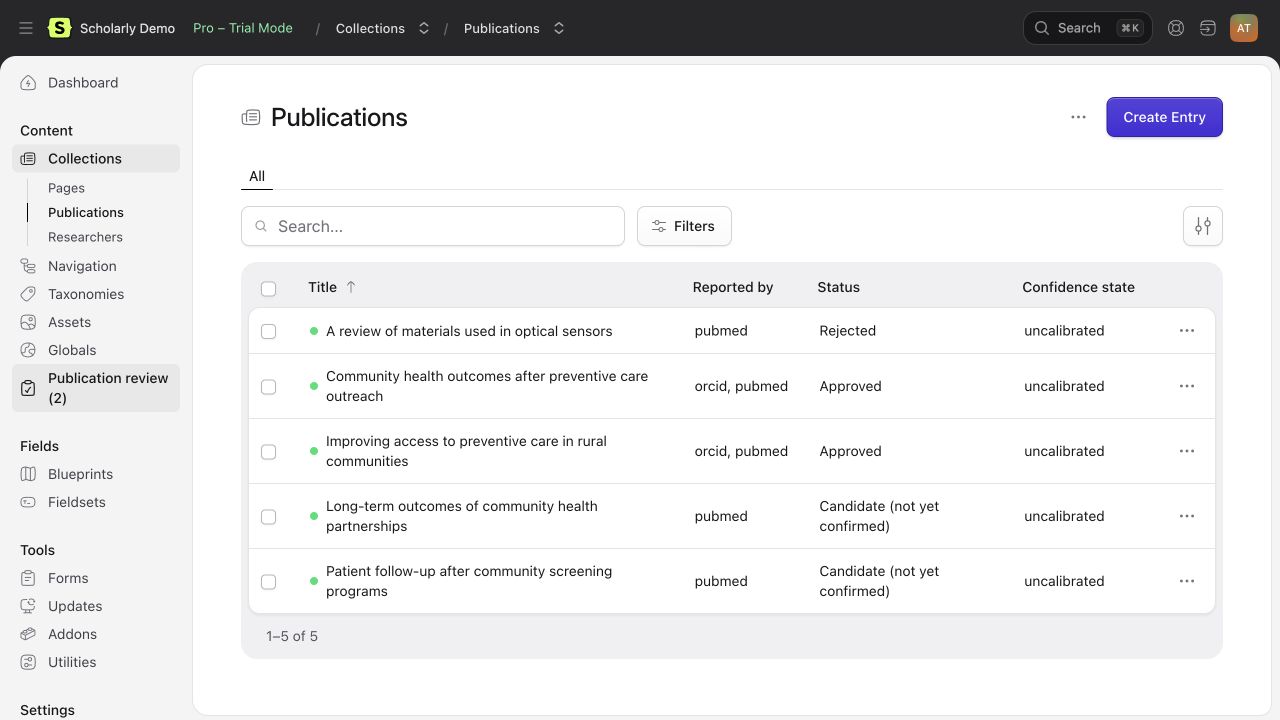
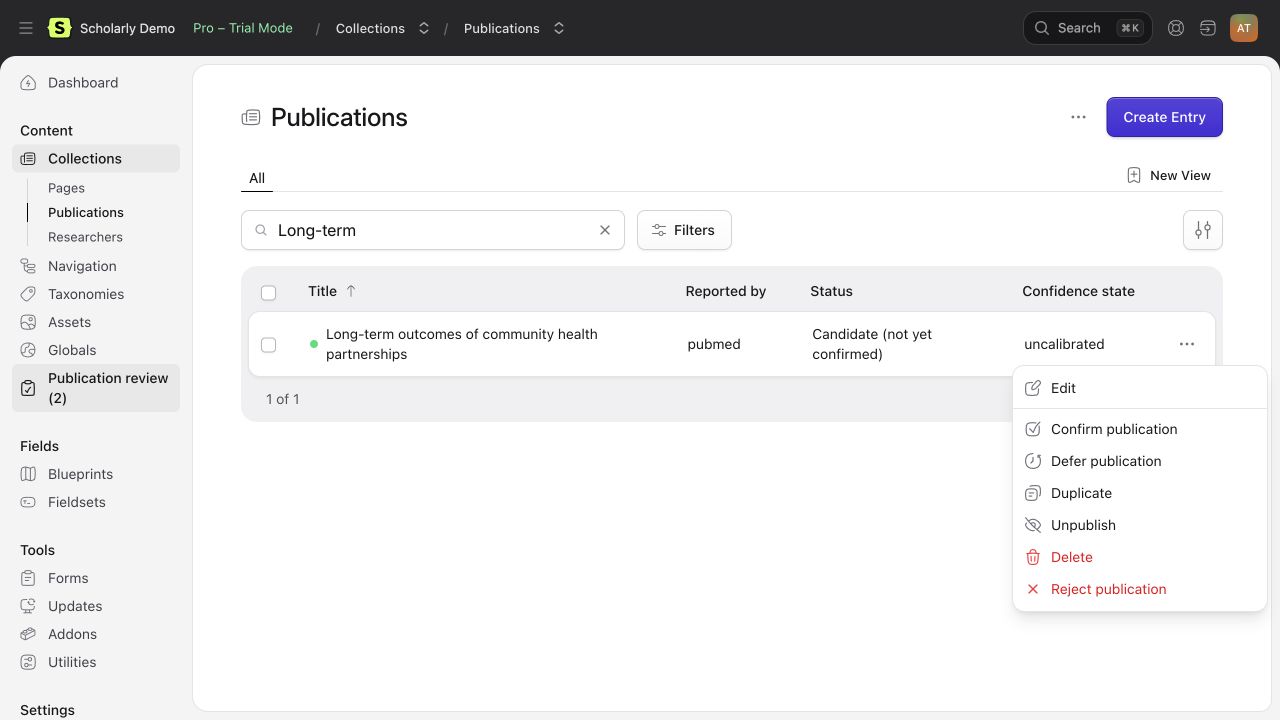
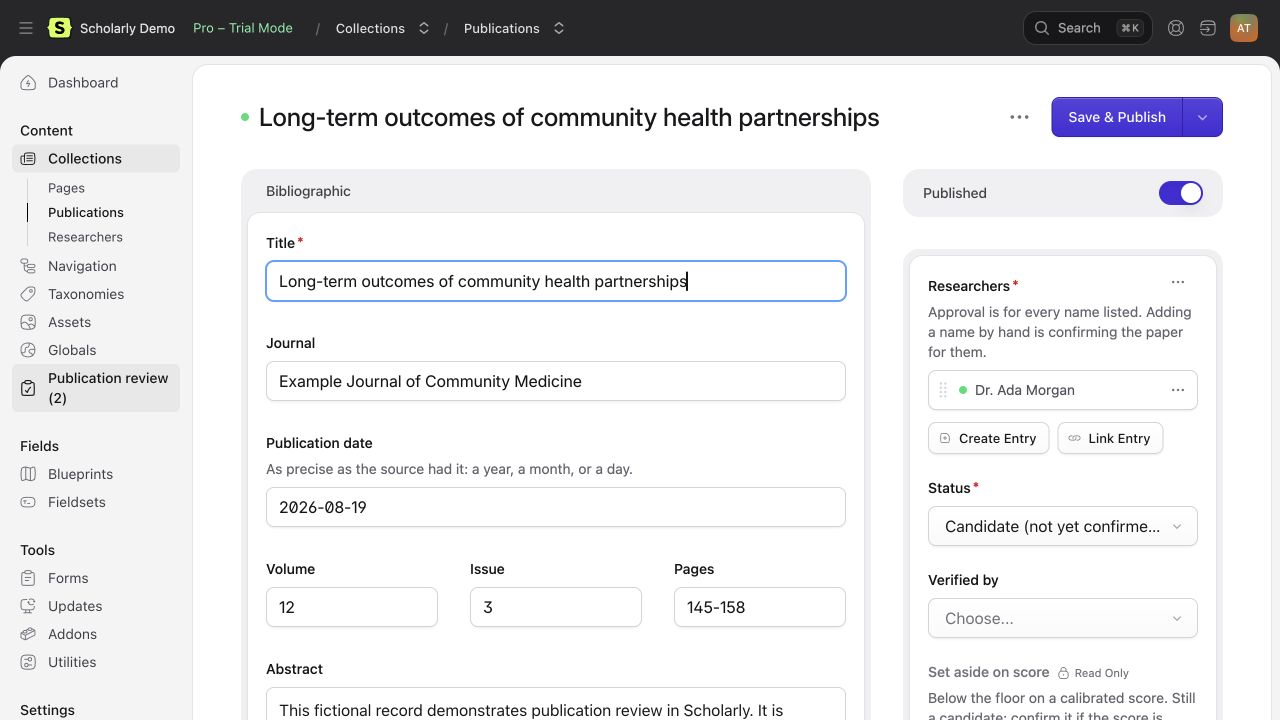
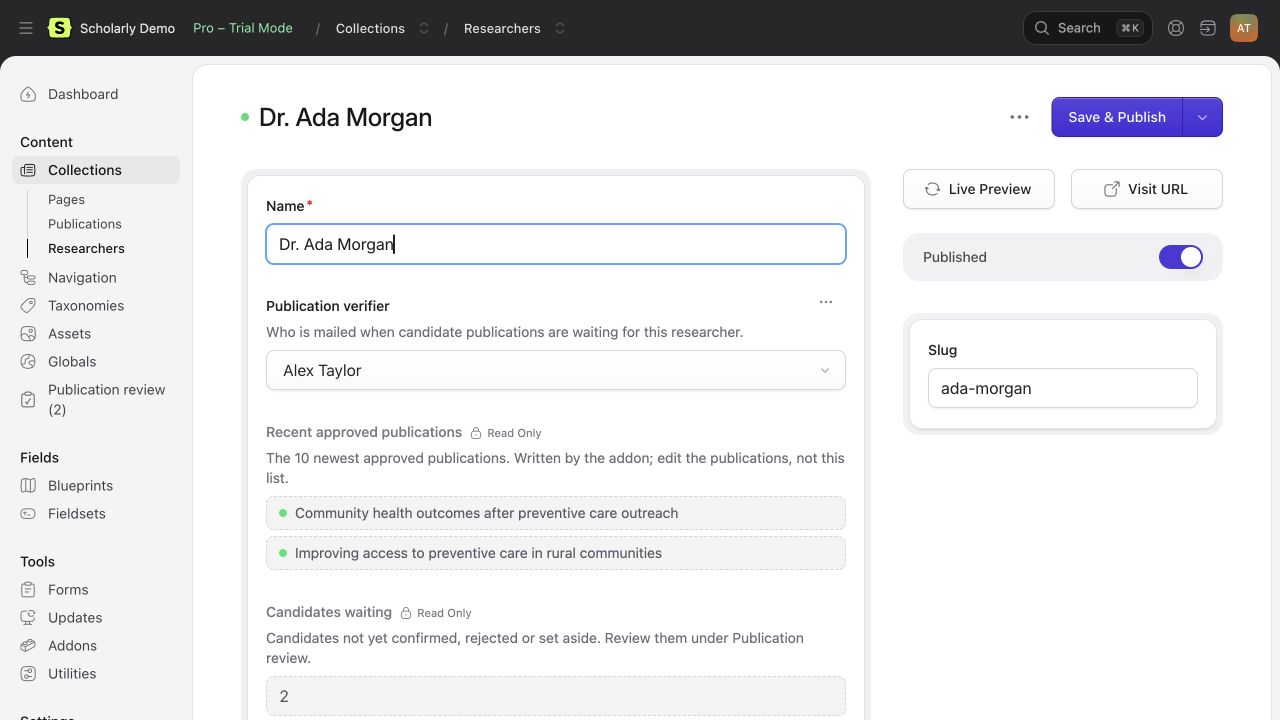
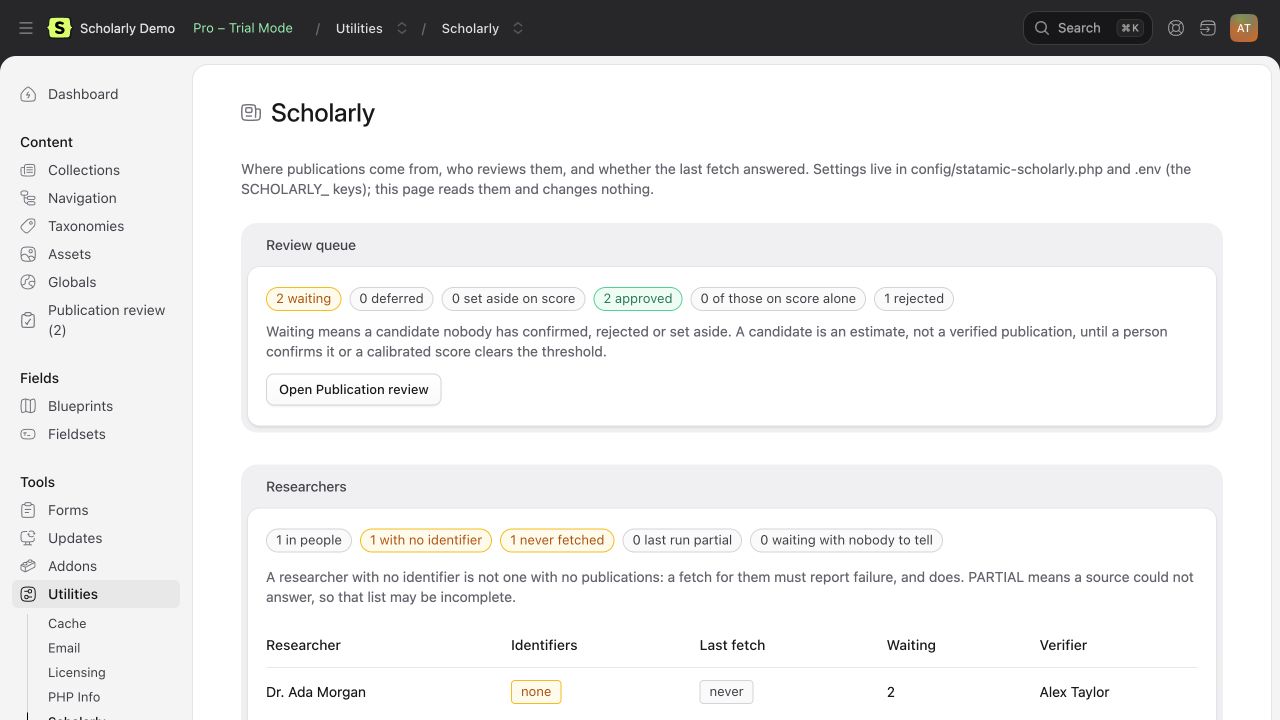
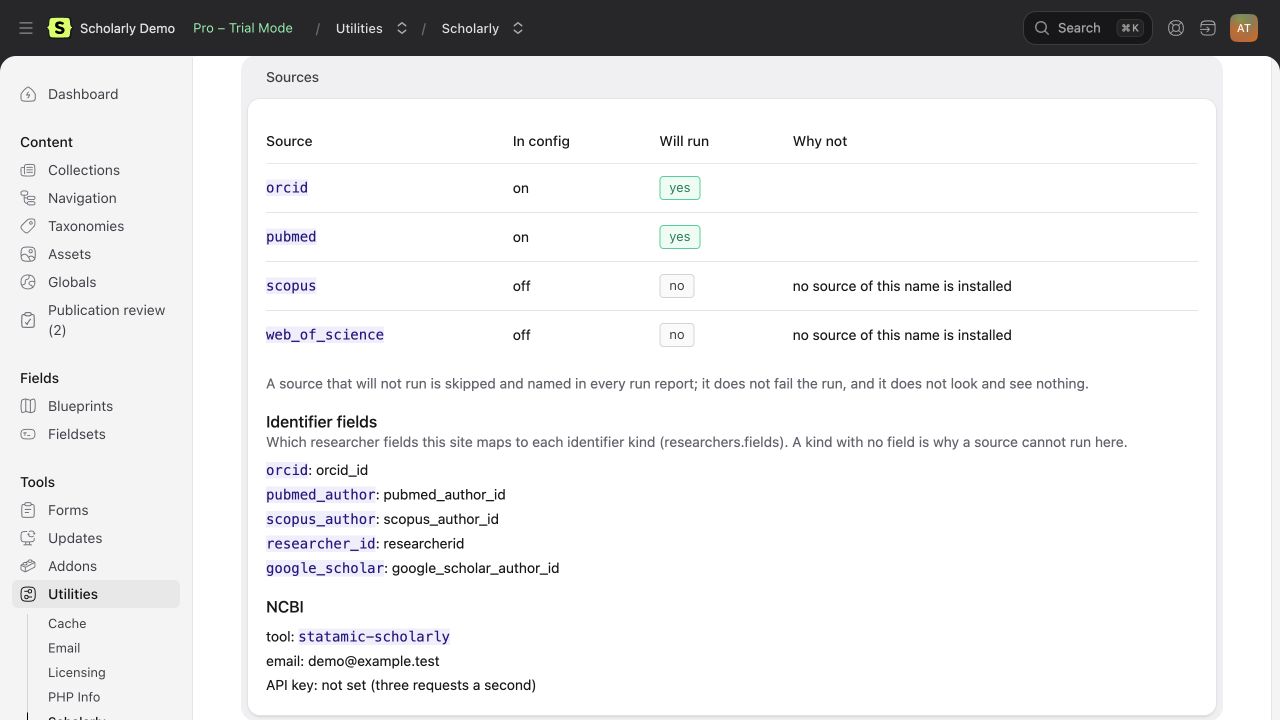
Actual Scholarly screens with fictional people and publications. The local demo shows Statamic Pro in trial mode.
 |
 |
 |
 |
 |
 |
What it will not do
- It will not tell you a publication is definitely someone's work. Outside an ORCID claim it is matching names, affiliations and co-authors, and a match is an estimate. A publication list on a profile is a claim about a named person, so a person, or a calibrated probability a person chose to trust, decides what goes on it.
- It will not report an empty list as an answer when it could not look. A source with a missing credential, a failed request or an unrecorded identifier is reported as a failure, because zero publications is otherwise indistinguishable from a researcher who has published nothing.
- It will not scrape Google Scholar. There is no API and scraping breaks its terms. BibTeX and CSV import is the supported route.
- It will not compute citation metrics.
Requirements
- PHP 8.2 or newer, with
ext-domandext-libxml(for PubMed's XML). - Statamic 6.27 or newer. Entries on the flat-file Stache or on
statamic/eloquent-driver(uuid or integer ids); the Eloquent driver itself needs PHP 8.3. - A queue for the scheduled fetch, or run it synchronously.
- Statamic Pro for host features such as multiple editor accounts, roles and permissions. Scholarly itself is free.
Installing
Scholarly is public and available on Packagist. Run these commands from your Statamic site:
composer require bpmore/statamic-scholarly:^0.3.1
php artisan vendor:publish --tag=statamic-scholarly-config
php please scholarly:install
No custom Composer repository or private-repository GitHub token is needed.
If you previously added a VCS repository for Scholarly, remove that entry
from your site's composer.json to use Packagist's package listing.
scholarly:install creates the publications collection the addon owns and
writes a scholarly fieldset for your researcher blueprint. It is safe to
run again.
Give editors access
In Users > Permissions, grant Scholarly > Verify publications to people who may confirm, reject or defer papers. Also grant the normal collection permissions they need to open and edit publications and researcher profiles. Access Scholarly utility, under Utilities, opens the read-only status page. These are separate permissions; seeing the status page does not grant the right to approve papers. Super users already have access.
Run the schedule
The default schedule fetches publications and sends review notifications
daily. Enable Laravel's scheduler on the host, and run a queue worker when
the site's queue connection is not sync. To check one researcher without
a worker, use php please scholarly:fetch <researcher> --sync.
Set a contact email
The addon refuses to query NCBI without one. NCBI asks every client to identify itself so they can make contact before blocking a heavy one; an addon on many sites that skipped this would make all of them anonymous traffic, and the block would land on site owners who did nothing.
SCHOLARLY_NCBI_EMAIL=you@example.org
SCHOLARLY_NCBI_API_KEY=optional-but-raises-your-rate-limit
SCHOLARLY_ORCID_ACCESS_TOKEN=optional-too
Say which fields hold identifiers
The addon does not assume your collection or field handles. In
config/statamic-scholarly.php, point it at whatever you use:
'researchers' => [
    'collection' => 'people',
    'fields' => [
        'orcid'         => 'orcid_id',
        'pubmed_author' => 'pubmed_author_id',   // e.g. "Carberry J"
        // ...
    ],
],
A wrong handle can make an identifier read empty. The fetch reports the missing field as a source failure and marks the run partial. Check the configured handles and the researcher entry when a source cannot run.
Import the fieldset and name a verifier
Import the scholarly fieldset into your researcher blueprint. Each
researcher's entry then shows their verifier, their ten newest approved
publications, how many candidates wait, and the last fetch's verdict. The
addon keeps those up to date; nothing is computed when the page renders.
Give a role the Verify publications permission, and set each researcher's verifier in the new field. For researchers with none:
SCHOLARLY_VERIFIER_EMAIL=review@example.org
Upgrading after repeated ORCID imports
Scholarly keeps ORCID work record IDs so repeated fetches reuse papers even
when ORCID supplies neither a DOI nor a PMID. Run php please scholarly:install
after updating to add the new hidden source-record field to the blueprint.
Fetches also add missing blueprint fields automatically.
Older records without these IDs cannot be linked safely by title. A first fetch can add one identifiable copy; subsequent fetches reuse it. Review any older duplicates by hand, keeping the reviewed entry and its decision. The upgrade never deletes or merges records by title.
Running a fetch
php please scholarly:fetch --sync     # every researcher, now, printing each report
php please scholarly:fetch            # every researcher, on the queue
php please scholarly:fetch jane-doe --source=pubmed --since=2024-01-01
php please scholarly:notify           # tell verifiers what is waiting
The schedule in config runs both daily. A report line says complete or
PARTIAL, and a partial run names the source that could not answer, because
zero publications from a source that never ran is not an answer.
Reviewing
"Publication review" in the control panel opens the publications listing
and shows how many candidates are waiting. Filter to Status: Candidate and
use the Confirm, Reject and Defer actions on a row or a selection. To
correct a record first, edit the entry, then Confirm it.
Confirming records who did it and when. A rejected paper is never brought back by a fetch, though a person can confirm it later.
What the confidence number means
Each candidate shows a confidence score and, next to it, a state. Read the state first.
certain: the researcher's own ORCID iD is on the paper, or they claimed it on their ORCID record. The number is 1.0 and is not a score.uncalibrated: the shipped starting weights. The order is meaningful (co-authors you have published with, your affiliation, a rare name); the number is not a probability.calibrated: fitted to this site's labelled examples. The number is an estimated probability, not a guarantee. The calibration command reports predicted and observed results on held-out decisions.
Open the entry to see why it scored as it did.
With scoring.auto_approve on (the default), a candidate is approved
without a person when its number means something and is at or above
auto_approve_threshold (0.90): an ORCID anchor, or a calibrated
probability. The shipped weights never approve anything. An
approved-on-score entry says so in the listing and a person can reject it.
Below discard_floor (0.30), a calibrated candidate is set aside: still in
the collection, still confirmable, but left out of the digest and filterable
out of the queue with "Set aside on score". Nothing is deleted, and a
candidate that later rises above the floor is asked about again.
Once your verifiers have made thirty or so decisions (at least ten each
way), run php please scholarly:calibrate. It fits the weights to those
decisions, prints how often a 0.90 was actually right, and, if the fit beats
the shipped weights, saves it. --dry-run reports without saving;
--forget goes back to the shipped weights.
Importing a list
php please scholarly:import ~/carberry.bib josiah-carberry
php please scholarly:import ~/list.csv josiah-carberry --confirm-as=jc@example.edu
BibTeX from any reference manager (Google Scholar's export included), or a
CSV whose header names the columns (title, doi, pmid, journal,
date, authors, abstract, volume, issue, pages; Google Scholar's
own headers work too). Records with a DOI or PMID are matched against what a fetch already found
and queue as candidates. A title alone is not enough to merge records. --confirm-as approves them as that
person, which is the right thing when the file is the researcher's own list.
Rendering
{{ scholarly:publications researcher="{id}" sort="publication_date:desc" limit="5" }}
    <article>
        <h3>{{ title }}</h3>
        <p>{{ authors | scholarly_authors:3 }}, <em>{{ journal }}</em>, {{ publication_date format="Y" }}</p>
        <p>{{ id | scholarly_citation:apa:html }}</p>
    </article>
{{ /scholarly:publications }}
Only approved publications are ever returned, and there is no parameter to
change that. Approval does not override Statamic's publish state: draft,
scheduled and expired publications stay out of the list, count and feed.
The researcher must also be published. A private or missing researcher has
no public feed and produces an empty list and a zero count.
researcher takes an id or a slug and defaults to the current
entry; year takes 2020 or 2020:2024; sort, limit, paginate, as
and journal work as on the collection tag.
{{ authors | scholarly_authors:3 }}joins the first three author names and adds "et al." when there are more.{{ id | scholarly_citation:ama }}renders a citation (ama,apaorvancouver; add:htmlfor an italic journal and escaped text). What the record lacks is left out, never filled in.{{ scholarly:publications_count researcher="{id}" }}gives the number.{{ scholarly:feed_url researcher="{id}" }}returns the URL for a JSON feed of the same approved list, at/!/statamic-scholarly/feed/{researcher}, with?year=,?journal=and?limit=.
Being told
scholarly:notify (scheduled with the fetch, or run by hand) mails each
verifier one digest of new candidates, says when the last fetch for a
researcher was partial, and never mentions the same candidate twice.
Deferred and set-aside candidates are left out. With no verifier and no
fallback address, the command says who could not be told and exits
non-zero. It never stays quiet about that.
To also POST each digest somewhere (a chat integration, a ticket queue), add
webhook to notifications.channels and set:
SCHOLARLY_WEBHOOK_URL=https://example.org/hooks/scholarly
SCHOLARLY_WEBHOOK_SECRET=a-long-random-string
The body is JSON; X-Scholarly-Signature is sha256= followed by the
HMAC-SHA256 of the exact body under the secret. Check it before trusting a
post.
Seeing where things stand
Under Tools in the control panel, a page called Scholarly shows what the addon knows about this site: candidates waiting, deferred and set aside; every researcher with the identifiers they carry, what their last fetch said and who is told when candidates wait on them; which sources will run and why one will not; whether NCBI has its contact email; whether scoring is calibrated; and how notifications and the schedule are set.
It reads. Nothing on it fetches, and nothing on it changes a setting: the
config file and .env are where that happens, and the page says so. A
researcher with no identifier is shown as that, not as one with no
publications; a partial run is shown as partial; a source that is off is
shown as off. The page keeps the same distinctions the run reports do.
Access is its own permission, Access Scholarly utility, under Utilities in a role's permissions. Super users have it. Credentials are never shown, only whether they are set.
What it sends where
Every outbound request the addon makes, so you can decide whether that is
acceptable on your site. Nothing is sent on a page render. Requests run
from scholarly:fetch and scholarly:notify; calibration reads saved data.
- NCBI E-utilities (
eutils.ncbi.nlm.nih.gov): the researcher's PubMed author string, PMIDs, yourSCHOLARLY_NCBI_EMAIL, the tool namestatamic-scholarly, and your API key if set. NCBI's usage policy asks for the email and tool name so they can contact a heavy client. - ORCID public API (
pub.orcid.org): the researcher's ORCID iD, and your access token if set. - Your webhook URL, if configured: the review digest (researcher names, counts, the last run's verdict), signed.
- Mail, through your site's mail driver: the same digest to verifiers.
No candidate content, verifier decisions or site data go anywhere else.
Caches (NCBI responses for a week, the fitted model) live in your site's
cache store and storage/app.
Upgrading
A published config does not gain new keys on its own. After an upgrade,
compare config/statamic-scholarly.php with the shipped one; a missing key
reads as the safe direction (for example, auto-approval off). Then run
php please scholarly:install again: it adds any fields the new version
ships to your existing blueprint and leaves everything you changed alone.
Your entries, decisions and configuration are never rewritten by an
upgrade.
After updating from 0.3.0, clear the site's static cache and purge any cached publication pages or JSON feeds from your CDN. Older versions could include an approved draft or a private researcher in public output; the fix cannot remove responses already saved by a browser or an external cache.
Adding your own source
Implement Bpmore\Scholarly\Contracts\PublicationSource, bind it, and tag
the binding scholarly.sources. A source returns a FetchOutcome rather
than an array, so it can report that it could not run rather than returning
nothing and being mistaken for an empty result.
If your application already has a PubMed client, bind
Bpmore\Scholarly\Contracts\PublicationMetadataFetcher to it. Otherwise you
get two clients caching the same records under different keys, and the two
caches can disagree.
Support
Report a problem or ask a question at
https://github.com/bpmore/statamic-scholarly/issues. Say which version
(composer show bpmore/statamic-scholarly), which Statamic version, and,
for a fetch problem, the report line the command printed: it names the
source that could not answer.
Licence
Free to use on any number of sites, with no key and no limit. Not free to redistribute or to build another product from. See LICENCE.