
bm1 / file-noindex

Exclude single files/images from search engines (Google Image Search) via a dynamically generated robots.txt - toggled per file in the file list.
Requires
- php: >=8.1
- typo3/cms-core: ^12.4 || ^13.4 || ^14.0
Requires (Dev)
- friendsofphp/php-cs-fixer: ^3.75
- phpstan/phpstan: ^2.1
- typo3/tailor: ^1.6
- typo3/testing-framework: ^8.2 || ^9
Suggests
None
Provides
None
Conflicts
None
Replaces
- typo3-ter/file-noindex: *
This package is auto-updated.
Last update: 2026-09-24 11:43:43 UTC
README

TYPO3 extension file_noindex · Composer bm1/file-noindex · TYPO3 v12 + v13 + v14 · GPL-2.0-or-later
Editors can exclude any file (images of all kinds, PDFs, …) from search engine indexing directly in the File list module — one checkbox in the file metadata, no developer involved, no matter where the file is used.
The extension serves a dynamically generated robots.txt that contains
Disallow entries for every marked file — the original file plus its
processed variants (csm_…, preview_…). Blocking via robots.txt is the
way officially recommended by Google
to keep images out of Google Image Search.
Typical use case
A person on a team photo asks not to appear in Google Image Search. Instead
of touching templates or moving files, an editor opens the file's metadata,
checks "Do not index in search engines", saves — done. The next time
crawlers fetch robots.txt, the file and all its rendered variants are
disallowed.
Installation
Composer mode
composer require bm1/file-noindex
Classic mode
Install file_noindex from the TYPO3 Extension Repository (TER) via the
Extension Manager.
After installation run a database schema update ("Analyze Database
Structure" in the Maintenance module or vendor/bin/typo3 database:updateschema). No further configuration is needed.
Usage
-
Open the File list module and edit the metadata of a file (or open the file resource in the Media module).
-
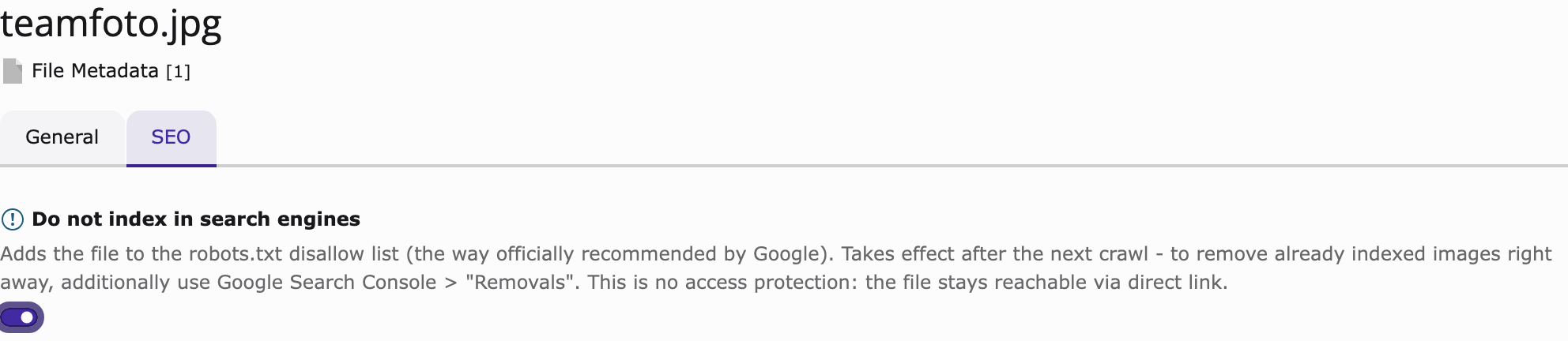
Switch to the SEO tab, enable "Do not index in search engines" and save.
-
https://your-site.example/robots.txtnow contains theDisallowentries — immediately, no cache flush needed:

User-agent: *
# Files excluded from indexing (EXT:file_noindex)
Disallow: /fileadmin/team/group-photo.jpg
Disallow: /fileadmin/_processed_/9/0/csm_group-photo_a97a0b95c4.jpg
Disallow: /fileadmin/_processed_/*/csm_group-photo_*
Disallow: /fileadmin/_processed_/*/preview_group-photo_*
Disallow: /typo3/
Unchecking the box removes the entries just as immediately.

How it works
A PSR-15 middleware answers GET /robots.txt in the frontend stack —
after site resolution, before TYPO3's static route resolver:
- Base rules are taken from the site configuration's
robots.txtroute (type: staticText), so your site config stays the single place to maintain them. Without such a route a minimalUser-agent: *group is used. - Disallow entries for all marked files are inserted into the last
existing
User-agent: *group (not appended as a duplicate group — not all parsers merge groups of the same name). Listed per file:- the original file path,
- all currently existing processed variants (
sys_file_processedfile), - wildcard patterns (
csm_<name>_*,preview_<name>_*inside the storage's processing folder) covering variants that will be generated in the future.
- Only files from local, public storages are listed. Renamed or moved files are reflected automatically on the next robots.txt request.
- The response is generated live on every request (
Cache-Control: public, max-age=3600). robots.txt is requested rarely; one indexed query per request is uncritical and checkbox changes take effect immediately without any cache invalidation logic.
Limits — please read
- No access protection. The file stays reachable via direct link. robots.txt only affects crawlers that respect it (Google, Bing, …). If you need hard protection, look at EXT:fal_protect.
- Already indexed images disappear only after the next crawl (days to weeks). For immediate removal additionally use Google Search Console → Removals.
- Deliberate over-blocking by wildcards.
csm_photo_*also matches variants of a file namedphoto_2.jpg. When in doubt the extension blocks too much rather than too little. - Specific user-agent groups win. If your robots.txt contains a more
specific group such as
User-agent: Googlebot-Image, that crawler ignores theUser-agent: *group entirely — including our entries. In that case replicate the disallows in the specific group or remove it. - robots.txt size limit. Google reads robots.txt only up to 500 KiB. With roughly three lines per file this allows thousands of marked files; if you get anywhere near that, reconsider your setup.
- Multi-site installations sharing one fileadmin list all marked files in the robots.txt of every site. Over-blocking across hosts is accepted in favour of a simple and robust v1.
- Language-independent. The checkbox lives on the default-language
metadata record and applies to the file as such (
l10n_mode=exclude).
Development
composer update
composer test:unit
typo3DatabaseDriver=pdo_sqlite composer test:functional
composer check:cs
composer check:phpstan
- Documentation: https://docs.typo3.org/p/bm1/file-noindex/main/en-us/
- Issues and source: https://github.com/BM1-de/file_noindex
License
GPL-2.0-or-later, see LICENSE.