
amarenkov / laravel-mutable-content

Laravel models with user-defined fields: typed JSON fields added without migrations, lists of values, and a trigger-based change log on PostgreSQL and MariaDB.
Package info
github.com/amarenkov/laravel-mutable-content
pkg:composer/amarenkov/laravel-mutable-content
Requires
- php: ^8.4
- brick/math: ^0.14.2 || ^0.15 || ^0.16 || ^0.17 || ^0.18 || ^0.19 || ^0.20 || ^1.0
- laravel/framework: ^13.8
Requires (Dev)
- larastan/larastan: ^3.0
- orchestra/testbench: ^11.0
- phpunit/phpunit: ^12.0
Suggests
- dedoc/scramble: For API documentation integration
- filament/filament: For admin UI management
Provides
None
Conflicts
None
Replaces
None
README

Laravel models whose set of fields is not fixed by the database schema. Values live in a single
JSON column (jsonb on PostgreSQL), and field definitions come from two sources: PHP attributes in code and records
in reference tables that an administrator edits by hand.
One field definition feeds everything at once: Eloquent, validation rules, the admin panel
(-filament), the user-facing
screens (-daisyui) and the
OpenAPI docs (-scramble). Add a
field, and it shows up in forms, tables, validation and API docs.
At a glance
#[Table('catalog.bicycles')]
#[ClassLabel('Bicycle')]
#[FieldCode, FieldLabel]
class Bicycle extends ModelWithFields
{
    #[CFAType(Type::TYPE_LOV_ITEM), CFALabel('Type'), CFALovCode(BikeType::CODE), CFAIsRequired]
    public const FIELD_TYPE = 'type';

    #[CFAType(Type::TYPE_WEIGHT), CFALabel('Weight')]
    public const FIELD_WEIGHT = 'weight';

    protected static array|bool|null $fieldDefinitions = null;
}

$bike = new Bicycle();
$bike->mergeWithFields(['code' => 'AERO-7', 'label' => 'Aero 7', 'type' => BikeType::ROAD,
    'weight' => Weight::fromKilograms(7.4)]);
$bike->withLogContext('Imported')->user($user->id)->save();

// "gears" was added by an administrator in the admin panel: no migration, no release
$bike->gears = 24;
$bike->weight = Weight::fromKilograms(7.2);
$bike->withLogContext('Weighed without pedals')->user($user->id)->save();

RuleHelper::getValidationRules(Bicycle::class);
// ['type' => [InLov, 'required'], 'weight' => ['nullable', 'numeric', 'gt:0'],
//  'gears' => ['nullable', 'integer'], ...]
The change log, written by database triggers, now holds both saves:
created  Imported                Code: AERO-7; Type: Road; Label: Aero 7; Weight: 7.4 kg
updated  Weighed without pedals  Weight: 7.4 kg → 7.2 kg; Gears: 24
Screenshots
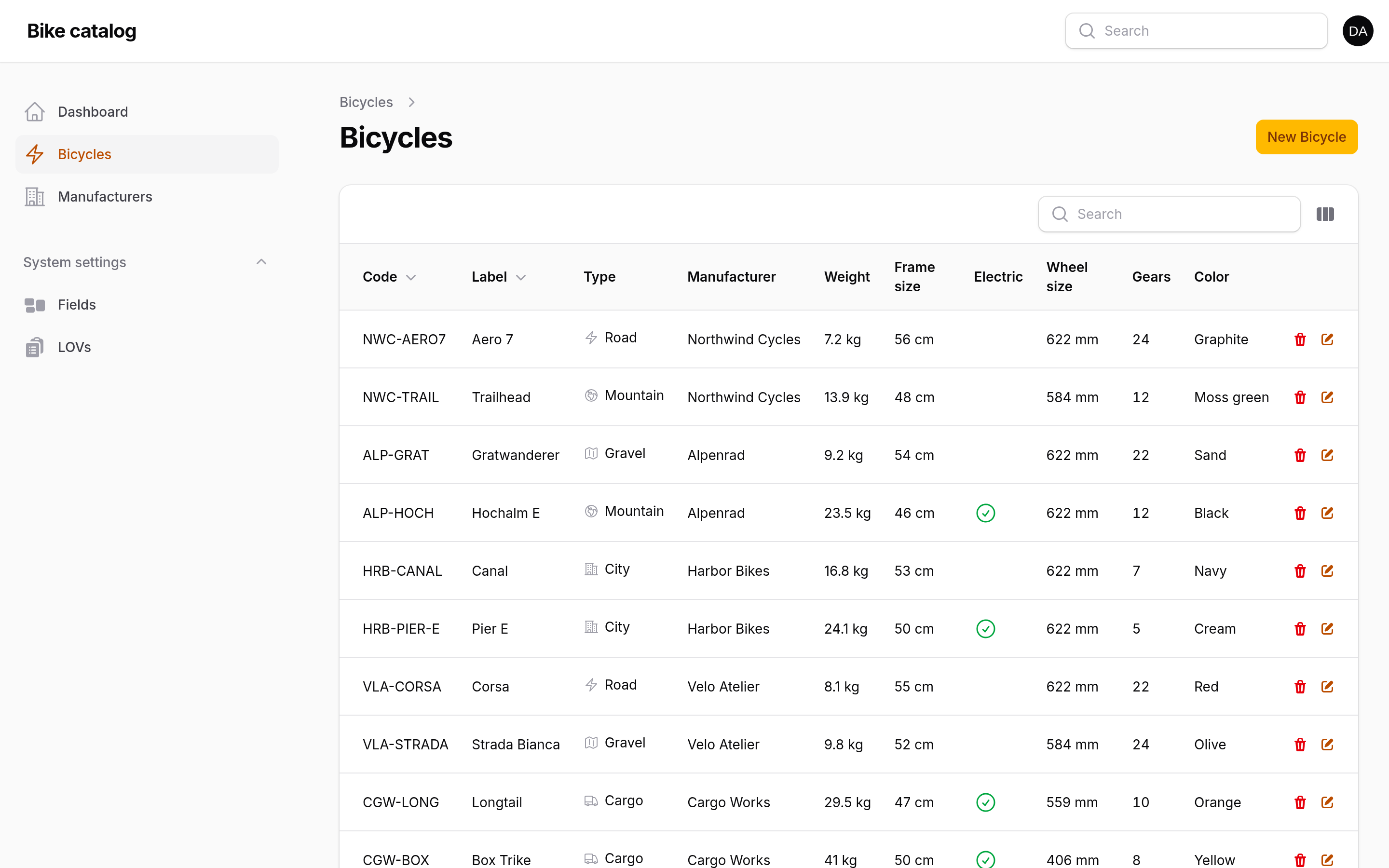
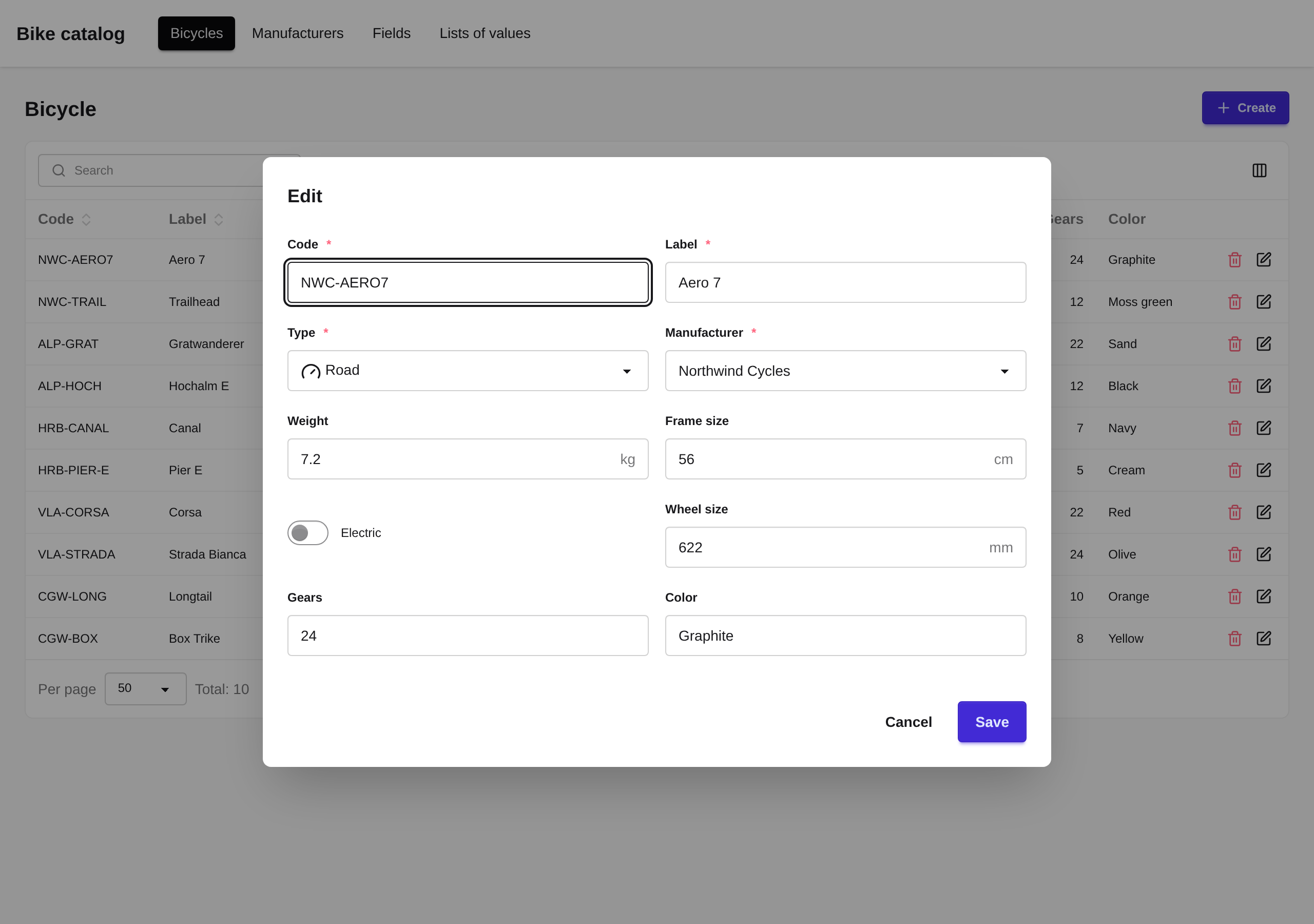
These screens are not part of this package. It has no user interface of its own: the screenshots show the companion packages
-filamentand-daisyuion a demo catalog, with forms and tables built from the field definitions above.
Filament admin panel (laravel-mutable-content-filament): the table and the form come from
the field definitions; "Gears" and "Color" were added in the admin panel.
daisyUI screens (laravel-mutable-content-daisyui): the same model in a server-rendered
Blade and Livewire application.
What it solves
- Users create and change object fields. New fields are added to a class in the admin panel, without migrations or a release.
- Users create and change lists of values (LOV). Statuses, categories and other reference lists are maintained in the admin panel, next to the system lists declared in code.
- Every content change is logged. The log is written by database triggers, not by the application, so changes made around it, even with plain SQL, still leave a trace with the old and new values.
- Code sets the minimum, users extend it. Fields and lists declared in code cannot be deleted in the admin panel, and their "required" and "immutable" flags can only be switched on there, not off.
- Data is not lost on write. The fields column cannot be overwritten as a whole, keys that are not declared as fields are kept, and concurrent saves of different fields do not overwrite each other.
- Who and why. Every change in the log carries its author, comment of any length and
any other structured data, and an event without field changes can be logged too (
logEvent()).
Features
- Field types.
string,text,bool,int,float,money,date,datetime,address,icon,secret,lov(a list of values),lov_item(an item of a list),object(a reference to an object of another class),weight,length,area,volume,density,surface_density,durationandsystem. The type drives the validation rule, the form component and the table column. Number and measurement fields have theallow_negativeandallow_zerosettings (on for numbers, off for measurements by default). - Money. A
moneyfield stores an amount and a currency code:{"amount": 1234.56, "currency": "USD"}. Currencies are the items of thecurrencyLOV (Models\Lov\Currency, ISO 4217 codes with the number of decimals and a symbol); the package declares USD, an application adds its own.$order->getMoney('total')returns aMoneyobject with exact decimal arithmetic (brick/math) and formatting. Thecurrencysetting fixes the currency of a field, and thedecimalssetting replaces the decimals of the currency (unit prices with six decimals, for example).multiply()andround()turn a unit price into a line total:$price->multiply($quantity)->round(). - Secrets. A
secretfield (an API key, a token) is encrypted with the application key when it is set and stays encrypted in the table and in the change log. It is shown with a few characters at the ends and a middle of a fixed length (sk****9f): thevisible_startandvisible_endsettings, two by default, a short secret is masked entirely.$account->getSecret('api_key')returns the text,maskedSecret('api_key')the mask. Setting the same text again keeps the stored value, so the record does not become dirty; an empty string removes the value. - Value objects for measurements.
Weight,Length,Area,Volume,Density,SurfaceDensityandDurationstore values in base units (kg, m, m², m³, kg/m³, kg/m², whole seconds), support arithmetic, tolerant comparison and formatting. Assign one directly ($item->weight = Weight::fromGrams(500)) and read it back with$item->getWeight('weight'). The display unit is a per-field setting: adurationfield such as an estimate is entered and shown in hours or minutes,getDuration('estimate')->clock()gives1:30:00. - Markdown text. The
formatsetting of atextfield isplain(default) ormarkdown;TypeSettings::isMarkdown($field)tells the interface to render and edit it as Markdown. - Fields of LOV items. A field is bound to a class or to one list, so the items of a list (material types, for example) get fields of their own.
- Transparent access.
$project->codereads the value from JSON as if it were a regular column:getAttribute,setAttributeandfillare intercepted. - Indexable JSON fields. The
fieldExtract()macro creates a stored generated column from a field for indexes, unique constraints and Eloquent relations. - Restore instead of duplicate. Creating a record with the unique fields of a soft-deleted one
restores that record with its id and history (
uniqueFieldSets()). - Change log tables.
Schema::createWithLog()creates a table together with its log table in thelogsschema and the triggers.LogHelperandModels\Log\Entryread the log back in a human-readable form. See Change log. - Typed queries.
whereField()compares numbers as numbers and measurements in base units, on the extracted column when there is one. See Querying fields. - Definitions between environments. Fields and lists created in the admin panel are exported to JSON and imported by codes. See Moving definitions between environments.
- References by code. An
objectfield can store an object code instead of its id (link_by_code), optionally accepting codes that do not exist yet (allow_unlisted_codes).
Requirements
- PHP 8.4
- Laravel 13
- PostgreSQL or MariaDB 10.7+ (connection driver
mariadb).
On MariaDB a table name with a schema, such as projects.projects, becomes
projects__projects in one database: models, Schema::createWithLog() and LogHelper translate
it, so the same models and migrations work on both. Schema::createSchema() does nothing there.
Use the model's getTable() instead of a literal name with a schema in raw queries. Log dates
are set by the database, so set the connection timezone to the application timezone on
MariaDB (on PostgreSQL the log date is timestamptz).
SQLite and MySQL are not supported: the change log needs triggers and JSON functions of PostgreSQL or MariaDB. Run the test suite of your application against one of them too, for example a PostgreSQL service in CI, rather than an in-memory SQLite database.
Installation
composer require amarenkov/laravel-mutable-content

php artisan mutable-content:install
The command publishes the migrations, migrates and seeds the system lists of values and fields
(--config publishes the config file too, --no-migrate only publishes the migrations). The
same by hand:
php artisan vendor:publish --tag=mutable-content-migrations
php artisan migrate

php artisan db:seed --class="Amarenkov\MutableContent\Database\Seeders\LovsSeeder"
php artisan db:seed --class="Amarenkov\MutableContent\Database\Seeders\FieldsSeeder"
Run the seeders in this order: lists of values first, then fields. Run them again on deploy: they add the fields and lists declared in code since the last run. An item removed from a list in code stops being system and can be deleted in the admin panel; the seeder does not delete it, as records may still refer to it.
Quick start
A model:
use Illuminate\Database\Eloquent\Attributes\Table;

use Amarenkov\MutableContent\Models\ModelWithFields;

use Amarenkov\MutableContent\Attributes\Class\Label as ClassLabel;
use Amarenkov\MutableContent\Attributes\Field\Common\Code as FieldCode;

use Amarenkov\MutableContent\Attributes\FieldAttr\Common\Type as CFAType;
use Amarenkov\MutableContent\Attributes\FieldAttr\Common\Label as CFALabel;
use Amarenkov\MutableContent\Attributes\FieldAttr\Common\IsRequired as CFAIsRequired;

use Amarenkov\MutableContent\Domain\Field\Lov\Type as FieldType;

#[Table('projects.projects')]
#[ClassLabel('Project')]
#[FieldCode]
class Project extends ModelWithFields
{
    #[CFAType(FieldType::TYPE_INT), CFALabel('Priority'), CFAIsRequired]
    const FIELD_PRIORITY = 'priority';

    // required: the base class sets it to false
    protected static array|bool|null $fieldDefinitions = null;
}
Register it in your service provider:
$this->app->make(MutableClassRegistry::class)->add(Project::class);
A migration:
Schema::createSchema('projects');

Schema::createWithLog('projects.projects', function (Blueprint $table) {
    $table->fieldsBase();        // id, JSON fields, created_at
    $table->fieldsUpdatedAt();   // updated_at
    $table->softDeletes();       // deleted_at

    $table->fieldExtract('code')->type('varchar(50)');
    $table->unique('code');
});
Usage:
$project = new Project();
$project->mergeWithFields(['code' => 'PRJ-1', 'priority' => 10]);
$project->withLogContext('import')->user($user->id); // goes to the change log with the next save
$project->save();

$project->priority; // 10, read from JSON like a regular attribute
Validation rules are built from the same definition:
use Amarenkov\MutableContent\Helpers\RuleHelper;

$request->validate(
    RuleHelper::getValidationRules(Project::class) +
    ['tasks' => 'array|required'] +
    RuleHelper::getValidationRules(Task::class, 'tasks.*')
);
Type settings, such as link_by_code and allow_unlisted_codes of an object field, are set
in the admin panel or in code with the TypeSettings attribute:
#[CFAType(Type::TYPE_OBJECT), CFAObjectClass(Team::class),
  CFATypeSettings([TypeSettings::LINK_BY_CODE => true, TypeSettings::ALLOW_UNLISTED_CODES => true])]
const FIELD_TEAM_CODE = 'team_code';
A field shared by several classes has one label, but each usage may have a label of its own that
replaces it in that class (forms, tables, validation messages, API docs). Set it in the admin panel
or in code with the UsageLabel attribute; FieldsSeeder copies it into an empty usage label:
#[CFAType(Type::TYPE_BOOL), CFALabel('Active'), CFAUsageLabel('Enabled')]
const FIELD_IS_ACTIVE = 'is_active';
Querying fields
whereField() and orWhereField() compare a field by its type. A plain
where('fields->weight', '>', 10) compares JSON values as text on PostgreSQL, so 9.5 is greater
than 10 there; whereField() casts numbers and measurements, takes value objects in base units
and dates as Y-m-d:
Bicycle::whereField('weight', '<', Weight::fromKilograms(10))
    ->whereField('frame_size', '>=', Length::fromCentimeters(54))
    ->whereField('is_electric', true)
    ->whereField('type', BikeType::GRAVEL)
    ->get();

Bicycle::whereField('gears', null)->get(); // the field is not set
A field extracted to a column with fieldExtract() is compared on that column, so its index is
used. The operators are =, <>, !=, <, <=, > and >=.
Change log
Database triggers write every insert and update of a table created by Schema::createWithLog()
to its log table: the action (created, updated, deleted, restored, or event for
logEvent()), the fields before and after, the log data and the id of the database
transaction, so entries of one operation can be grouped.
The log data is one JSON object: the author (user_id), the comment (comment) and any other
keys of the application. The user_id column is generated from it for filtering by author.
The data reaches the triggers through the database session, not through columns of the table:
use Amarenkov\MutableContent\Database\Log\LogContext;
use Amarenkov\MutableContent\Domain\Log\LogData;

// the next save or delete
$project->withLogContext('Imported from CSV')->user($user->id)->data(['source' => 'import'])->save();

// everything inside, including query builder updates and raw SQL
app(LogContext::class)->run(function () {
    DB::table('projects.projects')->where('id', 1)->update([...]);
}, ['user_id' => $user->id, 'comment' => 'Bulk fix']);

// a default for a request, a job or a command, e.g. in a middleware
app(LogContext::class)->set(new LogData()->user($request->user()?->id)->data(['ip' => $request->ip()]));
Data of a nested context is merged over the outer one by top-level keys. The default context is cleared before every queue job and Octane request.
Plain SQL outside the application sets the context itself, in the same transaction on PostgreSQL:
-- PostgreSQL
BEGIN;
SELECT set_config('mutable_content.data', '{"user_id": 5, "comment": "Manual fix"}', true);
UPDATE projects.projects SET fields = fields || '{"priority": 1}' WHERE id = 10;
COMMIT;

-- MariaDB: a session variable, reset it afterwards
SET @mutable_content_log_data = '{"user_id": 5, "comment": "Manual fix"}';
UPDATE projects__projects SET fields = json_set(fields, '$.priority', 1) WHERE id = 10;
SET @mutable_content_log_data = NULL;
A change without a context is still logged, without an author. On MariaDB the transaction id is filled only for writes inside a context.
Events without field changes take a translation key or a text, stored in the data as event
and translated when the log is shown, with scalar values of the data as replacements. An event
takes the pending withLogContext() of the model too and leaves it for the next save:
// 'projects.log.sync_skipped' => 'Sync skipped: :reason'
$project->logEvent('projects.log.sync_skipped', ['reason' => 'timeout'])
    ->comment('Retry later')
    ->user($user->id)
    ->write();
The triggers write the full fields before and after. Compression replaces them with the changed
fields only. The package schedules mutable-content:compress-log every minute without
overlapping, so the application only needs the Laravel scheduler running (schedule:run in
cron). Each run processes up to --limit entries of each class, and parallel runs skip each
other's entries. Deletions, restorations and events get empty changes; an update without
changes is left uncompressed with the error compression status and a warning in the
application log, for review. Compression never retries such entries; after the review, return
them with UPDATE <log table> SET compression_status = 'pending' WHERE compression_status = 'error'.
The schedule and the limit are set in the config: MUTABLE_CONTENT_LOG_COMPRESS_SCHEDULE, a
cron expression, empty to disable, and MUTABLE_CONTENT_LOG_COMPRESS_LIMIT. Publish it with
php artisan vendor:publish --tag=mutable-content-config.
Deleting old entries is up to the application: mutable-content:prune-log is never scheduled
by the package. To delete entries older than three years every night:
// routes/console.php
Schedule::command('mutable-content:prune-log --days=1095')->daily();
Both commands take --class= to limit them to some classes (all registered classes by
default), and the same is available as LogHelper::compress() and LogHelper::prune().
Moving definitions between environments
Fields, their usages, lists of values and items created in the admin panel live in the database. Move them, for example from staging to production, as JSON:
php artisan mutable-content:export-definitions definitions.json

php artisan mutable-content:import-definitions definitions.json --dry-run
php artisan mutable-content:import-definitions definitions.json --comment="Release 42"
The export holds only records created in the admin panel: system ones come from the code and
the seeders. References between records are written as codes, and the import matches records by
codes: it creates the missing ones and updates the keys present in the file, never touches system
records and runs in one transaction. Every change lands in the change log with the comment.
DefinitionsHelper::export() and DefinitionsHelper::import() do the same in code.
Translations
Labels in attributes are passed through __() when read, so they can be translation keys or
plain text. The package labels are in English and translated in lang/ru.json; messages are in
lang/{en,ru}/*.php under the mutable-content namespace. Publish them to override:
php artisan vendor:publish --tag=mutable-content-lang
Labels from code are written to the database by the seeders in the current locale; after that the database label wins and is edited in the admin panel.
Caveats
- Every
ModelWithFieldssubclass must redeclareprotected static array|bool|null $fieldDefinitions = null;, otherwise aLogicExceptionis thrown. withLogContext()only adds context to the log entry that the next successfulsave()ordelete()writes automatically, it writes nothing by itself; without a comment it keeps the comment given before. A save or delete with log context runs in a database transaction.- Change fields with
setField(), attribute assignment,fill()with field codes as keys ormergeWithFields():$model->fieldsis read-only, and changing fields of an object loaded without thefieldscolumn throws aLogicException. - Concurrent changes of the same field: the last save wins.
- Class labels in the registry must be unique.
- Create entity tables with
Schema::createWithLog()only: it requires thefields,updated_atanddeleted_atcolumns and fails if one is missing. - Hard deletes (
forceDelete()) are not logged. - Field definitions and lists of values are cached per process. The package flushes the cache when fields or lists change and before every queue job and Octane request.
Compared to other packages
- Schemaless attributes (for example
spatie/laravel-schemaless-attributes) also keep extra attributes in a JSON column, but without definitions: no types, labels, validation rules or admin screens, and any key can be written. Here every field is declared, in code or in the admin panel, and the declaration drives validation, forms and tables. - EAV packages keep each value in a separate row, so reading a record joins value tables and
filtering by a value needs a join per attribute. Here the values are one JSON column of the
row, and a field that needs an index or a unique constraint is extracted into a generated
column (
fieldExtract()). - Activity and audit logs (
spatie/laravel-activitylog,owen-it/laravel-auditing) record changes from Eloquent model events, so query builder updates, mass updates and plain SQL are not recorded. Here the log is written by database triggers, with the author and comment passed through the database session, so every change of the row is recorded.
The trade-off: PostgreSQL or MariaDB only, PHP 8.4 and Laravel 13.
Companion packages
amarenkov/laravel-mutable-content-filament: a Filament 5 admin panel with forms, tables and screens for managing fields and lists of values.amarenkov/laravel-mutable-content-daisyui: server-rendered Blade, Livewire and daisyUI screens with the same forms, tables and management screens.amarenkov/laravel-mutable-content-tasks: a task domain (tasks, participants, time tracking) with services and events, without a user interface. Work in progress.amarenkov/laravel-mutable-content-finance: a personal finance domain (accounts, operations split by categories, transfers, debts, receipts) onmoneyfields, with services and events, without a user interface. Work in progress.amarenkov/laravel-mutable-content-shop: a shop domain (carts of users and guests, orders with item snapshots, price breaks) onmoneyfields, with a cart service and an event, without a user interface.amarenkov/laravel-mutable-content-ai: memory, a run journal, approvals, editable prompts and tool schemas from fields forlaravel/aiagents, without a user interface. Very early.amarenkov/laravel-mutable-content-scramble: OpenAPI docs with field labels and LOV enums in Scramble.
License
MIT. See LICENSE.