ahmedmerza/logscope

A fast, database-backed log viewer for Laravel applications

Maintainers

Package info

github.com/AhmedMerza/laravel-logscope

pkg:composer/ahmedmerza/logscope

Statistics

Installs: 83

Dependents: 1

Suggesters: 0

Stars: 2

Open Issues: 1


README

Latest Version License PHP Version

A beautiful, database-backed log viewer for Laravel applications. Production-ready.

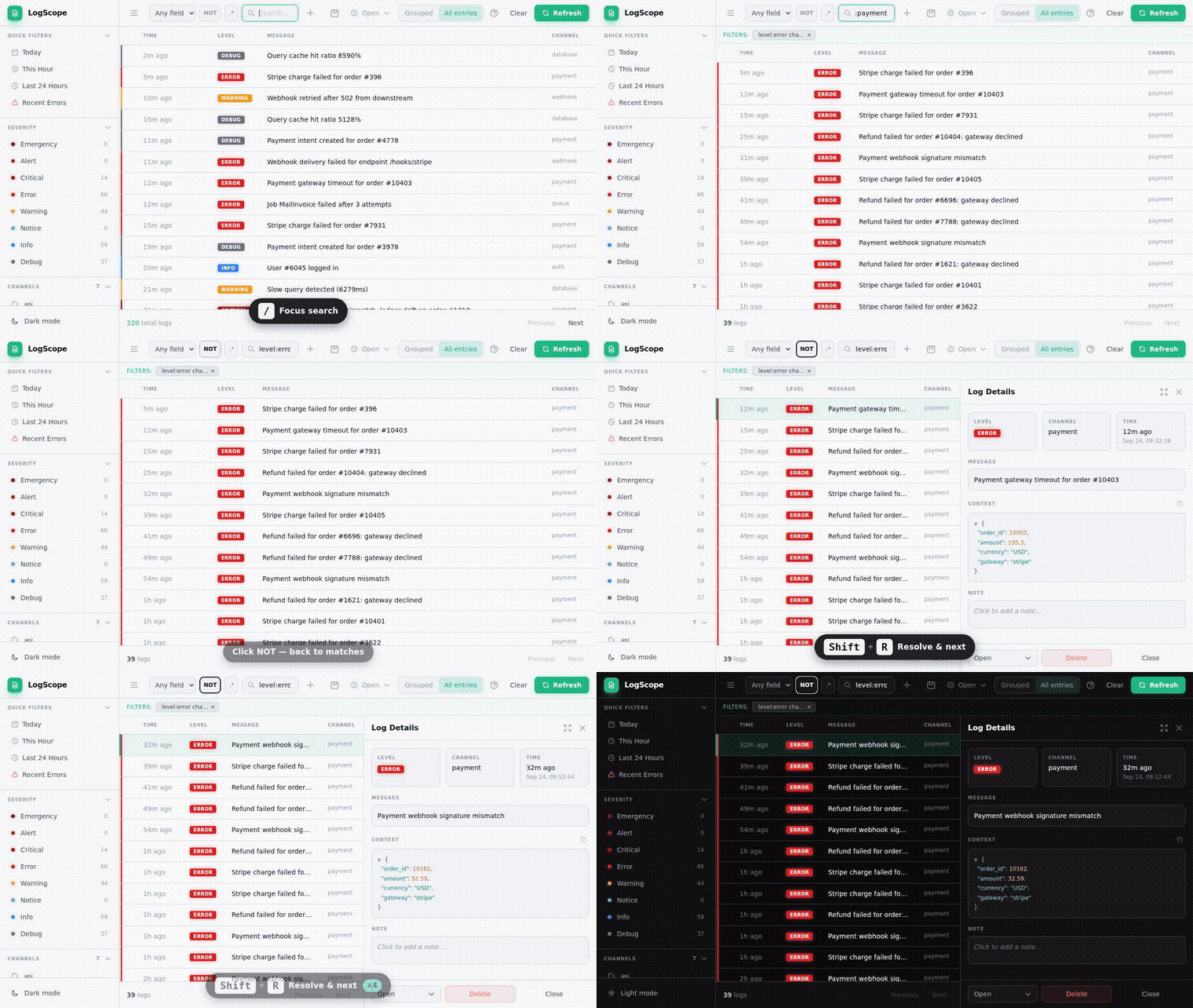
LogScope Screenshot

Quick Start

composer require ahmedmerza/logscope
php artisan logscope:install
php artisan migrate

Visit /logscope in your browser. That's it!

What's New

Latest: v1.5.7 β€” Hotfix: PHP deprecations filter regression in v1.5.5–v1.5.6. Upgrade if you rely on LOGSCOPE_IGNORE_DEPRECATIONS.

See CHANGELOG.md for full release history and behavior-change notes.

Table of Contents

✨ Features

Feature Description
Zero-Config Capture Automatically captures ALL logs from ALL channels
Request Context Trace ID, user ID, IP, URL, and user agent for every log
Advanced Search Search syntax (field:value), regex support, NOT toggle
Smart Filters Include/exclude by level, channel, HTTP method, date range
Active Filters Bar See all active filters at a glance, clear individually
Channel Search Search and filter channels when you have many
JSON Viewer Syntax-highlighted, collapsible JSON with copy support
Smart Context Auto-expand Request/Model objects, redact sensitive data
Status Workflow Track logs as open, investigating, resolved, or ignored
Log Notes Add investigation notes to any log entry
Quick Filters One-click filters for common queries
Keyboard Shortcuts 14 shortcuts for navigation, status changes, and actions
Dark Mode Full dark mode support with persistence
Shareable URLs Current filters reflected in URL for sharing
Deep Linking Link directly to specific log entries
Performance Keyset pagination, batch writes, query optimization, proper indexing

πŸ“‹ Requirements

  • PHP 8.2+
  • Laravel 10+
  • SQLite, MySQL, or PostgreSQL

πŸ€” When to Use LogScope

LogScope stores logs in your database - a deliberate choice that works great for most Laravel apps.

Great fit if you:

  • Want log visibility without external services
  • Have a typical Laravel app (up to ~100K requests/day)
  • Need rich search and filtering
  • Prefer simplicity over infrastructure complexity

Consider alternatives if you:

  • Process millions of requests daily
  • Need months/years of log retention
  • Already use centralized logging (Datadog, CloudWatch, ELK)

How LogScope handles common concerns:

Concern Solution
Database bloat Retention policies with scheduled pruning (default: 30 days)
Performance Batch mode writes logs after response is sent
Query speed Proper indexes on common filter combinations

⚠️ Known Limitations

LogScope captures everything that flows through Laravel's logger (Illuminate\Log\Logger). A few categories of logs structurally bypass that path and cannot be auto-captured. These are PHP / framework limitations, not bugs we can fix from a Composer package.

1. PHP's native error_log() is not interceptable

error_log("...") is a built-in PHP function that writes directly to the destination configured in php.ini's error_log directive (file, syslog, or stderr). It calls into PHP's C-level logging, never invokes set_error_handler, and there's no userland API to redirect it. Workarounds (the uopz extension, php.ini overrides, stderr capture) all live outside the PHP application β€” out of scope for a package.

If your app or a dependency calls error_log(), those messages land in your php-fpm/server log, not in LogScope. Search both places when investigating.

2. trigger_error(E_USER_*) should work, but depends on Laravel's exception handler

PHP routes trigger_error() through the registered set_error_handler, and Laravel's HandleExceptions bootstrapper installs one that converts these to ErrorException and reports them β€” which then fires MessageLogged and reaches LogScope. So in normal HTTP/CLI flow this works.

It can break in specific contexts where Laravel's exception handler is bypassed:

  • php artisan tinker (skips reporting via runningUnitTests()-style guards in some versions)
  • Custom set_error_handler calls in user code that don't chain to the previous handler
  • error_reporting being lowered to exclude E_USER_* levels

If something seems missing here, check error_reporting() and that \Illuminate\Foundation\Bootstrap\HandleExceptions::class is in your bootstrap chain (it is by default in Laravel 10/11/12).

3. Direct Monolog instances bypass capture

If a dependency (or your own code) does:

$logger = new \Monolog\Logger('foo');
$logger->error('something');

…that's a raw Monolog logger, not Laravel's Illuminate\Log\Logger. Only Laravel's logger fires MessageLogged. The Monolog instance has no way to know LogScope exists.

Opt-in workaround: push our handler onto the Monolog instance:

use LogScope\Logging\LogScopeHandler;

$logger = new \Monolog\Logger('foo');
$logger->pushHandler(new LogScopeHandler('foo'));  // 'foo' = the channel name to record
$logger->error('captured by LogScope now');

Auto-instrumentation isn't possible β€” we'd have to patch the Monolog\Logger class itself.

4. SIGKILL / segfault / E_PARSE in batch write mode loses the buffered batch

Batch mode (LOGSCOPE_WRITE_MODE=batch, default) accumulates logs during the request and flushes them on app->terminating() or PHP shutdown. Both safety nets require a graceful shutdown:

  • kill -9 (SIGKILL): cannot be caught by PHP β€” buffer is gone
  • OOM kill: same
  • E_PARSE / E_COMPILE_ERROR: PHP can't run user code at shutdown for these

If low-loss is critical, set LOGSCOPE_WRITE_MODE=sync to write every log immediately. Cost: each Log::*() call adds a synchronous DB round-trip.

5. null_channel filter β€” read before enabling

LOGSCOPE_IGNORE_NULL_CHANNEL=true drops logs that LogScope can't attribute to a named channel. This includes Laravel's own framework-level error reporter in some configurations, which means enabling this flag may silently drop unhandled exceptions. Only enable if you know exactly which no-channel logs flow through your app.

πŸ“¦ Installation

composer require ahmedmerza/logscope

Run the install command:

php artisan logscope:install
php artisan migrate

Access the dashboard at /logscope.

βš™οΈ Configuration

After installation, configure LogScope in config/logscope.php or via environment variables.

Capture Mode

# 'all' (default) - Capture all logs automatically
# 'channel' - Only capture logs sent to the logscope channel
LOGSCOPE_CAPTURE=all

Write Mode (Performance)

# 'batch' (default) - Buffer logs, write after response
# 'sync' - Write immediately (simple, but slower)
# 'queue' - Queue each log entry (best for high-traffic)
LOGSCOPE_WRITE_MODE=batch

# Queue settings (when using 'queue' mode)
LOGSCOPE_QUEUE=default
LOGSCOPE_QUEUE_CONNECTION=

Retention

LOGSCOPE_RETENTION_ENABLED=true
LOGSCOPE_RETENTION_DAYS=30

Note: Retention requires scheduling logscope:prune - see Schedule Pruning.

Features

LOGSCOPE_FEATURE_STATUS=true       # Enable status workflow
LOGSCOPE_FEATURE_NOTES=true        # Add notes to logs

Noise Reduction

# Filter out noisy logs
LOGSCOPE_IGNORE_DEPRECATIONS=true  # Skip "is deprecated" messages (default: true)
LOGSCOPE_IGNORE_NULL_CHANNEL=false # Skip logs without a channel (default: false)

Note: null_channel defaults to false because Log::build() (dynamic loggers) produce logs without a channel. Setting this to true would filter out those logs.

Cache TTL

# How long (in seconds) to cache stats and filter options (levels, channels, etc.)
# Set to 0 to disable caching
LOGSCOPE_CACHE_TTL=60

JSON Viewer

Configure collapsible JSON behavior in config/logscope.php:

'json_viewer' => [
    'collapse_threshold' => 5,  // Auto-collapse arrays/objects larger than this
    'auto_collapse_keys' => ['trace', 'stack_trace', 'stacktrace', 'backtrace'],
],

Routes

LOGSCOPE_ROUTES_ENABLED=true
LOGSCOPE_ROUTE_PREFIX=logscope
LOGSCOPE_DOMAIN=
LOGSCOPE_FORBIDDEN_REDIRECT=/
LOGSCOPE_UNAUTHENTICATED_REDIRECT=/login

Add middleware and configure error redirects:

'routes' => [
    'middleware' => ['web', 'auth'],
    'forbidden_redirect' => '/',           // Where to redirect on 403 (access denied)
    'unauthenticated_redirect' => '/login', // Where to redirect on 401/419 (session expired)
],

Error Handling

LogScope handles errors gracefully with toast notifications:

Error Behavior
401/419 (Session expired) Toast + redirect to unauthenticated_redirect
403 (Access denied) Toast + redirect to forbidden_redirect
429 (Rate limited) Toast only (retry later)
500+ (Server error) Toast only (temporary issue)
Network error Toast only (check connection)

Note: Redirect URLs can be relative paths (/login) or absolute URLs (https://auth.example.com/login).

πŸš€ Usage

Automatic Capture

All logs are captured automatically - no code changes needed:

Log::info('User logged in', ['user_id' => 1]);
Log::channel('slack')->error('Payment failed');
Log::stack(['daily', 'slack'])->warning('Low inventory');

Keyboard Shortcuts

Key Action
j / k Navigate down / up
h / l Previous / next page
r Refresh data
Enter Open detail panel
Esc Close panel
/ Focus search
y Copy context (yank)
n Focus note field
c Clear all filters
d Toggle dark mode
? Show keyboard help

Status shortcuts (require Shift, filter by status): | O | Open | I | Investigating | R | Resolved | X | Ignored |

Action shortcuts (r, h, l) and status shortcuts are configurable β€” see Keyboard Shortcuts.

Search Syntax

Type directly in the search box using field:value syntax:

Syntax Example Description
field:value message:error Search in specific field
-field:value -level:debug Exclude matches
field:"value" message:"user login" Quoted values with spaces
text error Search in all fields
-text -deprecated Exclude from all fields

Searchable fields: message, source, context, level, channel, user_id, ip_address, url, trace_id, http_method

Tip: Request context filters (trace ID, user ID, IP, URL) support partial matching. Type 192.168 to find all IPs starting with that prefix, or 42 to find user IDs containing "42".

Tip: Click on trace ID, user ID, or IP address in the detail panel to pivot your investigation β€” severity, channel, status, and search filters are cleared so nothing is hidden. Your date range is preserved.

Examples:

# Find errors in the API channel
channel:api level:error

# Find payment logs excluding debug
channel:payment -level:debug

# Find logs mentioning a specific user ID
user_id:123

# Find logs containing "timeout" anywhere
timeout

# Find logs with "connection failed" in message
message:"connection failed"

# Find context containing a job ID
context:abc123

# Exclude deprecated warnings
-message:deprecated

# Combine multiple conditions
level:error channel:database message:timeout

# Find all POST requests
http_method:POST

# Find logs from specific URL path
url:/api/payments

# Exclude health check endpoints
-url:/health -url:/ping

# Find logs from specific IP range
ip_address:192.168

# Track a specific request by trace ID
trace_id:abc-123-def

Regex mode: Click the .* button to enable regex patterns:

# Match error OR warning levels
level:error|warning

# Match any payment-related message
message:payment.*failed

# Match IP addresses starting with 192.168
ip_address:192\.168\.\d+\.\d+

Both search syntax and regex can be disabled in config if not needed.

Status Workflow

Logs have a status workflow: Open β†’ Investigating β†’ Resolved or Ignored.

Customize who changed the status:

// In AppServiceProvider::boot()
use LogScope\LogScope;

LogScope::statusChangedBy(function ($request) {
    return $request->user()?->name;
});

Customize Statuses

Override built-in statuses or add new ones in config/logscope.php:

'statuses' => [
    // Override built-in status
    'investigating' => [
        'label' => 'In Progress',
        'color' => 'blue',
    ],
    // Add custom statuses
    'waiting' => [
        'label' => 'Waiting for Customer',
        'color' => 'orange',
        'closed' => false,  // Shows in "Needs Attention"
    ],
    'duplicate' => [
        'label' => 'Duplicate',
        'color' => 'purple',
        'closed' => true,   // Hidden from "Needs Attention"
    ],
],

Available colors: gray, yellow, green, slate, blue, red, orange, purple

Quick Filters

Configure one-click filters in config/logscope.php:

'quick_filters' => [
    ['label' => 'Today', 'icon' => 'calendar', 'from' => 'today'],
    ['label' => 'Recent Errors', 'icon' => 'alert', 'levels' => ['error', 'critical'], 'from' => '-24 hours'],
    ['label' => 'Needs Attention', 'icon' => 'filter', 'statuses' => ['open', 'investigating']],
    ['label' => 'Resolved Today', 'icon' => 'filter', 'statuses' => ['resolved'], 'from' => 'today'],
],

Available options: label, icon (calendar/clock/alert/filter), levels, statuses, from, to

Status Shortcuts

Each status has a default keyboard shortcut (uppercase, requires Shift). Customize in config/logscope.php:

'statuses' => [
    // Disable a shortcut
    'ignored' => ['shortcut' => null],
    // Custom status with shortcut
    'waiting' => ['label' => 'Waiting', 'color' => 'orange', 'shortcut' => 'w'],
],

Keyboard Shortcuts

Action shortcuts (refresh, pagination) are configurable or can be disabled:

'keyboard_shortcuts' => [
    'refresh'   => 'r',  // Refresh logs and stats
    'prev_page' => 'h',  // Previous page
    'next_page' => 'l',  // Next page
],

Set any shortcut to null to disable it:

'keyboard_shortcuts' => [
    'prev_page' => null,  // Disable previous page shortcut
    'next_page' => null,
],

Authorization

LogScope uses a flexible auth system (checked in order):

1. Custom Callback:

LogScope::auth(fn ($request) => $request->user()?->isAdmin());

2. Gate:

Gate::define('viewLogScope', fn ($user) => $user->hasRole('admin'));

3. Default: Only accessible in local environment.

Custom Context

Add custom data to every log entry (e.g., API token ID, tenant ID):

// In AppServiceProvider::boot()
use LogScope\LogScope;

LogScope::captureContext(function ($request) {
    return [
        'token_id' => $request->user()?->currentAccessToken()?->id,
        'tenant_id' => $request->user()?->tenant_id,
    ];
});

This data is merged into the log's context field and appears in the JSON viewer.

Artisan Commands

# Import existing log files (one-time migration)
php artisan logscope:import
php artisan logscope:import storage/logs/laravel.log --days=7

# Prune old logs
php artisan logscope:prune
php artisan logscope:prune --dry-run
php artisan logscope:prune --days=14

Note: The import command is a one-time migration for existing log files. After setup, new logs are captured automatically.

🏭 Production Deployment

Recommended Settings

LOGSCOPE_WRITE_MODE=batch
LOGSCOPE_RETENTION_DAYS=14
LOG_LEVEL=info

Schedule Pruning

// Laravel 11+ (routes/console.php)
Schedule::command('logscope:prune')->daily();

// Laravel 10 (app/Console/Kernel.php)
$schedule->command('logscope:prune')->daily();

High-Traffic Apps

For thousands of requests/day:

  1. Use queue mode with a dedicated queue:

    LOGSCOPE_WRITE_MODE=queue
    LOGSCOPE_QUEUE=logs
  2. Run a separate queue worker:

    php artisan queue:work --queue=logs
  3. Consider shorter retention (7 days).

🎨 Customization

Theme

Customize the appearance in config/logscope.php:

'theme' => [
    // Primary accent color (buttons, links, selections)
    'primary' => '#10b981',

    // Default to dark mode for new users (users can toggle and preference is saved)
    'dark_mode_default' => true,

    // Google Fonts (set to false to use system fonts)
    'fonts' => [
        'sans' => 'Outfit',         // UI text
        'mono' => 'JetBrains Mono', // Code/logs
    ],

    // Log level badge colors
    'levels' => [
        'error' => ['bg' => '#dc2626', 'text' => '#ffffff'],
        'warning' => ['bg' => '#f59e0b', 'text' => '#1f2937'],
        // ... other levels
    ],
],

Disable external fonts (use system fonts instead):

'fonts' => [
    'sans' => false,
    'mono' => false,
],

Context Sanitization

LogScope automatically expands objects in your log context for better debugging:

// Request objects show useful data
Log::info('API request', ['request' => $request]);
// Context: { "request": { "_type": "request", "method": "POST", "url": "...", "input": {...} } }

// Models and Arrayable objects are converted
Log::info('User action', ['user' => $user]);
// Context: { "user": { "name": "John", "email": "..." } }

Sensitive data is automatically redacted (password, token, api_key, credit_card, etc.):

Log::info('Login', ['request' => $request]);
// Input: { "email": "john@example.com", "password": "[REDACTED]" }

Configure in config/logscope.php:

'context' => [
    'expand_objects' => true,      // Set false to show [Object: ClassName]
    'redact_sensitive' => true,    // Set false to disable redaction (not recommended)
    'sensitive_keys' => [],        // Empty = use defaults, or provide your own list
    'sensitive_headers' => [],     // Empty = use defaults, or provide your own list
],

Publishing Assets

php artisan vendor:publish --tag=logscope-config
php artisan vendor:publish --tag=logscope-migrations
php artisan vendor:publish --tag=logscope-views

All Environment Variables

# Capture & Performance
LOGSCOPE_CAPTURE=all
LOGSCOPE_WRITE_MODE=batch
LOGSCOPE_QUEUE=default
LOGSCOPE_QUEUE_CONNECTION=

# Features
LOGSCOPE_FEATURE_STATUS=true
LOGSCOPE_FEATURE_NOTES=true
LOGSCOPE_FEATURE_SEARCH_SYNTAX=true
LOGSCOPE_FEATURE_REGEX=true
LOGSCOPE_IGNORE_DEPRECATIONS=true
LOGSCOPE_IGNORE_NULL_CHANNEL=false

# Database & Retention
LOGSCOPE_TABLE=log_entries
LOGSCOPE_RETENTION_ENABLED=true
LOGSCOPE_RETENTION_DAYS=30
LOGSCOPE_MIGRATIONS_ENABLED=true

# Routes
LOGSCOPE_ROUTES_ENABLED=true
LOGSCOPE_ROUTE_PREFIX=logscope
LOGSCOPE_DOMAIN=
LOGSCOPE_MIDDLEWARE_ENABLED=true
LOGSCOPE_FORBIDDEN_REDIRECT=/
LOGSCOPE_UNAUTHENTICATED_REDIRECT=/login

# Search
LOGSCOPE_SEARCH_DRIVER=database

# Cache
LOGSCOPE_CACHE_TTL=60

# Context Sanitization
LOGSCOPE_EXPAND_OBJECTS=true
LOGSCOPE_REDACT_SENSITIVE=true

πŸ›‘οΈ Extensions

LogScope Guard

Block malicious IPs directly from the LogScope UI and sync the blacklist across all your environments automatically.

composer require ahmedmerza/logscope-guard
php artisan guard:install

View LogScope Guard β†’

🀝 Contributing

Contributions are welcome! Please open an issue or submit a pull request.

πŸ“„ License

MIT License. See LICENSE for details.