yellowteak / magento2-change-customer-password

Magento 2 module that makes it possible to change the customer password from the admin.
Package info
github.com/yellowteak/magento2-change-customer-password
Type:magento2-module
pkg:composer/yellowteak/magento2-change-customer-password
Requires
- php: ^8.2
- magento/framework: *
Requires (Dev)
None
Suggests
None
Provides
None
Conflicts
None
Replaces
None
This package is auto-updated.
Last update: 2026-09-20 08:48:03 UTC
README
Magento 2 module that makes it possible to change the customer password from the admin. This can be useful for customer support purposes or when a customer has forgotten their password and needs assistance.
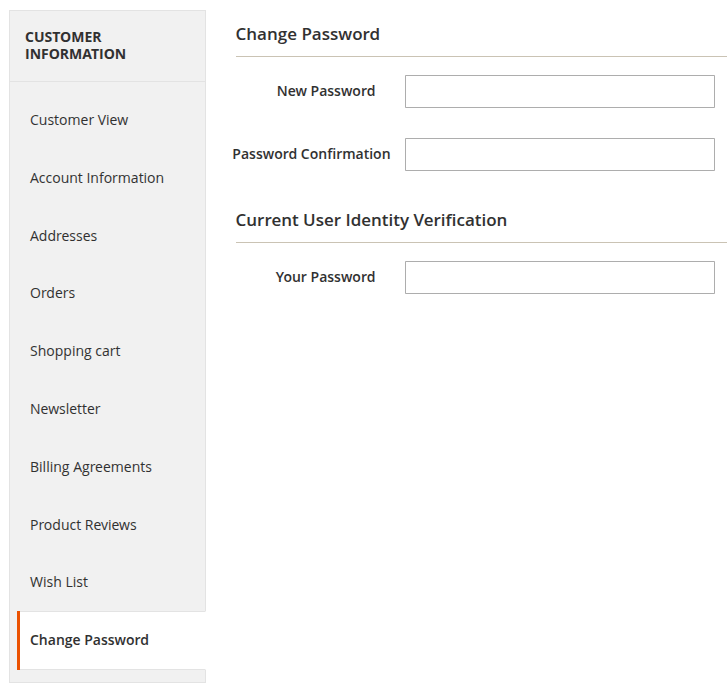
This module adds a new tab to the customer edit page in the Magento admin panel, allowing administrators to change the customer's password directly from there.
Installation details
- Run
composer require yellowteak/magento2-change-customer-password - Run
php bin/magento module:enable YellowTeak_ChangeCustomerPassword
Configuration
Before the new tab will be visible in the customer edit page, you need to enable the module in the configuration settings. To do this, follow these steps:
- Log in to the Magento admin panel.
- Navigate to
Stores > Configuration > YellowTeak > Change Customer Password. - Set
EnabledtoYes. - Click
Save Config. - Flush the cache by navigating to
System > Cache Managementand clickingFlush Magento Cache.
Usage
Once the module is enabled, you can change a customer's password by following these steps:
- Log in to the Magento admin panel.
- Navigate to
Customers > All Customers. - Click on the customer whose password you want to change.
- Click on the
Change Passwordtab. - Enter the new password in the
New PasswordandPassword Confirmationfield. - For security reasons, you will also need to enter your own admin password in the
Your Passwordfield to confirm the change. - Click
Saveto update the customer's password.