wnikk / laravel-access-ui
Interface of simple ACR (Access Control Rules) for Laravel.
Requires
- php: >=7.4
- illuminate/auth: ^8.0|*
- illuminate/console: ^8.0|*
- illuminate/container: ^8.0|*
- illuminate/contracts: ^8.0|*
- illuminate/database: ^8.0|*
- illuminate/support: ^8.0|*
- illuminate/validation: ^8.0|*
- wnikk/laravel-access-rules: ^2.0
Requires (Dev)
None
Suggests
None
Provides
None
Conflicts
None
Replaces
None
README

Laravel Access Control Rules UI
Administration screens for wnikk/laravel-access-rules: rules, owners and inheritance, plus a drop-in card for assigning access on a page you already have.
One JavaScript file and one stylesheet. No CSS framework, no CDN, no asset pipeline to agree with.
And no knowledge of your application. This package reads and writes the access-rules owner table and nothing else. It never loads, queries or names a model of yours — not even your user model. Integration is one expression: the owner id, which access-rules already gives you through the trait it asks you to add.
What you get
Three managers, one matrix, and one card.
| Screen | What it does |
|---|---|
| Rules | The guard-name tree: create, edit, deactivate, restore, delete |
| Owners | The records that hold permissions, with counts; opens the matrix for one of them |
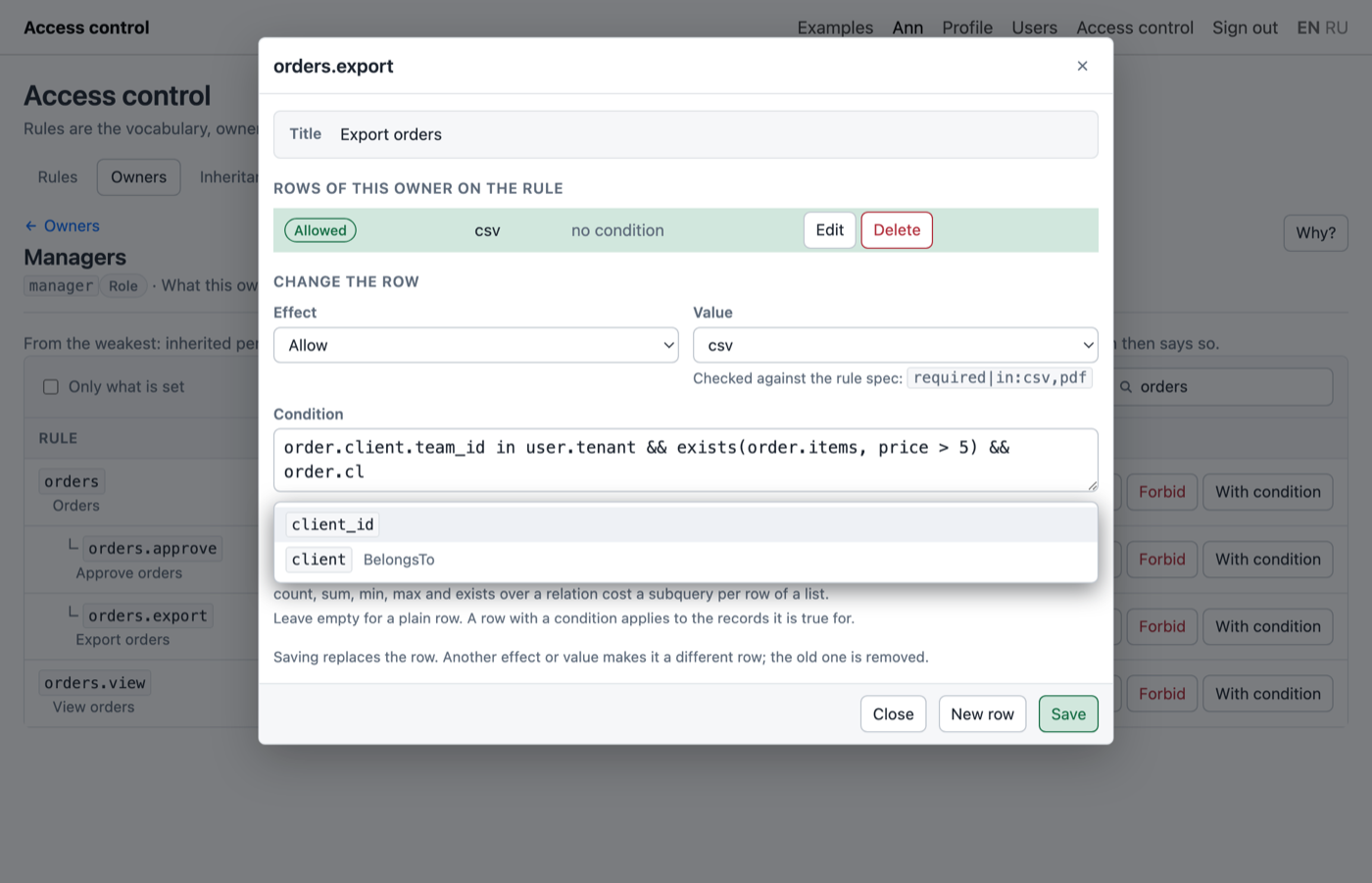
| Permissions | Allow or forbid each rule for one owner, option values included |
| Inheritance | Who inherits from whom: pick a source on the left, manage its inheritors |
| Widget | On your own page: where one account takes its rights from, and how many it holds |
Beyond the previous version:
- Any kind of owner, not just roles. Which types the panel lists, which it may create and which may be handed out as rights is configuration. Roles, groups, users, or nothing but users.
- Nothing is hidden. Any owner holding a permission appears on the owners and inheritance screens whatever its type, marked as unlisted. A grant made straight to one account is otherwise invisible on a list of roles, and a grant nobody can see is a grant nobody can revoke.
- Option-bearing rules are usable. Each granted option value is its own removable chip, validated against the rule's own spec before it is written.
- Inherited permissions look inherited. The state column says where a permission came from when the owner holds none of its own.
- Rule moves are cycle-checked, and deleting a rule is offered twice over: deactivate (reversible, keeps the permissions) and delete for good.
- Styles collide with nothing. Every class is prefixed
wacu-, every selector is scoped, light and dark are automatic, and the colours are custom properties you can override in one line.
Requirements
- PHP 7.4+
- Laravel 8 through 12
wnikk/laravel-access-rules^2, installed and migrated
Install
composer require wnikk/laravel-access-ui php artisan vendor:publish --tag=accessUi-config php artisan vendor:publish --tag=accessUi-assets
The second publish is not optional: it copies the bundle to public/vendor/accessui, and without it the
panel page loads and mounts nothing. Re-run it after every upgrade.
Nothing is registered yet, and that is deliberate
Out of the box no routes exist. These endpoints hand out permissions, so a route group reachable without a guard is an open door to everything else in the application — an unconfigured install therefore exposes nothing rather than exposing something unguarded.
Open config/accessUi.php and fill in both:
'routes' => [ 'prefix' => 'access-control', 'middleware' => ['web', 'auth', 'can:manage-access'], ],
['web', 'auth'] alone is not enough: it lets every signed-in account grant itself everything. Use
whatever your application already has to mark an administrator:
- a Gate —
Gate::define('manage-access', fn ($user) => $user->is_admin);thencan:manage-access - a rule from access-rules itself —
can:system.access.manage, self-hosting and fine as long as somebody holds it before you rely on it - your own middleware —
admin
Then visit /access-control.
Configuration
Layout and appearance
'layout' => [ 'view' => 'layouts.admin', // null = the built-in standalone page 'section' => 'content', 'title' => 'Access control', ], 'theme' => 'auto', // 'auto' | 'light' | 'dark'
Name a layout and the panel renders inside it from the first request. The layout only has to yield that
section — the stylesheet and script come with the panel. Leave it null and a plain standalone page is
served instead: enough to work with, not something to keep. $title reaches the layout as an ordinary
variable, so {{ $title ?? '' }} works there.
theme at auto follows prefers-color-scheme. The other two values put a wacu-light or wacu-dark
class on the mount point. Those classes also work on any ancestor, so an application that already
toggles its own theme by class on <html> can leave this at auto and be followed along.
Entities
An owner is anything that can hold permissions. access-rules keeps them all in one table, told apart by a numeric type derived from a label. This is where you say which labels matter and what may be done with each — and it is the whole of what this package knows about your domain.
'entities' => [ 'role' => [ 'type' => 'Role', // must also be in config/access.php → owner_types 'label' => 'Roles', 'single' => 'Role', 'create' => true, // the panel may add rows of this type by hand 'assignable' => true, // may be handed out as a source of rights ], 'user' => [ 'type' => null, // null = the class name from auth.providers.users.model 'label' => 'Users', 'single' => 'User', 'create' => false, 'assignable' => false, ], ],
type at null reads auth.providers.users.model — as a string. access-rules derives the owner type
from the label, and a label is all it is; the class is never loaded.
create is the only thing this list gates about the owner table itself. A role exists because somebody
made it here, so true. A user's owner row appears the first time the application touches them, so false
— typing one by hand would invite a typo that holds permissions and belongs to nobody.
assignable decides what may be handed out. These are what the widget's dropdown offers. Roles and
groups yes; users normally no, even though access-rules would happily let one user inherit from another.
Two things happen regardless of this list:
- any owner holding a permission or prohibition is listed, whatever its type. That is how a hand-tuned account stays visible.
- any owner in the table may be given rights. Who may receive rights is not a decision this list makes — if a row exists, something in the application put it there.
And note what is not gated: renaming and deleting are offered on every listed row. This screen works on the owner table, so deleting a user's owner row takes away their permissions and assignments. The user stays; only the access record goes.
A few shapes this covers:
// Roles and groups, both assignable 'entities' => [ 'role' => ['type' => 'Role', 'label' => 'Roles', 'create' => true, 'assignable' => true], 'group' => ['type' => 'Group', 'label' => 'Groups', 'create' => true, 'assignable' => true], 'user' => ['type' => null, 'label' => 'Users', 'create' => false, 'assignable' => false], ], // Permissions straight to accounts, no roles at all 'entities' => [ 'user' => ['type' => null, 'label' => 'Users', 'create' => false, 'assignable' => false], ], // Nothing configured: the panel then lists exactly the owners that hold something, // which is the whole truth about such a system. 'entities' => [],
Every type must also appear in config/access.php under owner_types. One that does not is dropped with
its reason shown at the top of the panel, rather than taking the screen down with it.
Screens
'screens' => [ 'rules' => ['enabled' => true, 'write' => false, 'ability' => null], // owners, permissions, inherit — same shape ],
A screen that is off is hidden and its endpoints answer 403. write => false makes it readable but not
editable; ability adds a Gate check on top.
Worth a thought for rules in particular. They are the vocabulary the rest of the application checks against, so renaming one silently stops it matching the code that asks for it. Two workable setups:
- read-only rules —
'write' => false. The tree stays browsable, the buttons disappear, writes answer 403. Rules then change only through migrations, which is where a vocabulary belongs. - editable rules — leave
writetrue and name anabilitygranted to the people who should have it.
Assets and pickers
'assets' => [ 'base' => '/vendor/accessui', 'inject' => true, // false if you bundle the two files yourself 'version' => null, // appended as ?v= to bust caches after an upgrade ], 'picker' => [ 'per_page' => 15, // rows per page when searching 'inline_limit' => 100, // shorter lists travel with the screen, costing no extra request ],
The assignment widget
One more card on a page that is already showing somebody: where this account takes its rights from, a dropdown of what may still be assigned, a remove button per row — and how many permissions it ends up with.
@accessUiWidget(['owner' => $user]) @accessUiWidget(['owner' => $user->getOwner()->id]) @accessUiWidget(['owner_id' => 17])
All three mean the same thing. The first is duck-typed on getOwner(), which comes from the trait
access-rules asks you to put on the model — so this package needs no knowledge of your classes, and the
owner row is created on demand, which is right: a user has none until something is granted to them, and
mounting this card is the moment somebody is about to.
Extra options: title for the heading, compact for a denser card. The directive emits the bundle tags
itself if the page has not already; @accessUiAssets does that from a layout, and the widget then stays
quiet about it.
It renders nothing at all when the routes are switched off or the inheritance screen is disabled, so a page carrying the line stays valid in an installation where the panel is not in use.
Outside Blade:
<div id="user-access"></div> <script> accessUi.widget('#user-access', { owner: 17, // the access-rules owner id routes: { /* URL templates — see below */ }, csrfToken: '…', }); </script>
Numbers, not contents
The card shows counts and no rule names: how much this account ends up with is worth knowing on a user page, but listing it is the permissions screen's job and would turn a card into a page.
The gap between the figures is the useful part. Nothing assigned and a non-zero total means somebody granted this account something directly — so an account with no roles still reports what it can do. "No roles" and "no rights" are not the same statement, and this is where the difference shows up.
Why it needs no endpoints of its own
There is no separate "assign a role" concept in access-rules: giving somebody a role is an inheritance link. So one link answers two questions, and which one you are asking depends on where you stand:
GET {prefix}/owners/{owner}/inherit?direction=parents whom this owner inherits from ← the widget
GET {prefix}/owners/{owner}/inherit?direction=children who inherits from this owner ← the panel
POST {prefix}/owners/{owner}/inherit { "direction": "parents", "target": 4 }
DELETE {prefix}/owners/{owner}/inherit/{link} remove one direct link
Both directions run through the same three endpoints, because they are the same three writes against the
same table. The GET returns direct links and everything those drag in behind them — an account
inheriting from a role which itself inherits from another holds both. Indirect rows are marked and carry
the direct link they arrived through; that link is the one to remove.
What may be added differs by direction, and the asymmetry is the design: parents offers only entities
marked assignable, children offers every owner in the table. Both arrive inline as
available: { list, truncated, total } while short enough for a dropdown; past picker.inline_limit the
list comes back empty with truncated: true and the client searches {prefix}/pick instead.
direction=parents additionally carries permissions: { effective, direct, forbidden } — the figures the
card shows.
Routes
{owner} is an owner id throughout.
| Method | Path | Name |
|---|---|---|
| GET | {prefix}/ |
accessUi.index |
| GET | {prefix}/rules |
accessUi.rules.index |
| POST | {prefix}/rules |
accessUi.rules.store |
| PUT | {prefix}/rules/{id} |
accessUi.rules.update |
| DELETE | {prefix}/rules/{id} |
accessUi.rules.destroy |
| POST | {prefix}/rules/{id}/restore |
accessUi.rules.restore |
| GET | {prefix}/owners |
accessUi.owners.index |
| POST | {prefix}/owners |
accessUi.owners.store |
| PUT | {prefix}/owners/{owner} |
accessUi.owners.update |
| DELETE | {prefix}/owners/{owner} |
accessUi.owners.destroy |
| GET | {prefix}/owners/{owner}/permissions |
accessUi.permissions.index |
| PUT | {prefix}/owners/{owner}/permissions/{rule} |
accessUi.permissions.update |
| GET | {prefix}/owners/{owner}/inherit |
accessUi.inherit.index |
| POST | {prefix}/owners/{owner}/inherit |
accessUi.inherit.store |
| DELETE | {prefix}/owners/{owner}/inherit/{link} |
accessUi.inherit.destroy |
| GET | {prefix}/pick |
accessUi.pick |
DELETE /rules/{id} deactivates; add ?force=1 to erase. GET /owners takes entity=<key> to narrow to
one type. GET /pick takes scope=assignable|all|listed, plus exclude, page, limit and search.
Every response but the first is one envelope:
{ "ok": true, "message": "Role created", "data": { }, "reload": null }
{ "ok": false, "message": "…", "errors": { "name": ["…"] } }
Laravel's own 422 body is the same shape, which is why $request->validate() is used as usual and needs no
wrapping.
How the three layers relate
Worth reading once, because the screens will not make sense otherwise.
A rule is a name the code checks: content.posts.publish. Rules form a tree through parent_id, but
the tree is presentation only — access-rules does not grant a parent because a child was granted. Container
rows exist to organise a long list.
An owner is anything that can hold permissions. See entities above.
A permission is a rule granted to an owner, either allowed or forbidden. Two facts decide most of what the screens show:
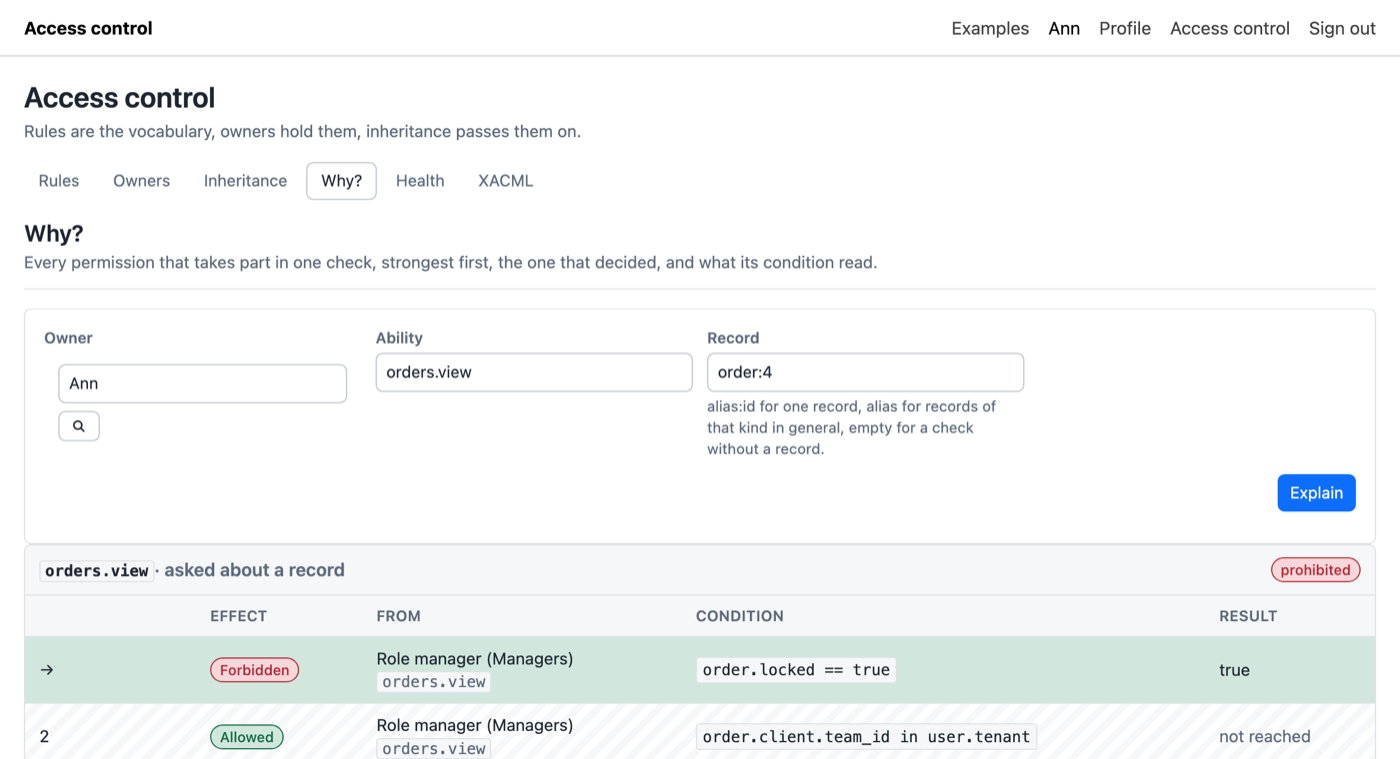
- a prohibition beats an allowance, including one that arrived through inheritance. That is what makes it possible to hand somebody a role and still hold them back from one part of it;
- a rule may declare an option, and then each option value is granted separately. A rule with the spec
in:read,writeis not one permission but as many as there are values granted.
Inheritance links one owner to another: the child takes everything the parent holds, and keeps taking it as the parent changes.
The option spec, and why it is validated
A rule's options column holds a Laravel validation-rule string such as nullable|in:read,write.
access-rules applies it verbatim to the option value every time a permission on that rule is granted, so
the spec is not documentation — it is executable. A malformed one would not fail where it was typed; it
would fail later, on somebody else's screen, as an unknown-rule crash. It is therefore compiled against a
sample value when the rule is saved and refused if compiling throws.
The permissions screen reads the same spec to decide what to ask for: in: becomes a dropdown,
integer/numeric a number field, anything else a text field. The server validates regardless, so the
client is free to be approximate.
Seeding rules
The screens manage rules but do not invent them. Create them in a migration or seeder:
use Wnikk\LaravelAccessRules\AccessRules; $acr = new AccessRules; $posts = $acr->newRule('content.posts', 'Posts', 'Everything about posts'); $acr->newRule('content.posts.view', 'View posts', null, $posts); $acr->newRule('content.posts.publish', 'Publish posts', null, $posts); // A rule that takes an option value: $acr->newRule('content.posts.access', 'Post access', null, $posts, 'in:read,write'); $acr->clearAllCachedPermissions();
Roles too, for the ones your code depends on:
$acr->newOwner('Role', 'editor', 'Editor'); $acr->addPermission('content.posts.view'); $acr->addPermission('content.posts.publish'); $acr->clearAllCachedPermissions();
Restyling
Override the custom properties. No build step, no fork:
.wacu-root { --wacu-accent: #6d28d9; --wacu-radius: 2px; --wacu-font: "Inter", sans-serif; }
The full set is at the top of resources/css/accessUi.css: background, border, text, accent, the
allow/forbid/warn triple, radius, gap and the two font stacks — each with a dark counterpart.
Translations
Every string goes through a small translator with English as the permanent fallback, so an untranslated locale shows English rather than key names, and a partial translation falls back key by key.
<script> accessUi.addMessages('de', { 'rules.title': 'Regeln', 'permissions.allow': 'Erlauben', }); </script>
Keys are flat and dotted; the full list is resources/js/lang/en.json. Server-side messages go through
__() as usual, so lang/*.json covers those.
Building from source
npm install npm run build
Output is dist/accessUi.js and dist/accessUi.css, built as an IIFE so a page can load them with a plain
<script src>. Vue and everything else is bundled in: the panel has to work on a machine with no route to
the internet, so nothing is left to a CDN at runtime.
npm run build empties dist/ first.
Caveats
Permission caching. access-rules caches resolved permissions. Every write here flushes the lot — correct, but not surgical, because a change to a role reaches everyone who inherits from it. On a large installation with a shared cache, expect a brief re-resolution cost after each change.
No audit trail. Nothing records who changed what. The write methods on the controllers are the place to add it; each already has the before and after values on hand.
No rate limiting. Add throttle: to the middleware stack if the section is reachable by more than a
couple of administrators.
Deleting an owner record is not reversible. Its permissions and links go with it, and everyone who inherited from it loses what it held.
Container rules are grantable. Nothing stops you allowing content.posts itself. access-rules will not
treat that as granting the children — it is just a rule nobody checks.
Quick check after installing
/access-control— the panel renders, with tabs for the screens you left on.- Rules — the tree renders and indents; the filter narrows it.
- Owners — create a role; it appears in the list.
- Open its Permissions — allow a rule, reload, the state persists as Allowed.
- Press Allow again on the same rule — it clears back to not set.
- On a rule with an option spec, Allow asks for a value and the granted value appears as a chip.
- Inheritance — pick the role on the left, add a user as an inheritor on the right.
- Put
@accessUiWidget(['owner' => $user])on that user's page — the role is listed, and the permission count is not zero. - Check the user really gained it:
$user->can('the.rule.you.allowed').
Step 9 is the one that matters. The rest is markup; that one is access-rules actually resolving what the screens wrote.
Upgrading from 1.x
2.0 replaces the frontend and the configuration wholesale. There is no migration path for
config/accessUi.php — publish it again and fill it in.
- The
btandukitthemes are gone, and with themdist/accessUi.bt.*anddist/accessUi.ukit.*. There is one bundle now, tied to no CSS framework. - Routes are no longer registered by
register => true; they needroutes.prefixandroutes.middleware, and the old['web']default is no longer enough. - The
*-dataroute names are gone. New names are in the table above. assign_permissions_to_userand the fourgrid_*switches becamescreens.*, which additionally separate reading from writing.- Roles are no longer assumed. Which types the panel manages is
entities. - Owners are addressed by owner id in every URL.
Contributing
Please report any issue you find in the issues page. Pull requests are more than welcome.
License
The MIT License (MIT). Please see License File for more information.