updatemi / imagex
A simple image service which support cropping with a focus point
Maintainers

Requires
- php: >=5.3.0
- ext-imagick: 3.*
This package is not auto-updated.
Last update: 2023-05-13 09:59:34 UTC
README
Requirements
- PHP >= 5.5
- PHP-Extension Imagick
Installation
- Copy all included files to server destination of your choice
- Create following folders and make sure that your web server has write permissions for these -- cache/source -- cache/thumbs
- Setup following command as cron job to clean up local cache directories periodically: -- find ./cache -mtime +30 -type f -delete
Optional Apache Config for clean URLs
If you have mod_rewrite installed on your Apache server you can use following rewrite rule to enable clean URLs for the imagex service:
RewriteRule (crop|resize)\/([0-9]*)\/([0-9]*)(\/([-+]?[0-1]+\.?[0-9]*)\/([-+]?[0-1]+\.?[0-9]*))?\/([A-Za-z0-9+/=]+)(:(nocache))?$ %{ENV:BASE}/imagex.php?mode=$1&width=$2&height=$3&x=$5&y=$6&url=$7&cache=$9 [NE,L]
After an apache restart you can also use imagex with URLs like the following:
http://my.domain.com/crop/400/280/0.18/0.25/http://upload.wikimedia.org/wikipedia/commons/e/e9/Official_portrait_of_Barack_Obama.jpg
Usage
http://my.domain.com/imagex.php?url=http://upload.wikimedia.org/wikipedia/commons/e/e9/Official_portrait_of_Barack_Obama.jpg&mode=crop&width=400&height=280&x=0.18&y=0.25
Parameters
The following 6 parameters are currently available:
url (required)
The url of the image you want to resize/crop/proxy. You can also base64-encode the url parameter if you like.
mode
Currently two modes are available: "resize" and "crop". Default is "resize".
width
Width of the resulting image. If no width is specified width will be scaled proportionally to the request height. If neither width nor height are specified the image will simply be proxied.
height
Height of the resulting image. If no height is specified width will be scaled proportionally to the request width. If neither width nor height are specified the image will simply be proxied.
x
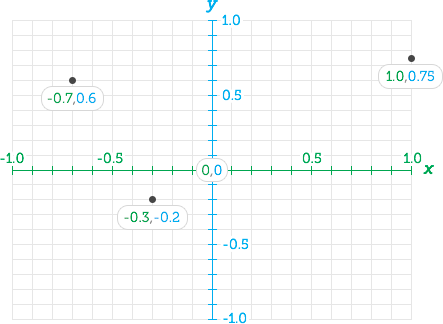
X-coordinate of the focus point used for cropping the image. Value must be between -1 and 1. Default is 0 - the middle of the axis. See below for more information about the focus point functionality.
y
Y-coordinate of the focus point used for cropping the image. Value must be between -1 and 1. Default is 0 - the middle of the axis. See below for more information about the focus point functionality.
More details about the focus point
This is basically implemented the same way as in the [https://github.com/jonom/jquery-focuspoint](jquery-focuspoint plugin):
An image's focus point is made up of x (horizontal) and y (vertical) coordinates. The value of a coordinate can be a number with decimal points anywhere between -1 and +1, where 0 is the centre. X:-1 indicates the left edge of the image, x:1 the right edge. For the y axis, y:1 is the top edge and y:-1 is the bottom.
Confused? Don't worry, there's a handy script included to help you find the focus coordinates of an image with a single click. Check out the helper tool (vastly improved courtesy of @auginator).