
theaminulai / feedback-sdk

Client SDK — adds a deactivation feedback modal to any WordPress plugin.
Requires
- php: >=7.4
Requires (Dev)
None
Suggests
None
Provides
None
Conflicts
None
Replaces
None
README
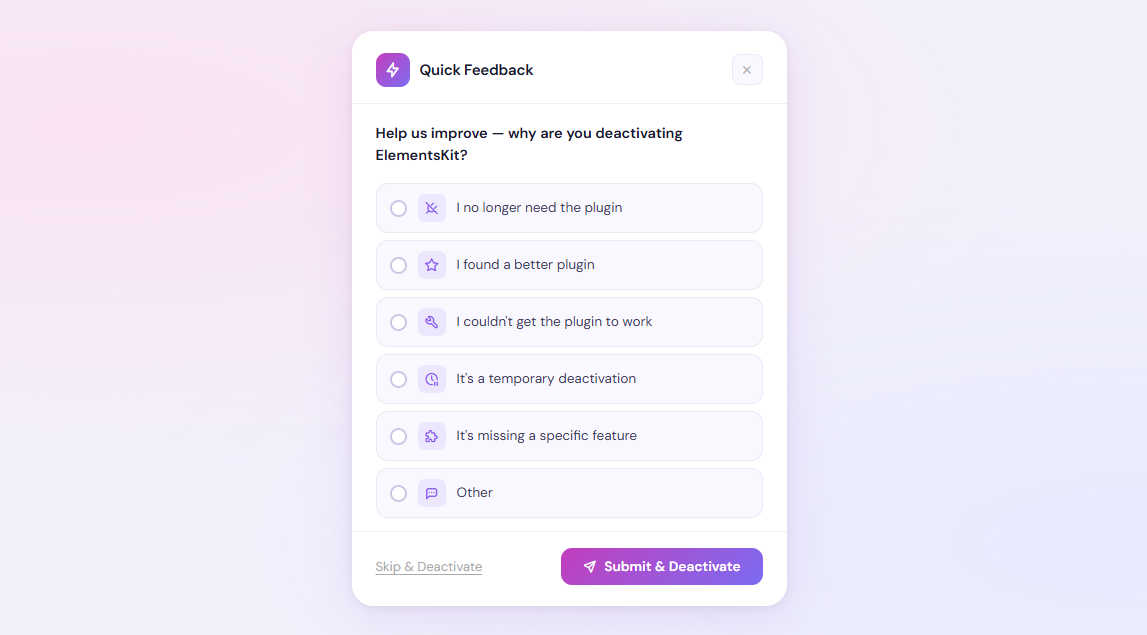
feedback-sdk — WordPress Plugin Deactivation Modal SDK
The client-side Composer package. Drop into any WordPress plugin to show a beautiful deactivation feedback modal and send data to the central Feedback server.
Installation · Quick Start · Configuration · Theming · Reasons · Hooks · Troubleshooting
📖 Overview
feedback-sdk intercepts the WordPress "Deactivate" link for your plugin, shows a branded feedback modal, collects the user's reason (with an optional message), and fires the data to the central Feedback server plugin before completing the deactivation.
If the network request fails, the deactivation still completes — users are never blocked.
User clicks "Deactivate"
        │
        ▼
SDK intercepts the link click (jQuery)
        │
        ▼
Branded modal opens with animated slide-up
        │
        ├─ User picks a reason + types a message
        │
        ├─ Clicks "Submit & Deactivate"
        │         └─► wp_ajax → sanitize → wp_remote_post (non-blocking)
        │                                        └─► /wp-json/feedback/v1/collect
        │                                        └─► window.location = deactivate_url
        │
        └─ Clicks "Skip & Deactivate"
                  └─► skip AJAX → window.location = deactivate_url
✅ Requirements
| Requirement | Minimum |
|---|---|
| PHP | 7.4 |
| WordPress | 6.0 |
📦 Installation
Option A — Composer (recommended)
composer require theaminulai/feedback-sdk
Composer's autoloader handles class loading automatically via PSR-4.
Option B — Manual
- Copy the
feedback-sdk/folder into your plugin directory - Require the entry file before calling
SDK::init():
require_once plugin_dir_path( __FILE__ ) . 'feedback-sdk/feedback-sdk.php';
📁 File Structure
feedback-sdk/
│
├── feedback-sdk.php                 # Entry point — PSR-4 autoloader bootstrap
├── composer.json
│
├── includes/
│   ├── Core/
│   │   ├── SDK.php                  # Singleton registry, one instance per plugin_slug
│   │   ├── Hooks.php                # Registers admin_enqueue_scripts + wp_ajax actions
│   │   └── Assets.php               # wp_enqueue_*, theme CSS variables, reasons builder
│   │
│   ├── Admin/
│   │   └── Deactivation.php         # Renders overlay <div>, handles AJAX submit/skip
│   │
│   └── API/
│       └── Client.php               # wp_remote_post() sender + transient retry queue
│
└── assets/
    ├── css/
    │   └── modal.css                # All modal styles via CSS custom properties
    └── js/
        └── modal.js                 # jQuery plugin: $.fn.feedbackSdkModal
⚡ Quick Start
Add this to your plugin's main file (or a bootstrap class):
add_action( 'plugins_loaded', function() {
    \Feedback_SDK\Core\SDK::init([
        'plugin_name'    => 'ElementsKit',
        'plugin_slug'    => 'elementskit-lite',
        'plugin_version' => ELEMENTSKIT_VERSION,
        'api_endpoint'   => 'https://api.theaminul.com/wp-json/feedback/v1/collect',
        'api_key'        => 'fk_your_api_key_here',
    ]);
}, 20 );
That's all. The SDK:
- Enqueues assets only on
plugins.php(zero impact on frontend or other admin pages) - Renders a hidden overlay
<div>in the admin footer - Intercepts the deactivate link click automatically
🔧 Configuration Reference
Pass all configuration as a single array to SDK::init().
Required
| Key | Type | Description |
|---|---|---|
plugin_name |
string |
Human-readable name shown in the modal heading |
plugin_slug |
string |
WordPress plugin folder slug — must match exactly (e.g. elementskit-lite) |
plugin_version |
string |
Current version string sent to the server |
api_endpoint |
string |
Full URL of the server's /collect REST endpoint |
api_key |
string |
API key from Plugin Feedback → Settings → API Key |
Optional — Behaviour
| Key | Type | Default | Description |
|---|---|---|---|
is_pro |
bool |
false |
Marks feedback as coming from the Pro version |
gdpr |
bool |
false |
Show a GDPR consent checkbox; unchecked = admin_email not sent |
debug |
bool |
false |
Log SDK events to PHP error_log() and browser console.log |
modal_title |
string |
'Why are you deactivating %s?' |
Modal question — %s is replaced with plugin_name |
Optional — Branding
| Key | Type | Default | Description |
|---|---|---|---|
brand_name |
string |
'Quick Feedback' |
Text shown in the modal header |
brand_icon |
string |
'ti-bolt' |
Any Tabler Icon class name |
brand_icon_url |
string |
'' |
Image URL for the brand icon — overrides brand_icon when set |
Optional — Typography
| Key | Type | Default | Description |
|---|---|---|---|
font_family |
string |
'DM Sans' |
CSS font-family name |
font_url |
string |
DM Sans Google CDN | Full <link> href for loading the font. Set to '' to skip |
font_size_base |
int |
13 |
Base font size in px for all modal text |
Optional — Colors & Layout
| Key | Type | Default | Description |
|---|---|---|---|
primary_color |
string |
'#9b59e8' |
Accent color for radio dots, option borders, textarea focus ring |
primary_gradient |
string |
'linear-gradient(135deg,#c94cbf,#7b6ef6)' |
CSS background for Submit button and brand icon circle |
bg_overlay |
string |
'rgba(15,15,30,.55)' |
Full-screen backdrop color |
modal_bg |
string |
'#ffffff' |
Modal background color |
modal_radius |
int |
20 |
Modal border-radius in px |
option_bg |
string |
'#faf8ff' |
Background of unselected option rows |
option_active_bg |
string |
'#f9f4ff' |
Background of the selected option row |
option_active_border |
string |
same as primary_color |
Border color of the selected option row |
text_primary |
string |
'#1a1a2e' |
Primary text color |
text_muted |
string |
'#9ca3af' |
Placeholder / muted text color |
border_color |
string |
'#ede8f5' |
Default border color for option rows |
Optional — Strings (i18n)
Override any modal label without modifying plugin files:
| Key | Default |
|---|---|
i18n['submit'] |
'Submit & Deactivate' |
i18n['skip'] |
'Skip & Deactivate' |
i18n['cancel'] |
'Cancel' |
i18n['gdpr_label'] |
'I agree to share this feedback anonymously.' |
🎨 Theming
Method 1 — PHP config (recommended)
Pass theme keys directly to SDK::init(). The SDK injects them as CSS custom properties scoped to your plugin's overlay:
\Feedback_SDK\Core\SDK::init([
    // ... required keys ...

    // Brand
    'brand_name'      => 'ElementsKit Feedback',
    'brand_icon'      => 'ti-layers',
    'brand_icon_url'  => 'https://cdn.example.com/elementskit-icon.png',

    // Colors
    'primary_color'   => '#f59e0b',
    'primary_gradient'=> 'linear-gradient(135deg, #f59e0b, #ef4444)',
    'modal_bg'        => '#fffbeb',
    'option_bg'       => '#fef9ee',
    'option_active_bg'=> '#fef3c7',
    'bg_overlay'      => 'rgba(0, 0, 0, 0.5)',

    // Layout
    'modal_radius'    => 16,

    // Typography
    'font_family'     => 'Inter',
    'font_url'        => 'https://fonts.googleapis.com/css2?family=Inter:wght@400;500;600&display=swap',
    'font_size_base'  => 13,

    // Text
    'text_primary'    => '#1c1917',
    'text_muted'      => '#78716c',
    'border_color'    => '#e5e7eb',
]);
Method 2 — CSS custom properties
Every color is a CSS variable scoped to your overlay ID (#feedback-sdk-modal-{slug}). Override them in your plugin's admin CSS:
#feedback-sdk-modal-elementskit-lite {
    --fbk-primary:        #f59e0b;
    --fbk-gradient:       linear-gradient(135deg, #f59e0b, #ef4444);
    --fbk-modal-bg:       #fffbeb;
    --fbk-modal-radius:   16px;
    --fbk-font:           'Inter', sans-serif;
    --fbk-font-size:      13px;
    --fbk-text:           #1c1917;
    --fbk-muted:          #78716c;
    --fbk-border:         #e5e7eb;
    --fbk-overlay:        rgba(0, 0, 0, 0.5);
}
All available CSS custom properties
| Property | Default |
|---|---|
--fbk-primary |
#9b59e8 |
--fbk-gradient |
linear-gradient(135deg,#c94cbf,#7b6ef6) |
--fbk-overlay |
rgba(15,15,30,.55) |
--fbk-modal-bg |
#ffffff |
--fbk-modal-radius |
20px |
--fbk-opt-bg |
#faf8ff |
--fbk-opt-active-bg |
#f9f4ff |
--fbk-opt-active-bdr |
same as --fbk-primary |
--fbk-text |
#1a1a2e |
--fbk-muted |
#9ca3af |
--fbk-border |
#ede8f5 |
--fbk-font |
'DM Sans', -apple-system, sans-serif |
--fbk-font-size |
13.5px |
📋 Reason Customization
Use default reasons (no config needed)
The 8 built-in reasons are used automatically:
| Key | Label | Placeholder |
|---|---|---|
no-longer-needed |
I no longer need the plugin | What did you use it for? |
found-better |
I found a better plugin | Which plugin? |
not-working |
I couldn't get the plugin to work | What issue did you face? |
temp-disabled |
It's temporarily disabled | When do you plan to reactivate? |
missing-feature |
Missing feature | Which feature? |
too-expensive |
Too expensive | What price would work for you? |
bug-issue |
Bug or issue | Please describe the issue |
other |
Other | Please share your thoughts |
Hide specific reasons
\Feedback_SDK\Core\SDK::init([
    // ...
    'hide_reasons' => ['too-expensive', 'found-better'],
]);
Add extra reasons
\Feedback_SDK\Core\SDK::init([
    // ...
    'extra_reasons' => [
        [
            'key'   => 'theme-conflict',
            'icon'  => 'ti-layout',                    // any Tabler icon
            'label' => 'Theme conflict',
            'ph'    => 'Which theme are you using?',   // textarea placeholder
        ],
    ],
]);
Replace all reasons completely
\Feedback_SDK\Core\SDK::init([
    // ...
    'reasons' => [
        ['key' => 'price',  'icon' => 'ti-coin',  'label' => 'Too expensive', 'ph' => 'What price works?'],
        ['key' => 'other',  'icon' => 'ti-dots',  'label' => 'Other',         'ph' => 'Tell us more'],
    ],
]);
📡 What Data Is Sent to the Server
When a user submits feedback, this JSON payload is posted to api_endpoint:
{
  "plugin_name":    "ElementsKit",
  "plugin_slug":    "elementskit-lite",
  "plugin_version": "3.5.2",
  "reason":         "missing-feature",
  "message":        "Need advanced WooCommerce filters",
  "competitor":     "",                      // only sent if user fills it in
  "site_url":       "https://example.com",
  "admin_email":    "admin@example.com",     // empty string when GDPR unchecked
  "wp_version":     "6.8",
  "php_version":    "8.2",
  "locale":         "en_US",
  "is_pro":         false,
  "timestamp":      "2026-05-18 10:22:00"
}
The request uses 'blocking' => false so the user is never waiting for a server response — the deactivation URL is followed immediately.
🔁 Retry Queue
If the API call fails (server unreachable, timeout, etc.), the payload is stored in a WordPress transient (feedback_sdk_retry_queue) for up to 24 hours.
Flush manually (e.g. on admin_init or a WP-Cron hook):
$client = new \Feedback_SDK\API\Client(
    'https://api.theaminul.com/wp-json/feedback/v1/collect',
    'fk_your_api_key'
);
$client->flush_retry_queue();
Or hook it to a scheduled event:
// Register the event on activation
register_activation_hook( __FILE__, function() {
    wp_schedule_event( time(), 'hourly', 'my_plugin_flush_feedback_queue' );
});

add_action( 'my_plugin_flush_feedback_queue', function() {
    $client = new \Feedback_SDK\API\Client( FEEDBACK_ENDPOINT, FEEDBACK_KEY );
    $client->flush_retry_queue();
});
🔗 Hooks & Filters
Actions
// Fired after the API send attempt (success or fail).
// @param string $slug     Plugin slug.
// @param bool   $success  Whether wp_remote_post returned without WP_Error.
// @param array  $payload  The data that was sent.
add_action( 'feedback_sdk/after_send', function( $slug, $success, $payload ) {
    if ( ! $success ) {
        error_log( "[$slug] Feedback send failed." );
    }
}, 10, 3 );
Filters
// Modify the payload array before it is posted to the server.
// @param array  $payload  Sanitized data array.
// @param string $slug     Plugin slug.
// @return array
add_filter( 'feedback_sdk/payload', function( array $payload, string $slug ): array {
    $payload['my_custom_field'] = 'value';
    return $payload;
}, 10, 2 );

// Modify the reasons array before it is localized into the modal.
// @param array  $reasons  Array of {key, icon, label, ph} objects.
// @param string $slug     Plugin slug.
// @return array
add_filter( 'feedback_sdk/reasons', function( array $reasons, string $slug ): array {
    // Add, remove, or reorder reasons here.
    return $reasons;
}, 10, 2 );
🔒 Security
| Layer | Implementation |
|---|---|
| Nonce | Every AJAX action verified with check_ajax_referer("feedback_sdk_{$slug}") |
| Capability | activate_plugins checked on every AJAX handler |
| Sanitization | All POST fields: sanitize_text_field, sanitize_textarea_field |
| API Key | Sent in HTTP header only, never exposed in JS or HTML source |
| HMAC Signing | hash_hmac('sha256', $body, $api_key) on every request |
| XSS in JS | All user values escaped with $('<span>').text(val).html() before DOM insertion |
| Non-blocking | 'blocking' => false — server response never delays the user's browser |
🧩 jQuery Plugin API
The modal is built as a jQuery plugin registered as $.fn.feedbackSdkModal.
Auto-initialisation happens on DOM ready for every #feedback-sdk-modal-{slug} element found on the page. Manual usage:
// Access the internal instance
var modal = $( '#feedback-sdk-modal-elementskit-lite' ).data( 'feedbackSdkModal' );

// Open programmatically
modal._open();

// Close programmatically
modal._close();
🔌 AJAX Endpoints
Two WordPress AJAX actions are registered per plugin slug:
| Action | Handler | Description |
|---|---|---|
feedback_sdk_submit_{slug} |
Deactivation::handle_ajax() |
Sends feedback + returns deactivation URL |
feedback_sdk_skip_{slug} |
Deactivation::handle_skip() |
Returns deactivation URL immediately (no send) |
Both require nonce feedback_sdk_{slug} and activate_plugins capability.
❌ What Cannot Be Changed
These items are hard-coded and require code edits to modify:
| Item | Value | Where |
|---|---|---|
| Number of modal options shown | All provided reasons | assets/js/modal.js — cfg.reasons loop |
| Textarea rows | 2 |
modal.js → _buildHtml() |
| Button order | Skip · Cancel · Submit | modal.js → _buildHtml() |
| AJAX action names | feedback_sdk_submit_{slug} / feedback_sdk_skip_{slug} |
Core/Hooks.php |
| Retry TTL | 24 hours | API/Client.php → DAY_IN_SECONDS |
| Asset load condition | plugins.php screen only |
Core/Assets.php → enqueue() |
| CSS animation style | slide-up + fade | assets/css/modal.css → @keyframes fbkSlideUp |
🐛 Troubleshooting
| Problem | Solution |
|---|---|
| Modal doesn't appear | Confirm plugin_slug exactly matches the WordPress plugin folder name (case-sensitive) |
| Deactivation doesn't happen after submit | Check browser Console for JS errors; confirm modal.js is enqueued on plugins.php |
403 from server |
Verify api_key matches the key in server's Settings → API Key |
| AJAX nonce failure | Ensure SDK::init() is called on plugins_loaded at priority ≥ 1 (before output) |
| Font not loading | If behind a strict CSP, set 'font_url' => '' and load your font separately |
| GDPR checkbox missing | Add 'gdpr' => true to the config array |
| Custom icon not showing | Check that brand_icon_url is a publicly accessible URL; brand_icon is a fallback |
| Retry queue growing | Call Client::flush_retry_queue() on a cron schedule; check that the server endpoint is reachable |
Enable 'debug' => true to log all SDK events to PHP error_log() and browser console.log.
🤝 Contributing
- Fork github.com/theaminulai/feedback-sdk
- Create a branch:
git checkout -b feature/my-feature - All JS functions must have full JSDoc comments
- Follow WordPress Coding Standards
- Open a pull request
📋 Changelog
1.0.0 — 2026-05-18
- Initial release
- jQuery plugin pattern (
$.fn.feedbackSdkModal) with full JSDoc - Full theming via PHP config (color, gradient, font, radius, icon, image URL)
- Per-option textareas — each reason shows its own textarea on selection
- GDPR consent checkbox support
- Non-blocking
wp_remote_postwith 24-hour transient retry queue - Reason customization: hide, extend, or fully replace the default list
- All colors via CSS custom properties scoped per plugin slug
brand_icon_urlfor custom image logos in modal header