
tearoom1 / kirby-meta-kit

AI-powered SEO plugin for Kirby with bulk edit, automatic meta descriptions, live previews, sitemap generation, and Schema.org support.
Package info
github.com/tearoom1/kirby-meta-kit
Type:kirby-plugin
pkg:composer/tearoom1/kirby-meta-kit
Requires
- php: ^8.2
- getkirby/composer-installer: ^1.2
Requires (Dev)
- getkirby/cms: ^5.0
- phpunit/phpunit: ^10.5
Suggests
None
Provides
None
Conflicts
- getkirby/cms: <5.0
Replaces
None
This package is auto-updated.
Last update: 2026-11-06 07:16:44 UTC
README
An SEO workflow plugin for Kirby CMS: one Panel area for all metadata, validation that shows what to fix, AI generation that follows your rules, previews, sitemap, robots.txt and structured data.
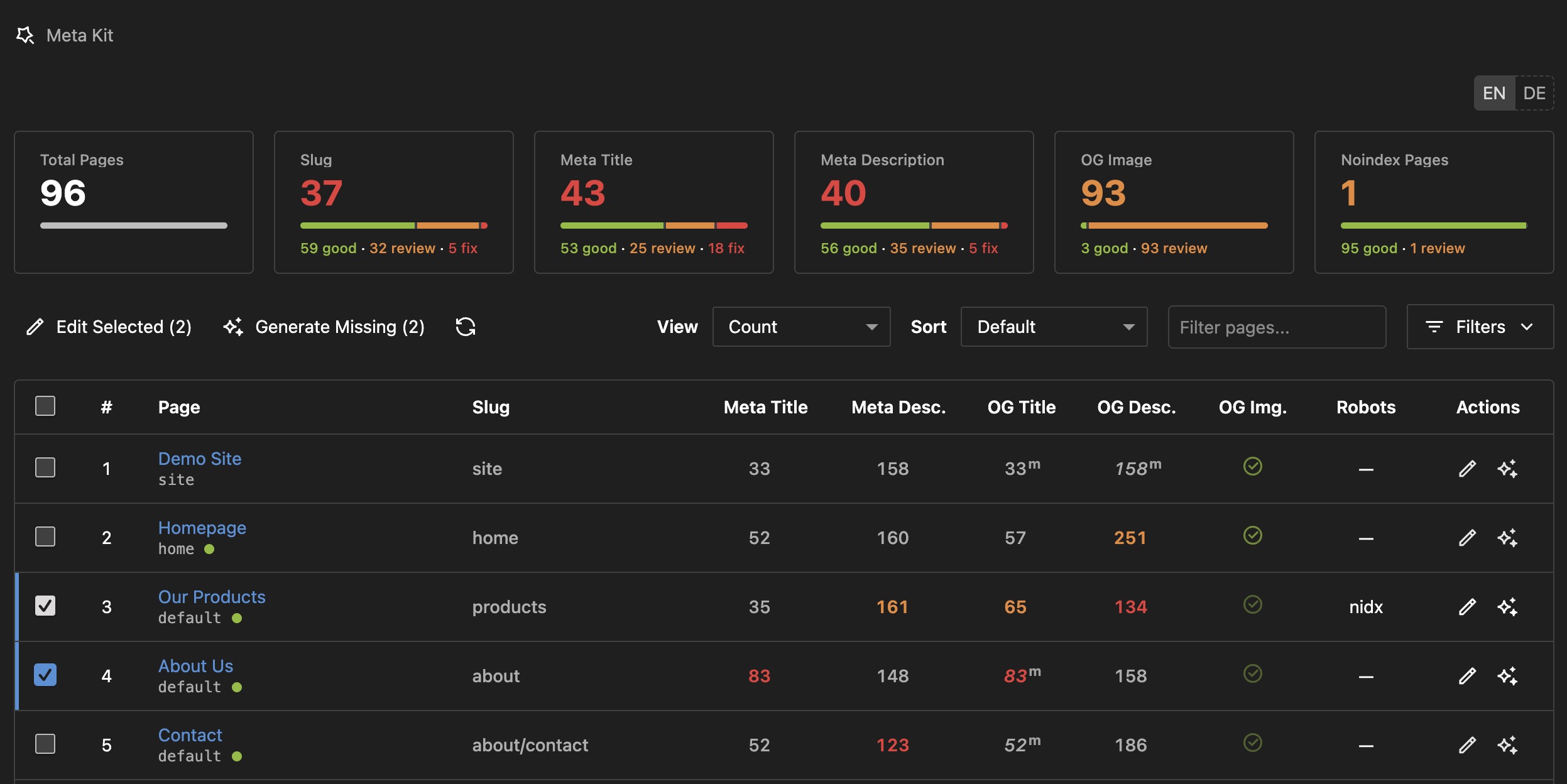
What you get
- One place for metadata. A Meta Kit area in the Panel lists every page with its meta title, description, Open Graph fields and image. Edit one page or many in dialogs, filter by what needs attention.
- Validation that explains itself. Length ranges for titles, descriptions and slugs, global or per template. Only problems get a mark: orange to review, red to fix. Site name appending is part of the title length.
- AI that follows your rules. Generate titles and descriptions that match your ranges, in the current language. OpenRouter (free tier available), Mistral (EU) or any OpenAI-compatible API. Generated texts are reviewed before anything is saved. Optional: an experimental content review per page.
- Previews. Google, Facebook and Twitter cards in the page editor.
- Everything in the head. One snippet outputs meta tags, canonical, robots, Open Graph, Twitter Cards, hreflang and Schema.org JSON-LD.
- Sitemap and robots.txt. A styled multilingual sitemap with priorities, a dynamic robots.txt with bad bot and AI crawler blocking, redirects after slug changes, llms.txt.
- Multilingual and Kirby 5. Works with language fallbacks and inherited values, Panel in English and German, dark mode.
Installation
Via Composer (Recommended)
composer require tearoom1/kirby-meta-kit
Manual Installation
- Download and extract to
site/plugins/meta-kit - Get a free API key from OpenRouter.ai (optional, for AI features)
Quick Start
1. Add SEO Snippet
Add this single line to your template's <head> section:
<head>
    <?php snippet('meta-kit/seo') ?>
    <!-- Your other head content -->
</head>
This snippet automatically includes:
- All meta tags (title, description, robots, canonical, keywords)
- OpenGraph and Twitter Card tags
- Schema.org JSON-LD structured data
- Hreflang tags for multilingual sites
2. Extend Blueprints
Site Settings (site/blueprints/site.yml):
tabs:
  seo:
    extends: meta-kit/site
Page SEO (site/blueprints/pages/default.yml):
tabs:
  seo:
    extends: meta-kit/page
3. Configure Basic Settings
Add to site/config/config.php:
return [
    'tearoom1.meta-kit' => [
        // Optional: Add AI features
        'api.key' => 'sk-or-v1-YOUR-KEY',
        'api.model' => 'google/gemma-4-31b-it:free',
    ]
];
That's it! You now have:
- ✅ SEO metadata fields in your pages
- ✅ Site-wide SEO settings
- ✅ Automatic sitemap at
/sitemap.xml - ✅ Dynamic robots.txt at
/robots.txt - ✅ (Optional) AI-powered content generation
Configuration
Two layers: technical settings in site/config/config.php, content defaults in the Panel under Site → SEO & Social Media (default title and description, title separator, site name appending, AI provider and model, social profiles, sitemap and robots.txt). Config values win over Panel values. On multilingual sites the settings are maintained once in the default language, while titles and descriptions stay translated: Multilingual sites
The options you will most likely touch:
'tearoom1.meta-kit' => [
    'api.provider' => 'openrouter',   // 'openrouter', 'mistral' or 'custom'
    'api.key' => 'sk-or-v1-YOUR-KEY',
    'api.model' => 'google/gemma-4-31b-it:free',
    'ai.enabled' => true,             // false hides every AI feature
    'review.enabled' => false,        // opt-in: experimental AI content review
    'allowedRoles' => [],             // roles besides admin that may use Meta Kit
    'excludeTemplates' => [],         // templates hidden from the Panel table
    'validation' => [],               // length ranges, see Validation
    'sitemap.enabled' => true,
    'languages.available' => null,    // callback: does a page exist in a language?
    'robots' => ['enabled' => true, 'blockBadBots' => true, 'blockAiCrawlers' => false],
    'redirects.enabled' => true,
    'llms.enabled' => false,
]
Only admins see Meta Kit unless you list other roles in allowedRoles. Full details, every option and the Panel tabs: docs/configuration.md
Validation
Every title and description gets a length range: green inside the optimal range, orange inside the warning range, red outside. Slugs are checked for depth, word count and length. Title lengths include the appended site name. The ranges guide editing only: a text outside them can still be saved and is rendered in full, never cut.
| Field | Optimal | Still acceptable |
|---|---|---|
| Meta title | 20 to 60 | 15 to 75 |
| Meta description | 140 to 160 | 126 to 176 |
| OG title | 20 to 60 | 15 to 75 |
| OG description | 80 to 200 | 50 to 300 |
Override globally or per template; partial rules keep the rest of the defaults:
'validation' => [
    'ranges' => ['title' => ['optimal' => ['min' => 30, 'max' => 60]]],
    'templates' => [
        'article' => ['title' => ['optimal' => ['min' => 40, 'max' => 70]]],
    ],
]
Slug rules and the reasoning behind the ranges: docs/validation.md
AI Generation and Review
Set api.key and api.model and every title and description field gets a generate button. The AI reads the page text, writes in the current language and formality, and keeps to the validation ranges of that template. In the Meta Kit area, Generate Missing fills empty fields for the selected or filtered pages, page by page with progress and cancel, and shows the texts for review before anything is saved.
- Providers: OpenRouter (default, free tier), Mistral (EU data processing), or any OpenAI-compatible endpoint via
api.provider => 'custom'andapi.endpoint - Tuning:
api.temperature,api.reasoningfor reasoning models,ai.toneformal or informal, custom prompts per field - Content review (experimental,
review.enabled => true): an editorial verdict per page with keyphrases, strengths, problems and next steps, in the Meta Kit table and as anmk-reviewfield in page blueprints - Off switch: no key, no model, or
ai.enabled => false
Providers, model list, prompts and the review field: docs/ai.md
Panel Interface
The Meta Kit area in the main menu lists every page with slug, meta title, meta description, OG title, OG description and OG image.
- Tiles per area show what is open, split into fix and review. Click one to filter the table.
- Table: only problems get a dot, orange to review and red to fix. Inherited values are dimmed; the Display menu switches between hiding them, dimming them, or writing the source beneath (Title, Meta, Site, main language). Hover a value for the text, a length meter and the source.
- Edit and Generate Missing act on the selected pages, or on all filtered pages when nothing is selected. The button says which.
- Dialogs for one page or many, with a length meter under every field and an AI button per field.
- Display remembers view, inheritance and page size per browser; filters, search and sort stay for the tab.
The SEO tab in the page editor (extends: meta-kit/page) adds slug info, meta and OG fields with live counters, robots, canonical URL and Google, Facebook and Twitter previews. More: docs/panel.md
Sitemap, robots.txt, Redirects, llms.txt and Schema.org
/sitemap.xml(/sitemapredirects there with 301): all published pages, hreflang for every language, priorities and change frequencies per template, page images, styled for humans, cached and cleared on every content change. Exclude pages in the Panel or withsitemap.exclude.- Pages in some languages only: a page counts as existing in every language. If language URLs without a translation redirect on your site, set
languages.available, a callbackfn ($page, string $languageCode): bool. Languages it returns false for are left out of the sitemap, hreflang andog:locale:alternate. x-default stays on the default language. /robots.txt: generated with sitemap reference, bad bot blocking, optional AI crawler blocking, and custom rules from the Panel under Site → Robots.txt.- Redirects: when a slug changes or a page moves, the old path and all subpaths redirect with 301 to the page's new URL. Listed and editable under Site → SEO & Sitemap → Redirects.
/llms.txt: optional Markdown overview for AI assistants, off by default.- Schema.org: Organization, WebSite, WebPage with breadcrumbs and Article markup as JSON-LD, all from the one snippet. Breadcrumbs skip parents that can't be opened (no template file, or a template listed in
schema.breadcrumb.excludeTemplates).
Every toggle and the article fields: docs/sitemap-robots.md
For Developers
$page->metaTitle()->value();            // the stored fields
$page->ogImage()->toFile();
$page->generateSeoTitle();               // AI generation from code
$page->generateSeoDescription($text, 'de');
$page->text()->toSeoDescription();       // any field to an SEO text
POST /api/meta-kit/generate # {"text": "...", "language": "de", "pageId": "...", "fieldType": "description"}
Page methods, endpoints, custom templates and troubleshooting: docs/developers.md. Habits that keep metadata in good shape: docs/best-practices.md
Requirements
- PHP: 8.1 or higher
- Kirby: 5.0+
- Composer: For dependency management
- AI Provider API Key: Optional, only needed for AI features (OpenRouter has a free tier)
License
This plugin is licensed under the MIT License.
Credits
Developed by: Mathis Koblin
Special Thanks:
- The Kirby CMS team for an excellent platform
- OpenRouter for affordable AI API access
- The Kirby community for feedback and support
Support & Feedback
- Issues and Suggestions: GitHub Issues
- Documentation: the docs folder and inline code comments
- Support Policy: Support is limited to public GitHub Issues. Email support, consulting, and guaranteed response times are not included.
Meta Kit is free and MIT licensed, and it stays that way. If it saves you time, you can help keep it maintained. Paying is voluntary and any amount is welcome.
Agencies and companies that need an invoice can get a Supporter License. You choose the price and whether it covers one project or your whole company. Lemon Squeezy handles the sale as merchant of record, so you get a proper invoice with VAT. The license adds no features and no priority support.
Screenshots
Screenshots use sample content at 1408 × 902 pixels. Panel views are cropped to the content area. The main image uses the light theme.
| View | Light | Dark |
|---|---|---|
| Overview | Light | Dark |
| Page SEO | Light | Dark |
| Site settings | Light | Dark |
| Bulk editing | Light | Dark |


