
sumeetghimire / laravel-ai-orchestrator

A unified, driver-based AI orchestration layer for Laravel
Package info
github.com/sumeetghimire/Laravel-AI-Orchestrator
pkg:composer/sumeetghimire/laravel-ai-orchestrator
Requires
- php: ^8.1
- guzzlehttp/guzzle: ^7.0
- illuminate/database: ^10.0|^11.0|^12.0
- illuminate/http: ^10.0|^11.0|^12.0
- illuminate/support: ^10.0|^11.0|^12.0
- nesbot/carbon: ^2.0|^3.0
Requires (Dev)
- orchestra/testbench: ^8.0|^9.0|^10.0
- phpunit/phpunit: ^10.0|^11.0
Suggests
None
Provides
None
Conflicts
None
Replaces
None
README

Laravel AI Orchestrator
-> A unified, driver-based AI orchestration layer for Laravel — supporting OpenAI, Anthropic, Gemini, Ollama, HuggingFace, and more.
Overview
Laravel AI Orchestrator lets you connect, manage, and switch between multiple AI models with a single elegant API.
It handles provider differences, caching, cost tracking, fallback logic, and structured output — so you can focus on building intelligent Laravel apps faster.
Highlights
Plug & play support for OpenAI, Anthropic, Gemini, Ollama, HuggingFace, Replicate
Self-hosted/local model support — run AI models on your own infrastructure
Fallback & chaining — automatically retry or switch models
Smart caching to reduce token usage & cost
Token + cost tracking per user & provider
Streaming support for chat responses
Multi-modal support — images, audio, embeddings
Unified API for chat, completion, embeddings, image generation, and audio
Structured Output (JSON / typed responses)
Extendable driver system — add your own AI provider
User attribution + quota tracking
Zero-cost local models — perfect for development and privacy-sensitive applications
Built-in logging, events, and monitoring hooks
Installation
composer require sumeetghimire/laravel-ai-orchestrator
Then publish config:
php artisan vendor:publish --tag="ai-config"
Publish migrations:
php artisan vendor:publish --tag="ai-migrations"
php artisan migrate
Configuration (config/ai.php)
The package comes with a default configuration file. You can customize it by publishing the config file.
return [
    'default' => env('AI_DRIVER', 'openai'),
    'providers' => [
        'openai' => [
            'driver' => 'openai',
            'api_key' => env('OPENAI_API_KEY'),
            'model' => env('OPENAI_MODEL', 'gpt-4o'),
        ],
        'custom' => [
            'driver' => \App\Ai\Providers\CustomProvider::class,
            'api_key' => env('CUSTOM_API_KEY'),
            'model' => 'custom-model',
        ],
    ],
    'fallback' => env('AI_FALLBACK_DRIVER', 'anthropic,gemini'),
    'cache' => [
        'enabled' => env('AI_CACHE_ENABLED', true),
        'ttl' => env('AI_CACHE_TTL', 3600),
    ],
    'logging' => [
        'enabled' => env('AI_LOGGING_ENABLED', true),
        'driver' => env('AI_LOGGING_DRIVER', 'database'),
    ],
    'models' => [
        'log' => env('AI_LOG_MODEL', \Sumeetghimire\AiOrchestrator\Models\AiLog::class),
        'memory' => env('AI_MEMORY_MODEL', \Sumeetghimire\AiOrchestrator\Models\AiMemory::class),
    ],
];
Don't forget to add your API keys to your .env file:
# Cloud providers
AI_DRIVER=openai
OPENAI_API_KEY=your-api-key-here
ANTHROPIC_API_KEY=your-api-key-here
GEMINI_API_KEY=your-api-key-here
CUSTOM_API_KEY=demo-key
AI_FALLBACK_DRIVER=anthropic,gemini

# Self-hosted (Ollama)
OLLAMA_BASE_URL=http://localhost:11434
OLLAMA_MODEL=llama3
Need to use UUIDs or a custom table? Point AI_LOG_MODEL or AI_MEMORY_MODEL at your own Eloquent model classes. The orchestrator will resolve them at runtime as long as they extend Illuminate\Database\Eloquent\Model.
Basic Usage
Prompt Completion
use Sumeetghimire\AiOrchestrator\Facades\Ai;

$response = Ai::prompt("Write a tweet about Laravel 12")->toText();
echo $response;
Chat Conversation
$response = Ai::chat([
    ['role' => 'system', 'content' => 'You are a coding assistant.'],
    ['role' => 'user', 'content' => 'Write a Fibonacci function in Python.'],
])->using('anthropic')->toText();
Fallback Chain
Fallbacks now support full provider queues. The orchestrator will try each provider in order until one succeeds, capturing the attempt history along the way.
$builder = Ai::prompt("Explain quantum computing in simple terms")
    ->using('gemini')
    ->fallback(['huggingface', 'anthropic']);

$response = $builder->toText();

$resolvedProvider = $builder->resolvedProvider();   // e.g. 'anthropic'
$attempts = $builder->providerAttempts();          // status + errors for every provider
To configure global fallbacks, use a comma-separated list (or an array in config/ai.php):
AI_FALLBACK_DRIVER=gemini,anthropic
'fallback' => [
    'gemini',
    'anthropic',
],
Structured Output (Typed Responses)
Concept
Get structured JSON or typed data instead of free-form text. Useful for extraction, automation, or chaining.
Example: Schema Output
$article = Ai::prompt("Summarize this blog post", [
    'input' => $blogText,
])->expect([
    'title' => 'string',
    'summary' => 'string',
    'keywords' => 'array',
])->toStructured();
Output:
[
  'title' => 'Laravel Orchestrator: Unified AI Layer',
  'summary' => 'A system for managing multiple AI models...',
  'keywords' => ['laravel', 'ai', 'openai', 'orchestrator']
]
JSON Enforcement Mode
$response = Ai::prompt("Extract contact info from this text")
->using('openai:gpt-4o')
->expectSchema([
        'name' => 'string',
        'email' => 'string',
        'phone' => 'string',
    ])
->toStructured();
The orchestrator automatically ensures the model returns valid JSON, retries on errors, and validates schema.
Schema Validation Example
$validated = Ai::prompt("Generate product data")
->expectSchema([
        'name' => 'required|string',
        'price' => 'required|numeric|min:0',
        'stock' => 'integer',
    ])
->validate();
Invalid JSON? The orchestrator retries with a correction prompt automatically.
Caching
$response = Ai::prompt("Summarize Laravel's request lifecycle")
->cache(3600)
->toText();
Memory & Contextual Recall
Ai::remember('support-session-42')
    ->prompt('What did I decide about cache TTL earlier?')
    ->toText();
- Persist previous prompts and responses under a session key
- Rehydrate history automatically for both
prompt()andchat()calls - Store histories in the
ai_memoriestable or switch to cache-backed storage - Disable or tune via
AI_MEMORY_ENABLEDandAI_MEMORY_MAX_MESSAGES - Perfect for conversational experiences, contextual agents, and long-running tasks
# Memory configuration
AI_MEMORY_ENABLED=true
AI_MEMORY_DRIVER=database   # database | cache
AI_MEMORY_CACHE_STORE=redis # optional, used when driver=cache
AI_MEMORY_MAX_MESSAGES=50
Streaming Responses
Ai::prompt("Generate step-by-step Laravel CI/CD guide")
->stream(function ($chunk) {
        echo $chunk;
    });
Multi-Modal Support
Image Generation
$images = Ai::image("A futuristic cityscape at sunset")
->using('openai')
->toImages();
foreach ($images as $imageUrl) {
    echo "<img src='{$imageUrl}'>";
}
Embeddings (Vector Search)
$embeddings = Ai::embed("Laravel is a PHP framework")
->using('openai')
->toEmbeddings();
$embeddings = Ai::embed([
    "Laravel framework",
    "PHP development",
    "Web application"
])->toEmbeddings();
Audio Transcription (Speech-to-Text)
$transcription = Ai::transcribe(storage_path('audio/recording.mp3'))
->using('openai')
->toText();

echo $transcription; // "The transcribed text..."
Text-to-Speech
$audioPath = Ai::speak("Hello, this is a test")
->using('openai')
->toAudio();
$url = Storage::disk('public')->url($audioPath);
$audioPath = Ai::speak("Custom message")
->using('openai')
->withOptions(['output_path' => 'custom/audio/output.mp3'])
->toAudio();
$audioBase64 = Ai::speak("Hello world")
->using('openai')
->withOptions(['output_path' => null])
->toAudio();
Audio Storage Configuration:
The package automatically saves audio files to configured storage locations with user-specific folders. You can customize: Storage disk (public, local, S3, etc.) Storage path structure User-specific folders Automatic cleanup
See AUDIO_STORAGE.md for complete audio storage configuration, examples, and best practices. See SELF_HOSTED_GUIDE.md for the full self-hosted setup, deployment options, and troubleshooting guide.
# Audio Storage Configuration
AI_AUDIO_DISK=public              # Storage disk
AI_AUDIO_PATH=audio               # Base path
AI_AUDIO_USER_SUBFOLDER=true      # Organize by user ID
AI_AUDIO_AUTO_CLEANUP=false       # Auto cleanup old files
AI_AUDIO_CLEANUP_DAYS=30          # Cleanup after X days
Self-Hosted & Local Model Support
Laravel AI Orchestrator fully supports self-hosted and local AI models, giving you complete control over your AI infrastructure, privacy, and costs.
Why Use Self-Hosted Models?
Zero API costs — Run models locally without per-request fees Data privacy — Keep sensitive data on your infrastructure Offline capability — Work without internet connectivity Custom models — Use fine-tuned or specialized models Development flexibility — Test without API rate limits
Ollama (Recommended for Local Models)
Ollama is the easiest way to run large language models locally. It provides a simple API server that runs on your machine or server.
Installation
# Install Ollama (macOS/Linux)
curl -fsSL https://ollama.ai/install.sh | sh

# Or download from https://ollama.ai/download
Setup
-
Start Ollama server:
ollama serve
-
Pull a model:
ollama pull llama3
ollama pull mistral
ollama pull codellama
-
Configure in Laravel:
Add to your
.env:AI_DRIVER=ollama OLLAMA_BASE_URL=http://localhost:11434 OLLAMA_MODEL=llama3
Or use remote Ollama server:
OLLAMA_BASE_URL=http://your-server:11434
Usage
$response = Ai::prompt("Explain Laravel's service container")
->using('ollama')
->toText();
$response = Ai::prompt("Write Python code")
->using('ollama:codellama')
->toText();
$response = Ai::prompt("Complex task")
->using('openai')           // Try cloud first
->fallback('ollama:llama3')  // Fallback to local if cloud fails
->toText();
Supported Ollama Models
llama3 / llama3:8b / llama3:70b
mistral / mistral:7b
codellama / codellama:13b
neural-chat / starling-lm
And 100+ more models
Custom Self-Hosted Models
You can create a custom provider for any self-hosted model that exposes an API:
use Sumeetghimire\AiOrchestrator\Drivers\AiProviderInterface;

class CustomSelfHostedProvider implements AiProviderInterface
{
    protected $baseUrl;

    public function __construct(array $config)
    {
        $this->baseUrl = $config['base_url'] ?? 'http://localhost:8080';
    }
}
Then register it in config/ai.php:
'providers' => [
    'custom-local' => [
        'driver' => 'custom-self-hosted',
        'base_url' => env('CUSTOM_MODEL_URL', 'http://localhost:8080'),
        'model' => env('CUSTOM_MODEL', 'my-custom-model'),
    ],
],
Hybrid Setup (Cloud + Local)
Perfect for production: use cloud models for heavy tasks, local models for development and fallbacks.
$response = Ai::prompt("User query")
->using('openai')
->fallback('ollama:llama3')
->toText();
$response = Ai::prompt("Development test")
->using('ollama')
->toText();
Cost Comparison
| Provider | Cost per Request | Notes |
|---|---|---|
| Ollama (Local) | $0.00 | Free, runs on your hardware |
| OpenAI GPT-4 | ~$0.03-0.10 | Pay per token |
| Anthropic Claude | ~$0.015-0.075 | Pay per token |
| Gemini | ~$0.00125-0.005 | Pay per token |
Local models are free but require hardware. Great for development, testing, and privacy-sensitive applications.
Deployment Options
- Same Server — Run Ollama on the same machine as Laravel
- Dedicated Server — Run Ollama on a separate GPU server
- Docker Container — Deploy Ollama in Docker for easy scaling
- Kubernetes — Orchestrate multiple local model instances
Example: Docker Setup
# Dockerfile for Ollama server
FROM ollama/ollama:latest

# Expose Ollama API
EXPOSE 11434
# docker-compose.yml
services:
  ollama:
    image: ollama/ollama
    ports:
"11434:11434"
    volumes:
ollama-data:/root/.ollama
Token & Cost Tracking
$total = Ai::usage()
->provider('openai')
->today()
->sum('cost');
Or per user:
$totalTokens = Ai::usage()
->user(auth()->id())
->sum('tokens');
Database Schema
Table: ai_logs
| Column | Type | Description |
|---|---|---|
id |
bigint | Primary key |
user_id |
int | Optional |
provider |
string | Provider name |
model |
string | Model used |
requested_model |
string, nullable | Original model, if a budget downgrade swapped it |
prompt |
text | Prompt content |
response |
longtext | Response content |
tokens |
int | Token count |
cost |
decimal | Estimated cost (float, kept for backward compatibility) |
cost_micros |
bigint, nullable | Estimated cost in integer micro-USD (1 USD = 1,000,000) |
budget_action |
string, nullable | downgrade, soft_overrun, or block, when a budget applied |
budget_scopes |
json, nullable | The scope keys (e.g. ["global:global"]) this call was charged to |
trace_id |
uuid, nullable | Links to ai_traces.trace_id when tracing is enabled |
cached |
boolean | Cached result flag |
duration |
float | Time taken |
created_at |
timestamp | — |
See Budgets & Spend Limits below for ai_budgets, ai_budget_ledgers, ai_budget_reservations, and ai_budget_adjustments.
Integration Examples
$response = Ai::prompt("Suggest SEO titles for: $post->title")->toText();

Route::post('/ai', fn(Request $req) =>
    Ai::prompt($req->input('prompt'))->toJson()
);
Need the call off the request cycle? ->queue() dispatches it to run on a queue worker instead of inline:
Ai::prompt('Analyze user logs')->queue();

// Chain Laravel's normal dispatch options on the returned PendingDispatch:
Ai::prompt('Analyze user logs')->queue()->onQueue('ai')->delay(now()->addMinutes(5));
Because the call now runs asynchronously, ->queue() returns Laravel's PendingDispatch, not the builder — it can't be chained into ->toText() etc. Everything the call would normally do (logging, budget settlement, tracing) still happens, just inside the worker. ->chargeTo()/->feature() scopes (and any scope resolved from budgets.defaults, e.g. auth()->user()) are resolved before dispatch and carried in the job payload, since a queued job has no auth() context to re-resolve them from. A ->whenOverBudget() callback can't travel across the queue boundary (closures aren't serializable) — a queued call that exceeds budget always follows budgets.queue_on_exceeded (fail by default, or release to re-queue the job until the budget's period resets) instead.
Dashboard
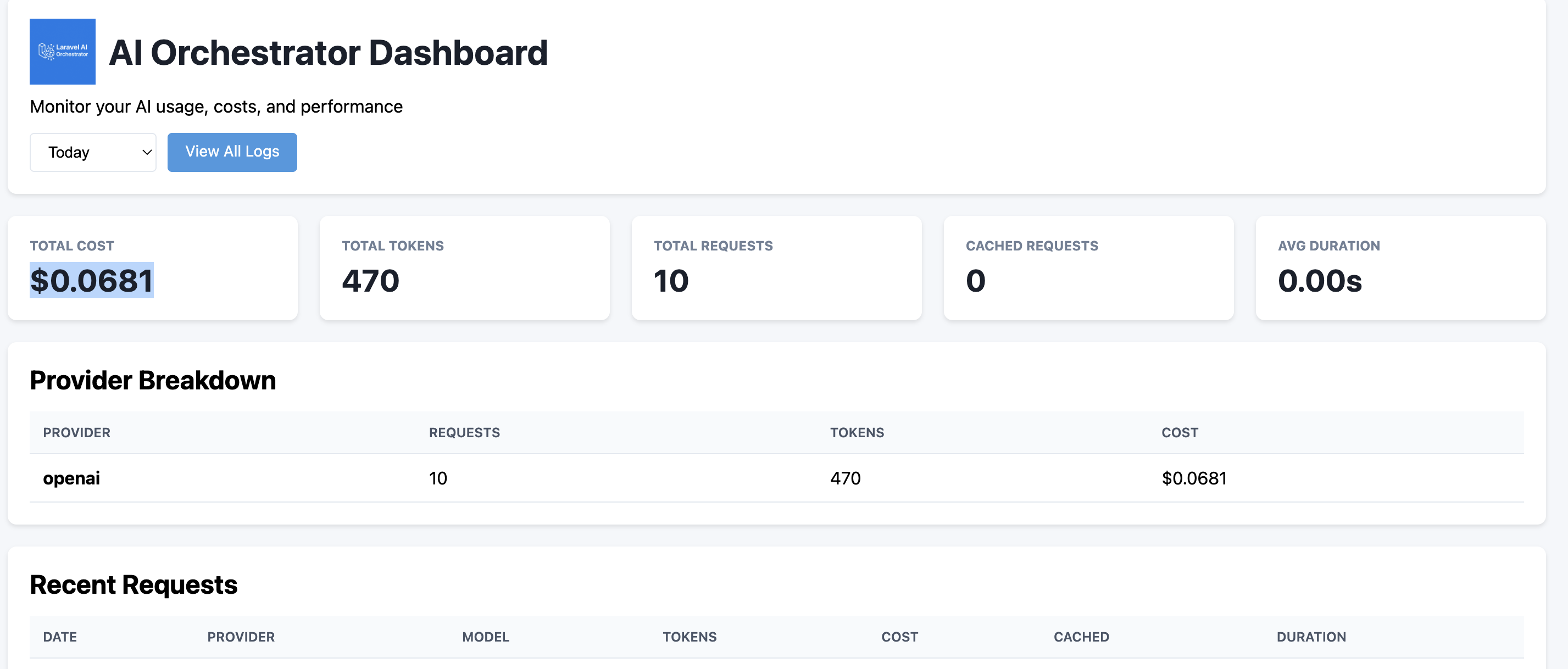
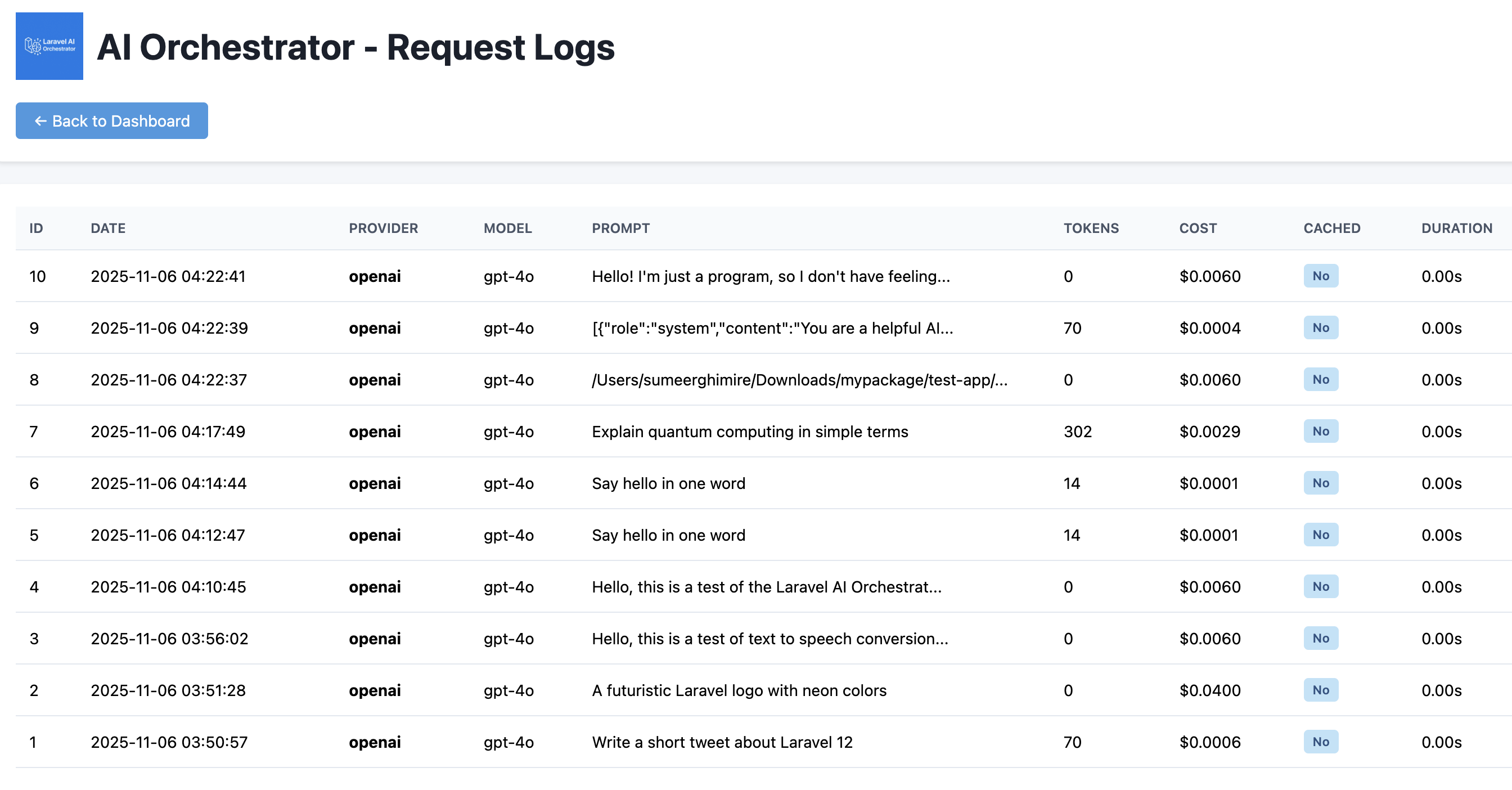
The package includes a built-in dashboard for monitoring AI usage, costs, and performance.
Dashboard Overview
Security Note
The dashboard is disabled by default for security. You must explicitly enable it.
Enable Dashboard
AI_DASHBOARD_ENABLED=true
AI_DASHBOARD_MIDDLEWARE=auth  # Protect with authentication
Access Dashboard
Once enabled:
http://your-app.com/ai-orchestrator/dashboard
Secure the Dashboard
Always protect the dashboard with middleware:
# Require authentication
AI_DASHBOARD_MIDDLEWARE=auth

# Require admin role
AI_DASHBOARD_MIDDLEWARE=auth,role:admin

# Custom middleware
AI_DASHBOARD_MIDDLEWARE=auth,admin.check
Dashboard Features
Usage statistics (cost, tokens, requests) Provider breakdown Request logs with full details Filtering by period (today/week/month/all) User-specific analytics Real-time cost tracking Cached vs non-cached requests A read-only Budgets tab: spend/limit progress per scope, downgraded/blocked requests from the last 7 days (linked to their traces when tracing is enabled), top spenders this period, and a banner listing unpriced models
See DASHBOARD_SECURITY.md for detailed security configuration.
AI Decision Tracing & Replay
New in v1.3.0 — Automatically record every AI call and replay any trace with different providers, models, or settings to compare results.
Features:
- Automatic tracing of all AI calls (zero code changes required)
- Replay any trace with different providers/models
- Track prompt versions and compare performance
- Input sanitization for sensitive data
- Full API for viewing and managing traces
Quick Start:
// Enable in .env
AI_TRACING_ENABLED=true

// All AI calls are automatically traced
$response = Ai::prompt("Hello")->toText();

// Replay a trace with different settings
$response = Ai::replay($traceId)
    ->withModel('claude-3')
    ->withPrompt('job_matcher:v4')
    ->run()
    ->toText();
See TRACING.md for complete documentation, usage examples, and production API endpoints.
Artisan Commands
ai:test
Run a diagnostic prompt against your configured providers and verify fallback behaviour. When you execute the command you can pass a prompt with --prompt or enter one interactively. If the default provider fails the command automatically tries the fallback provider and reports the outcome, duration, and model output.
php artisan ai:test
php artisan ai:test --prompt="Write a Laravel tip"
ai:status
Display a quick health summary that includes the default and fallback providers, cache settings, cache hit metrics, and the timestamp of the most recent successful response.
php artisan ai:status
ai:config
Print the effective configuration so you can confirm provider selection, cache TTL values, logging driver, and dashboard settings without digging through configuration files.
php artisan ai:config
ai:usage
Aggregate token and cost usage by provider using the ai_logs table. You can scope the report to a single provider with --provider=openai.
php artisan ai:usage
php artisan ai:usage --provider=openai
ai:providers
List every configured provider, the model or endpoint it targets, the inferred type (cloud text, local, multimodal), and whether required configuration such as API keys is present.
php artisan ai:providers
ai:flush-cache
Clear every cached AI response stored by the orchestrator and reset cache metrics. Useful during testing or after switching providers, models, or prompts.
php artisan ai:flush-cache
ai:prune
Delete ai_logs rows (and ai_traces rows, when tracing is enabled) older than a retention window. Defaults to 30 days. Schedule it periodically to keep the tables from growing unbounded.
php artisan ai:prune
php artisan ai:prune --days=14
ai:pricing
List every provider:model combination seen in ai_logs alongside its configured price from config('ai.pricing'), flagging any that are unpriced. Useful in CI to catch a new model that was used but never priced.
php artisan ai:pricing
php artisan ai:pricing --fail-on-unpriced
Budgets & Spend Limits
Per-user, per-team, per-tenant, and per-feature spend limits that are checked before each AI call (atomic reservation) and settled with the real cost after. Off by default — with AI_BUDGETS_ENABLED=false, behavior is identical to not having this feature at all.
Enable & Migrate
AI_BUDGETS_ENABLED=true
php artisan vendor:publish --tag="ai-migrations"   # if you haven't already
php artisan migrate
Setting a Budget
use Sumeetghimire\AiOrchestrator\Facades\Ai;

Ai::budgets()->for('global')->set(usd: 100, period: 'monthly', action: 'block');
Ai::budgets()->for($user)->set(usd: 5, period: 'daily', action: 'downgrade');
Ai::budgets()->for('feature:ticket_summary')->set(tokens: 50_000, period: 'daily', action: 'allow');

Ai::budgets()->for('global')->status();      // BudgetStatus: spent, reserved, limit, percent, resetsAt
Ai::budgets()->for('global')->remaining();    // int, in the budget's own unit (micro-USD or tokens)
Ai::budgets()->for('global')->reset();        // clears spent/reserved/threshold history for the current period
Ai::budgets()->for('global')->credit(usd: 5, reason: 'refund for an outage'); // audited negative adjustment
Or from the CLI:
php artisan ai:budgets
php artisan ai:budgets --scope=global
php artisan ai:budgets --over=80

php artisan ai:budgets:set global --usd=100 --period=monthly --action=block
php artisan ai:budgets:set "feature:ticket_summary" --tokens=50000 --period=daily --action=allow

php artisan ai:budgets:reset global        # asks for confirmation
php artisan ai:budgets:reset global --force
A scope is either an Eloquent model (a user, team, or any model using the HasAiBudget trait) or a string like "global" or "feature:ticket_summary". Supported periods: daily, weekly, monthly, rolling_24h (sums the last 24 hours instead of a calendar period), lifetime.
Scoping a Call
Ai::prompt('Summarize this ticket')
    ->chargeTo($user, $team)   // charge to one or more scopes, additive with ->feature()
    ->feature('ticket_summary') // adds a "feature:ticket_summary" scope
    ->toText();
If a call sets neither, scope resolution falls through: a closure registered via Ai::resolveBudgetScopesUsing(fn () => [...]) (typically in a service provider's boot()), then config('ai.budgets.defaults') — by default, the authenticated user plus a global scope.
Actions
What happens when a call would exceed a budget:
| Action | Behavior |
|---|---|
block |
Throws BudgetExceededException (carries the scope, limit, spent, and a BudgetDecision). |
downgrade |
Looks up config('ai.budgets.downgrade_map') for a cheaper provider:model, retries once; blocks if the cheaper target is also over budget. |
reroute |
Falls through to the next provider in the existing ->fallback() queue. |
allow |
Proceeds anyway and logs it as a soft overrun (ai_logs.budget_action = 'soft_overrun'). |
Override the configured action for one call with ->whenOverBudget():
use Sumeetghimire\AiOrchestrator\Support\Budgets\BudgetDecision;

Ai::prompt('...')
    ->chargeTo($user)
    ->whenOverBudget(fn (BudgetDecision $decision) => $decision->downgradeTo('openai:gpt-3.5-turbo'))
    ->toText();
Pricing
config('ai.pricing') prices tokens in integer micro-USD (1 USD = 1,000,000) per 1M tokens, keyed by "provider:model", with a "provider:*" wildcard (Ollama/HuggingFace/Replicate ship priced at 0). config('ai.budgets.unpriced_models') controls what happens when a cost-metric budget hits a model with no price: block (default), allow (don't enforce that budget for the call), or estimate (use a conservative fallback rate). Find out what's priced and what isn't:
php artisan ai:pricing
php artisan ai:pricing --fail-on-unpriced   # non-zero exit for CI
Threshold Events & Notifications
BudgetThresholdReached fires once per period the first time spend crosses each percent in config('ai.budgets.thresholds') (50/80/100 by default, or per-budget via set(thresholds: [...])). Budgets also fire BudgetReserved, BudgetSettled, BudgetExceeded, RequestDowngraded, BudgetPeriodReset, and UnpricedModelUsed — all plain, listenable events. An opt-in BudgetThresholdNotification (mail) ships for the threshold event; the package never sends it itself:
use Illuminate\Support\Facades\Event;
use Illuminate\Support\Facades\Notification;
use Sumeetghimire\AiOrchestrator\Events\BudgetThresholdReached;
use Sumeetghimire\AiOrchestrator\Notifications\BudgetThresholdNotification;

Event::listen(BudgetThresholdReached::class, function (BudgetThresholdReached $event) {
    Notification::route('mail', config('mail.ops_address'))
        ->notify(new BudgetThresholdNotification($event));
});
Protecting Routes
The ai.budget middleware blocks a route once every resolved scope with a budget is exhausted — independent of whether the route itself calls the AI orchestrator:
Route::post('/chat', ChatController::class)->middleware('ai.budget');
Route::post('/admin/reports', ReportController::class)->middleware('ai.budget:team');
With no parameter it uses the normal scope resolution above. A parameter checks one specific scope: user (auth()->user()), global, or any other string is treated as a method/relation/attribute on auth()->user() (ai.budget:team calls $user->team() or reads $user->team). It responds with HTTP 402 (configurable via AI_BUDGETS_MIDDLEWARE_STATUS, e.g. to 429):
{ "message": "AI budget exceeded.", "remaining": 0, "resets_at": "2026-11-01T00:00:00+00:00" }
Queued Calls
->queue() resolves scopes before dispatch (a queued job has no auth() context to resolve them from later) — see Integration Examples above. config('ai.budgets.queue_on_exceeded') controls what a queued call does if its budget is exceeded by the time it runs: fail (default, normal job failure) or release (re-queues the job until the budget's period resets).
Maintenance & Visibility
php artisan ai:budgets:sweep        # expires stale 'held' reservations past their TTL; schedule every 5 minutes
php artisan ai:usage --by=scope     # usage broken down by budget scope instead of provider
// routes/console.php or app/Console/Kernel.php
Schedule::command('ai:budgets:sweep')->everyFiveMinutes();
The dashboard's Budgets tab (see Dashboard above) shows spend/limit progress per scope, downgraded/blocked requests from the last 7 days, top spenders, and unpriced models — no extra setup beyond AI_DASHBOARD_ENABLED=true.
Testing Without Real Calls
Ai::fake()->assertBudgetSpent($scope, lessThanOrEqual: ...), assertDowngraded(from:, to:), and assertBlocked() let you assert on budget behavior without a real provider call, driven by the real enforcement engine against a scripted response. See Testing below for the full API and setup.
A Note on Accuracy
Costs are estimates derived from token counts and the prices in config('ai.pricing') — not the provider's own billing meter. Reconcile against your provider invoices periodically, especially if you rely on unpriced_models: 'estimate' or have custom/fine-tuned models that aren't priced exactly.
Testing
Ai::fake() swaps out real provider calls with scripted responses, keyed by "provider:model" (an optional "provider:*" or bare "*" wildcard matches anything not listed explicitly). Everything else — budget enforcement, settlement, logging, tracing — still runs for real against your test database, so budget logic is genuinely testable without hitting a real API:
use Sumeetghimire\AiOrchestrator\Facades\Ai;

$fake = Ai::fake([
    'openai:*' => Ai::response('a canned reply', inputTokens: 1000, outputTokens: 200),
]);

Ai::prompt('hello')->using('openai')->toText();

$fake->assertProviderUsed('openai:gpt-4o');
$fake->assertNothingSent(); // before any call, or to assert none happened at all
$fake->assertBudgetSpent('global', lessThanOrEqual: 50_000); // micro-USD
$fake->assertDowngraded(from: 'openai:gpt-4o', to: 'openai:gpt-3.5-turbo');
$fake->assertBlocked();
Only prompt()/chat() (including streaming) are supported under the fake; image/embedding/transcribe/speech calls raise, since budgets themselves don't enforce those yet either. Call Ai::fake() before Event::fake() if you need both — budget event listeners the fake relies on for assertDowngraded()/assertBlocked() won't fire once the event dispatcher itself is faked.
Running against a real database
The package's own test suite defaults to in-memory SQLite, but the atomic reservation guard in DatabaseBudgetStore::reserve() is concurrency-critical and SQLite can't exercise real concurrent writers (or differences like MySQL's affected-rows semantics). Point AI_ORCHESTRATOR_TEST_DB at pgsql or mysql (with DB_HOST/DB_PORT/DB_DATABASE/DB_USERNAME/DB_PASSWORD) to run the whole suite against a real database instead — CI does this in dedicated jobs. The CI matrix covers PHP 8.1–8.3 × Laravel 10–12 (invalid combinations excluded) on SQLite, plus a full run against live MySQL and Postgres.
Future Roadmap
[ ] Auto model selector (route task to best model)
[ ] Native Laravel Nova & Filament integration
[ ] Plugin system for tools (browser, filesystem)
[ ] Context-aware memory management
[ ] Typed DTO generation from structured output
[ ] Budget enforcement for image/embedding/transcribe/speech calls (currently prompt/chat only)
[ ] Redis/cache-backed budget store (the database store is the only one shipped today)
Creating Custom Providers
Have your own provider or an experimental API? Implement Sumeetghimire\AiOrchestrator\Drivers\AiProviderInterface and point the configuration at your class. The orchestrator will instantiate it automatically.
// app/Ai/Providers/CustomProvider.php
namespace App\Ai\Providers;

use GuzzleHttp\Client;
use Sumeetghimire\AiOrchestrator\Drivers\AiProviderInterface;

class CustomProvider implements AiProviderInterface
{
    protected Client $client;
    protected array $config;

    public function __construct(array $config)
    {
        $this->config = $config;
        $this->client = new Client([
            'base_uri' => $config['base_uri'] ?? 'https://example-ai-provider.test/api/',
            'headers' => [
                'Authorization' => 'Bearer ' . ($config['api_key'] ?? ''),
                'Content-Type' => 'application/json',
            ],
        ]);
    }

    public function complete(string $prompt, array $options = []): array
    {
        $response = $this->client->post('chat/completions', [
            'json' => [
                'model' => $this->getModel(),
                'messages' => [
                    ['role' => 'user', 'content' => $prompt],
                ],
            ],
        ]);

        $data = json_decode($response->getBody()->getContents(), true);

        return [
            'content' => $data['choices'][0]['message']['content'] ?? '',
            'usage' => $data['usage'] ?? [],
        ];
    }

    public function chat(array $messages, array $options = []): array
    {
        return $this->complete(end($messages)['content'] ?? '', $options);
    }

    public function streamChat(array $messages, callable $callback, array $options = []): void
    {
        $callback($this->chat($messages, $options)['content'] ?? '');
    }

    public function generateImage(string $prompt, array $options = []): array { throw new \RuntimeException('Not supported'); }
    public function embedText(string|array $text, array $options = []): array { /* ... */ }
    public function transcribeAudio(string $audioPath, array $options = []): array { throw new \RuntimeException('Not supported'); }
    public function textToSpeech(string $text, array $options = []): string { throw new \RuntimeException('Not supported'); }
    public function getModel(): string { return $this->config['model'] ?? 'custom-model'; }
    public function calculateCost(int $inputTokens, int $outputTokens): float { return 0.0; }
    public function getName(): string { return $this->config['name'] ?? 'custom'; }
}
Then register it in config/ai.php:
'providers' => [
    'custom' => [
        'driver' => \App\Ai\Providers\CustomProvider::class,
        'api_key' => env('CUSTOM_API_KEY'),
        'model' => 'custom-model',
    ],
],
If you prefer, you can set driver directly to the fully-qualified class name. Either way, once configured you can call it like any other provider:
$response = Ai::prompt('Explain vector databases')
    ->using('custom')
    ->toText();
Contributing
Pull requests are welcome!
If you want to add a new provider, implement the AiProviderInterface interface and submit a PR.
License
MIT © 2025 — Laravel AI Orchestrator Team
Made for developers who believe AI should be beautifully integrated.