
ruvelo / laravel-inbox

The in-app notification inbox Laravel never shipped: a header bell, an inbox page and per-type preferences, on top of the database notification channel.
Requires
- php: ^8.3
- laravel/framework: ^12.4.1|^13.0
Requires (Dev)
- larastan/larastan: ^3.13
- laravel/pint: ^1.32
- orchestra/testbench: ^10.0|^11.0
- phpunit/phpunit: ^11.5|^12.0
Suggests
None
Provides
None
Conflicts
None
Replaces
None
README
Live demo Configuration Developer guide Changelog

Laravel Inbox
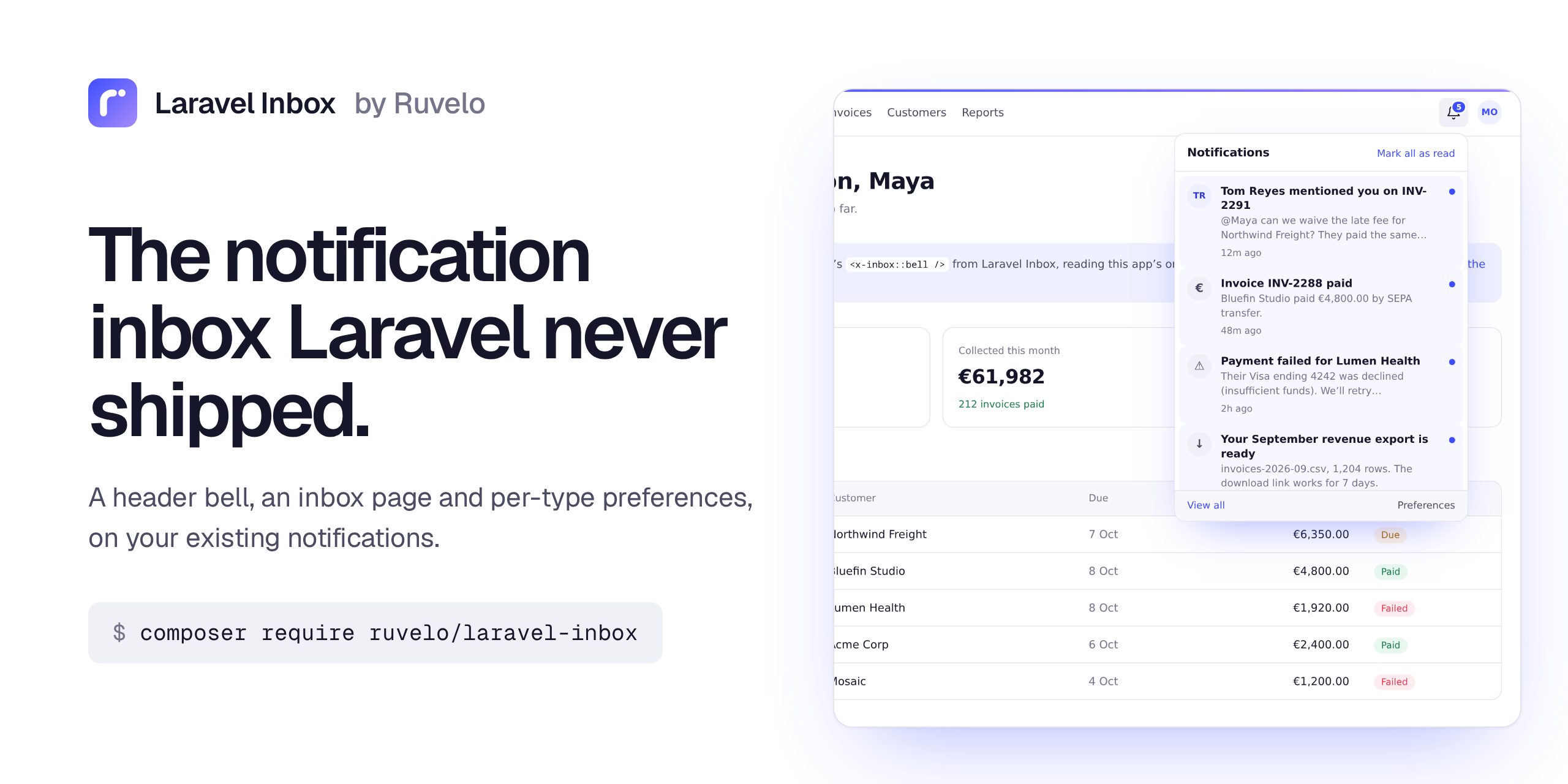
The in-app notification inbox Laravel never shipped. A bell for your header, an inbox page, and per-type preferences, built on Laravel's own database notification channel. The notifications you already send show up as they are: no new table for them, no changes to your classes, no frontend build step.
composer require ruvelo/laravel-inbox
php artisan migrate
Then put <x-inbox::bell /> in your header. Or click around the live demo first.
A quick tour

A bell for your header. One Blade tag. It shows the unread count, and opens on the latest notifications. Opening one marks it read in the background and takes you straight to it. The count keeps itself up to date while the tab is open, and updates instantly if your app uses Laravel Echo.

An inbox page for everything else. All and Unread tabs, notifications grouped by day, a filter by type, and mark read, mark unread and delete on every item.

Preferences people can set themselves. Each notification type, each channel, one switch. Your notifications' via() respects them with one line.
 |
 |
Light and dark, following each person's system setting (or your app's data-theme / .dark). |
Made for phones too, with the actions always in reach. |
Features
- Zero changes to existing notifications. Anything you send through the
databasechannel appears. By convention,toArray()/toDatabase()returnstitle,body,url, and optionallyicon(an emoji or a short string) andactor(a name). Other shapes still show, titled after the class:InvoicePaidNotificationbecomes "Invoice paid". <x-inbox::bell />: unread badge (capped at 99+), a dropdown with the latest notifications, "Mark all as read", "View all" and "Preferences". Without JavaScript it's a link to the inbox. With it: an accessible dropdown (aria-expanded, Esc to close, focus moves in and back), read marks sent in the background, a polled unread count that pauses while the tab is hidden, and live updates over Laravel Echo whenwindow.Echoexists.- The inbox page at
/inbox: All and Unread tabs, grouped by Today, Yesterday and dates in your app's timezone, filter by type, mark read or unread, delete, mark all as read, pagination and helpful empty states. Clicking an item marks it read and follows its link, through a plain redirect that works without JavaScript. - Preferences at
/inbox/preferences: per notification type, people switch channels on and off. Types have labels, descriptions, groups, per-channel defaults, and can be required (shown, but always on). RespectsInboxPreferences: one trait, one line invia().- A JSON API for React, Vue and Inertia, over the session: only ever the signed-in user's own notifications.
- Safe by default: everything is escaped, links are only ever
http(s)or paths (javascript:URLs in stored data are dropped), and someone else's notification is a 404 on every route. - Cheap: the unread count is one indexed
COUNTquery, and the bell runs two queries however many notifications there are. - Fits in: the bell's styles are scoped and included once, so they can't touch your CSS. The pages can use your app's layout.
Requirements
- PHP 8.3+
- Laravel 12 or 13
- The
notificationstable:php artisan make:notifications-tableif you don't have it yet - A notifiable model that uses Laravel's
Notifiabletrait (usuallyUser)
Using it
Put the bell in your layout, wherever your header is:
<header>
    …
    <x-inbox::bell />
</header>
It renders nothing for guests. Options: <x-inbox::bell :limit="8" :poll="60" label="Updates" class="ms-auto" />, and :user="$someone" to show another notifiable than the signed-in user.
Send notifications as you already do, with a title, body and url:
class InvoicePaid extends Notification
{
    public function via(object $notifiable): array
    {
        return ['mail', 'database'];
    }

    public function toArray(object $notifiable): array
    {
        return [
            'title' => "Invoice {$this->invoice->number} paid",
            'body' => "{$this->invoice->customer} paid {$this->invoice->total}.",
            'url' => route('invoices.show', $this->invoice),
            'icon' => '💸',
        ];
    }
}
That's all. subject, message and action_url work too, if that's what your notifications already use.
Describing a notification in code
Implement InboxNotification and the inbox stores your message with the notification; you don't need toArray():
use Ruvelo\Inbox\Contracts\InboxNotification;
use Ruvelo\Inbox\InboxMessage;

class TeammateJoined extends Notification implements InboxNotification
{
    public function via(object $notifiable): array
    {
        return ['database'];
    }

    public function toInbox(object $notifiable): InboxMessage
    {
        return InboxMessage::make("{$this->user->name} joined your team")
            ->withUrl(route('team'))
            ->withActor($this->user->name);
    }
}
Or decide how a type looks without touching it (handy for notifications from other packages, or ones already in the database):
Inbox::present(ExportReady::class, fn (array $data) => InboxMessage::make(
    'Your export is ready',
    body: "{$data['rows']} rows",
    url: route('exports.show', $data['export_id']),
    icon: '📦',
));
Preferences
Register the types people can switch, in config/inbox.php or a service provider:
use Ruvelo\Inbox\Inbox;

Inbox::preferences([
    InvoicePaid::class => [
        'label' => 'Invoice paid',
        'description' => 'When a customer pays one of your invoices.',
        'group' => 'Billing',
        'channels' => ['mail', 'database'],
        'defaults' => ['mail' => false],   // off until they turn it on
    ],
    SecurityAlert::class => [
        'label' => 'Security alerts',
        'channels' => ['mail'],
        'required' => true,                // shown, can't be turned off
    ],
]);
Then let the notification respect them:
use Ruvelo\Inbox\Notifications\RespectsInboxPreferences;

class InvoicePaid extends Notification
{
    use RespectsInboxPreferences;

    public function via(object $notifiable): array
    {
        return $this->preferredChannels($notifiable, ['mail', 'database']);
    }
}
Channels that aren't listed for a type, unregistered types, required types and on-demand notifiables (Notification::route(...)) always get through. To share one switch between several notifications, override inboxType() to return the same key. Choices live in their own table, one row per explicit choice; everything else follows the type's default.
Who sees what
Every route needs a signed-in user and only ever shows or changes that user's own notifications. Anyone else's notification is a 404, never a 403, so ids can't be probed. Guests are sent to your login route, or get a 403 in an app that doesn't have one yet (a fresh install before a starter kit), so you don't need auth in the middleware, though it's fine to add it.
Configuration
Publish the config file if you want to change the defaults:
php artisan vendor:publish --tag=inbox-config
| Key | Default | |
|---|---|---|
path |
inbox (INBOX_PATH) |
URL prefix for the inbox and preferences pages |
domain |
null |
Serve them on their own (sub)domain |
middleware |
['web'] |
Applied to every page; signing in is always required |
routes |
true |
Set to false to register routes yourself (copy routes/web.php) |
api.enabled |
true (INBOX_API) |
The JSON API |
api.prefix |
api/inbox |
Where the JSON API lives |
api.middleware |
['web'] |
Session authentication: keep web, or use your own guard |
layout |
null |
Your layout view for the pages; null uses the package's own |
section |
content |
The section of your layout the pages fill |
bell.limit |
6 |
How many notifications the dropdown shows |
bell.poll |
30 |
Seconds between unread-count checks; 0 turns polling off |
bell.echo |
true |
Listen on the user's private channel when Laravel Echo is on the page |
per_page |
25 |
Notifications per page on the inbox |
timezone |
your app's | Timezone for "Today", "Yesterday" and dates |
preferences |
[] |
Notification types people can switch on and off |
channels |
database → In app, mail → Email… |
How channels are labelled on the preferences page |
notifications_table |
notifications |
Laravel's notifications table |
table_prefix |
inbox_ |
The preferences table is {prefix}preferences |
run_migrations |
true |
Set to false if you publish the migration and run it yourself (--tag=inbox-migrations) |
Making it look like your app
The colours are CSS variables, scoped to the bell and the pages, using the Ruvelo house style. Override any of them in your own CSS:
.inbox-bell, .inbox-page { --inbox-accent: #0e7c66; --inbox-accent-soft: #e6f5f1; }
To put the inbox and preferences pages inside your app's chrome, point layout at your layout. The pages fill the section you name (and a title section), and bring their own scoped styles:
'layout' => 'layouts.app',
'section' => 'content',
For full control, publish the views. They land in resources/views/vendor/inbox:
php artisan vendor:publish --tag=inbox-views
For developers
PHP API
use Ruvelo\Inbox\Inbox;

Inbox::unreadCount($user);              // one indexed COUNT query
Inbox::latest($user, 5);                // newest first, read or not
Inbox::query($user)->whereNull('read_at')->paginate();
Inbox::find($user, $id);                // null if it isn't theirs
Inbox::markRead($notification);         // false if it already was
Inbox::markUnread($notification);
Inbox::markAllRead($user);              // one query; returns how many
Inbox::delete($notification);
Inbox::message($notification);          // how it looks: an InboxMessage
Inbox::present(Type::class, fn (array $data, Notification $n) => InboxMessage::make('…'));
Inbox::preferences([...]);              // register switchable types
Inbox::wants($user, InvoicePaid::class, 'mail');
Inbox::filterChannels($user, InvoicePaid::class, ['mail', 'database']);
Inbox::preferencesFor($user);           // [type => [channel => bool]], defaults filled in
Inbox::updatePreferences($user, [InvoicePaid::class => ['mail' => true]]);
The write methods accept Laravel's own DatabaseNotification (what $user->notifications returns) as well as the package's Ruvelo\Inbox\Models\Notification, which reads the same table and adds message(), isUnread() and the ownedBy($user) scope.
InboxMessage is a small immutable value object: make($title, $body, $url, $icon, $actor), with…() methods that return copies, initials(), excerpt() and toArray().
JSON API
For React, Vue and Inertia front ends. It runs on the session (web middleware), so send the CSRF token on writes as you would for any form, and only ever touches the signed-in user's own notifications. Paths are relative to /api/inbox.
| Request | Does |
|---|---|
GET /notifications |
List, newest first. ?filter=unread, ?type=<class>, ?per_page= up to 100. meta.unread and meta.types included |
GET /notifications/count |
{"unread": 3}: cheap enough to poll |
GET /notifications/{id} |
One notification |
POST /notifications/{id}/read |
Mark read; returns the notification |
POST /notifications/{id}/unread |
Mark unread; returns the notification |
POST /notifications/read-all |
{"marked": 3, "unread": 0} |
DELETE /notifications/{id} |
Delete. 204 |
GET /preferences |
Every registered type with its label, description, group, required and channels: {mail: true, …} |
PUT /preferences |
{"preferences": {"App\\Notifications\\InvoicePaid": {"mail": false}}}; only the pairs sent change. 422 for unknown types or channels, or for turning off a required type |
A notification looks like this:
{
  "id": "9d1c…", "type": "App\\Notifications\\InvoicePaid", "type_label": "Invoice paid",
  "title": "Invoice INV-2288 paid", "body": "Bluefin Studio paid €4,800.00.", "url": "/invoices/INV-2288",
  "open_url": "https://app.test/inbox/9d1c…/open", "icon": "💸", "actor": null, "initials": "I",
  "read": false, "read_at": null, "created_at": "2026-10-08T09:12:00+00:00",
  "time_ago": "48 minutes ago", "day": "Today", "payload": { "…": "the stored data" }
}
Someone else's notification is a 404; a guest gets a 401.
Web routes
GET /inbox |
The inbox (?filter=unread, ?type=) |
GET /inbox/preferences, PUT /inbox/preferences |
Preferences |
GET /inbox/{id}/open |
Mark read and follow the link |
POST /inbox/{id}/read, /unread, DELETE /inbox/{id} |
One notification; answers JSON when asked for it |
POST /inbox/read-all |
Mark everything read |
GET /inbox/count, GET /inbox/bell |
What the bell polls, and its list as HTML |
Events
| Event | When |
|---|---|
NotificationRead |
A notification was marked read, one at a time or by opening it |
NotificationUnread |
A read notification was marked unread |
AllNotificationsRead |
Someone marked everything read; has notifiable and count |
NotificationDeleted |
A notification was deleted |
PreferencesUpdated |
Someone changed their preferences; has notifiable and the changes |
All in Ruvelo\Inbox\Events, and only fired when something actually changed.
Exceptions
UnknownPreference (a type or channel that isn't registered), RequiredPreference (turning off a required type) and InvalidPreferenceType (a malformed registration), all extending Ruvelo\Inbox\Exceptions\InboxException.
In your tests
use Ruvelo\Inbox\Models\Notification;

Notification::factory()->to($user)->count(3)->create();
Notification::factory()->to($user)->read()->ofType(InvoicePaid::class)
    ->message(InboxMessage::make('Invoice paid', url: '/invoices/1'))->create();
Using an AI coding agent?
The package ships Laravel Boost guidelines in resources/boost/guidelines/core.blade.php. With Boost installed (composer require laravel/boost --dev), run php artisan boost:install and pick ruvelo/laravel-inbox from the third-party packages (or php artisan boost:update --discover if Boost is already set up). Your agent then knows how to put the bell in your layout, make notifications show nicely, respect preferences, and use the JSON API, and what not to do.
Contributing
Pull requests are welcome. Clone, composer install, then composer check runs code style (Pint), static analysis (PHPStan level 8) and the tests, exactly as CI does. See CONTRIBUTING.md and the changelog.
The demo and screenshots are built from the package itself: composer demo writes the static demo into build/, and demo/screenshots.sh regenerates art/.
Credits
Built by François Bultez at Valtry, the website security scanner, and everyone who contributes.
License
MIT. See LICENSE.