
mehedi250 / laravel-structure-kit

Laravel scaffolding package with a browser UI and Artisan command — generates Model, Controller, Migration, Service Pattern (interface + implementation), and Repository Pattern (interface + implementation) with correct namespaces.
Package info
github.com/mehedi250/laravel-structure-kit
Language:Blade
pkg:composer/mehedi250/laravel-structure-kit
Fund package maintenance!
Requires
- php: ^8.1
- illuminate/console: ^10.0|^11.0|^12.0
- illuminate/filesystem: ^10.0|^11.0|^12.0
- illuminate/http: ^10.0|^11.0|^12.0
- illuminate/routing: ^10.0|^11.0|^12.0
- illuminate/support: ^10.0|^11.0|^12.0
- symfony/console: ^6.0|^7.0|^8.0
Requires (Dev)
- laravel/pint: ^1.0
- orchestra/testbench: ^8.0|^9.0|^10.0
- phpunit/phpunit: ^10.0|^11.0
Suggests
None
Provides
None
Conflicts
None
Replaces
None
README
 ██████╗████████╗██████╗ ██╗   ██╗ ██████╗████████╗██╗   ██╗██████╗ ███████╗
██╔════╝╚══██╔══╝██╔══██╗██║   ██║██╔════╝╚══██╔══╝██║   ██║██╔══██╗██╔════╝
╚█████╗    ██║   ██████╔╝██║   ██║██║        ██║   ██║   ██║██████╔╝█████╗
 ╚═══██╗   ██║   ██╔══██╗██║   ██║██║        ██║   ██║   ██║██╔══██╗██╔══╝
██████╔╝   ██║   ██║  ██║╚██████╔╝╚██████╗   ██║   ╚██████╔╝██║  ██║███████╗
╚═════╝    ╚═╝   ╚═╝  ╚═╝ ╚═════╝  ╚═════╝   ╚═╝    ╚═════╝ ╚═╝  ╚═╝╚══════╝
Laravel Structure Kit
A browser-based scaffolding panel for Laravel — generate Models, Controllers, Services, Repositories, and Migrations in one click.
No terminal required. Open the UI, pick your components, hit Generate.
Overview
Laravel Structure Kit gives you a clean browser panel for scaffolding Laravel file structures. Enter a model name, check the components you want, optionally adjust directory paths, and click Generate Files — all selected files are created instantly with the correct namespaces.
It supports the Service Pattern and Repository Pattern out of the box, generating both the interface (contract) and the implementation class for each.
Requirements
| Dependency | Version |
|---|---|
| PHP | ^8.1 |
| Laravel | ^10.0 | ^11.0 | ^12.0 | ^13.0 |
Installation
composer require mehedi250/laravel-structure-kit
The package registers itself automatically via Laravel's package auto-discovery. No config file or service provider registration required.
Using the UI Panel
Open the panel
Start your local server and visit:
http://localhost:8000/structure-kit
The panel is only accessible in
localenvironment. It returns a403in any other environment.
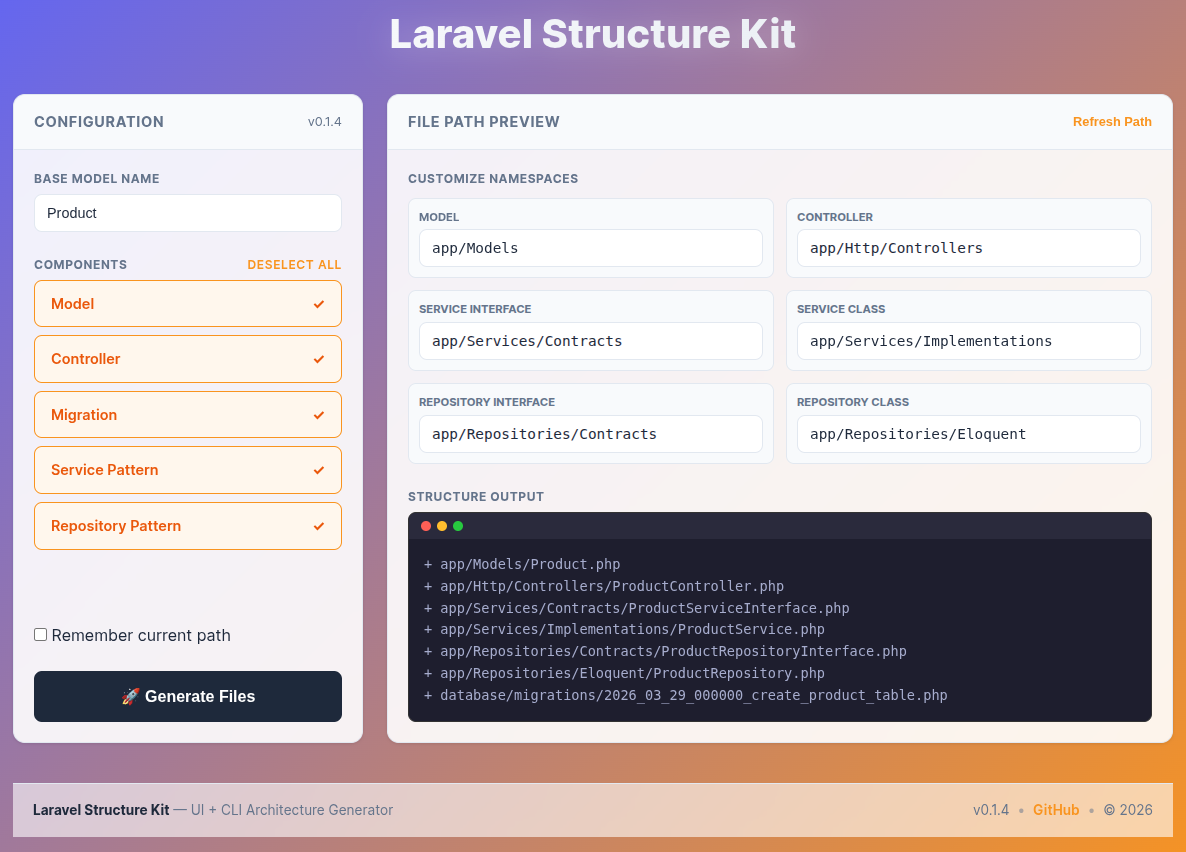
Step 1 — Enter a model name
Type your base model name in the Base Model Name field at the top of the Configuration panel.
Product
Every generated filename is derived from this name:
| Generated file | Derived name |
|---|---|
Product.php |
Model |
ProductController.php |
Controller |
ProductServiceInterface.php |
Service Interface |
ProductService.php |
Service Class |
ProductRepositoryInterface.php |
Repository Interface |
ProductRepository.php |
Repository Class |
xxxx_xx_xx_create_products_table.php |
Migration |
Step 2 — Select components
All five components are selected by default. Uncheck anything you don't need. Use Deselect All / Select All to toggle everything at once.
| Component | What gets generated |
|---|---|
| Model | Eloquent model class |
| Controller | Resource controller wired to the service interface |
| Migration | Timestamped create_table migration |
| Service Pattern | ProductServiceInterface.php + ProductService.php |
| Repository Pattern | ProductRepositoryInterface.php + ProductRepository.php |
Selecting Service Pattern without Repository Pattern generates a service that works directly with the model — no repository dependency.
Step 3 — Review and customize paths (optional)
The right panel shows Customize Namespaces — one editable path field per selected component. The defaults match standard Laravel conventions:
| Component | Default path |
|---|---|
| Model | app/Models |
| Controller | app/Http/Controllers |
| Service Interface | app/Services/Contracts |
| Service Class | app/Services/Implementations |
| Repository Interface | app/Repositories/Contracts |
| Repository Class | app/Repositories/Eloquent |
You can change any path before generating. All paths must start with app/ — the UI blocks submission if a path does not.
Refresh Path resets all fields back to the defaults above.
Remember current path — tick this checkbox to save your custom paths in the browser. The next time you open the panel, your paths are pre-filled automatically.
Step 4 — Preview the file tree
The Structure Output terminal on the right updates live as you type the model name, check components, or edit paths. It shows exactly what will be written to disk before you commit to generating.
+ app/Models/Product.php
+ app/Http/Controllers/ProductController.php
+ app/Services/Contracts/ProductServiceInterface.php
+ app/Services/Implementations/ProductService.php
+ app/Repositories/Contracts/ProductRepositoryInterface.php
+ app/Repositories/Eloquent/ProductRepository.php
+ database/migrations/2026_06_07_xxxxxx_create_products_table.php
Step 5 — Generate
Click 🚀 Generate Files.
The form submits via Fetch API — no page reload. A success or error message appears at the top of the page. Files that already exist on disk are skipped (not overwritten).
Generated file structure
Running the generator with model name Product and all components selected produces:
app/
├── Models/
│   └── Product.php
├── Http/
│   └── Controllers/
│       └── ProductController.php
├── Services/
│   ├── Contracts/
│   │   └── ProductServiceInterface.php
│   └── Implementations/
│       └── ProductService.php
└── Repositories/
    ├── Contracts/
    │   └── ProductRepositoryInterface.php
    └── Eloquent/
        └── ProductRepository.php
database/
└── migrations/
    └── 2026_06_07_xxxxxx_create_products_table.php
Artisan Command (CLI alternative)
Prefer the terminal? The Artisan command generates the same files without the browser.
php artisan structure-kit {ModelName} {flags}
Flags
| Flag | Component |
|---|---|
m |
Model |
c |
Controller |
s |
Service + Service Interface |
r |
Repository + Repository Interface |
t |
Migration |
Examples
# Generate everything
php artisan structure-kit Product mcsrt

# Service + Repository only
php artisan structure-kit Product sr

# Model + Controller only
php artisan structure-kit Product mc

# Preview without writing files
php artisan structure-kit Product mcsrt --dry-run
Use Cases
- New projects — establish a consistent structure from the first model
- Team environments — everyone generates files the same way, same paths, same conventions
- Rapid prototyping — scaffold a full feature in seconds, then fill in the logic
- Learning clean architecture — see how Interfaces, Services, and Repositories connect before writing a line
Contributing
All contributions are welcome — bug fixes, new features, documentation improvements.
# Fork on GitHub, then:
git clone https://github.com/YOUR_USERNAME/laravel-structure-kit.git
git checkout -b feature/your-feature
git commit -m "feat: describe your change"
git push origin feature/your-feature
# Open a Pull Request
Repository: github.com/mehedi250/laravel-structure-kit
License
Released under the MIT License.
Copyright © 2026 Md. Mehedi Hasan Shawon
See the LICENSE file for full details.
If this package saved you time, consider giving it a ⭐ on GitHub.
Made with ❤️ for the Laravel community · Report a Bug · Request a Feature