
mage-os / module-passkey-auth

Passkey (WebAuthn) authentication for customer accounts
Package info
github.com/mage-os/module-passkey-auth
Type:magento2-module
pkg:composer/mage-os/module-passkey-auth
Requires
- php: >=8.2
- magento/framework: *
- magento/module-authorization: *
- magento/module-backend: *
- magento/module-config: *
- magento/module-customer: *
- magento/module-email: *
- magento/module-integration: *
- magento/module-store: *
- magento/module-two-factor-auth: *
- magento/module-ui: *
- magento/module-user: *
- symfony/serializer: ^6.4 || ^7.0 || ^8.0
- web-auth/cose-lib: ^4.2.3
- web-auth/webauthn-lib: ^5.2
Requires (Dev)
- phpunit/phpunit: ^10.5 || ^11.0 || ^12.0
Suggests
- magento/module-graph-ql: Enables the passkey GraphQL API for headless storefronts
- magento/module-graph-ql-cache: Marks customer passkey queries as non-cacheable in the GraphQL cache
Provides
None
Conflicts
None
Replaces
None
This package is auto-updated.
Last update: 2026-10-27 13:41:05 UTC
README
Passwordless login for Magento 2 customer accounts using the WebAuthn/FIDO2 standard. Customers register passkeys (biometric, security key, or device PIN) and sign in with a single tap. There is no password to remember, phish, or leak.
Built on web-auth/webauthn-lib 5.2 or later.
Documentation: see the manual for setup, customer and admin guides, the headless API, and troubleshooting. Changes between releases are in CHANGELOG.md.
Key Features
Passwordless Authentication
- One-tap login: Customers authenticate with fingerprint, Face ID, Windows Hello, or a hardware security key
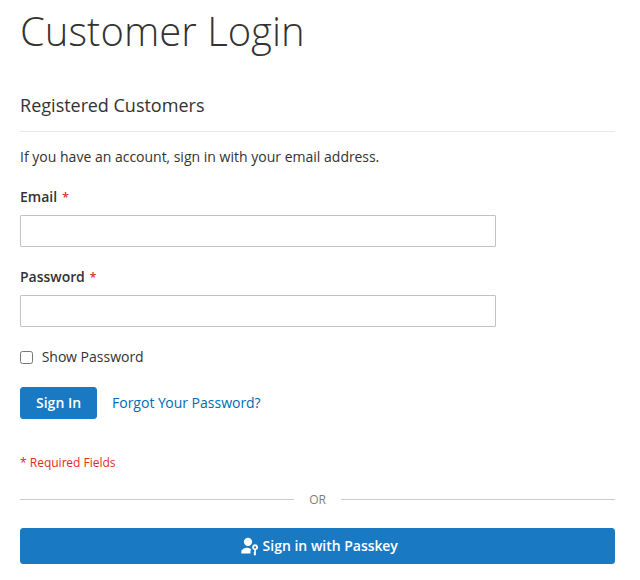
- Passkey autofill (conditional UI): Saved passkeys appear directly in the browser's email-field autofill dropdown on the login page and at checkout
- Token-based sessions: Successful passkey authentication issues a standard Magento customer token
- Anti-enumeration: Sign-in options for an email with no passkeys (or no account) carry a stable decoy credential, so they look like those of an account with a passkey
Credential Management
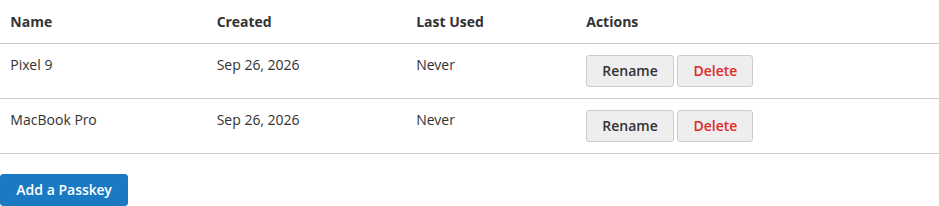
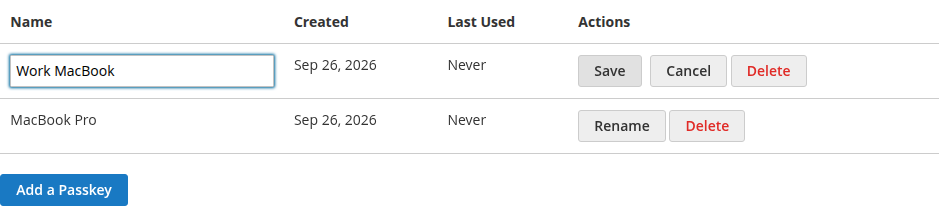
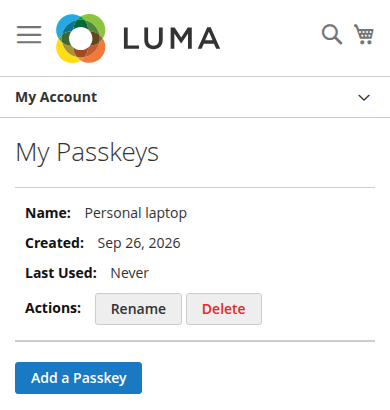
- My Account page: Customers add, rename, and delete passkeys from their account dashboard
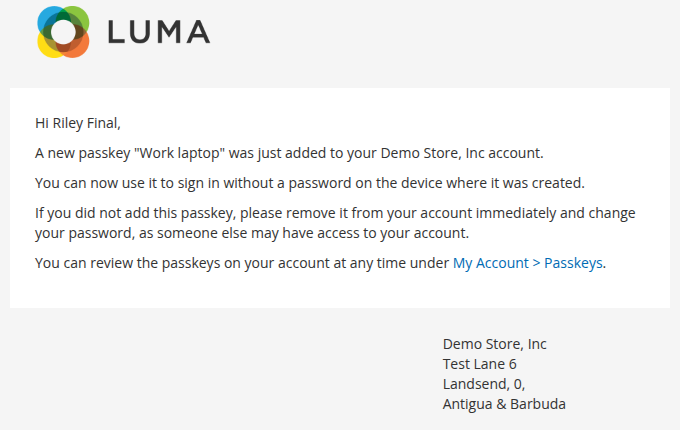
- Security notification emails: Customers are emailed when a passkey is added to or removed from their account
- Clone detection: Sign-count tracking detects copied authenticators
Theme & API Coverage
- Luma and Hyvä: Native storefront implementations for both (RequireJS widgets and Alpine.js components sharing one ceremony core)
- REST and GraphQL: Full registration, authentication, and management surface for headless storefronts
Store Admin Controls
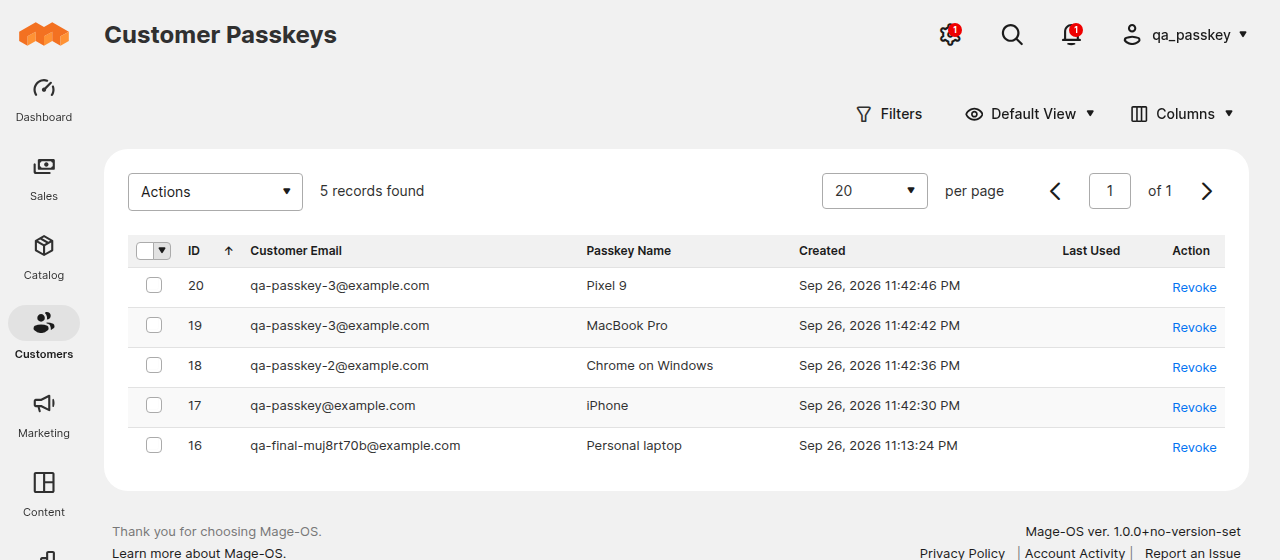
- Customer Passkeys grid: View and revoke any customer's passkeys under Customers > Customer Passkeys (revocation signs the customer out everywhere and notifies them)
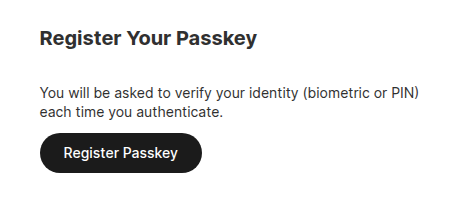
- Admin passkey TFA: Passkey provider for the Magento admin two-factor framework, including a
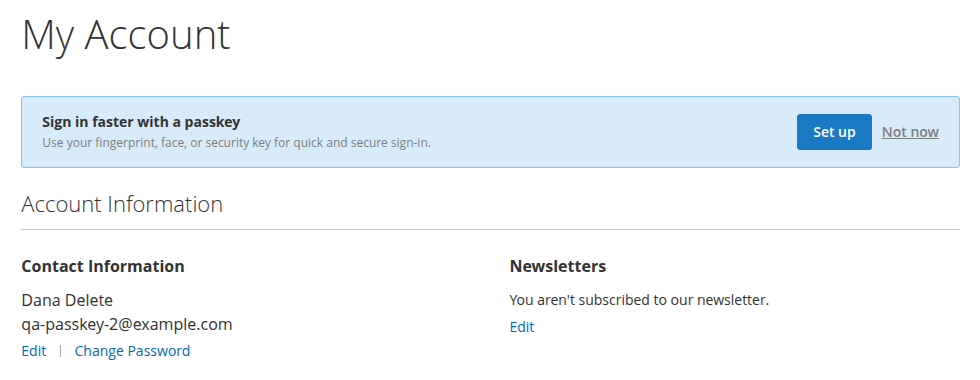
security:tfa:passkey:reset-allCLI command - Enrollment prompts: Optional banners on account pages after password login or account creation, with built-in dismissal cooldown to avoid nagging
- Rate limiting: Built-in cache-based limits on options requests and verification failures
Screenshots
The storefront screenshots show the Luma theme.
| Sign in with a passkey | Enrollment prompt after password sign-in |
|---|---|
 |
 |
My Account › Passkeys: add, rename and delete passkeys.
| On a phone | Security notification email |
|---|---|
 |
 |
Admin: the Customers › Customer Passkeys grid (single and mass revoke), and registering an admin passkey for two-factor authentication.
Requirements
| Component | Version |
|---|---|
| PHP | 8.2+ |
| Magento Open Source / Mage-OS | 2.4.6+ |
| HTTPS | Required (WebAuthn does not work over plain HTTP) |
Installation
composer require mage-os/module-passkey-auth
bin/magento setup:upgrade
Customer passkeys are disabled by default on new installs. Upgrades from a pre-1.0 release that already has customer passkeys keep them on. Turn them on under Enable Passkey Authentication (see below), or run:
bin/magento config:set customer/passkey/enabled 1
The admin passkey 2FA provider doesn't depend on this setting; it's managed with the other 2FA providers.
Configuration
Navigate to Stores > Configuration > Customers > Customer Configuration > Passkey Authentication.
| Setting | Description | Default |
|---|---|---|
| Enable Passkey Authentication | Master on/off switch for the storefront, REST and GraphQL features | No |
| Prompt After Password Login | Show enrollment banner on account pages after password sign-in | Yes |
| Prompt After Account Creation | Show enrollment banner on account pages after registration | No |
| Email Customer When Passkeys Change | Send a security notification when a passkey is added/removed | Yes |
| Passkey Notification Email Sender | Store identity used for notification emails | General Contact |
| Passkey Added / Removed Email Template | Theme-fallback template selection for the two notifications | Module defaults |
The Relying Party (RP) ID and allowed origins are derived automatically from the store's base URL. There is nothing to configure.
WebAuthn parameters (user verification, attestation conveyance, ceremony timeout, authenticator attachment, and max credentials per customer) use sane defaults internally and are not exposed as admin settings.
Architecture
Service Contracts
All business logic is exposed through Api interfaces:
| Interface | Implementation | Purpose |
|---|---|---|
RegistrationOptionsInterface |
Registration\OptionsGenerator |
Generate WebAuthn creation options |
RegistrationVerifierInterface |
Registration\Verifier |
Verify attestation and store credential |
AuthenticationOptionsInterface |
Authentication\OptionsGenerator |
Generate WebAuthn request options |
AuthenticationVerifierInterface |
Authentication\Verifier |
Verify assertion and issue token |
CredentialRepositoryInterface |
CredentialRepository |
Credential CRUD and getList() |
CredentialManagementInterface |
CredentialManagement |
List, rename, delete credentials |
CustomerPasskeyManagementInterface |
CustomerPasskeyManagement |
List, rename, register for the web API, without key material |
WebAuthnConfigInterface |
Config |
Relying party and WebAuthn settings |
Data\CredentialInterface |
Data\Credential |
Full stored credential (extensible) |
Data\CustomerPasskeyInterface |
Data\CustomerPasskey |
Passkey as the web API returns it (extensible) |
Data\CredentialSearchResultsInterface |
CredentialSearchResults |
getList() results |
Data\AuthenticationResultInterface |
Data\AuthenticationResult |
Authentication result DTO |
REST API
| Method | Endpoint | Auth | Purpose |
|---|---|---|---|
POST |
/V1/passkey/registration/options |
Customer (self) | Get creation options for navigator.credentials.create() |
POST |
/V1/passkey/registration/verify |
Customer (self) | Submit attestation response, receive the new passkey |
POST |
/V1/passkey/authentication/options |
Anonymous | Get request options for navigator.credentials.get() |
POST |
/V1/passkey/authentication/verify |
Anonymous | Submit assertion response, receive customer token |
GET |
/V1/passkey/credentials |
Customer (self) | List customer's registered passkeys |
PUT |
/V1/passkey/credentials/:entityId |
Customer (self) | Rename a passkey |
DELETE |
/V1/passkey/credentials/:entityId |
Customer (self) | Delete a passkey |
Passkeys come back as {id, name, transports, created_at, last_used_at}, the same fields as GraphQL. See Headless API.
GraphQL API
The schema mirrors the REST surface; WebAuthn ceremony options travel as JSON strings (options_json) ready for navigator.credentials.create()/get():
# Guest: start + finish sign-in (returns a customer bearer token)
mutation { createPasskeyAuthenticationOptions(email: "jane@example.com") { options_json } }
mutation {
    verifyPasskeyAuthentication(input: {
        challenge_token: "…", assertion_response: "…"
    }) { customer_token }
}

# Customer (Authorization: Bearer <token>): register + manage
mutation { createPasskeyRegistrationOptions { options_json } }
mutation {
    verifyPasskeyRegistration(input: {
        challenge_token: "…", attestation_response: "…", name: "Chrome on Windows"
    }) { id name }
}
query { customerPasskeys { id name transports created_at last_used_at } }
mutation { renameCustomerPasskey(passkeyId: 1, name: "Work laptop") { id name } }
mutation { deleteCustomerPasskey(passkeyId: 1) { success } }
Events
| Event | Payload | Fired When |
|---|---|---|
passkey_credential_register_after |
customer_id, entity_id, credential_id, credential |
New passkey registered |
passkey_authentication_success |
customer_id, entity_id, credential_id, credential |
Successful passkey login |
passkey_authentication_failure |
credential_id, customer_id, reason, message |
Failed passkey login |
passkey_registration_failure |
customer_id, reason, message |
Passkey registration failed validation |
passkey_credential_remove_after |
customer_id, entity_id, credential_id, credential |
Passkey deleted |
entity_id is the row ID, credential_id the WebAuthn credential ID, and reason a fixed code (credential_not_found or verification_failed). Names and codes are constants on Model\PasskeyEvents. See the Developer guide.
A passkey sign-in also fires core customer_login, on the storefront and over REST, SOAP, and GraphQL.
The bundled notification emails are implemented as observers on the register/remove events, so they fire for every entry point (storefront, REST, GraphQL, admin revocation).
Database
passkey_credential: Stores registered WebAuthn credentials. One customer can have multiple credentials (up to 10). Foreign key to customer_entity with CASCADE delete.
passkey_challenge: Temporary single-use challenges with a 5-minute TTL. Cleaned up by the passkey_challenge_cleanup cron job.
Extensibility
Observing Passkey Events
Create an observer in your module's etc/events.xml:
<event name="passkey_authentication_success">
    <observer name="my_module_passkey_login" instance="Vendor\Module\Observer\PasskeyLogin"/>
</event>
Overriding Services
All service contracts can be replaced via DI preferences in etc/di.xml:
<preference for="MageOS\PasskeyAuth\Api\AuthenticationVerifierInterface"
            type="Vendor\Module\Model\CustomVerifier"/>
Frontend Customization
The module provides three jQuery UI widgets that can be extended via RequireJS mixins:
passkeyLogin: Login page authentication flowpasskeyManage: My Account credential management (add/rename/delete)enrollmentPrompt: Enrollment banner after password login
Templates are in view/frontend/templates/ and can be overridden via theme fallback. Styles use Luma/blank theme variables and patterns (.message.info, .data.table, .action.primary) for native theme consistency.
Testing
- Unit tests (standalone, run in CI):
composer install && composer test - Integration tests (
Test/Integration, Magento integration conventions): install the module into a Magento instance, then fromdev/tests/integrationrun../../../vendor/bin/phpunit ../../../vendor/mage-os/module-passkey-auth/Test/Integration - GraphQL api-functional tests (
Test/Api/GraphQl): configuredev/tests/api-functional/phpunit_graphql.xmlfor your instance, then fromdev/tests/api-functionalrun../../../vendor/bin/phpunit -c phpunit_graphql.xml ../../../vendor/mage-os/module-passkey-auth/Test/Api/GraphQl. The default suite doesn't include module tests, so give the path.
Security
- HTTPS required: WebAuthn ceremonies are rejected by browsers on non-secure origins. The module detects non-secure contexts and displays a specific error message.
- Change notifications: Customers are emailed whenever a passkey is added or removed, so silent credential planting is visible. See SECURITY.md for the disclosure policy.
- Single-use challenges: Each challenge token is claimed atomically on verification and cannot be reused.
- Rate limiting: Options generation (10 requests/60s per email and IP, or per customer for registration) and failed sign-ins (5 per 15 minutes per IP, shared by the storefront, REST, and GraphQL) are rate-limited. Behind a proxy, Magento must see the real client IP. See How it works and security.
- Sign-count validation: Rejects sign-ins whose signature counter doesn't increase, a sign of a cloned authenticator.
- Anti-enumeration: Authentication options for an email with no passkeys (or no account) carry a stable, secret-derived decoy credential descriptor instead of an empty list.
- Ownership enforcement: All credential operations validate that the credential belongs to the requesting customer.
- Per-website accounts: With customer accounts shared per website, a passkey only signs in on its own customer's website.
- Account checks: Like password sign-in, passkey sign-in refuses locked accounts, accounts awaiting email confirmation, and customer groups excluded from the website. Failed passkey attempts never lock an account.
- Sign-out on removal: An admin revoke ends the customer's storefront sessions and revokes their API tokens. A customer deleting a passkey ends their other storefront sessions, as a password change does.
- Login as Customer: Passkey registration is refused while an admin is signed in as the customer on the storefront. Known limitation: REST and GraphQL registration with a token from
generateCustomerTokenAsAdminis not blocked.
Contributing
Issues and pull requests welcome on GitHub.
License
This module is licensed under the Open Software License 3.0.
Support
- Issues: GitHub Issues
- Community: Mage-OS Discord