
knifelemon / comment-template

A PHP template engine with asset compilation, template inheritance, and variable processing
Requires
- php: >=7.4
- matthiasmullie/minify: ^1.3
Requires (Dev)
- phpstan/phpstan: ^1.0
- phpunit/phpunit: ^11.5
- tracy/tracy: ^2.11
Suggests
- tracy/tracy: For development debugging and logging capabilities
Provides
None
Conflicts
None
Replaces
None
README
CommentTemplate
A powerful PHP template engine with asset compilation, template inheritance, and variable processing. CommentTemplate provides a simple yet flexible way to manage templates with built-in CSS/JS minification and caching.
Features
- Template Inheritance: Use layouts and include other templates
- Asset Compilation: Automatic CSS/JS minification and caching
- Variable Processing: Template variables with filters and commands
- Base64 Encoding: Inline assets as data URIs
- Flight Framework Integration: Optional integration with Flight PHP framework
Installation
Install via Composer:
composer require knifelemon/comment-template
Quick Start
Basic Usage
<?php
require_once 'vendor/autoload.php';

use KnifeLemon\CommentTemplate\Engine;

// Initialize template engine
$template = new Engine();
$template->setPublicPath(__DIR__);        // Root directory (where index.php is)
$template->setSkinPath('templates');      // Relative to public path
$template->setAssetPath('assets');        // Relative to public path
$template->setFileExtension('.php');
$template->setCacheBusting(true);         // Append ?timestamp to asset URLs

// Render template
$template->render('homepage', [
    'title' => 'Welcome',
    'content' => 'Hello World!'
]);
Flight Framework Integration
Method 1: Using Callback (Recommended)
<?php
require_once 'vendor/autoload.php';

use KnifeLemon\CommentTemplate\Engine;

$app = Flight::app();

$app->register('view', Engine::class, [], function (Engine $engine) {
    $engine->setPublicPath(__DIR__);           // Root directory (where index.php is)
    $engine->setSkinPath('views');             // Relative to public path
    $engine->setAssetPath('assets');           // Relative to public path
    $engine->setFileExtension('.php');
    $engine->setCacheBusting(true);            // Enable cache busting
});

$app->map('render', function(string $template, array $data) use ($app): void {
    echo $app->view()->render($template, $data);
});
Method 2: Using Constructor Parameters
<?php
require_once 'vendor/autoload.php';

use KnifeLemon\CommentTemplate\Engine;

$app = Flight::app();

$app->register('view', Engine::class, [
    __DIR__,                // Public path (root directory where index.php is)
    'views',                // Templates path (relative to public path)
    'assets',               // Asset path (relative to public path)
    '.php',                 // File extension
    true                    // Enable cache busting
]);

$app->map('render', function(string $template, array $data) use ($app): void {
    echo $app->view()->render($template, $data);
});
Template Directives
Asset Loading Strategies
CommentTemplate supports different JavaScript loading strategies:
- Normal:
<!--@js(file)-->- Standard blocking script load - Async:
<!--@jsAsync(file)-->- Non-blocking, executes immediately when loaded - Defer:
<!--@jsDefer(file)-->- Non-blocking, waits for HTML parsing to complete - Top placement: Use
jsTop*variants to load scripts in the<head>section - Single files: Use
*Single*variants to skip minification and load individual files
Layout Inheritance
Use layouts to create a common structure:
layout.php:
<!DOCTYPE html>
<html>
<head>
    <title>{$title}</title>
</head>
<body>
    <!--@contents-->
</body>
</html>
page.php:
<!--@layout(layout)-->
<h1>{$title}</h1>
<p>{$content}</p>
Asset Management
CSS Files
<!--@css(/css/styles.css)-->          <!-- Minified and cached -->
<!--@css(/css/*.css)-->               <!-- Load all CSS files in folder (sorted alphabetically) -->
<!--@cssSingle(/css/critical.css)-->  <!-- Single file, not minified -->
JavaScript Files
<!--@js(/js/script.js)-->             <!-- Minified, loaded at bottom -->
<!--@js(/js/*.js)-->                  <!-- Load all JS files in folder (sorted alphabetically) -->
<!--@jsAsync(/js/analytics.js)-->     <!-- Minified, loaded at bottom with async -->
<!--@jsDefer(/js/utils.js)-->         <!-- Minified, loaded at bottom with defer -->
<!--@jsTop(/js/critical.js)-->        <!-- Minified, loaded in head -->
<!--@jsTopAsync(/js/tracking.js)-->   <!-- Minified, loaded in head with async -->
<!--@jsTopDefer(/js/polyfill.js)-->   <!-- Minified, loaded in head with defer -->
<!--@jsSingle(/js/widget.js)-->       <!-- Single file, not minified -->
<!--@jsSingleAsync(/js/ads.js)-->     <!-- Single file, not minified, async -->
<!--@jsSingleDefer(/js/social.js)-->  <!-- Single file, not minified, defer -->
Wildcard Support:
- Use
*to match multiple files:<!--@css(/css/*.css)--> - Files are processed in alphabetical order for consistent output
- Works with all asset directives:
@css,@js,@jsAsync,@jsDefer, etc.
Priority Ordering:
All asset directives (@css, @cssSingle, @js, @jsAsync, @jsDefer, @jsTop, @jsTopAsync, @jsTopDefer, @jsSingle, @jsSingleAsync, @jsSingleDefer) support optional priority ordering by adding a number after the file path:
<!--@js(file, priority)-->
<!--@css(file, priority)-->
Priority rules:
- No priority: Files are loaded in the order they appear in the template
- All prioritized: Sorted by priority number (ascending)
- Mixed: Prioritized files first (sorted by number), then non-prioritized in original order
<!-- No priority: loaded in order file1 → file2 → file3 -->
<!--@js(js/file1.js)-->
<!--@js(js/file2.js)-->
<!--@js(js/file3.js)-->

<!-- All prioritized: loaded in order file2 → file3 → file1 -->
<!--@js(js/file1.js, 3)-->
<!--@js(js/file2.js, 1)-->
<!--@js(js/file3.js, 2)-->

<!-- Mixed: prioritized first, then non-prioritized → file2 → file1 → file3 -->
<!--@js(js/file1.js, 3)-->
<!--@js(js/file2.js, 1)-->
<!--@js(js/file3.js)-->

<!-- Works with CSS too -->
<!--@css(css/reset.css, 1)-->
<!--@css(css/theme.css, 3)-->
<!--@css(css/layout.css, 2)-->
Cache Busting
Enable cache busting to append a timestamp query string (?{filemtime}) to compiled asset URLs. This forces browsers to reload assets when files are updated.
// Via constructor (5th parameter)
$template = new Engine(__DIR__, 'views', 'assets', '.php', true);

// Via setter
$template->setCacheBusting(true);
Output comparison:
<!-- cacheBusting = false (default) -->
<link rel="stylesheet" href="/assets/css/a1b2c3.css">
<script src="/assets/js/d4e5f6.js"></script>

<!-- cacheBusting = true -->
<link rel="stylesheet" href="/assets/css/a1b2c3.css?1742486400">
<script src="/assets/js/d4e5f6.js?1742486400"></script>
Works with all asset types: @css, @cssSingle, @js, @jsAsync, @jsDefer, @jsTop, @jsTopAsync, @jsTopDefer, @jsSingle, @jsSingleAsync, @jsSingleDefer.
Base64 Encoding
<!--@base64(images/logo.png)--> <!-- Inline as data URI -->
<!-- Inline small images as data URIs for faster loading -->
<img src="<!--@base64(images/logo.png)-->" alt="Logo">
<div style="background-image: url('<!--@base64(icons/star.svg)-->');">
    Small icon as background
</div>
Asset Copying
<!--@asset(images/photo.jpg)-->       <!-- Copy single asset to public directory -->
<!--@assetDir(assets)-->              <!-- Copy entire directory to public directory -->
Asset Directives in CSS/JS Files
CommentTemplate also processes asset directives within CSS and JavaScript files during compilation:
CSS Example:
/* In your CSS files */
@font-face {
    font-family: 'CustomFont';
    src: url('<!--@asset(fonts/custom.woff2)-->') format('woff2');
}

.background-image {
    background: url('<!--@asset(images/bg.jpg)-->');
}

.inline-icon {
    background: url('<!--@base64(icons/star.svg)-->');
}
JavaScript Example:
/* In your JS files */
const fontUrl = '<!--@asset(fonts/custom.woff2)-->';
const imageData = '<!--@base64(images/icon.png)-->';
Benefits:
- Asset directives are processed during CSS/JS compilation
- Files are automatically copied to the public directory
- URLs are generated with correct asset paths
- Base64 encoding works in CSS/JS files too
PHP Code Execution
Execute PHP code and output the result using <!--@echo()-->:
<!-- Execute PHP functions and constants -->
<div>Current time: <!--@echo(date('Y-m-d H:i:s'))--></div>
<div>PHP Version: <!--@echo(PHP_VERSION)--></div>
<div>App Version: <!--@echo(APP_VERSION)--></div>
In JavaScript files:
// Generate dynamic URLs with Flight framework
location.href = '<!--@echo(Flight::getUrl('login'))-->';
const apiUrl = '<!--@echo(Flight::getUrl('api'))-->';
const dashboardUrl = '<!--@echo(Flight::getUrl('dashboard'))-->';

// Access constants and configuration
const DEBUG_MODE = <!--@echo(DEBUG ? 'true' : 'false')-->;
const MAX_UPLOAD = <!--@echo(MAX_FILE_SIZE)-->;
In CSS files:
/* Dynamic theme values */
.theme {
    --primary-color: <!--@echo($theme['primary'] ?? '#007bff')-->;
    --font-url: url('<!--@echo(CDN_URL . '/fonts/custom.woff2')-->');
}

.logo {
    background: url('<!--@echo(Flight::getUrl('static') . '/logo.png')-->');
}
Features:
- Executes any PHP expression (functions, constants, class methods)
- Supports nested parentheses and string literals
- Handles complex expressions like
Flight::getUrl('route') - Works in HTML templates, CSS files, and JavaScript files
- Access template variables when used in template context
- Errors are silently replaced with empty string
Important Notes:
- Template variables (
$data) are available in HTML templates - In CSS/JS files, only global functions, constants, and static methods are accessible
- The code is executed during template compilation
- Use carefully as it executes arbitrary PHP code
Path Configuration
CommentTemplate provides intelligent path handling for both relative and absolute paths:
Public Path
The Public Path is the root directory of your web application, typically where index.php resides. This is the document root that web servers serve files from.
// Example: if your index.php is at /var/www/html/myapp/index.php
$template->setPublicPath('/var/www/html/myapp');  // Root directory

// Windows example: if your index.php is at C:\xampp\htdocs\myapp\index.php
$template->setPublicPath('C:\\xampp\\htdocs\\myapp');
Templates Path Configuration
Templates path supports both relative and absolute paths:
$template = new Engine();
$template->setPublicPath('/var/www/html/myapp');  // Root directory (where index.php is)

// Relative paths - automatically combined with public path
$template->setSkinPath('views');           // → /var/www/html/myapp/views/
$template->setSkinPath('templates/pages'); // → /var/www/html/myapp/templates/pages/

// Absolute paths - used as-is (Unix/Linux)
$template->setSkinPath('/var/www/templates');      // → /var/www/templates/
$template->setSkinPath('/full/path/to/templates'); // → /full/path/to/templates/

// Windows absolute paths
$template->setSkinPath('C:\\www\\templates');     // → C:\www\templates\
$template->setSkinPath('D:/projects/templates');  // → D:/projects/templates/

// UNC paths (Windows network shares)
$template->setSkinPath('\\\\server\\share\\templates'); // → \\server\share\templates\
Asset Path Configuration
Asset path also supports both relative and absolute paths:
// Relative paths - automatically combined with public path
$template->setAssetPath('assets');        // → /var/www/html/myapp/assets/
$template->setAssetPath('static/files');  // → /var/www/html/myapp/static/files/

// Absolute paths - used as-is (Unix/Linux)
$template->setAssetPath('/var/www/cdn');           // → /var/www/cdn/
$template->setAssetPath('/full/path/to/assets');   // → /full/path/to/assets/

// Windows absolute paths
$template->setAssetPath('C:\\www\\static');       // → C:\www\static\
$template->setAssetPath('D:/projects/assets');    // → D:/projects/assets/

// UNC paths (Windows network shares)
$template->setAssetPath('\\\\server\\share\\assets'); // → \\server\share\assets\
Smart Path Detection:
- Relative Paths: No leading separators (
/,\) or drive letters - Unix Absolute: Starts with
/(e.g.,/var/www/assets) - Windows Absolute: Starts with drive letter (e.g.,
C:\www,D:/assets) - UNC Paths: Starts with
\\(e.g.,\\server\share)
How it works:
- All paths are automatically resolved based on type (relative vs absolute)
- Relative paths are combined with the public path
@cssand@jscreate minified files in:{resolvedAssetPath}/css/or{resolvedAssetPath}/js/@assetcopies single files to:{resolvedAssetPath}/{relativePath}@assetDircopies directories to:{resolvedAssetPath}/{relativePath}- Smart caching: files only copied when source is newer than destination
Asset Directory Copying Examples
<!-- Copy entire assets folder -->
<!--@assetDir(assets)-->

<!-- Copy specific subdirectory -->
<!--@assetDir(images)-->
<!--@assetDir(fonts)-->
<!-- Copy and reference static assets -->
<img src="<!--@asset(images/hero-banner.jpg)-->" alt="Hero Banner">
<a href="<!--@asset(documents/brochure.pdf)-->" download>Download Brochure</a>

<!-- Copy entire directory (fonts, icons, etc.) -->
<!--@assetDir(assets/fonts)-->
<!--@assetDir(assets/icons)-->
Directory structure example:
templates/
├── resources/
│   ├── images/
│   │   ├── logo.png
│   │   └── banner.jpg
│   ├── css/
│   │   └── style.css
│   └── js/
│       └── app.js
└── layout.php

After <!--@assetDir(resources)--> in template:

public/
└── assets/           # (configured asset path)
    └── resources/       # (copied directory)
        ├── images/
        ├── css/
        └── js/
Template Includes
<!--@import(components/header)--> <!-- Include other templates -->
<!-- Include reusable components -->
<!--@import(components/header)-->

<main>
    <h1>Welcome to our website</h1>
    <!--@import(components/sidebar)-->

    <div class="content">
        <p>Main content here...</p>
    </div>
</main>

<!--@import(components/footer)-->
Variable Processing
Variable Filters
{$title|upper}                       <!-- Convert to uppercase -->
{$content|lower}                     <!-- Convert to lowercase -->
{$html|striptag}                     <!-- Strip HTML tags -->
{$text|escape}                       <!-- Escape HTML -->
{$multiline|nl2br}                   <!-- Convert newlines to <br> -->
{$html|br2nl}                        <!-- Convert <br> tags to newlines -->
{$description|trim}                  <!-- Trim whitespace -->
{$subject|title}                     <!-- Convert to title case -->
Variable Commands
{$title|default=Default Title}       <!-- Set default value -->
{$name|concat= (Admin)}              <!-- Concatenate text -->
Chain Multiple Filters
{$content|striptag|trim|escape} <!-- Chain multiple filters -->
Example:
<h1>{$title|upper}</h1>
<p>{$description|striptag}</p>
Comments
Template comments are completely removed from the output and won't appear in the final HTML:
{* This is a single-line template comment *}

{*
   This is a multi-line
   template comment
   that spans several lines
*}

<h1>{$title}</h1>
{* Debug comment: checking if title variable works *}
<p>{$content}</p>
Note: Template comments {* ... *} are different from HTML comments <!-- ... -->. Template comments are removed during processing and never reach the browser.
API Reference
Engine Class
Constructor
public function __construct(string $publicPath = "", string $skinPath = "", string $assetPath = "", string $fileExtension = "", bool $cacheBusting = false)
Methods
render(string $template, array $data = []): void
- Render template and output to browser
fetch(string $template, array $data = []): string
- Render template and return as string
setPublicPath(string $path): void
- Set public path for asset compilation
setSkinPath(string $path): void
- Set template directory path (supports both relative and absolute paths)
setFileExtension(string $extension): void
- Set template file extension
setAssetPath(string $path): void
- Set asset storage path (supports both relative and absolute paths)
setCacheBusting(bool $enabled): void
- Enable or disable cache busting (appends
?{filemtime}to asset URLs)
getPublicPath(): string
- Get current public path
getSkinPath(): string
- Get current template directory path
getFileExtension(): string
- Get current template file extension
getAssetPath(): string
- Get current asset storage path
getCacheBusting(): bool
- Get current cache busting setting
This will:
- Minify and combine CSS files
- Minify and combine JS files
- Cache compiled assets
- Inject
<link>and<script>tags automatically
Development
Running Tests
composer test
Code Analysis
composer phpstan
Test Coverage
composer test-coverage
Tracy Debugger Integration
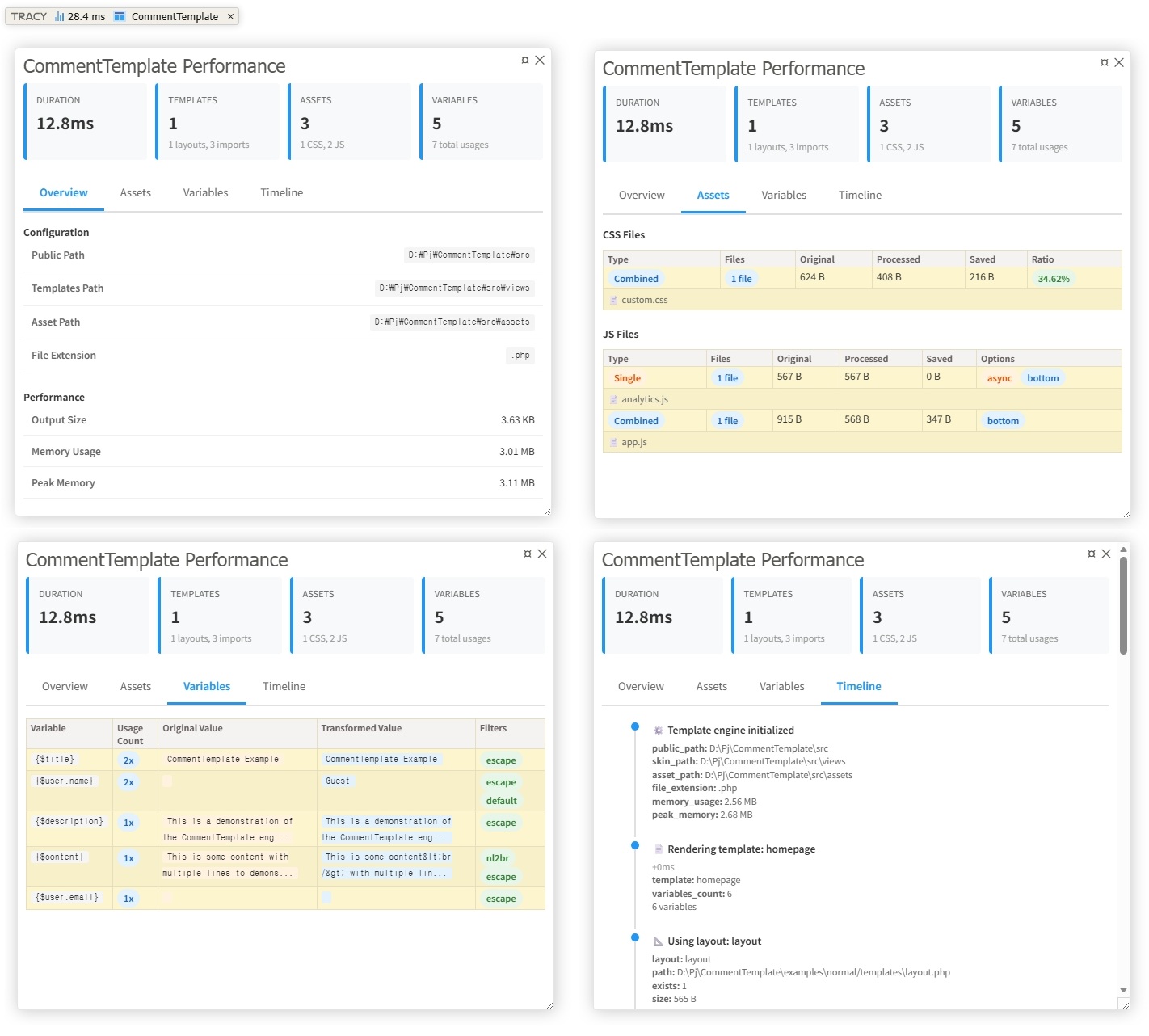
CommentTemplate includes integration with Tracy Debugger for development logging and debugging.
Installation
composer require tracy/tracy
Usage
<?php
use KnifeLemon\CommentTemplate\Engine;
use Tracy\Debugger;

// Enable Tracy (must be called before any output)
Debugger::enable(Debugger::DEVELOPMENT);

// Use CommentTemplate as normal - logging happens automatically
$template = new Engine();
$template->setPublicPath(__DIR__);
$template->setSkinPath('templates');
$template->setAssetPath('assets');

$template->render('homepage', ['title' => 'Hello World']);
Debug Panel Features
CommentTemplate adds a custom panel to Tracy's debug bar with four tabs:
- Overview: Configuration, performance metrics, and counts
- Assets: CSS/JS compilation details with compression ratios
- Variables: Original and transformed values with applied filters
- Timeline: Chronological view of all template operations
What Gets Logged
- Template rendering (start/end, duration, layouts, imports)
- Asset compilation (CSS/JS files, sizes, compression ratios)
- Variable processing (original/transformed values, filters)
- Asset operations (base64 encoding, file copying)
- Performance metrics (duration, memory usage)
Note: Zero performance impact when Tracy is not installed or disabled.
See examples/tracy/ and examples/flightphp/ for complete working examples.
License
MIT License. See LICENSE file for details.
Contributing
- Fork the repository
- Create a feature branch
- Make your changes
- Add tests
- Submit a pull request