
josephcrowell / wn-gdpr-plugin

Winter CMS plugin to make websites GDPR and ePrivacy compliant
Package info
github.com/josephcrowell/wn-gdpr-plugin
Language:HTML
Type:winter-plugin
pkg:composer/josephcrowell/wn-gdpr-plugin
Requires
None
Requires (Dev)
None
Suggests
None
Provides
None
Conflicts
None
Replaces
This package is auto-updated.
Last update: 2026-10-12 02:08:40 UTC
README
Winter CMS plugin to make websites GDPR compliant.
This is a Winter CMS fork of OFFLINE's October CMS GDPR plugin.
The Composer package josephcrowell/wn-gdpr-plugin replaces offline/oc-gdpr-plugin.
The plugin uses the JosephCrowell.GDPR identifier and josephcrowell.gdpr:: resource namespace.
Winter's plugin replacement mapping provides compatibility aliases for OFFLINE.GDPR.
Version 2.2.31 renames the three GDPR database tables and saved-settings keys from offline_gdpr_* to josephcrowell_gdpr_*, preserving their records and values. Run php artisan winter:up from your Winter CMS root before using the updated plugin. Historical migrations retain the upstream names; fresh installations run those migrations before the rename.
The rename migration refuses to overwrite existing destination tables or settings keys. Resolve any reported source/destination conflicts before retrying the upgrade. Its rollback restores the upstream names.
Translated model types and model-specific retention settings retain their upstream identifiers to preserve existing data.
Permission codes use the josephcrowell.gdpr.* namespace. Existing backend users and roles granted offline.gdpr.* permissions must be reassigned the corresponding new permissions.
The upstream cleanup registration event remains supported for existing integrations.
Features
-
Wide cookie banner with group-level choices, accent colour schemes, and an optional cookie illustration (integrated from GDPR Plus).
Cookie Consent Manager
This plugin provides two simple components to make your Winter CMS installation GDPR compliant.
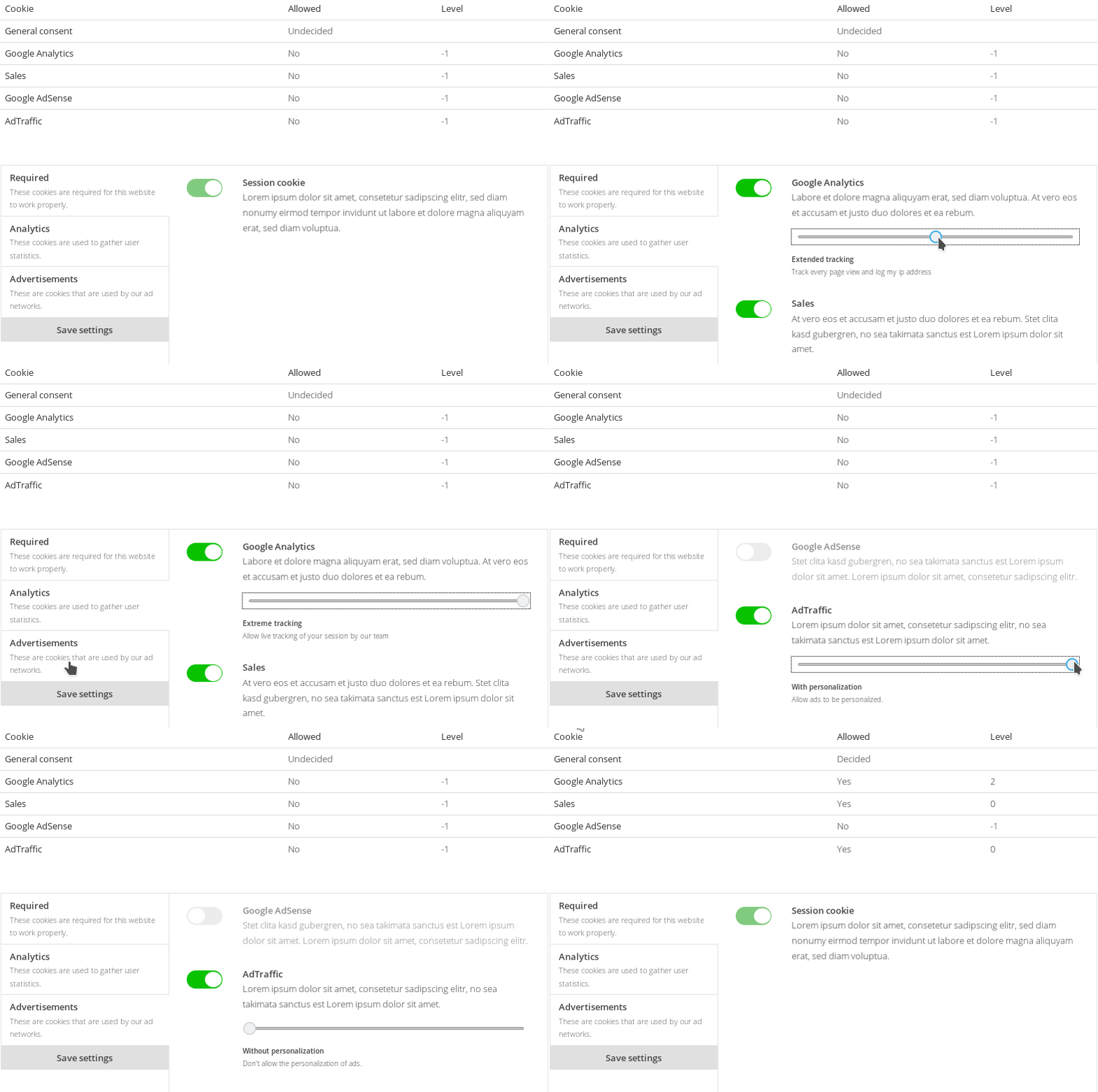
Quick start
- Add Winter CMS's Snowboard framework to every theme layout that uses the GDPR components:
{% snowboard all %}
Place this tag before any plugin or custom scripts that call Snowboard. The all option loads
the AJAX request, HTML data-attribute handling, and extras modules. The base {% snowboard %}
tag alone does not load these modules. Winter CMS already loads Snowboard in the backend;
this step is required for your frontend theme layouts.
-
Render Winter's component assets in your layout. Put
{% styles %}in the<head>and{% scripts %}before</body>, after the Snowboard tag. -
Define your cookie groups and cookies via the backend settings page. You can also import a example preset by running
php artisan gdpr:import -
Place the
cookieManagercomponent on acookies.htmpage -
Place the
cookieBannercomponent on all of your layouts. Use the configuration listed below.
[cookieBanner]
include_css = 1
update_partial = "gdpr"
update_selector = "#gdpr-reload"
cookie_manager_page = "cookies"
==
{% component 'cookieBanner' %}
- Create a new
gdpr.htmpartial. Include the partial in your layouts as shown below. Note the#gdpr-reloadwrapper.
<div id="gdpr-reload">
    {% partial 'gdpr' %}
</div>
- Inside your
gdpr.htmpartial you can now conditionally include your dependencies by querying the cookie'scode.
{% if gdprCookieAllowed('google-analytics') %}
    <!-- Include analytics code here -->
{% endif %}
Cookie manager
The cookieManager component gives a visitor more control over the cookies your site is using.
This component can simply be placed on a page and needs no further configuration.
title = "Cookies"
url = "/cookies"
layout = "default"
is_hidden = 0

[cookieManager]
==
{% component 'cookieManager' %}
Standalone frontend styling
The cookie banners and cookie manager ship their own compiled Tailwind CSS 4.3 and daisyUI 5 styles. They keep the original layout, light-mode colours, spacing, toggle appearance, and responsive breakpoints without Bootstrap, a CSS reset, or any particular theme. You do not need to install Tailwind or daisyUI in your theme, and no CDN or runtime CSS compiler is used.
Leave include_css = 1 (the default) on these components. The shared UI stylesheet and each
component's styles are registered automatically and rendered by {% styles %}. Controls use
the gdpr-ui- daisyUI prefix, theme variables are local to .gdpr-ui, and Tailwind's global
preflight is not included, so the plugin does not reset or theme the rest of your site.
Setting include_css = 0 opts out of the bundled styling; in that case you must supply all
component styles yourself. Existing gdpr-banner__* and gdpr-cookie-manager__* classes remain
available for custom partials and CSS. Cookie toggles now use the native, keyboard-accessible
checkbox class gdpr-cookie-manager__toggle instead of the global tgl / tgl-btn classes.
If your theme overrides the default component partials, update those copies to include the
.gdpr-ui root and the new control classes, or remove the overrides to use the shipped partials.
Automatic light/dark mode
The bundled styles use daisyUI's native default: true light theme and prefersdark: true
dark theme. daisyUI generates the prefers-color-scheme media query, so the components follow
the visitor's operating-system preference and update automatically if it changes. This works
without JavaScript; the plugin adds no theme switch, detection script, or stored theme preference.
Theme colours are inherited when the surrounding page already applies a daisyUI theme with
data-theme, including custom themes such as sonicde-light and sonicde-dark. An explicit
data-theme="light" or data-theme="dark" on a .gdpr-ui component root can also override the
system preference for that component. These are optional integrations: the bundled automatic
themes work on their own, without a theme dependency, and do not change the host page's theme.
Rebuilding and testing frontend assets
The compiled CSS is included in the plugin, so these commands are only needed for development.
Run them from plugins/josephcrowell/gdpr, not from the CMS or theme directory:
npm ci
npm run build:css
npm test
npx playwright install chromium
npm run test:frontend
Edit assets/src/base.css, assets/src/banner.css, assets/src/manager.css,
assets/src/wide.css, and assets/src/info.css, then rebuild.
The build writes assets/frontend/ui.css, assets/cookieBanner/banner.css,
assets/cookieManager/manager.css, assets/cookieBannerWide/banner.css, and assets/backend/info.css. Do not edit those
generated files directly. Browser tests render the real component partials on an otherwise
unstyled page and compare the original banner and manager against their existing mobile,
tablet, and desktop screenshot references. They also check the wide banner, form interactions,
keyboard access, automatic light/dark mode, and isolation from host-page CSS. The fixture
renderer uses PHP and the parent Winter installation's Composer dependencies.
Run ../../../vendor/bin/phpunit --no-configuration tests from the plugin directory to test
storage compatibility and the wide banner's server-side consent handlers using in-memory SQLite.
Wide cookie banner
The GDPR Plus wide-banner functionality is included directly in JosephCrowell.GDPR. No
separate Hounddd.GdprPlus or OFFLINE.GDPR installation is required. Composer declares
both packages replaced, but Winter's runtime replacement map retains only OFFLINE.GDPR
for legacy migrations and compatibility aliases: Winter does not support replacing multiple
plugins at runtime. If the separate Hounddd.GdprPlus plugin is still installed, disable or
remove that plugin before using the built-in wide banner to avoid duplicate component registrations.
Use cookieBannerWide instead of cookieBanner in your layout, not alongside it:
[cookieBannerWide]
include_css = 1
bg_cookie = 1
color_scheme = "blue"
cookie_manager_page = "cookies"
update_partial = "gdpr"
update_selector = "#gdpr-reload"
==
{% component 'cookieBannerWide' %}
It inherits the ordinary banner's configuration, consent cookie, logging, accept/decline handlers, and soft-reload behaviour, and adds:
- A responsive, native modal dialog with group toggles and Save my choice.
bg_cookie: display the bundled cookie illustration (default0).color_scheme: one ofblue(default),red,orange,amber,yellow,lime,green,emerald,teal,cyan,sky,indigo,violet,purple,fuchsia,pink, orrose.- Automatic suppression when consent is already recorded or the current page contains
cookieManager, including a manager registered under a custom alias. - A settings-page dropdown restricted to pages that actually contain
cookieManager.
Optional groups start selected only if they contain an active cookie preset (initial_status).
Like the upstream wide banner, saving selected groups or accepting all applies their active
cookie presets at the maximum level. Required cookies are always included server-side, even
if their disabled toggles are omitted from the submitted form. Use the cookie-manager page
for individual cookie/level choices. Invalid group-ID payloads are rejected before consent changes.
The dialog uses native JavaScript and Snowboard, with no jQuery or Bootstrap. Successful requests update the configured partial and close the dialog; failed requests leave it open for retry. Escape closes it without recording consent. It uses the same daisyUI automatic light/dark mode as the other components, with no additional theme switch or detection script.
Customise the accent colours and toggle size with the existing GDPR Plus CSS variables in CSS loaded after the plugin assets:
.gdpr-bannerwide__wrapper {
    --color-background: #bfdbfe;
    --color-border: #3b82f6;
    --color-accent: #1d4ed8;
}
.gdpr-bannerwide {
    --toggle-size: 20px;
    --toggle-speed: .25s;
}
Default toggle sizes are 20px below 768px, 22px at 768px, 24px at 1024px, and 28px at 1280px.
Custom partials retain the cookiebannerwide partial names and gdpr-bannerwide__* class
prefix, but should use the shipped native checkbox/dialog markup and data-gdpr-banner-dismiss
success marker rather than the old jQuery success callbacks.
English and French text is provided under josephcrowell.gdpr::lang.components.bannerwide.
Site overrides belong in lang/en/josephcrowell/gdpr/lang.php (or the equivalent locale path):
return [
    'components' => [
        'bannerwide' => [
            'title' => 'We use cookies.',
            'message' => 'Your customised cookie notice.',
        ],
    ],
];
The message supports trusted HTML from translation files. Existing GDPR Plus installations
should move their hounddd/gdprplus translation overrides to this namespace. No database
migration or change to existing consent data is needed for the wide-banner integration.
Cookie presets
It is possible to define your cookie groups and cookies in a yaml file and import them using the gdpr:import console command.
This allows you to define cookies once and re-use them between installations.
php artisan gdpr:import --path=plugins/josephcrowell/gdpr/assets/presets/example_en.yaml --replace
You can find example definitions in the assets/presets directory of this plugin.
You can optionally use the --replace flag to remove all existing cookie data and replace it with your preset.
If no path is specified, the plugin will load all presets from the configured presets_path and ask you which preset to import.
You can change the path where presets are loaded from by changing the josephcrowell.gdpr::config.presets_path config entry.
To do this, create the file config/josephcrowell/gdpr/config.php and return your custom path:
<?php
return [
    'presets_path' => '/path/to/your/presets',
];
cookieBanner

The cookieBanner component displays a cookie banner on the first page view. There the user has the possibility to
enable and disable cookies that your website uses (defined via Winter's backend settings).
These settings are stored and made available in your partials using the gdprCookieAllowed helper. With this helper
you can check for the user's consent and optionally include your resources.
Installation
- Load Snowboard in your theme layouts with
{% snowboard all %}as described in the quick start. - Define your cookie groups and cookies via the Backend settings
- Add the
cookieBannercomponent to all your layouts.
[cookieBanner]
include_css = 1
update_partial = "gdpr"
update_selector = "#gdpr-reload"
cookie_manager_page = "cookies"
==
{% component 'cookieBanner' %}
Log
You can enable a log via the backend settings so every cookie banner request gets logged. This is useful to get an idea of the number of users that do not accept a cookie request and therefore never end up in your analytics data.
The log only contains the user's session id and their decision.
Properties
If you don't want to include the default css use include_css = 0 when including your component.
cookieManager page
Set the property cookie_manager_page to the page that contains the cookieManager component.
A Advanced Settings link will be placed on the cookieBar that links to this page. This enables the user to
further define what cookies are allowed.
Twig Helpers
gdprCookieAllowed($code, $minLevel = 0)
Check if a certain cookie is allowed to be included. You can optionally pass a cookie level to check if the user has accepted a specific level of this cookie.
{% if gdprCookieAllowed('google-analytics') %}
    <!-- Include Analytics Code here -->
{% endif %}

{% if gdprCookieAllowed('google-analytics', 3) %}
    <!-- Include advanced Level 3 Analytics Code here -->
{% endif %}
gdprAllowedCookieLevel($code)
Get the max allowed level for a certain cookie. A return value of -1 means the cookie is not allowed at all. A
value of 0 or higher means the cookie is allowed with the returned level value.
{% if gdprAllowedCookieLevel('google-analytics') >= 3 %}
    <!-- Include advanced Level 3 Analytics Code here -->
{% endif %}
gdprIsUndecided()
Check if the user has made a decision about the cookies yet. This will return true on the second page view if the
user did not interact with the cookieBanner (silent opt-in).
Data retention
The data retention functionality enables you to delete old plugin data after a specified amount of days.
You can specify the data retention policy for each plugin via Winter's backend settings.
Important: To automatically delete old data make sure you have set up the Task Scheduler correctly.
Register your plugin
To register your plugin you have to listen for the josephcrowell.gdpr::cleanup.register event in your Plugin's boot method.
    public function boot()
    {
        \Event::listen('josephcrowell.gdpr::cleanup.register', function () {
            return [
                'id'     => 'your-contact-form-plugin',
                'label'  => 'Custom Contact Form Plugin',
                'models' => [
                    [
                        'label'   => 'Contact form messages',
                        'comment' => 'Delete logged contact form messages',
                        'class'   => MessageLog::class,
                    ],
                    [
                        'id'      => 'vendor-plugin-spam-messages',  // The ID is required if you specify a closure. This should be unique to your plugin.
                        'label'   => 'SPAM-Messages',
                        'comment' => 'Delete blocked SPAM messages',
                        'closure' => function (Carbon $deadline, int $keepDays) {
                            // Delete your old data here
                        },
                    ],
                ],
            ];
        });
    }
You have to specify the following data:
| key | information |
|---|---|
| id | A unique identifier of your plugin |
| label | A human readable label for your plugin |
| models | An array of all your data collecting models |
As models you have to specify an array with the following data:
| key | information |
|---|---|
| id | A unique string to identify this model. Use only _-a-z0-9. Only required if you specify a closure. (ex. offline-gdpr-spam-messages) |
| label | A human readable label for the backend switch form widget |
| comment | A human readable comment for the backend switch form widget |
| closure | A closure that is called when the cleanup job is run. Make sure to also define an id. |
| class | A model class that defines a gdprCleanup method |
You have to specify either a closure or a class value. If both are specified the closure value will be used.
Cleanup method
You can either specify a closure or a model class that defines a gdprCleanup method. Both have the same
signature:
    public function gdprCleanup(\Carbon\Carbon $deadline, int $keepDays)
    {
        self::where('created_at', '<', $deadline)->each(function (self $item) {
            $item->delete();
        });
        // or
        // self::where('created_at', '<', $deadline)->delete();
    }
This method is called whenever the cleanup job is run. $deadline contains a Carbon instance.
All data older than this date has to be deleted. $keepDays contains the number of days
that $deadline is in the past.
Make sure to use an each/delete loop if your model makes use of deleting/deleted model events.
Cleanup command
You can trigger the cleanup on demand via
php artisan gdpr:cleanup