
jardis / dev-skills

Composer plugin that installs Jardis Skills and aggregates AGENTS.md for AI-assisted development (Claude Code, Codex, Cursor, GitHub Copilot, Gemini CLI)
Requires
- php: >=8.3
- composer-plugin-api: ^2
Requires (Dev)
- composer/composer: 2.10.3
- phpstan/phpstan: 2.2.3
- phpunit/phpunit: 11.5.55
- squizlabs/php_codesniffer: 3.13.6
Suggests
None
Provides
None
Conflicts
None
Replaces
None
- dev-main
- v1.41.0
- v1.40.0
- v1.39.0
- v1.38.1
- v1.38.0
- v1.37.0
- v1.36.0
- v1.35.0
- v1.34.0
- v1.33.0
- v1.32.0
- v1.31.1
- v1.31.0
- v1.30.0
- v1.29.0
- v1.28.0
- v1.27.0
- v1.26.0
- v1.25.1
- v1.25.0
- v1.24.0
- v1.23.0
- v1.22.3
- v1.22.2
- v1.22.1
- v1.22.0
- v1.21.1
- v1.21.0
- v1.20.0
- v1.19.14
- v1.19.13
- v1.19.12
- v1.19.11
- v1.19.10
- v1.19.9
- v1.19.8
- v1.19.7
- v1.19.6
- v1.19.5
- v1.19.4
- v1.19.3
- v1.19.2
- v1.19.1
- v1.19.0
- v1.18.0
- v1.17.0
- v1.16.0
- v1.15.0
- v1.14.1
- v1.14.0
- v1.13.0
- v1.12.0
- v1.11.0
- v1.10.0
- v1.9.2
- v1.9.1
- v1.9.0
- v1.8.2
- v1.8.1
- v1.8.0
- v1.7.1
- v1.7.0
- v1.6.1
- v1.6.0
- v1.5.0
- v1.4.0
- v1.3.6
- v1.3.5
- v1.3.4
- v1.3.3
- v1.3.2
- v1.3.1
- v1.3.0
- v1.2.9
- v1.2.8
- v1.2.7
- v1.2.6
- v1.2.5
- v1.2.4
- v1.2.3
- v1.2.2
- v1.2.1
- v1.2.0
- v1.1.0
- v1.0.7
- v1.0.6
- v1.0.5
- v1.0.4
- v1.0.3
- v1.0.2
- v1.0.1
- v1.0.0
- dev-develop
- dev-feature/261025_skills_zugriff_raus_nachzug
- dev-feature/261025_zugriff_raus_doku2
- dev-feature/261025_zugriff_raus_doku
- dev-feature/261003_profile-core-jardis
- dev-feature/261001_acceptance-fixes
- dev-feature/261001_docs-release
- dev-feature/261001_bodies-en
- dev-feature/261001_smoke-fixes
- dev-feature/260930_process
- dev-feature/260930_knowledge
- dev-feature/260930_addons
- dev-feature/260930_installer-core
- dev-feature/260930_repo-hygiene
This package is auto-updated.
Last update: 2026-10-25 13:27:22 UTC
README
Gives your AI coding agent the rules and APIs of Jardis. Jardis is the Domain-Driven Design platform for PHP: you model your domain, and Jardis generates the production-ready hexagonal code. This Composer plugin installs 34 bundled skills, the skills of every Jardis package you use, an AGENTS.md process router and reviewer agent files into your project, so Claude Code, Codex, Cursor, GitHub Copilot and Gemini CLI find them. No configuration is needed.
Part of Jardis — the Domain-Driven Design platform for PHP. You model your domain; Jardis generates the production-ready hexagonal code (DTOs, Command/Query handlers, repositories, persistence). This plugin keeps your AI agent in sync with the rules and APIs that generated code follows.
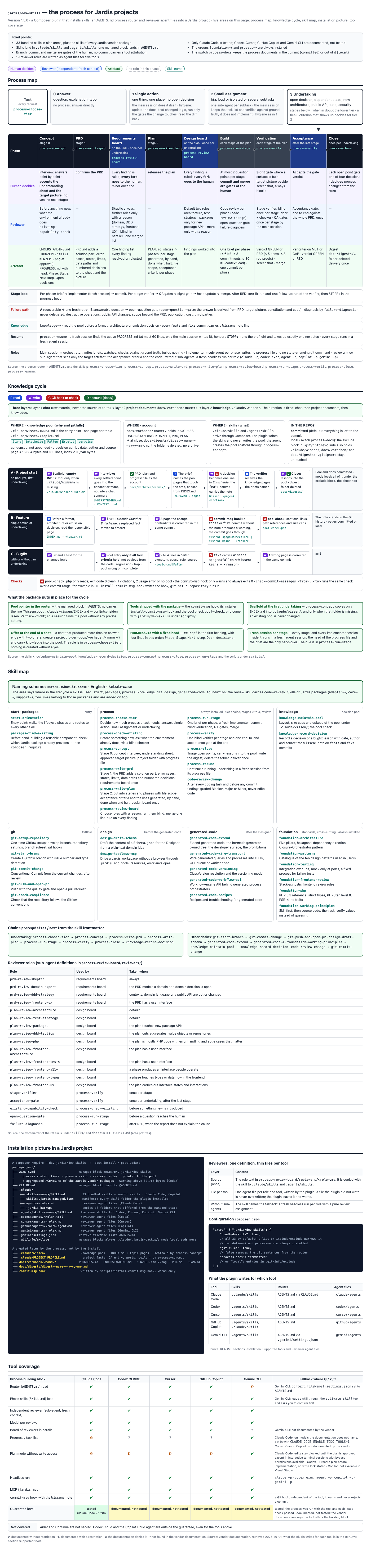
The same overview as a web page: overview.html.
The overview in German: overview.de.html.
What does the plugin do?
After composer install or composer update, the plugin does the following in your project root:
- Skills. It copies the bundled skills of the installation profile (all 34 in the profile
jardis, 25 in the profilecore, see Installation profile) and every skill of ajardis*vendor package (vendor/<vendor>/<package>/.claude/skills/<name>/) into two folders:.claude/skills/and.agents/skills/. AGENTS.md. It writes one managed block intoAGENTS.md. The block opens with a process router (work tiers, the phase-to-skill table, a pointer to the knowledge pool, optionally the git rules) and then lists every Jardis vendor package as a short block (what it is, when to use it, which skills to load and the docs URL), not as its fullAGENTS.md. A project that is itself ajardis*package gets no block (seeagents-md).CLAUDE.md. It adds a managed block that imports@AGENTS.md(not withagents-md=none)..gemini/settings.json. It listsAGENTS.mdincontext.fileName(only withgeminiinhosts; not withagents-md=none).- Reviewer agents. It writes the 19 reviewer roles of the
process-review-boardskill (17 in the profilecore) as agent files for the tools named inhosts(default: Claude Code only; see Reviewer agent files). - Manifest. It records every skill folder it installed in
.claude/skills/.jardis-managed.json; update and uninstall touch only what the manifest lists. - Git exclude block. It writes a managed block into
.git/info/exclude(seeprocess-docs).
The add-ons — the CLAUDE.md block, the Gemini entry, the reviewer agent files and the exclude block — only warn when they fail; they never stop the install.
Commit the result. AGENTS.md and .agents/skills/<package>/ change on every install or require of a Jardis package (adapters too, for example after set_stack_selection).
Commit them together with composer.lock, as you commit the lock file.
.agents/ is not ignored: the folder is part of the project state.
Agent files under .claude/agents that are not reviewer shells of the plugin are left unchanged and reported in one summary line.
The bundled skills also contain a development process: tier choice, concept, PRD, plan, review board, stage run, verification and closing. Two tools for it ship with the package: the knowledge pool checker and the commit-msg hook (see Process tools).
Supported tools
| Tool | Status | What the plugin writes for it | Shells with hosts: [...] |
|---|---|---|---|
| Claude Code | tested | .claude/skills, AGENTS.md imported from CLAUDE.md, .claude/agents |
"claude" (default) |
| Codex | documented, not tested | .agents/skills, AGENTS.md, .codex/agents |
"codex" |
| Cursor | documented, not tested | .agents/skills, AGENTS.md, .cursor/agents |
"cursor" |
| GitHub Copilot | documented, not tested | .agents/skills and .claude/skills, AGENTS.md, .github/agents |
"copilot" |
| Gemini CLI | documented, not tested | .agents/skills, .gemini/settings.json with AGENTS.md, .gemini/agents |
"gemini" |
.agents/skills, AGENTS.md and the CLAUDE.md import are the layer all tools share; they are always written. Only the agent files (…/agents) and the Gemini entry depend on hosts.
tested means: the process was run with the tool and each check listed below passed. documented, not tested means: the vendor documentation says the tool reads that location, we quote the passage below, and we have not run the process with that tool. Other tools are not covered.
Out of scope, even for the tools above: Codex Cloud and the Copilot cloud agent.
Claude Code — tested
Claude Code 2.1.286, runs on 2026-09-30 and 2026-10-01. Each of these checks passed:
- Tier choice: the session names a tier with a reason and loads the entry skill of that tier without naming it in the answer.
- Progress head: the progress file carries its head for each phase, in order, and the pool check is green.
- Failing check: a red verification leads to one fix run and then to green.
- Fresh verifier: the verifier receives only the target artefact, the acceptance criteria and the code.
- Questions: at most two points per question; an open question ends in a stop marker or in a gate.
- Closing: a digest is written, the work folder is archived before the delivery (moved to
tmp/archiv/<name>/), lessons are recorded throughknowledge-record-decisionwith a note. - Hook: the
commit-msghook warns (exit code 0) on afeat:commit without aWissen:note and stays silent with one. Checked by deterministic hook tests, not by a smoke run. - Honesty: the verdict names every deviation.
- Git gates: the session creates no commit, merge or branch of its own, asks for the commit at each gate, and adds no tool attribution.
Documentation read for the AGENTS.md import (no test claim):
| File kind | Quote | URL | Retrieved |
|---|---|---|---|
| AGENTS.md | “By default, Claude reads AGENTS.md only when you have no CLAUDE.md in your working directory or above it.”; “Reading AGENTS.md directly requires Claude Code v2.1.277 or later.”; “A CLAUDE.md containing @AGENTS.md: you can leave it.” | https://code.claude.com/docs/en/memory | 2026-10-01 |
Re-checked before each release.
Codex — documented, not tested
| File kind | Quote | URL | Retrieved |
|---|---|---|---|
| AGENTS.md | “Codex concatenates files from the root down, joining them with blank lines.”; “stops adding files once the combined size reaches the limit defined by project_doc_max_bytes (32 KiB by default)” | https://learn.chatgpt.com/docs/agent-configuration/agents-md | 2026-10-01 |
| Skills | “For repositories, Codex scans .agents/skills in every directory from your current working directory up to the repository root.” | https://learn.chatgpt.com/docs/build-skills | 2026-10-01 |
| Sub-agents | “add standalone TOML files under ~/.codex/agents/ for personal agents or .codex/agents/ for project-scoped agents.”; “Every standalone custom agent file must define: name description developer_instructions” | https://learn.chatgpt.com/docs/agent-configuration/subagents | 2026-10-01 |
Re-checked before each release.
With many vendor packages the managed AGENTS.md block can grow past 32 KiB. The router stands first in the block, ahead of the aggregated package content. The short package blocks keep the file far below that; the plugin prints a warning when AGENTS.md exceeds 32,768 bytes only if codex is listed in hosts, and still writes the file.
Cursor — documented, not tested
| File kind | Quote | URL | Retrieved |
|---|---|---|---|
| AGENTS.md | “You can place AGENTS.md files in any subdirectory of your project, and they will be automatically applied when working with files in that directory or its children.” | https://cursor.com/docs/rules | 2026-10-01 |
| Skills | “A .cursor/skills/ (or .agents/skills/) folder anywhere inside your repository is picked up” | https://cursor.com/docs/skills | 2026-10-01 |
| Sub-agents | “Create a subagent file at .cursor/agents/verifier.md with YAML frontmatter (name, description) followed by the prompt.”; “Model to use: inherit or a specific model ID.” | https://cursor.com/docs/subagents | 2026-10-01 |
Re-checked before each release.
GitHub Copilot — documented, not tested
| File kind | Quote | URL | Retrieved |
|---|---|---|---|
| AGENTS.md | “You can create one or more AGENTS.md files, stored anywhere within the repository. When Copilot is working, the nearest AGENTS.md file in the directory tree will take precedence.” | https://docs.github.com/en/copilot/how-tos/copilot-on-github/customize-copilot/add-custom-instructions/add-repository-instructions | 2026-10-01 |
| Skills | “Project skills, stored in your repository (.github/skills, .claude/skills, or .agents/skills)” | https://docs.github.com/en/copilot/concepts/agents/about-agent-skills | 2026-10-01 |
| Custom agents | “This will open a template agent profile called my-agent.agent.md in the .github/agents directory of your target repository.” | https://docs.github.com/en/copilot/how-tos/copilot-on-github/customize-copilot/customize-cloud-agent/create-custom-agents | 2026-10-01 |
Re-checked before each release.
Copilot reads both .claude/skills and .agents/skills (quote above), and the plugin fills both with the same skills. Copilot may therefore show an entry twice; we have not verified this.
Gemini CLI — documented, not tested
| File kind | Quote | URL | Retrieved |
|---|---|---|---|
| AGENTS.md | “While GEMINI.md is the default filename, you can configure this in your settings.json file.”; “use the context.fileName property” | https://geminicli.com/docs/cli/gemini-md/ | 2026-10-01 |
| Skills | “Workspace skills: Located in .gemini/skills/ or the .agents/skills/ alias.” | https://geminicli.com/docs/cli/skills/ | 2026-10-01 |
| Sub-agents | “Project-level: .gemini/agents/*.md (Shared with your team)”; “subagents cannot call other subagents” | https://geminicli.com/docs/core/subagents/ | 2026-10-01 |
Re-checked before each release.
Installation
composer require --dev jardis/dev-skills
Requirements: PHP >= 8.3, Composer >= 2, and an allow-plugins entry for the plugin, so that Composer is allowed to run it:
{
    "config": {
        "allow-plugins": {
            "jardis/dev-skills": true
        }
    }
}
After installation you will see a line such as:
Jardis Skills installed: <N> skills, <M> AGENTS.md aggregated. See https://docs.jardis.io/en/skills
From that point on, your project contains (excerpt):
your-project/
├── .claude/
│   ├── skills/
│   │   ├── .jardis-managed.json       ← manifest: what the plugin installed
│   │   ├── foundation-architecture/   ← bundled skill
│   │   ├── process-concept/           ← bundled skill
│   │   ├── adapter-cache/             ← from vendor/jardisadapter/cache/
│   │   └── ...
│   └── agents/                        ← reviewer agent files (Claude Code)
├── .agents/
│   └── skills/                        ← the same skills for the other tools
├── .codex/agents/  .cursor/agents/  .github/agents/  .gemini/agents/
├── .gemini/settings.json              ← lists AGENTS.md in context.fileName
├── AGENTS.md                          ← process router + aggregated package AGENTS.md
└── CLAUDE.md                          ← imports @AGENTS.md
The plugin acts on composer install and composer update (Composer's post-install and post-update events). In Composer's global context (composer global ...) it writes and deletes nothing.
--no-plugins
composer install --no-plugins loads no plugin, so nothing happens and the plugin cannot print a message. To catch up, run composer install once without the flag.
Update and downgrade
No downgrade. A downgrade below 1.4.0 is not supported. Version 1.3.x does not know the manifest .claude/skills/.jardis-managed.json; on uninstall it removes skill folders by name prefix (adapter-, core-, support-, tools-, schema-, plan-, platform-, rules-). From 1.4.0 on, a guard applies: if the manifest was written by a newer plugin version (or a newer manifest schema), an older plugin changes nothing and prints a warning. This holds for install and uninstall. A manifest the plugin cannot read is ignored with a warning.
Update from 1.3.x. Version 1.4.0 renamed 18 bundle skills to a scheme of area prefixes (for example rules-architecture is now foundation-architecture; RenamedSkills lists all 18). The update migrates as follows:
- Each old skill folder the plugin installed in
.claude/skillsis replaced by a small redirect skill under the old name that points to the new name (as long as yourbundled-skillsconfig still selects it). The console lists the old-to-new pairs. The redirect skills are removed in 2.0.0; use the new names before then. - Old
bundled-skillsglobs keep working: a glob that matches an old name also selects the name the skill carries now (platform-*selects the fivegenerated-code-*skills). - 1.3.x wrote no manifest. In the first run the fixed list of the 18 old names decides what the plugin may replace, never a name prefix. Every old folder is copied to
.claude/.jardis-backup/before it is replaced, so local edits survive. - The migration takes effect only in the second Composer run after the update. The update run itself is still driven by the old plugin code and does not migrate. After
composer update jardis/dev-skills, runcomposer installonce more. - The default of
bundled-skillschanged: without the key, all 34 skills are installed (1.3.x installed only three). From 1.7.0 on, a fresh project without a Jardis package gets the 25 skills of the profilecore; an update keeps all 34 (see Installation profile).
Windows is not tested. The continuous integration runs on Linux only (ubuntu-latest).
Symlinked skills folder. If .claude/skills or .agents/skills is a symlink to a folder outside the project, the install writes into that folder. The removal of deselected skills and the uninstall do not follow the link: they leave the folder and its content in place and print a warning. Clean such a folder up by hand. A single skill folder that is a symlink is treated the same way when deselected skills are removed and on uninstall: it is neither backed up nor removed, and the plugin warns.
Which skills are installed?
The 34 bundled skills come with the plugin. Their names start with the prefix of their area. The column Profile says which installation profile installs the skill: core skills are installed in both profiles, jardis skills only in the profile jardis.
| Prefix | Profile | Skills |
|---|---|---|
start- |
jardis |
start-orientation — entry point, routes into the other skills |
packages- |
core |
packages-find-existing — the package catalog (see Package catalog) |
design- |
jardis |
design-draft-schema, design-headless-mcp, design-model-capabilities |
generated-code- |
jardis |
generated-code-extend, generated-code-wire-transport, generated-code-versioning, generated-code-workflow-api, generated-code-recipes |
foundation- |
core |
foundation-architecture, foundation-patterns, foundation-testing, foundation-frontend-review, foundation-php, foundation-working-principles |
git- |
core |
git-setup-repository, git-start-branch, git-commit-change, git-push-and-open-pr, git-check-compliance |
knowledge- |
core |
knowledge-maintain-pool, knowledge-record-decision |
process- |
core |
process-choose-tier, process-concept, process-write-prd, process-write-plan, process-review-board, process-run-stage, process-verify, process-close, process-resume, process-check-existing |
code-review- |
core |
code-review-change |
Skills of Jardis packages are added on top. The plugin scans vendor/jardis*/*/.claude/skills/*/SKILL.md; those packages use the prefixes adapter-, core-, support- and tools-. If a bundled skill and a vendor skill have the same name, the bundled skill wins and the console shows a warning.
Skills you wrote yourself are not touched, as long as no installed skill has the same name: the plugin removes and replaces only folders listed in the manifest.
Which of the bundled skills are installed is controlled by bundled-skills (next section).
Configuring bundled skills
The mandatory groups foundation-* and process-* are always installed. Everything else is controlled via composer.json:
{
    "extra": {
        "jardis/dev-skills": {
            "bundled-skills": true
        }
    }
}
Accepted values:
| Value | Effect |
|---|---|
Key absent, or true |
All 34 bundled skills (default) |
false, or [], or { "include": [] } |
Only the mandatory groups foundation-* and process-* |
["git-*", "design-*"] |
Whitelist: the matching skills plus the mandatory groups |
{ "include": [...], "exclude": [...] } |
include first, then exclude; an absent include means all skills; the mandatory groups are always added |
Anything else (for example 42) |
Warning, treated as false |
An exclude glob that hits a mandatory skill has no effect and prints a warning. Skills of vendor packages are not affected by bundled-skills.
Examples:
"bundled-skills": ["git-*"]
Installs the git-* skills plus foundation-* and process-*.
"bundled-skills": {
    "include": ["generated-code-*", "design-*"],
    "exclude": ["design-headless-mcp"]
}
Installs the generated-code-* skills and design-draft-schema, plus the mandatory groups.
"bundled-skills": {
    "exclude": ["git-*"]
}
Installs all bundled skills except the git-* skills (a missing include means all).
Pattern syntax: shell globs via fnmatch() — * matches anything, ? matches one character. No regex. Globs written for the 1.3.x names (platform-*, rules-*, do-*, schema-*, jardis-*) still work; see Update and downgrade.
Sync behavior: the config is the source of truth. If you narrow bundled-skills, the next composer install removes the deselected bundled skills from .claude/skills/ and .agents/skills/. A deselected folder that you changed locally is first copied to .claude/.jardis-backup/. Vendor skills and your own skills are left alone.
Invalid config (for example bundled-skills: 42): console warning, falls back to false (the mandatory groups only). No abort.
Installation profile (profile)
The bundled skills come in two profiles. core serves any PHP project: 25 skills, the process, the rules foundation-*, the git and knowledge skills and the package catalog. jardis adds the nine skills for projects that work with the Jardis Designer and its generated code (start-orientation, design-*, generated-code-*). Each skill declares its profile in the frontmatter field profile. The profile also decides which router section AGENTS.md carries (## PHP projects or ## Jardis projects) and how many reviewer agent files are written (17 or 19).
The plugin resolves the profile in every run, in this order:
extra."jardis/dev-skills"."profile"is"core"or"jardis": this value counts. Any other value prints a warning and the next step decides.- The project was installed with a plugin version before 1.7.0 (the manifest has no
profile, or the old skill folders of 1.3.x exist):jardis. The installation keeps every skill it had and stays in this state in every later run; only the keyprofilechanges it. - Otherwise detection: a package folder
vendor/jardis*/*other thanjardis/dev-skillsmeansjardis, no such folder (or novendorfolder) meanscore.
| Value | Skills | Router section | Reviewer agent files |
|---|---|---|---|
core |
25 | ## PHP projects |
17 (no plan-review-packages, no plan-review-ddd-tactics) |
jardis |
34 | ## Jardis projects |
19 |
A fresh project without a Jardis package therefore gets core. After composer require of a jardis* package the next composer install resolves jardis and installs the other nine skills; remove the package and the next run takes them out again (a changed folder is backed up first, as for any removed skill). The profile of the last run is recorded in the manifest. Reviewer agent files that already exist are never removed when the profile narrows. The key is independent of bundled-skills, which selects within the profile.
{
    "extra": {
        "jardis/dev-skills": {
            "profile": "core"
        }
    }
}
Git rules in the router (git-rules)
The key has three stances. By default (true) the process router in AGENTS.md states the git rules: branch, commit and merge are gates of the human, no tool attribution in commits, and Git flow (feature/* and fix/* from develop, hotfixes from main). With "delegated" the session creates the branch and the commits itself, after checking that every changed file belongs to the scope of the task; merge and push stay gates of the human, pull requests are merged by squash (one commit on the base, the branch is deleted on merge), and the Git flow and the ban on tool attribution hold unchanged. false takes these sentences out of the router; the git skills stay installed in every stance. Any other value than true, false or "delegated" keeps the strict rules on and prints a warning. The key is independent of bundled-skills and process-docs, and it enforces nothing: no hook rejects a commit and no settings.json rule is written.
{
    "extra": {
        "jardis/dev-skills": {
            "git-rules": "delegated"
        }
    }
}
git-start-branch creates a branch from origin/develop (hotfixes from origin/main), so it needs a remote named origin and a develop branch.
Reviewer shells per tool (hosts)
The key hosts lists the tools that get reviewer agent files. By default (no key) that is ["claude"]: only Claude Code is tested, so the plugin does not write files for the other four tools unasked. Values are "claude", "codex", "cursor", "copilot" and "gemini".
{
    "extra": {
        "jardis/dev-skills": {
            "hosts": ["claude", "codex"]
        }
    }
}
Sync behavior: the config is the source of truth, as for bundled-skills. If a host drops out of the list, the next composer install deletes the reviewer shells the manifest lists for it and removes its …/agents folder when that is empty. A file the plugin did not write stays, and so does the folder it lives in. "gemini" also decides the entry in .gemini/settings.json: without it the plugin does not create or change that file, and takes out an entry an earlier run added. .agents/skills, .claude/skills, AGENTS.md and the CLAUDE.md import do not depend on hosts; agents-md = none still keeps the Gemini entry out in any case.
Invalid config (not a list, or an unknown name such as "vim"): console warning, treated as ["claude"]. An empty list is valid and writes no shells.
Why: before this key every install wrote 19 shells for each of the five tools, 76 of them for tools nobody had tested, and each re-install reported the files of a project that already had them (exists and is not a reviewer shell of the plugin, 95 lines in one measured project). Ask for a tool only when you use it.
AGENTS.md in a Jardis package (agents-md)
The AGENTS.md of a Jardis package is a deliverable: dev-skills aggregates it into the projects that require the package. It must not become the workplace of the plugin. The key agents-md decides whether the plugin writes its managed block (router plus the aggregated AGENTS.md of the vendor packages) into the AGENTS.md of the project it runs in.
| Value | Effect |
|---|---|
aggregate |
The managed block is written into AGENTS.md, CLAUDE.md imports it and .gemini/settings.json lists it |
none |
No block in AGENTS.md, no import block in CLAUDE.md, no entry in .gemini/settings.json |
| Absent | none if the vendor part of the root package name begins with jardis (jardis/, jardiscore/, jardissupport/, jardisadapter/, jardistools/), otherwise aggregate |
| Anything else | Warning, treated like an absent key |
An explicit value beats the default. With none the plugin also takes out what an earlier run or release left behind: the managed block in AGENTS.md (text outside the markers stays byte for byte; an AGENTS.md that is empty afterwards and was created by the plugin is deleted), the import block in CLAUDE.md and the Gemini entry. Skills, reviewer agent files, the manifest and the exclude block are not affected. The key is independent of the other keys. Only the name of the root package counts; the plugin does not look for other signs of a package.
{
    "name": "jardiscore/kernel",
    "extra": {
        "jardis/dev-skills": {
            "agents-md": "none"
        }
    }
}
Where the generated files go (process-docs)
The files the plugin generates (the skill folders, AGENTS.md, the reviewer agent files, the manifest) are meant to be committed, so the whole team gets the same skills. The folder .claude/.jardis-backup/ is never meant for a commit; the exclude block lists it, and tmp/archiv/ (the archive of closed workshops), in both modes.
{
    "extra": {
        "jardis/dev-skills": {
            "process-docs": "local"
        }
    }
}
| Value | Effect |
|---|---|
committed (default, also when the key is absent) |
Everything is left to the commit; the exclude block holds only the backup folder and tmp/archiv/ |
local |
The exclude block in .git/info/exclude (besides the two folders above) also keeps the process document folders (docs/vorhaben/, docs/digests/, .claude/wissen/), the skill folders and files the plugin installed, and the manifest out of the commit |
| Anything else | Warning, treated as local |
At the close of a workshop, process-close archives the folder: docs/vorhaben/<name>/ is moved to tmp/archiv/<name>/ before the delivery (not deleted), so main carries only code, pool pages and the digest.
.gitignore is never touched by the plugin, and the plugin never stages, commits or untracks anything. Git cannot hide files it already tracks; the plugin lists those in a warning, and you run git rm --cached yourself. Without a Git repository at the project root (or with the project below the top of a larger work tree) the exclude block is not written and the plugin warns; the rest of the install runs normally.
Skill listing budget
Every skill description is part of the skill listing the agent sees in each session. Claude Code truncates that listing at 1 % of the context window and cuts each single description at 1,536 characters (see the Claude Code skills documentation, https://code.claude.com/docs/en/skills). The Claude Code setting for the listing budget is skillListingBudgetFraction. With 33 bundled skills, the skills of your Jardis packages and two skill folders, the listing can reach that limit; the tail of the trigger text or whole skills may then be missing. The bundled skills keep their descriptions short (new skills: at most 45 words, see docs/SKILL-FORMAT.md). If skills go missing from the listing, narrow bundled-skills.
Reviewer agent files
The 19 reviewer roles of process-review-board live in skills/process-review-board/reviewers/. For each role the plugin writes one agent file per tool listed in hosts (default claude); in the profile core the two roles plan-review-packages and plan-review-ddd-tactics get none (17 roles), and existing files are left in place:
| Tool | Path |
|---|---|
| Claude Code | .claude/agents/<role>.md |
| Codex | .codex/agents/<role>.toml |
| Cursor | .cursor/agents/<role>.md |
| GitHub Copilot | .github/agents/<role>.agent.md |
| Gemini CLI | .gemini/agents/<role>.md |
A file the plugin did not write itself is never overwritten; the plugin leaves it and reports all such files in one summary line. A link at the target path or in a folder on the way is never followed. On uninstall the plugin deletes the files it wrote and removes their folders when they are empty.
Process tools
Knowledge pool checker. scripts/pool-check.php is linked as vendor/bin/pool-check.php. It checks the page layout, links, path references and size caps of the pool in .claude/wissen/, and the progress head and plan caps of the work folders in docs/vorhaben/. It only reads.
vendor/bin/pool-check.php [--root=<dir>]
Exit code: 0 clean, 1 violations found, 2 usage error or no pool.
commit-msg hook. A feat: or fix: commit should carry a Wissen: note: Wissen: <page>#<section> or Wissen: keins – <reason>. The hook only warns; it never rejects a commit (it exits with 0 whatever the message says). Install it from the project root:
sh vendor/jardis/dev-skills/scripts/install-commit-msg-hook
It writes .husky/commit-msg, the hook in core.hooksPath, or .git/hooks/commit-msg, whichever your setup uses, and never changes a hook that already exists. For CaptainHook, GrumPHP and Lefthook it prints the snippet to add. The git-setup-repository skill runs the same installer. scripts/check-commit-messages <from>..<to> runs the same check over a commit range, for example in CI; it reports warned messages on stderr and still exits with 0.
Package catalog (packages-find-existing)
packages-find-existing is a discovery skill, installed in both profiles. It lists every Packagist-published Jardis package with a brief capability description, a "use when" trigger and the exact composer require command. When an AI agent is about to build a reusable component from scratch — caching, scheduling, HTTP clients, validation, workflow orchestration or other scaffolding — the catalog helps it find the matching Jardis package and recommend composer require <package> instead. The full API skill of a package becomes available only after you install the package. The catalog is thin on purpose: no class names, no API details. It is the bridge into Jardis for any PHP project: every jardissupport/* and jardisadapter/* package installs on its own, and the first composer require of one of them lets the next run install the Jardis skills.
catalog/manifest.json in this repository holds the curated package descriptions. bin/generate-catalog.php renders them into skills/packages-find-existing/SKILL.md, which is committed and shipped with the plugin. No network access is needed at install time.
To leave the catalog out, use an explicit list that does not select it, for example ["git-*"]; it is then not installed. { "exclude": ["packages-find-existing"] } alone installs all other bundled skills and leaves out only the catalog.
Conflicts
Skill directories
Before the plugin replaces or removes a skill folder, it checks whether the folder holds content the plugin did not put there (the manifest holds the checksum of what it installed). Such a folder is copied to .claude/.jardis-backup/<name> first; if that name is taken, the copy gets a timestamp suffix. Existing backups are never overwritten. The console shows a warning with the backup path:
<warning>jardis/dev-skills: existing skill "adapter-cache" differs from the managed state, saved to /path/.claude/.jardis-backup/adapter-cache</warning>
A <name>.backup folder left behind by plugin versions up to 1.3.x is moved into .claude/.jardis-backup/ as well. The backups are not deleted automatically; you decide whether you need them. The folder is never meant for a commit.
AGENTS.md
The plugin manages a managed block in AGENTS.md between the markers <!-- BEGIN jardis/dev-skills ... --> and <!-- END jardis/dev-skills -->. Everything outside these markers belongs to you and is left untouched.
If an aggregated source package ships its own managed block in its AGENTS.md, those markers are stripped during aggregation. The result therefore always has exactly one BEGIN/END pair, never nested markers.
- File does not exist yet: the plugin creates
AGENTS.md; the content is the managed block only. - File exists without markers (your own
AGENTS.md): the plugin moves the original toAGENTS.md.backup(a staleAGENTS.md.backupis replaced), carries your content into the new file and appends the managed block at the bottom. Console:<warning>jardis/dev-skills: existing AGENTS.md moved to /path/AGENTS.md.backup</warning> - File exists with markers (re-run): the managed block is replaced in place; your content above and below remains unchanged.
- Duplicate or nested markers (for example left behind by an older plugin version): the plugin self-heals. The region from the first BEGIN to the last END is collapsed into a single fresh block, and a notice is printed.
- Corrupt markers (only the header, only the footer, or the first BEGIN after the last END): the install aborts with
InstallFailedException. Fix the file manually and runcomposer installagain. AGENTS.mdis a link, or lies behind one: from 1.4.0 on the plugin no longer writes it. It leaves the file unchanged and warns. To keep the managed block, makeAGENTS.mda regular file and letCLAUDE.mdimport it with@AGENTS.md.
Uninstallation
composer remove jardis/dev-skills
The plugin removes exactly what it installed:
- The skill folders the manifest lists, in
.claude/skillsand.agents/skills, and the manifest itself. Without a manifest, a fixed list of the known bundle names (old and new) is used, plus the vendor-prefixed skill folders (adapter-,core-,support-,tools-) in.claude/skills, never a prefix match on the bundle areas; with a manifest that is defective or written by a newer version, nothing is removed. - The managed block in
AGENTS.md. Only the block in the file: the file is deleted. Block plus your own content: only the block is removed. Corrupt markers: the file is left untouched and the console shows a warning. - The import block in
CLAUDE.md(the file is deleted if only whitespace is left), theAGENTS.mdentry in.gemini/settings.json(that file is deleted only if the plugin created it and nothing else is in it), the reviewer agent files the plugin wrote, and the exclude block in.git/info/exclude.
Left untouched:
- Your own skill folders, and any folder the manifest does not list
.claude/.jardis-backup/andAGENTS.md.backup- An
AGENTS.mdwithout markers (no Jardis aggregation, no reason to touch it) - Any file behind a symlink; the plugin never follows links
composer install --no-dev does not remove anything: as long as the root package still requires the plugin, its removal is not a real removal.
Shipping your own Jardis-compatible skills (for package maintainers)
If you are building a Composer package that should ship a skill to the plugin, two things are sufficient:
- Package name with a
jardisprefix (for examplejardisadapter/foo,jardissupport/bar) — the plugin only scansvendor/jardis*/. - Skill file at
<package>/.claude/skills/<skill-name>/SKILL.md. Recommended prefix:adapter-,core-,support-ortools-. - Optional:
<package>/AGENTS.mdin the package root. Its content is aggregated into the projectAGENTS.mdduring install.
No further configuration is needed — no extra: block in composer.json is required. Do not reuse the name of a bundled skill: the bundled skill wins and the plugin warns.
Troubleshooting
Skills do not end up in the project
The plugin triggers on post-install-cmd / post-update-cmd. If you call composer require jardis/dev-skills inside another Composer script, these events do not fire; run a separate composer install in the project root. The same holds after --no-plugins (see Installation). Also check the allow-plugins entry, and that you are not in composer global.
After an update from 1.3.x the old names are still there
The migration takes effect in the second Composer run. Run composer install once more (see Update and downgrade).
The plugin changed nothing and warned about a newer manifest The manifest was written by a newer plugin version, and an older plugin does not downgrade it. Update the plugin.
My AGENTS.md is not removed during uninstall
This is intentional: if the file does not contain the managed block marker <!-- BEGIN jardis/dev-skills ... -->, the plugin assumes you have taken it over. Delete it yourself.
AGENTS.md was not written
A link at that path is never written. Make AGENTS.md a regular file (see Conflicts).
Vendor package has a skill but it is not copied
Check: is the package name under vendor/jardis*/? The plugin scans exclusively vendor/jardis*/*/.claude/skills/*/SKILL.md. Packages without a jardis prefix are ignored.
A skill folder of mine was moved
This happens when a folder has the name of a skill the plugin installs and differs from the new content. You find a copy in .claude/.jardis-backup/. Renaming your folder resolves this permanently.
Skills are missing from the agent's listing See Skill listing budget.
Development (plugin maintainers)
Docker-based via make:
make help                       # List all targets
make install                    # Run composer install
make update                     # Run composer update
make autoload                   # Run composer dump-autoload
make phpunit                    # Run all tests
make phpunit-reports            # Run all tests with reports
make phpunit-coverage           # Run all tests with coverage text
make phpunit-coverage-html      # Run all tests with HTML coverage
make phpstan                    # Run PHPStan analysis (level 8)
make phpcs                      # Run coding standards (PSR-12)
make validate-skills            # Validate every bundled SKILL.md against docs/SKILL-FORMAT.md
make generate-catalog           # Generate skills/packages-find-existing/SKILL.md from catalog/manifest.json
make generate-catalog-check     # Check that the checked-in SKILL.md matches the manifest (exit≠0 on drift)
make check-catalog-packagist    # Check Packagist for Jardis packages missing from catalog/manifest.json (warning only, exit 0)
make check-public-text          # Check publicly shipped texts for home paths and private denylist terms (env PUBLIC_TEXT_DENYLIST)
make check-changelog-top VERSION=1.4.0  # Exit 0 if the top version heading of CHANGELOG.md is the version to tag, any other exit means not releasable (the message says why)
make shell                      # Run a shell inside the phpcli container
make clean                      # Stop containers and clean up volumes
make remove                     # Stop and remove containers, images, network and caches
make ssh-agent                  # Get SSH agent ready
make install-hooks              # Install git hooks (pre-commit + pre-push)
Before a release tag run make check-changelog-top VERSION=<x.y.z>: exit 0 means the version matches, any other exit means the tag is not releasable and the message says why (make reports every failure as exit 2). The release notes are in CHANGELOG.md. Notes for agents working in this repository are in AGENTS.md.
Architecture: Closure-Orchestrator pattern (src/SkillInstaller.php, src/SkillUninstaller.php), handlers as __invoke() closures under src/Handler/, value objects under src/Data/. Composer events via Composer\Plugin\PluginInterface + Composer\EventDispatcher\EventSubscriberInterface in src/Plugin.php.
More details: https://docs.jardis.io/en/skills
License
MIT — see LICENSE.md.