
ice6 / laravel-schema

Display the connected database information in console.
Requires
None
Requires (Dev)
None
Suggests
None
Provides
None
Conflicts
None
Replaces
None
README
This package will help to display database schema information from terminal.
Installation
Via Composer
$ composer require thedevsaddam/laravel-schema
Install manually (add the line to composer.json file)
"thedevsaddam/laravel-schema": "^2.0"
Then open your terminal and hit the command
composer update
Add the following line to config/app.php file's providers array
Thedevsaddam\LaravelSchema\LaravelSchemaServiceProvider::class,
For lumen open bootstrap/app.php and add the line below
$app->register(Thedevsaddam\LaravelSchema\LaravelSchemaServiceProvider::class);
Available commands / Features
php artisan schema:helpDisplay the available commands and usages.php artisan schema:simpleDisplay overall tables with total rows count.php artisan schema:listDisplay all the available tables. schema information in list (please see details below).php artisan schema:showDisplay all the available tables schema information in tabular form (please see details below).php artisan schema:table --t=yourTableName or --t=Namespace\\ModelDisplay a table's paginated data (please see details below).php artisan schema:query --r="wirte your raw sql query in double quote"Perform a sql query.php artisan schema:monitorDisplay database server status.
Usage in details
Show Schema information in tabular form
php artisan schema:show
Example output: Schema information in tabular form
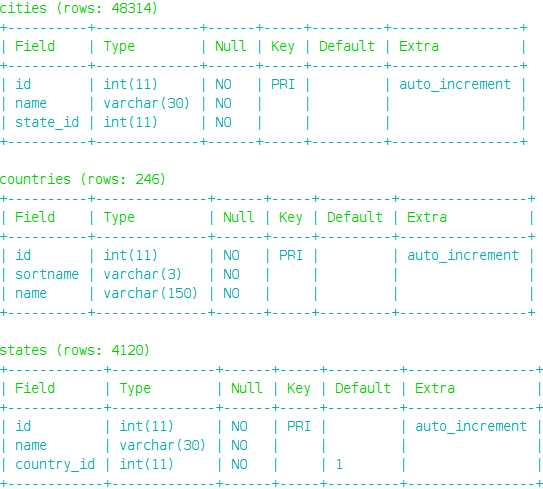
If you want to see a specific table then pass table name or Namespace\\Model
php artisan schema:show --t=tableName or --t=Namespace\\Model

Note: Same condition will be applied for tables list view
Show Schema information in List
php artisan schema:list
Example output: Schema information in list
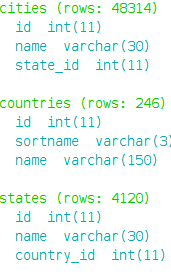
Avaliable Options in show and list:
--t=tableNameor-t tableNameto provide table name or Namespace\Model--c=connectionNameor-c connectionNameto provide connection name
Show Table names and total rows
php artisan schema:simple
Example output: Tables name with rows count
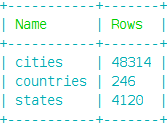
Note: You may pass --c=connectionName or -c connectionName to display a specific connection schema info
Show table definition
php artisan schema:table --t=tableName or --t=Namespace\\Model
Example output: Table definition with default page and limit
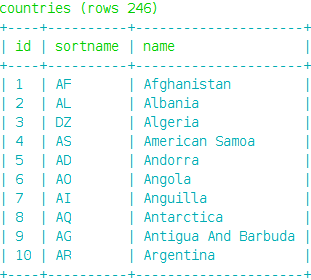
Avaliable Options in table:
--t=tableNameor-t tableNameto provide table name or Namespace\\Model (e.g: --t=App\\User or --t=users).--p=pageNumberor-p PageNumberto provide current page which you want to see--o=orderByor-o orderByto provide orderBy clause against a column (e.g: --o=id:desc or --o=id:asc [default asc]).--l=rowsLimitPerPageor-l rowsLimitPerPageto provide number of rows you want to display (e.g: --l=20).--c=connectionNameor-c connectionNameto provide connection name--w=widthOfTableCellor-w widthOfTableCellto provide character length of cell to show in tables (numeric [default=10]).--s=columnNameto provide the column to display, you can provide comma (,) separated names to display (e.g: --s=name or --s=id,name).
php artisan schema:table --t=countries --p=4 --o=id:desc --l=25
Perform raw sql query
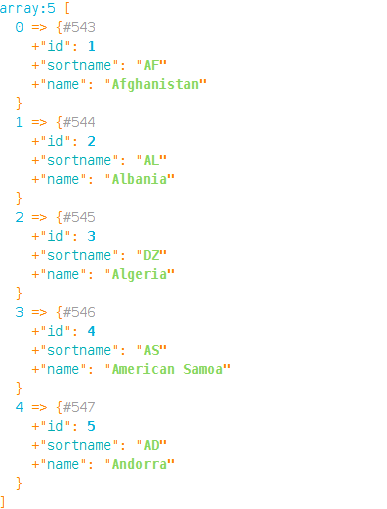
php artisan schema:query --r="your sql query"
Example output: Query result will be dumped in console
Avaliable Options in query:
--r=yourRawQueryor-r yourRawQueryto provide your raw sql query (e.g: --r="select * from someTable limit 20").--c=connectionNameor-c connectionNameto provide connection name (e.g: --c=mysql or -c sqlite)
Monitor database server
php artisan schema:monitor
Example output: Showing the database status
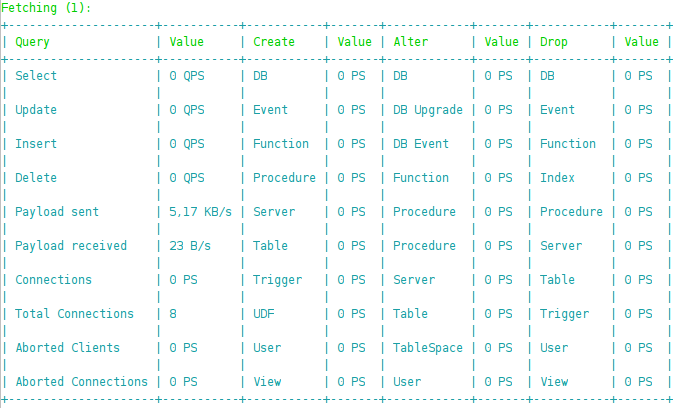
You can pass --i=integerNumber as refresh time interval and --c=ConnectionName as well
php artisan schema:monitor --i=3 --c=secondaryDatabase
License
The laravel-schema is a open-source software licensed under the MIT License.
Thank you :)