
devdome / devdome-redirect-manager

Free WordPress redirect plugin: 301/302/307/308/JavaScript redirects with geo targeting, device targeting, link rotation, scheduling and per-rule statistics. Free alternative to Redirection Pro features, Pretty Links Pro and ThirstyAffiliates Pro.
Package info
github.com/DevDomeFamily/devdome-redirect-manager
Type:wordpress-plugin
pkg:composer/devdome/devdome-redirect-manager
Requires
- php: >=7.4
- composer/installers: ^1.0 || ^2.0
Requires (Dev)
None
Suggests
None
Provides
None
Conflicts
None
Replaces
None
README
Set up 301 and 302 redirects, URL rotation, geo redirect and device redirect rules, plus domain forwarding and per-rule statistics. Configure rules for your entire site, selected content, custom paths or 404 pages from one screen without coding. Rotate destinations in order, randomly or with weighted distribution, or forward visitors to the same path on another domain while preserving the query string. All features are free, with unlimited rules and no paid tier.
The free alternative to Pretty Links Pro, ThirstyAffiliates Pro, 301 Redirects Pro and Yoast Premium redirects.
- Install from WordPress.org: https://wordpress.org/plugins/devdome-redirect-manager/
- Website: https://devdome.com
- Support: https://wordpress.org/support/plugin/devdome-redirect-manager/
Why DevDome Redirect Manager instead of the alternatives
| DevDome Redirect Manager | Redirection | Pretty Links | ThirstyAffiliates | 301 Redirects (WebFactory) | Yoast SEO | |
|---|---|---|---|---|---|---|
| Price for geo targeting | Free | Not available | Marketer plan, $149.50 / year | Pro, from $99.60 / year | Pro, from $5.99 / month | Not available |
| Price for link rotation / split testing | Free | Not available | Pro | Not available | Pro | Not available |
| 301 / 302 / 307 / 308 redirects | Yes | Yes | Yes | Yes | Yes | Premium, $99 / year |
| Device targeting (desktop, mobile, tablet) | Yes | No | Pro | No | No | No |
| Scheduled redirects | Yes | No | No | No | No | No |
| Redirect every 404 to a page | Yes | Log only | No | No | Yes | No |
| Per-rule statistics | Yes | Log | Pro | Pro | Pro | No |
| Once per visitor, every N-th visitor | Yes | No | No | No | No | No |
| Unlimited rules | Yes | Yes | Per plan | Per plan | Per plan | Yes |
Prices reflect the existing September 2026 comparison. Split testing here means distributing traffic, without conversion measurement.
Prices are the vendors' published plans in September 2026. Redirection is a good free 301 tool; it has no geo, device, rotation or scheduling. Rank Math includes redirects only as part of its full SEO suite.
Features
URL redirect rules and domain forwarding
Use the redirector for a page redirect, post redirect or category redirect. Choose a homepage redirect, a whole-site redirect, or send every 404 to homepage. A website redirect can also match custom paths or referring websites, including optional UTM source matching.
- Methods: 301 redirect for permanent redirection, 302 redirect for temporary url forwarding, plus 307, 308, JavaScript and meta refresh.
- Destinations: one URL, multiple URLs, a matching link/button on the page, or a domain redirect preserving paths and queries.
- Migration: when you change domain, use 301 redirects for the redirect portion of site migration. After you change url paths or change permalink settings, map old paths to new destinations with a link redirect. The plugin does not migrate files or change permalinks.
- Short links: supply your own custom path for a short url or vanity url. Slugs are not generated.
Link rotation with a url rotator
The link rotator sends visitors first to last, randomly, or by weighted distribution using a slider. Repeat the destination list when exhausted.
For basic ab testing, split traffic between destinations; the plugin does not measure conversions or choose winners.
Country redirect, geo redirect and geotargeting
Use geo targeting to include listed countries or everyone except them. A geo ip redirect uses IP geolocation, also called geoip lookup. The optional DevDome geo service receives visitor IP addresses when filtering is enabled; filtering defaults off.
Proxy/CDN detection and trusted forwarded IP headers support country lookup behind proxies.
Mobile redirect, timing and schedules
- Devices: desktop, mobile or tablet.
- Frequency: every visit, once per visitor by IP or IP plus device, or again after a chosen delay; optionally every N-th unique visitor.
- Opening: an automatic redirect or wait-for-click. JavaScript supports auto redirect delays and new tabs; new tabs require a real visitor click.
- Schedules: start/end dates and times, timezone, weekdays and time windows.
- Filtering: optional daily limits, visitor checks and IP, browser or role exclusions. Known-bot skipping defaults on but cannot identify every bot.
Redirect statistics and link tracking
Each rule has priority, nickname, run state and statistics. Reorder redirections by dragging; the highest-priority matching running rule handles redirecting.
As a link tracker, the plugin counts rule activity, including visitors, redirects, bypasses, devices, countries and source/destination breakdowns. Counts do not confirm destination arrival.
Purge page cache on save with WP Rocket, LiteSpeed, W3 Total Cache, WP Super Cache and more. Export configurations as JSON; import replaces rules and leaves them stopped.
AI agents and MCP (WordPress Abilities API)
Since 1.4.0, WordPress 6.9+ exposes plugin features as WordPress Abilities. Connected agents such as Claude, ChatGPT or Cursor discover them through the official WordPress MCP Adapter.
Abilities use the same code and administrator permissions as plugin screens. Anonymous requests have no access.
| Ability | What it does | Kind |
|---|---|---|
devdome-redirect-manager/list-redirects |
All rules in priority order, full configuration, state and statistics | read |
devdome-redirect-manager/get-redirect-details |
One rule, per-source, per-destination, per-country and daily counts | read |
devdome-redirect-manager/get-redirect-stats |
Totals: redirects, bypasses, page views, deduplicated unique visitors, devices; per-rule stats | read |
devdome-redirect-manager/find-404-redirect-candidates |
Visitor 404 paths and suggested targets; requires DevDome Link Monitor | read |
devdome-redirect-manager/search-site-content |
Search pages, posts and categories by title | read |
devdome-redirect-manager/get-geo-status |
Geo service health and proxy/CDN detection | read |
devdome-redirect-manager/export-redirects |
Full configuration JSON, matching Export | read |
devdome-redirect-manager/create-redirect |
All options: sources, methods, destinations, rotation, opening, delays, frequency, schedules, geo, devices, fallback, custom domains; stopped unless start: true |
add |
devdome-redirect-manager/update-redirect |
All-or-nothing changes; refused keys leave rules untouched | modify |
devdome-redirect-manager/set-redirect-state |
Run/Stop | modify |
devdome-redirect-manager/duplicate-redirect |
Create " copy", stopped, zero statistics | add |
devdome-redirect-manager/reorder-redirects |
Set all rule priorities | modify |
devdome-redirect-manager/delete-redirect |
Permanently delete; requires confirm: true |
destroy |
devdome-redirect-manager/reset-redirect-stats |
Reset statistics and visitor memory; requires confirm: true |
destroy |
devdome-redirect-manager/purge-redirect-cache |
Purge page caches for one/all rules | modify |
All fifteen are public and show_in_rest: authenticated GET /wp-json/wp-abilities/v1/abilities. Read abilities are annotated readonly; add/modify are non-destructive; destroy abilities are destructive.
Enabling geo targeting and disabling enabled Visitor Check or Outdated Browsers settings also require confirmation. The default MCP server exposes direct tools such as devdome-redirect-manager-create-redirect alongside discover/execute meta-tools.
Install the adapter, create an administrator application password, and configure Claude Code:
{"mcpServers":{"my-site":{"type":"http","url":"https://example.com/wp-json/mcp/mcp-adapter-default-server","headers":{"Authorization":"Basic <base64 user:application-password>"}}}}
Verified 2026-09-10 with Claude Code: a full-option request for a stopped Black Friday 302 rule, US/Canadian mobile visitors, weekdays 9 to 17 Berlin time, once per visitor, succeeded unaided. Renaming a nonexistent rule was refused; subscriber access was denied.
Screenshots
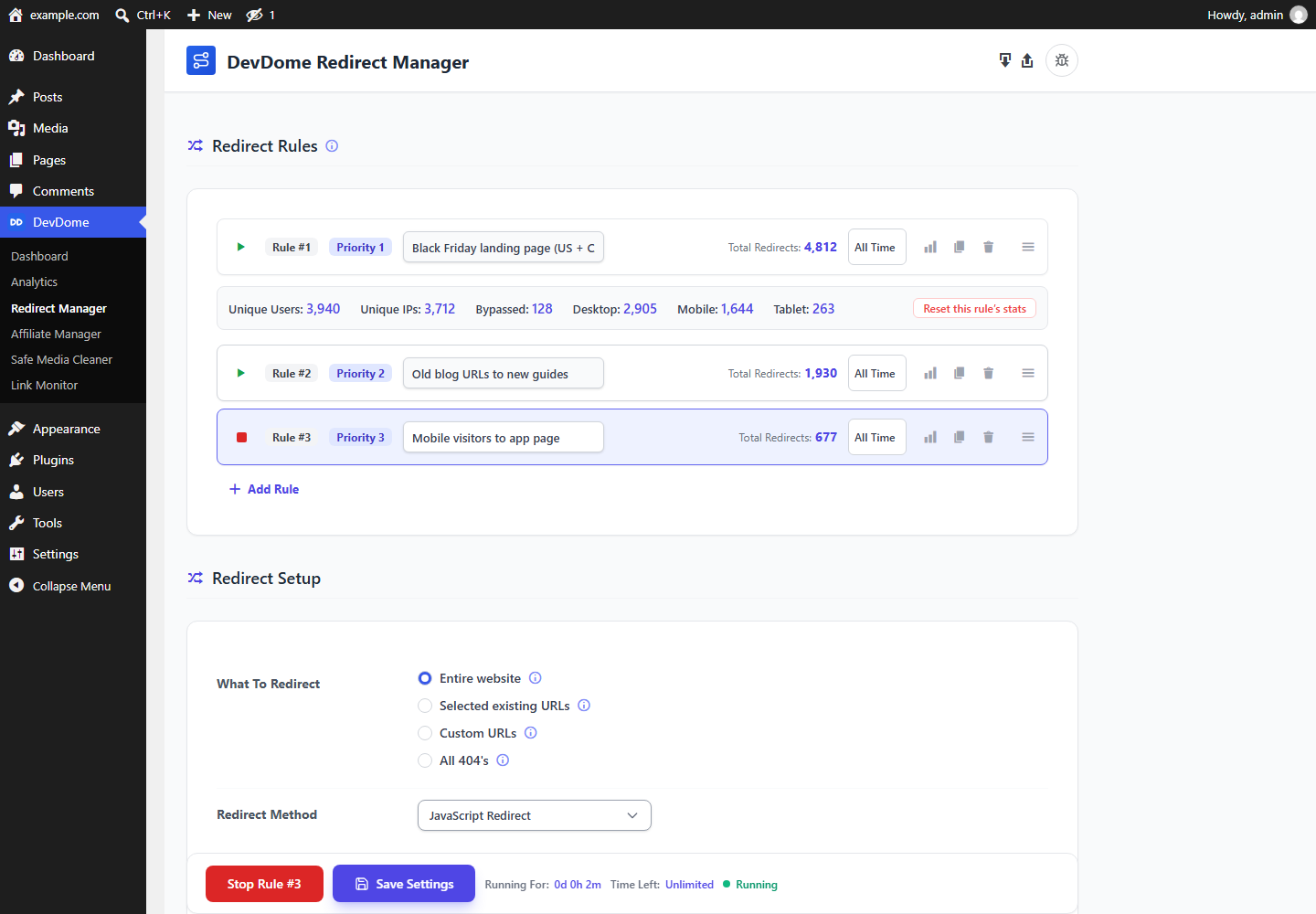 Redirect rules: independent rules with priority, nickname and statistics.
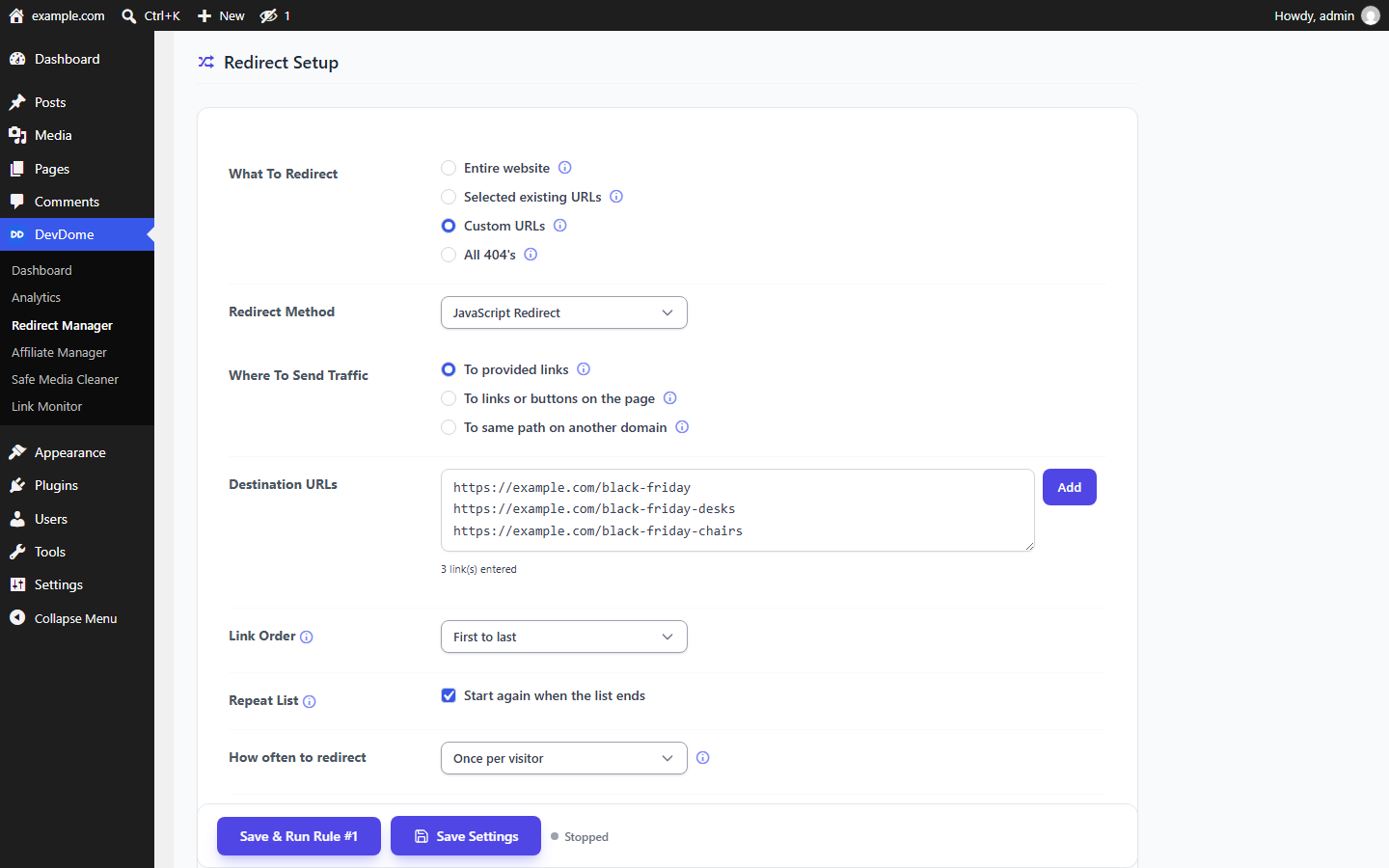 Redirect setup: targets, method, destinations, rotation order and frequency.
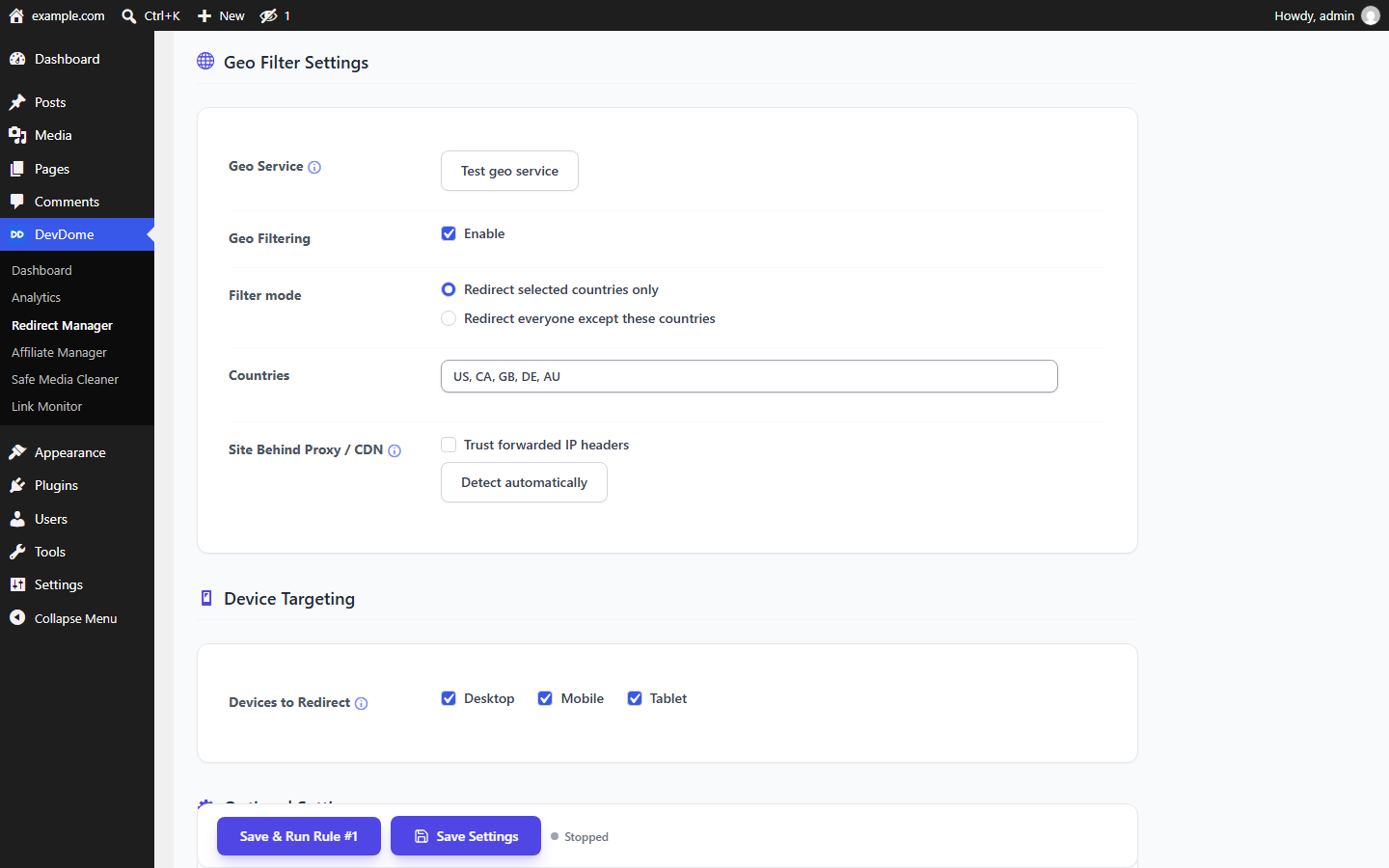 Geo filter: listed countries only, or everyone except them.
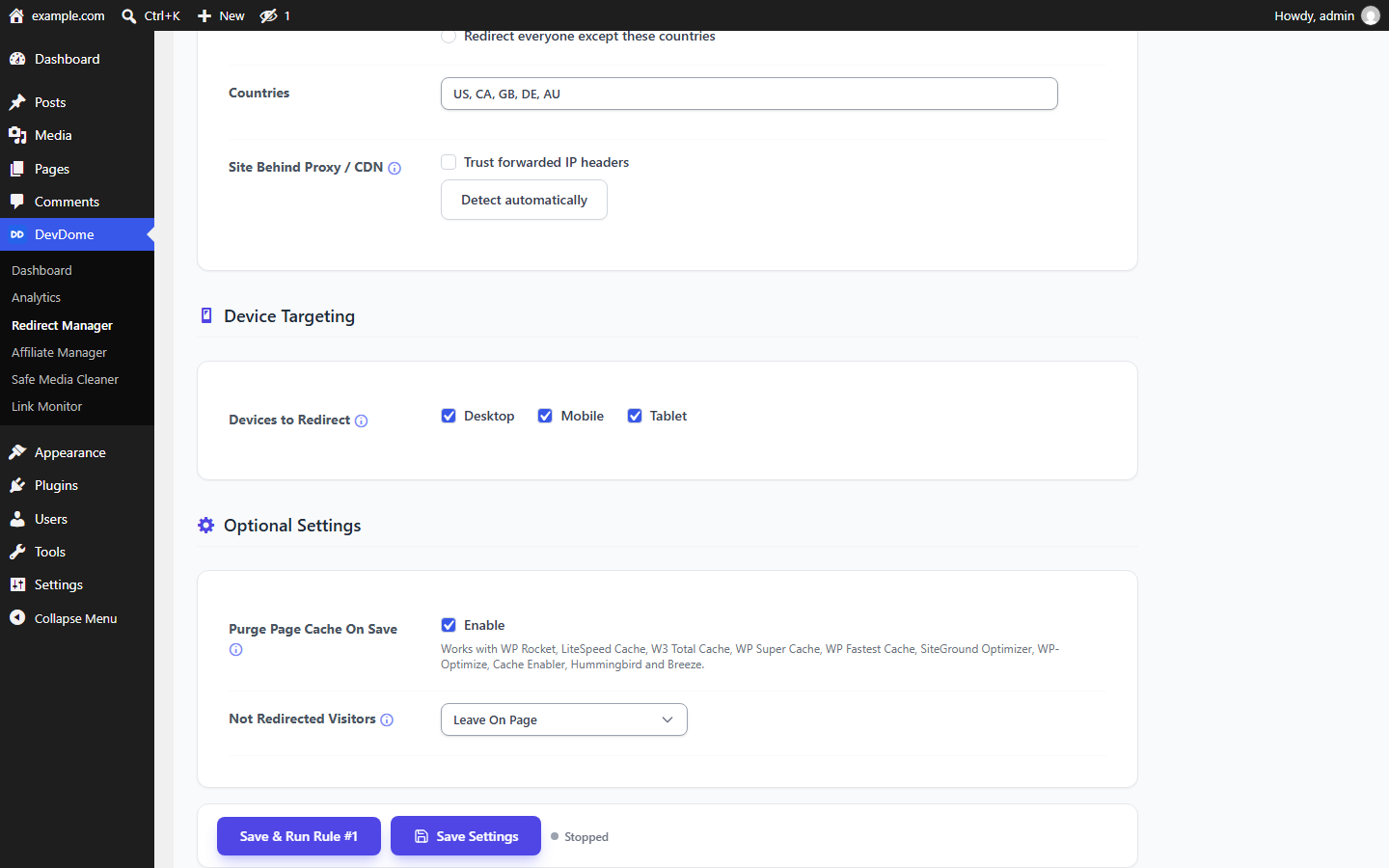 Device targeting and optional settings.
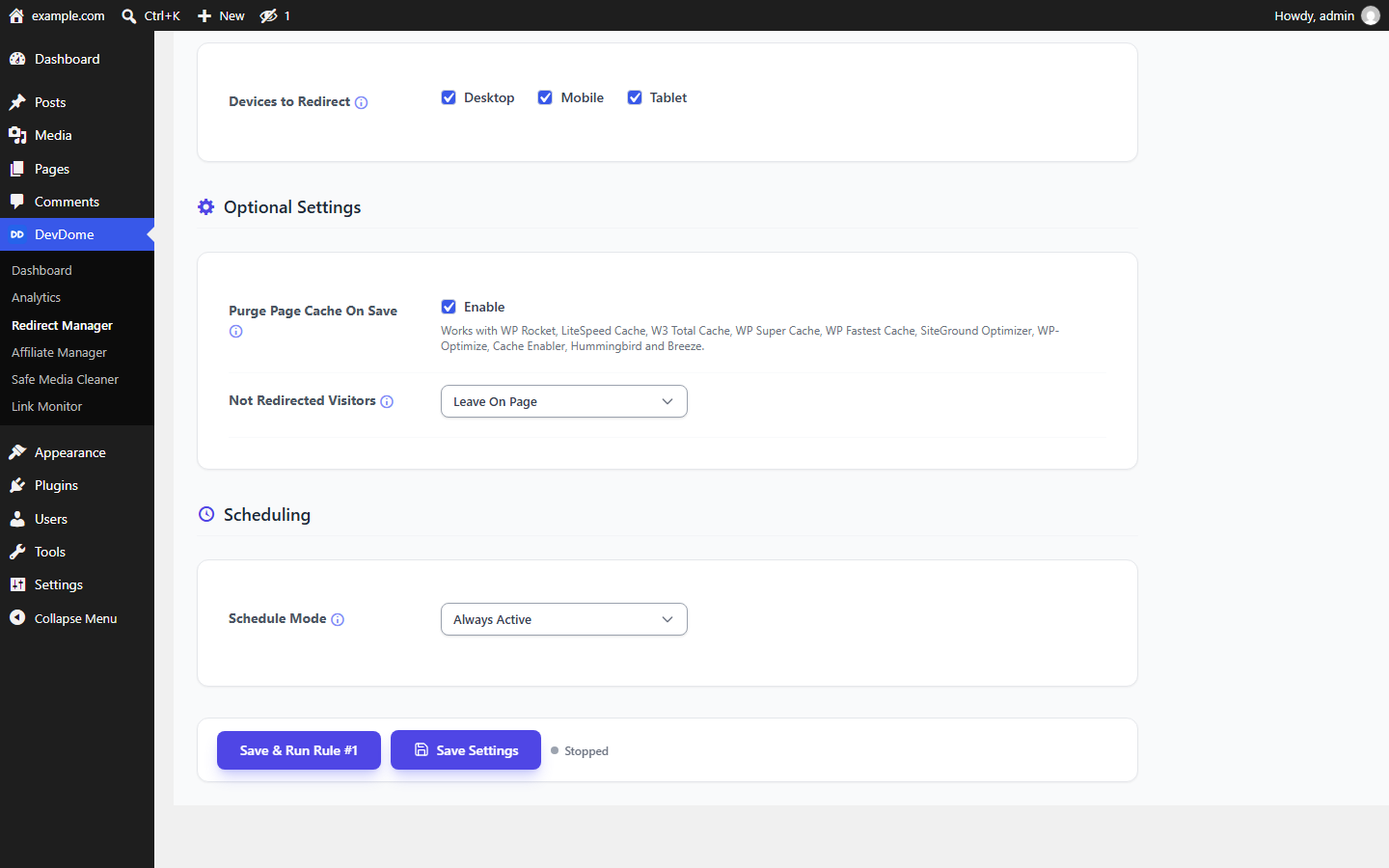 Scheduling: run a rule between dates and times.
Requirements
WordPress 5.6+, PHP 7.4+. Geo filtering uses the DevDome geo service.
Installation
- In wp-admin, open Plugins > Add New, search DevDome Redirect Manager, install and activate.
- Open Tools > DevDome Redirect Manager, add a rule, choose sources and destinations, then Save & Run.
Part of the DevDome plugin family
Free WordPress plugins by DevDome: Analytics (cookieless, bot/AI crawler split, public API and MCP server), Redirect Manager, Media Cleaner, Link Monitor and Affiliate Manager.
Every plugin includes the DevDome Dashboard in wp-admin for one-click installation of the others.
Development
This repository mirrors the WordPress.org release. Open an issue for bugs or feature requests, or use the support forum.
License
GPL-2.0 or later. See LICENSE.