
bymayo / akeneo

Akeneo is a Craft CMS plugin that syncs products and data from Akeneo PIM (https://akeneo.com) into Craft CMS.
Requires
- php: >=8.2
- akeneo/api-php-client: ^11.0
- craftcms/cms: ^5.8.0
Requires (Dev)
- craftcms/phpstan: dev-main
Suggests
None
Provides
None
Conflicts
None
Replaces
None
README

Akeneo for Craft CMS 5
Akeneo is a Craft CMS plugin that syncs products and data from Akeneo PIM into Craft CMS.
Features
- Source Management - Create multiple sources to sync different Akeneo product sets into different Craft sections or Commerce product types
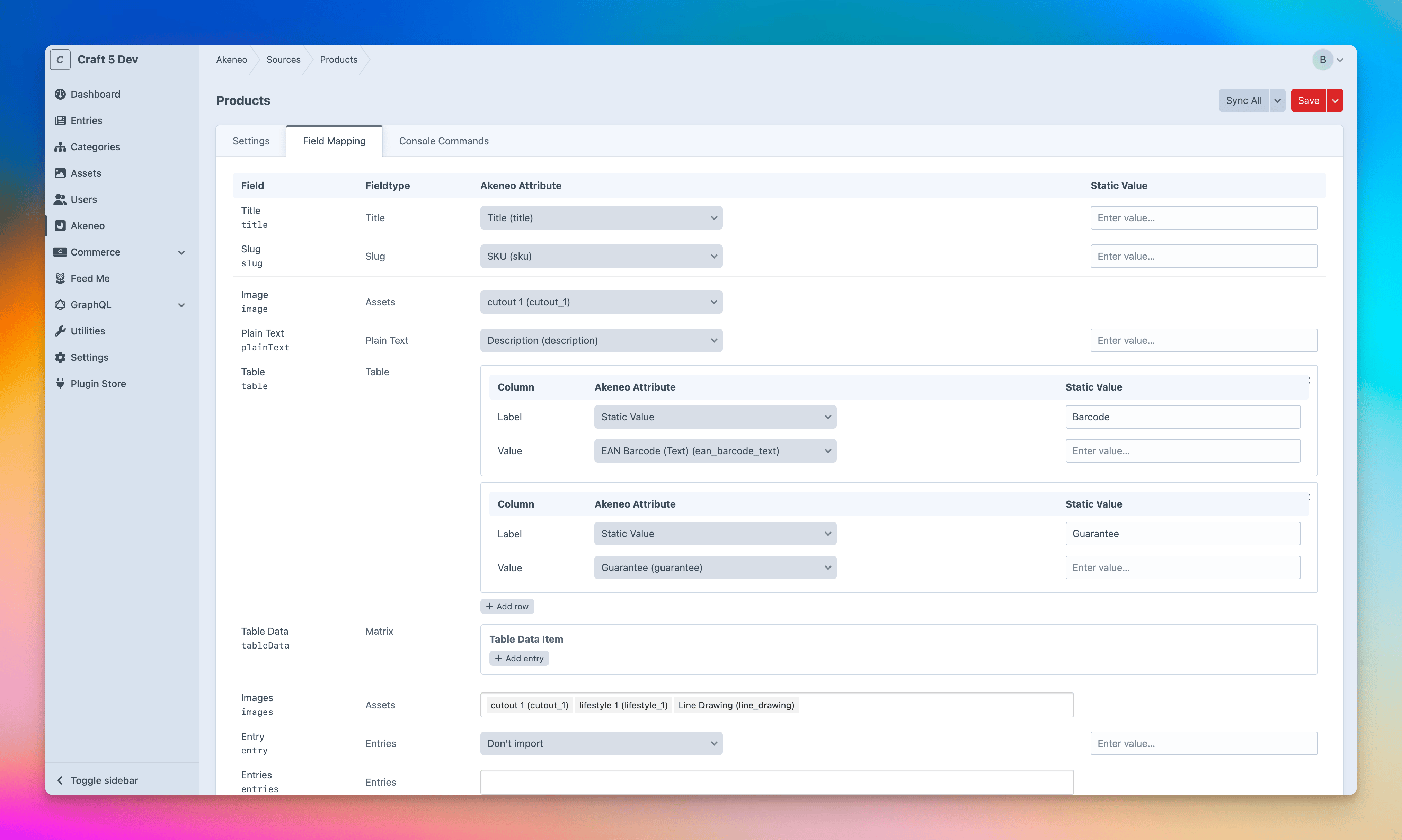
- Field Mapping - Map Akeneo attributes to Craft fields with support for plain text, CKEditor, numbers, dropdowns, dates, table fields, matrix fields and asset fields
- Export, Import & Duplicate - Export a source (with its filters and field mappings) to a JSON file, import it on another environment, or duplicate a source in place — references are re-resolved by handle, so it works across environments without Project Config
- Asset Syncing - Download and sync Akeneo asset collections into Craft asset fields, respecting each field's volume configuration
- Multi-Asset Support - Asset fields that allow multiple assets can be mapped to multiple Akeneo asset collections
- Entries & Categories - Map Akeneo attributes to Entries and Categories fields with automatic creation of missing entries and categories
- Commerce Variants & Prices - Sync variant title, SKU and price to the default variant on Commerce product types
- Static Values - Set static values on mapped fields instead of pulling from Akeneo
- Product Filters - Filter which Akeneo products are imported using attribute-based search filters (equals, contains, in, between, empty, etc.)
- Per-Source Locale - Choose which Akeneo locale to pull attribute values from per source (e.g.
en_GB,en_US) - Multi-Site Support - Import entries into a specific Craft site per source
- Orphaned Entry Handling - Automatically disable or delete Craft entries that no longer exist in Akeneo after a sync
- Test Sync - Try a quick limited sync to check your mappings, filters and volumes before running the real thing
- Custom Queue - Optionally run sync jobs on a dedicated queue with configurable priority and TTR
- Permissions - Control access to sources, dashboard widgets and cache clearing with granular user permissions
- Dashboard Widget - Trigger syncs directly from the dashboard with options for all data, data only, or images only
- Console Commands - Run syncs from the terminal or cron jobs
- Connection Test - Verify your Akeneo API connection from the settings page
NOTE: This plugin only imports products and data from Akeneo. It does not export data to Akeneo.
Install
- Install with Composer via
composer require bymayo/akeneofrom your project directory - Enable / Install the plugin in the Craft Control Panel under
Settings > Plugins - Configure the API settings under
Settings > Plugins > Akeneo
Requirements
- Craft CMS 5.x
- PHP 8.2
- MySQL (No PostgreSQL support)
Setup
1. Configure API Settings
Navigate to Settings > Plugins > Akeneo and enter your Akeneo PIM API credentials:
| Setting | Description |
|---|---|
| API URL | The base URL of your Akeneo PIM instance |
| Client ID | The Akeneo API client ID |
| Secret Key | The Akeneo API secret key |
| Username | The Akeneo API username |
| Password | The Akeneo API password |
All credential fields support environment variables.
A connection status indicator at the top of the settings page will confirm if your credentials are valid.
2. Create a Source
Navigate to the Akeneo section in the CP sidebar and click New Source:
- Give the source a Name
- Select the Type (Craft Section or Commerce Product Type)
- Set the Orphaned Entry Action (Do Nothing, Disable, or Delete)
- Choose an Entry Identifier field for matching existing entries during sync (e.g. SKU)
- Select the Akeneo Locale to pull attribute values from
- Optionally select a Site to import entries into
- Optionally add Product Filters to limit which products are synced
Product Filters
Each filter row has three parts: an attribute code (e.g. sku, enabled), an operator, and a value. Only products matching every filter are synced. The value format depends on the operator:
| Operator | Value format | Example |
|---|---|---|
=, != |
Single value — true, false, a number, or text |
true |
<, >, <=, >= |
A number or date | 2024-01-01 |
IN, NOT IN |
Comma-separated list | red,green,blue |
CONTAINS, DOES NOT CONTAIN |
Text to match | shirt |
STARTS WITH |
Prefix text | SKU- |
BETWEEN, NOT BETWEEN |
Two comma-separated bounds (min,max) |
10,20 |
EMPTY, NOT EMPTY |
No value (the value field is hidden) | — |
The value field's placeholder updates to hint the expected format as you change the operator.
3. Map Fields
After saving the source, navigate to the Field Mapping tab. Map each Craft field to an Akeneo attribute, a static value, or leave unmapped.
Supported field types:
- Plain Text
- Number
- URL
- Dropdown
- Radio Buttons
- Lightswitch
- Color
- Date
- Money
- Table
- Matrix (with nested field mapping)
- Assets (single and multi-select)
- Entries (auto-creates missing entries)
- Categories (auto-creates missing categories)
SuperTable isn't supported. If you're upgrading from Craft 4 and still using SuperTable, switch those fields over to Matrix before setting up your mappings:
./craft super-table/migrate/indexThe plugin only walks native Matrix fields, so any asset fields tucked inside a SuperTable will fail with "No volume provided for asset..." until they're migrated.
Commerce Variant Fields
When the source type is a Commerce product type, the following special fields can be mapped to sync the default variant:
- Variant Title
- SKU
- Price
4. Run a Sync
Syncs can be triggered from:
- Source list - Sync All, Sync Data, Sync Images, or Test Sync (10 products only) buttons per source
- Dashboard widget - Add the Akeneo Product Sync widget
- Console commands - See below
Test Sync
Test Sync is a quick way to check your setup before kicking off a full import. It works just like Sync All, with two key differences:
- Only pulls a small batch. Defaults to 10 products (configurable via the Test Sync Limit setting), so you get a fast result without waiting on the full catalogue. Override per-run with
--limitwhen using the console command. - Won't touch your existing entries. A normal sync runs the Orphaned Entry Action afterwards, which would disable or delete anything not in the batch. Since a test only pulls 10 products, that step is skipped — your live entries are left alone.
It's handy when you want to:
- Double-check your field mappings are landing in the right places.
- See which products match after tweaking your filters.
- Debug a sync issue (image volumes, value mappings, matrix blocks, etc.) without sitting through thousands of products.
You'll find Test Sync in the Action dropdown on both the Sources index and each Source edit page, marked with a terminal icon.
Export, Import & Duplicate
Sources can be moved between environments without using Project Config, so users keep the freedom to create sources directly on any environment.
- Export - From a source's Action dropdown, choose Export to download a
.jsonfile containing the source config (filters, locale, orphaned-entry action, etc.) and all of its field mappings. Environment-specific values (section / product type, site) are stored by handle, not by ID. - Import - On the Sources index, open the dropdown next to New Source and choose Import, then pick a previously exported
.jsonfile. A new source is created and the section / product type, site and field references are re-resolved by handle on the current environment. If a handle doesn't exist here, the import fails with a clear message. - Duplicate - Each row on the Sources index has a duplicate icon next to the delete button. Duplicating creates a copy of the source (named
… (copy)) along with all of its field mappings, then opens it for editing.
Console Commands
Each source has a Console Commands tab with copy-paste ready commands (Replacing source=1 with your source ID):
php craft akeneo/sync/all --source=1
php craft akeneo/sync/data-only --source=1
php craft akeneo/sync/images-only --source=1
php craft akeneo/sync/test --source=1
php craft akeneo/sync/test --source=1 --limit=25
The test action mirrors Test Sync in the control panel — it pulls a small batch and skips orphan handling. Without --limit it uses the Test Sync Limit setting (default 10).
Permissions
The plugin registers three permissions under Settings > Users > Permissions:
| Permission | Description |
|---|---|
| Manage Sources | Access and manage Akeneo sources in the control panel |
| View Widgets | View and add Akeneo sync widgets on the dashboard |
| Clear Cache | Clear Akeneo attribute and locale caches |
Custom Queue
By default, sync jobs run on the default Craft queue. Enable Custom Queue in the Queue settings tab to run them on a dedicated akeneo queue channel instead.
When enabled, run the worker as a separate process:
php craft akeneo-queue/listen
This prevents long-running syncs from blocking other Craft queue jobs.
After updating the plugin, restart the queue listener so new features (like the Log) are picked up.
To manage and monitor the custom queue from the control panel, we recommend installing the Custom Queue Manager and Queue Monitor plugins.
Config File
You can override plugin settings by creating a config/akeneo.php file in your Craft project:
<?php

use craft\helpers\App;

return [
    'apiUrl' => App::env('AKENEO_API_URL'),
    'clientId' => App::env('AKENEO_CLIENT_ID'),
    'secretKey' => App::env('AKENEO_SECRET_KEY'),
    'username' => App::env('AKENEO_USERNAME'),
    'password' => App::env('AKENEO_PASSWORD'),
    'attributeCacheDuration' => 21600,
    'syncPageSize' => 75,
    'syncMaxPages' => 1000,
    'testSyncLimit' => 10,
    'assetFolderName' => 'Akeneo',
    'customQueue' => false,
    'jobPriority' => 1024,
    'jobTtr' => 300,
];
| Setting | Default | Description |
|---|---|---|
apiUrl |
null |
The base URL of your Akeneo PIM instance |
clientId |
null |
The Akeneo API client ID |
secretKey |
null |
The Akeneo API secret key |
username |
null |
The Akeneo API username |
password |
null |
The Akeneo API password |
attributeCacheDuration |
21600 |
How long (in seconds) to cache Akeneo attributes. Set to 0 to disable |
syncPageSize |
75 |
Number of products to fetch per API request during sync |
syncMaxPages |
1000 |
Maximum number of pages to fetch during a sync |
testSyncLimit |
10 |
Default product limit for a Test Sync. Override per-run with --limit on the console command |
assetFolderName |
Akeneo |
The folder name within the volume where Akeneo images are stored |
customQueue |
false |
Run sync jobs on a dedicated queue instead of the default Craft queue |
jobPriority |
1024 |
Priority for sync jobs. Lower numbers run first. Only applies to the default queue |
jobTtr |
300 |
Maximum time (in seconds) a job can run before it is retried |
Upgrading from Craft 4
Coming from Craft 4 with SuperTable fields? You'll need to convert those over to Matrix before your first sync — see the note under Setup → Map Fields for details.
Support
If you have any issues (Surely not!) then I'll aim to reply to these as soon as possible. If it's a site-breaking-oh-no-what-has-happened moment, then hit me up on the Craft CMS Discord - @bymayo