
b10k / craft-component-check

Craft tells Playwright what to test: finds where every Matrix block is actually used and runs desktop + mobile browser checks on those pages, without writing a single test.
Package info
github.com/b10k-nl/craft-component-check
Type:craft-plugin
pkg:composer/b10k/craft-component-check
Requires
- php: >=8.2
- craftcms/cms: ^5.0.0
Requires (Dev)
- phpstan/phpstan: ^2.0
- phpunit/phpunit: ^10.5
Suggests
- b10k/craft-component-map: Test only the blocks your changes affect (test --changed, --since; targeted watch).
Provides
None
Conflicts
None
Replaces
None
README
You changed the Hero. Which pages just broke on mobile? Craft already knows where every Hero is used. Component Check asks Craft, picks the pages worth testing, and runs desktop and mobile browser checks on them with Playwright — without a single test file.
$ php craft component-check/snapshot hero       # before the change
$ # …edit _blocks/hero.twig…
$ php craft component-check/test hero

Hero (hero)
  Home                             desktop ✓   mobile ✕
    /
      ✕ mobile: Changed since snapshot: h1 “Fitting, coaching and servici…”:
        width 334→1200px, now cut off by 235px; p “Book”: moved 0, -37px
        screenshot: storage/component-check/latest/screenshots/hero/p1-mobile-123.png
        before:     storage/component-check/snapshot/mobile/123.png
        trace:      storage/component-check/latest/traces/p1-mobile.zip

FAILED — 1 passed, 1 failed, 0 skipped
It is not a replacement for Playwright, Pest or Craft Pest. Playwright does the browser work; Craft knows the content model; this plugin connects the two.
Free (MIT). Craft CMS 5, for local development, staging and CI.
How it works
Matrix fields ─► every block on a live page ─► representative pages ─► manifest.json
                                                                           │
          report / JSON / exit code ◄── results.json ◄── Playwright (desktop, mobile)
- Discovery. Every Matrix field, every block (nested entry), walked up to the page that owns it. Only live pages count: enabled, for that site, not a draft or revision.
- Sampling. Usages are grouped into variants — same section, page type, site and the same set of filled-in fields (plus the value of dropdowns, radio buttons and lightswitches). Pages are chosen so every variant is covered with as few pages as possible. 3,000 identical Heroes → one page.
- Browser checks, on every viewport — see What fails, what warns.
- Before/after, if you took a snapshot: every block is compared with how it looked before your change.
- Artifacts for every failure: a screenshot of the failing component (not the whole page), the snapshot's screenshot next to it, and a Playwright trace.
What fails, what warns
A plugin cannot know what the designer intended. A heading cut off by
overflow: hidden is a bug on one site and the design on another. So there are
two kinds of verdict:
Failures — wrong whatever the intent:
- the page answers 4xx/5xx, throws an uncaught JavaScript error, or fails to load a script or stylesheet;
- a block that is in the content is not on the page, or renders with no size;
- an image in a block does not load;
- a block changed since the snapshot (below).
Warnings — often a bug, sometimes the design; they never fail a run:
- the page scrolls sideways;
- a block is wider than the viewport;
- text in a block is cut off by an
overflow: hiddenancestor.
Before and after: snapshots
The question a regression test really asks is not “is this bad?” but “did my change change this?” — and that one needs no guessing:
php craft component-check/snapshot hero     # how the Hero blocks look now
# …change the template or CSS…
php craft component-check/test hero         # what changed since
Nothing changed:
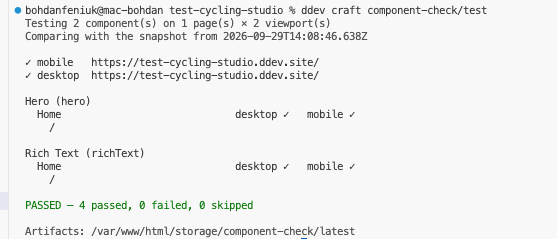
The Hero's heading got a different background:
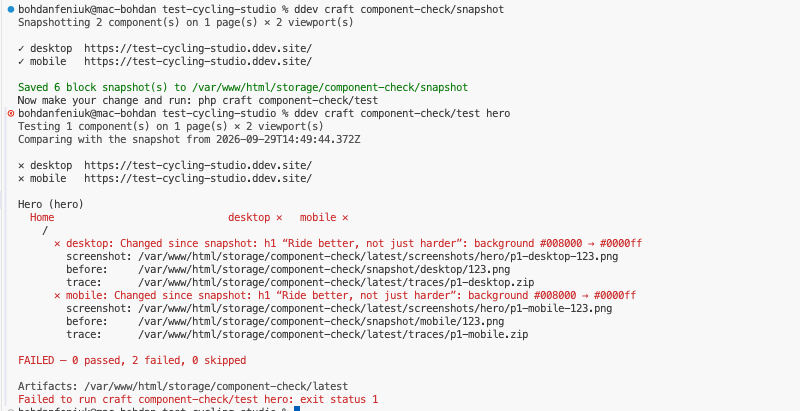
A snapshot records, per block and viewport, its geometry (every element's
size and position within the block, its text, colour, background, font, and
whether it is cut off) and a screenshot. test then reports changes in words —
h1 “…”: width 334→1200px, now cut off by 235px — above the pixel tolerance
(tolerance, 2px). Movement is measured relative to the parent, so a
container that moves does not report every child as moved.
- Content edits are not regressions. Craft knows when each block was last
saved. If an editor changed a block after the snapshot, it is not compared
—
testsays so instead of flagging it. - Local by default. Snapshots live in
storage/component-check/snapshot/, for this machine and this database.snapshot herokeeps the snapshots of other components;--resetstarts over. To share one with your team and CI, see A shared baseline. - No snapshot, no comparison:
testthen checks for errors only.--no-snapshotskips the comparison on purpose. - Needs mode
full(blocks are found by their markers).
Watch mode
For the edit–save–look loop, run this in its own terminal:
$ ddev craft component-check/watch hero

Component Check — watching hero on 1 page(s) × 2 viewport(s)
[10:42:05] Snapshot taken: 2 block snapshot(s) in storage/component-check/snapshot
Watching templates, web — save a file to compare. Keys: r run · s new snapshot · q quit

[10:42:13] _blocks/hero.twig changed — 1.4s
  Hero  desktop ✓  mobile ✕
      ✕ mobile: Changed since snapshot: h1 “Fitting, coaching…”: width 334→1200px, now cut off by 235px
        now:    storage/component-check/latest/screenshots/hero/p1-mobile-123.png
        before: storage/component-check/snapshot/mobile/123.png
  ✕ 1 of 2 case(s) changed or failing

[10:42:51] _blocks/hero.twig changed — 1.2s
  Hero  desktop ✓  mobile ✓   (mobile fixed)
  ✓ all 2 case(s) match the snapshot
With Component Map installed, a save re-checks only the blocks rendered through that file:
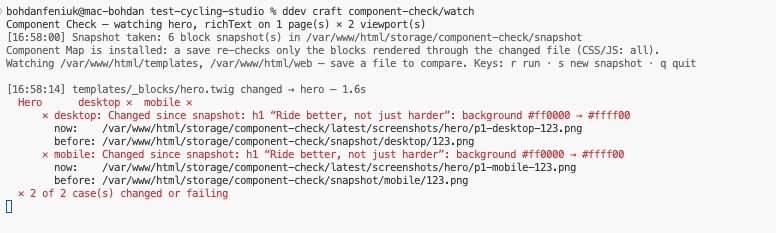
- The snapshot taken at start is how it was before you started. Press
swhen a change is intended and should become the new “before”.--keep-snapshotreuses the existing snapshot instead. - Content is discovered once and one browser stays open, so a save is checked in a second or two.
- It polls (
watchInterval, 700ms) rather than relying on file events, which do not reliably cross the Docker mount between your machine and DDEV. Only.twig,.html,.css,.js,.mjs,.svgand.jsonfiles count;watchIgnoreskipscpresources,node_modules,uploads,assets. - Watches
@templatesand@webrootby default (watchPaths, or--paths). If your CSS is built by Vite or Tailwind, the built files inweb/are what trigger a run — keep the build watcher running too. - Restart it after editing content in the control panel.
With Component Map: test only what you changed
Component Map knows which blocks each template is rendered through. With it installed:
php craft component-check/test --changed        # your uncommitted changes
php craft component-check/test --since=main     # everything on your branch
Changed files affect hero.
Testing 1 component(s) on 1 page(s) × 2 viewport(s)
- Changing
_components/card.twigtests the blocks that render cards, not the whole site. Changing the dispatcher or a layout tests every block. - Changing CSS, JS or PHP — or anything built into
web/— tests everything: any page can look different, and no map can say which. - Files that never reach the browser are ignored and listed: docs, dotfiles
(
.ddev/,.github/,.env),composer.json/.lock,package.jsonand other lockfiles,config/project/(Component Map already turns content model changes into the blocks they affect). After acomposer update, run a fulltest. - If nothing you changed renders a block, nothing runs (exit code
0).
watch without components uses it too: each save re-checks only the blocks
rendered through the file you saved.
The two plugins talk through Component Map's documented JSON
(component-map/impact --json), so each can be updated on its own.
Requirements
- Craft CMS 5, PHP 8.2+
- Node 18+ where
php craftruns, withplaywrightinstalled in the project (see Setup). Only needed to run tests — not on production.
Setup
composer require b10k/craft-component-check
php craft plugin/install component-check

npm install --save-dev playwright
npx playwright install --with-deps chromium

php craft component-check/doctor
doctor checks the mode, Node, Playwright, Chromium, the output directory,
whether the site answers at the discovered URLs, and whether your templates
have markers — and says how to fix whatever is missing.
DDEV: run everything with ddev exec / ddev craft …; Node is already in
the web container (nodejs_version in .ddev/config.yaml). Chromium needs its
system libraries, which --with-deps installs; add
webimage_extra_packages or a post-start hook if you want that to survive
ddev restart.
Markers: from page checks to component checks
Without markers you get page-level checks. With them, the browser knows exactly which DOM belongs to which block. Add them once, in the loop that renders your blocks — no component needs to change:
{% for block in entry.contentBlocks.all() %}
    {{ craft.componentCheck.start(block) }}
    {% include '_blocks/' ~ block.type.handle %}
    {{ craft.componentCheck.end() }}
{% endfor %}
Or, on a component's root element:
<section class="hero" {{ craft.componentCheck.attributes(block) }}>
These render nothing unless the request comes from a test run: the mode is
full and the request carries a signed, short-lived token that only the
test command can create. Visitors, editors, crawlers and production get
exactly the markup they got before. A marked-up response is sent with
Cache-Control: no-store so it never lands in a shared cache.
Markers nest (a card inside a cards grid); end() closes the most recent
start().
Commands
| Command | What it does | Needs mode |
|---|---|---|
component-check/discover [components] |
Where each component is used and which pages would be tested. --all lists every page, --json prints the manifest. |
readonly |
component-check/snapshot [components] |
Records how blocks look now, for the next test to compare against. --reset, --viewport, --snapshot-path, --json. |
full |
component-check/watch [components] |
Snapshots once, then re-checks on every save of a template or stylesheet. Keys: r run, s new snapshot, q quit. --keep-snapshot, --paths, --viewport, --snapshot-path. |
full |
component-check/test [components] |
Runs the browser checks, and compares with the snapshot if there is one. --changed / --since=main test only what your changes affect (needs Component Map). --viewport=mobile, --no-snapshot, --snapshot-path, --json, --headed. |
readonly (page checks) / full (component checks, snapshots) |
component-check/doctor |
Checks the setup. --json. |
any |
components is a comma-separated list of entry type handles: hero,cards.
Exit codes: 0 passed · 1 regressions found · 2 could not run (mode
off, setup problem, unknown component). Stable, so CI and coding agents can
branch on them.
JSON
php craft component-check/test hero --json
{
  "status": "failed",
  "passed": 3,
  "failed": 1,
  "skipped": 0,
  "error": null,
  "components": {
    "hero": { "desktop": "passed", "mobile": "failed" }
  },
  "failures": [
    {
      "component": "hero",
      "url": "https://site.test/about",
      "title": "About",
      "viewport": "mobile",
      "reasons": ["Block #1823 is 318px wider than the viewport"],
      "screenshot": "/…/storage/component-check/latest/screenshots/hero/p2-mobile-1823.png",
      "trace": "/…/storage/component-check/latest/traces/p2-mobile.zip"
    }
  ],
  "outputDir": "/…/storage/component-check/latest",
  "manifest": "/…/latest/manifest.json",
  "results": "/…/latest/results.json"
}
Open a trace with npx playwright show-trace <file>.
Environments and modes
The plugin installs on every environment, production included — project config stays identical, and the Twig helpers never break a template. What it does depends on the mode:
| Mode | Discovery | Page checks | Markers in HTML |
|---|---|---|---|
off |
– | – | – |
readonly |
✓ | ✓ | – |
full |
✓ | ✓ | ✓ (signed requests only) |
With no setting, the mode follows allowAdminChanges: full where admin
changes are allowed (development), off where they are not (production,
and usually staging). A plugin cannot reliably tell staging from production, so
an explicit setting always wins:
# .env on staging / in CI
COMPONENT_CHECK_MODE=full
Configuration
Copy vendor/b10k/craft-component-check/src/config.php to
config/component-check.php. Highlights:
| Setting | Default | |
|---|---|---|
mode |
'' (auto) |
off, readonly, full |
baseUrl |
'' |
Replace scheme/host of discovered URLs (CI, Docker) |
fields |
[] (all) |
Matrix field handles to scan |
samplesPerVariant |
1 |
Pages per variant |
maxPagesPerComponent |
10 |
Cap per component |
viewports |
desktop 1440×900, mobile 390×844 | Add isMobile to override the touch/mobile heuristic |
ignoreErrors |
[] |
Substrings of JS errors to ignore |
blockRequests |
GTM, GA, Facebook, Hotjar | Blocked in the browser |
outputPath |
@storage/component-check |
Artifacts go to …/latest/ |
snapshotPath |
'' |
Where snapshots live. Empty = snapshot/ inside outputPath, local. A folder in the repository makes a shared baseline. Env: COMPONENT_CHECK_SNAPSHOT_PATH |
concurrency |
4 |
Pages in parallel |
tolerance |
2 |
Pixels an element may move or resize before a snapshot comparison reports it |
watchPaths |
@templates, @webroot |
What watch watches |
watchIgnore |
cpresources, node_modules, uploads, assets |
Folder names watch skips |
watchInterval |
700 |
How often watch looks for changes (ms) |
CI
- run: npm ci && npx playwright install --with-deps chromium
- run: php craft component-check/test --json > component-check.json
  env:
    COMPONENT_CHECK_MODE: full
- uses: actions/upload-artifact@v4
  if: failure()
  with:
    name: component-check
    path: storage/component-check/latest
The results are only as representative as the database the job runs against: use a recent content snapshot.
A shared baseline
Without a snapshot, CI checks for errors: broken pages, missing blocks, failed scripts. To also catch visual changes on every pull request, commit a snapshot to the repository and let CI compare against it:
// config/component-check.php
return [
    'snapshotPath' => '@root/tests/component-check',
];
or per command: --snapshot-path=tests/component-check (relative to the
project root). Then:
php craft component-check/snapshot          # record the baseline
git add tests/component-check && git commit -m "Component Check baseline"
From then on test and watch compare against it, and so does CI. When a
change is intended, re-record the components it touched (snapshot hero) and
commit the new baseline with the change — the pull request then shows the
before/after screenshots of what was accepted.
A baseline is tied to two things, so keep them together:
- The database. Blocks are matched by ID, and a block whose content was edited after the baseline is skipped, not compared. Record the baseline against the same content dump CI restores, and re-record when you refresh the dump.
- The browser and OS. The same page can measure a pixel differently in
another Chromium or with other fonts. The snapshot records what rendered it;
when
testruns somewhere else it says so (The snapshot was taken with chromium 141…, darwin-arm64; this run uses … linux-x64), so rendering differences are not mistaken for your change. DDEV and GitHub'subuntu-latestare both Linux; with the same Playwright version they usually agree. If they do not, record the baseline in CI (a manually triggered job runningsnapshotand committing the folder) instead of on your laptop.
A GitHub Actions job against a content dump, using Craft's built-in server:
jobs:
  components:
    runs-on: ubuntu-latest
    services:
      mysql:
        image: mysql:8.0
        env: { MYSQL_ROOT_PASSWORD: root, MYSQL_DATABASE: craft }
        ports: ['3306:3306']
        options: --health-cmd="mysqladmin ping" --health-interval=5s --health-retries=10
    env:
      CRAFT_DB_DRIVER: mysql
      CRAFT_DB_SERVER: 127.0.0.1
      CRAFT_DB_PORT: 3306
      CRAFT_DB_DATABASE: craft
      CRAFT_DB_USER: root
      CRAFT_DB_PASSWORD: root
      CRAFT_SECURITY_KEY: ${{ secrets.CRAFT_SECURITY_KEY }}
      COMPONENT_CHECK_MODE: full
      COMPONENT_CHECK_BASE_URL: http://localhost:8080
      PHP_CLI_SERVER_WORKERS: 4
    steps:
      - uses: actions/checkout@v4
      - uses: shivammathur/setup-php@v2
        with: { php-version: '8.2' }
      - uses: actions/setup-node@v4
        with: { node-version: 20 }
      - run: composer install --no-interaction --prefer-dist
      - run: npm ci && npx playwright install --with-deps chromium
      - run: php craft db/restore tests/content.sql   # your content dump
      - run: php craft up --interactive=0
      - run: php craft serve localhost:8080 > /dev/null 2>&1 &
      - run: php craft component-check/test
      - uses: actions/upload-artifact@v4
        if: failure()
        with:
          name: component-check
          path: storage/component-check/latest
On failure the artifact holds, for every changed block, the screenshot from the baseline next to the one from this run, and a Playwright trace.
Coding agents
The loop this plugin is built for: snapshot <component>, change it, run
test <component> --json (or test --changed --json with Component Map),
read what changed, look at the before/after screenshots, fix or accept, run
again. See AGENTS.md for the recipe to hand your
agent.
Limitations
- Matrix only. Neo, Super Table and custom page builders are not discovered yet.
- Chromium only.
- Snapshots compare geometry and computed style, not pixels. A changed colour, font or size is caught; a changed background image or icon is not. The before/after screenshots are there for a human (or an agent) to look at.
- Snapshots are local. Shared baselines for a team or CI are not there yet.
- Static caches. Blitz and similar serve HTML before Craft runs, so marker requests may get the cached copy without markers. Exclude the test run (or disable the static cache) in environments where you test.
{% cache %}tags can serve markup cached without markers.- Your data decides. A component with no content on a live page cannot be
tested;
discoverlists those.
Development
composer install && composer check     # PHPUnit + PHPStan
npm install --no-save playwright && npx playwright install chromium
npm test                                # runner unit tests + real-browser tests
The core — mode rules, tokens, sampling, the manifest, the report — is Craft-free and unit-tested. The runner's checks are pure functions, tested without a browser; a second suite drives real Chromium against a fixture site.
License
MIT