
1994 / flatpack-statamic

Compile Statamic's flat-file content at deploy into PHP files OPcache serves from memory. Content stays in your Markdown and YAML files.
Package info
github.com/1994limited/flatpack-statamic
Type:statamic-addon
pkg:composer/1994/flatpack-statamic
Requires
- php: ^8.2
- statamic/cms: ^5.11|^6.0
Requires (Dev)
- laravel/pint: ^1.20
Suggests
None
Provides
None
Conflicts
None
Replaces
None
README
Statamic's flat files, compiled at deploy. Flatpack turns your content into plain PHP files that OPcache keeps in memory, so a cold server, a fresh deploy or a big multisite doesn't have to re-read and re-parse thousands of YAML files before it can answer a request. Your Markdown and YAML files stay the source of truth: edit them, commit them, deploy them, as you do now.
Features
- Nothing to migrate. No database, no new storage, no content changes. Flatpack replaces only the cache Statamic keeps of your content (the Stache), and switching it off puts everything back as it was.
- Built at deploy.
php please flatpack:buildcompiles everything once. Requests then read compiled PHP that OPcache serves from shared memory, instead of unserializing a large cache on every cold start. - Big fields skipped until needed. Page builders and long Bard fields are most of a typical site's YAML, and most requests (listings, navs, URLs, queries) never read them. Flatpack leaves them unparsed until a page actually renders them.
- Lower memory. Builds and cold requests load what they use, not every entry at once.
- Refreshes that are actually correct.
php please flatpack:refreshupdates only what changed after agit pull, including deleted files, renamed files and reordered page trees, which Statamic's own file watcher can miss. - Saves still work. Editing in the Control Panel writes exactly the same files Statamic writes, and updates the compiled copy at the same time.
- In the Control Panel. A Flatpack page under Utilities shows what's compiled, which content files have changed on disk since, and builds or refreshes with a click. Statamic's own Warm button keeps working.
- No extra extensions. Runs on a stock Laravel Forge or Laravel Cloud server. If pcntl is there (it is on the command line on both), builds use it to go faster.
Where it helps, and where it doesn't
Flatpack speeds up getting content out of the Stache: cold starts, deploys, builds, queries, and the memory those take. It doesn't make Antlers or Blade render faster, so a page whose time is mostly spent rendering will look much the same. Sites with many entries, many sites, or heavy page builders gain the most.
Performance
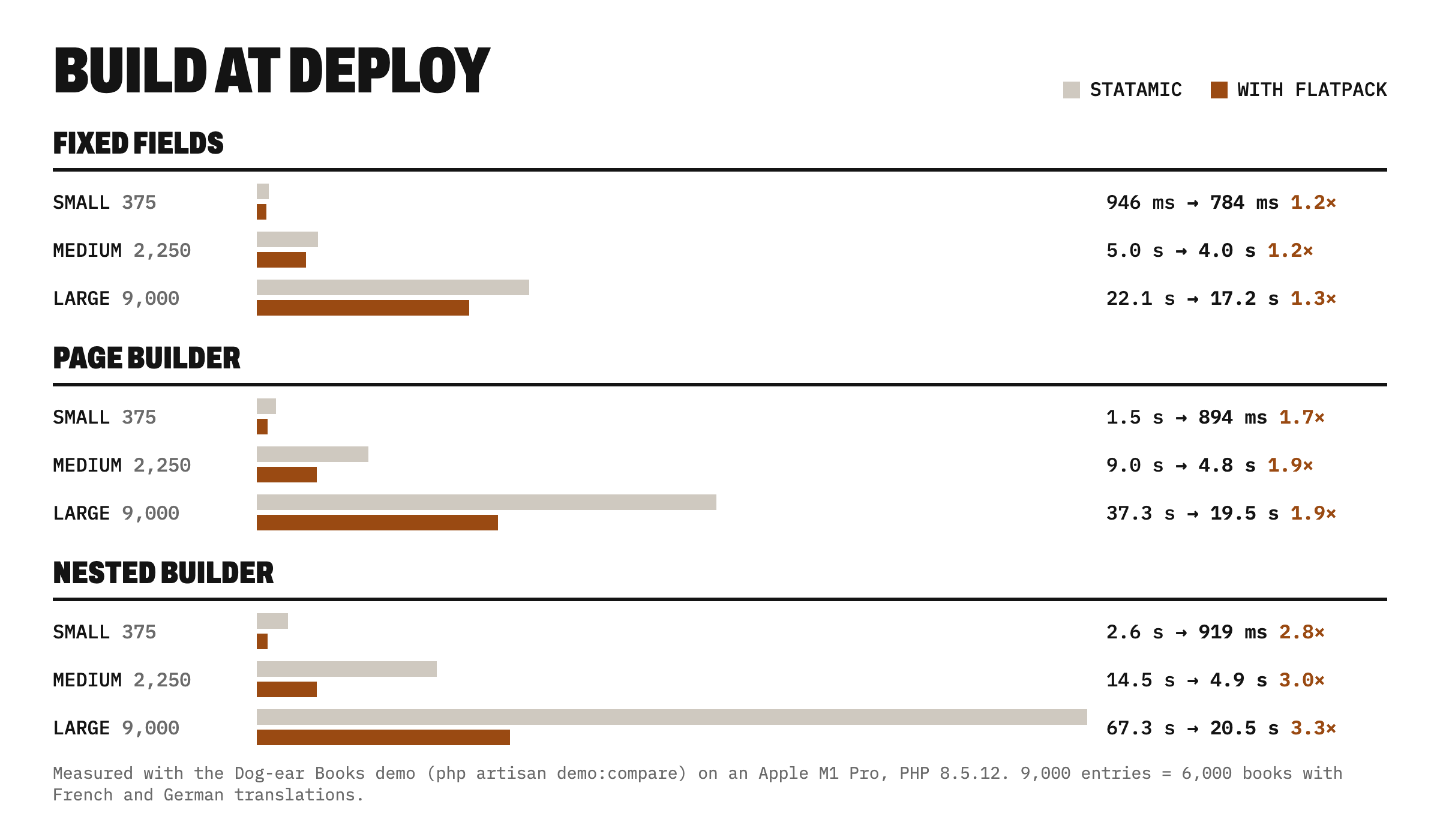
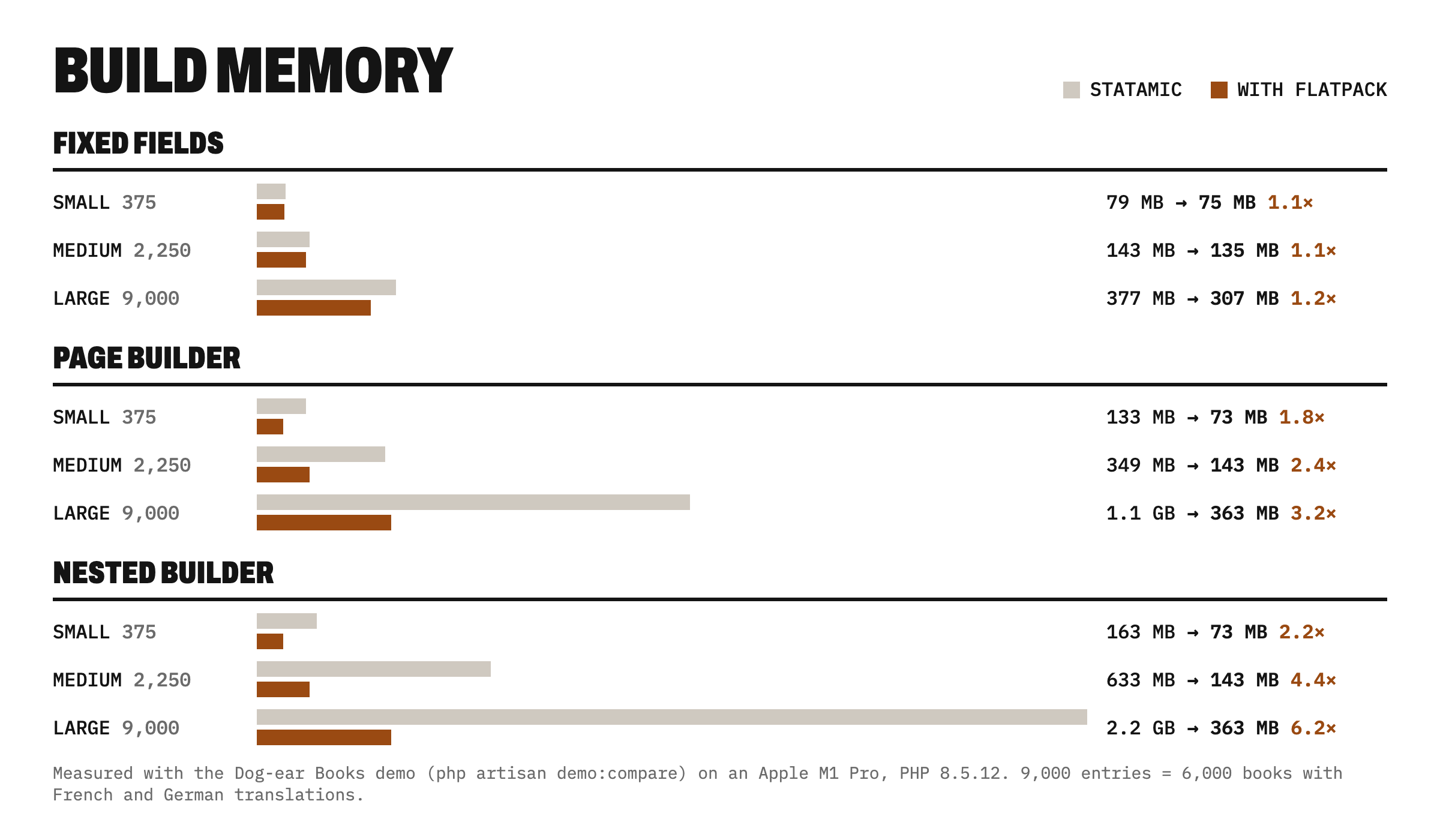
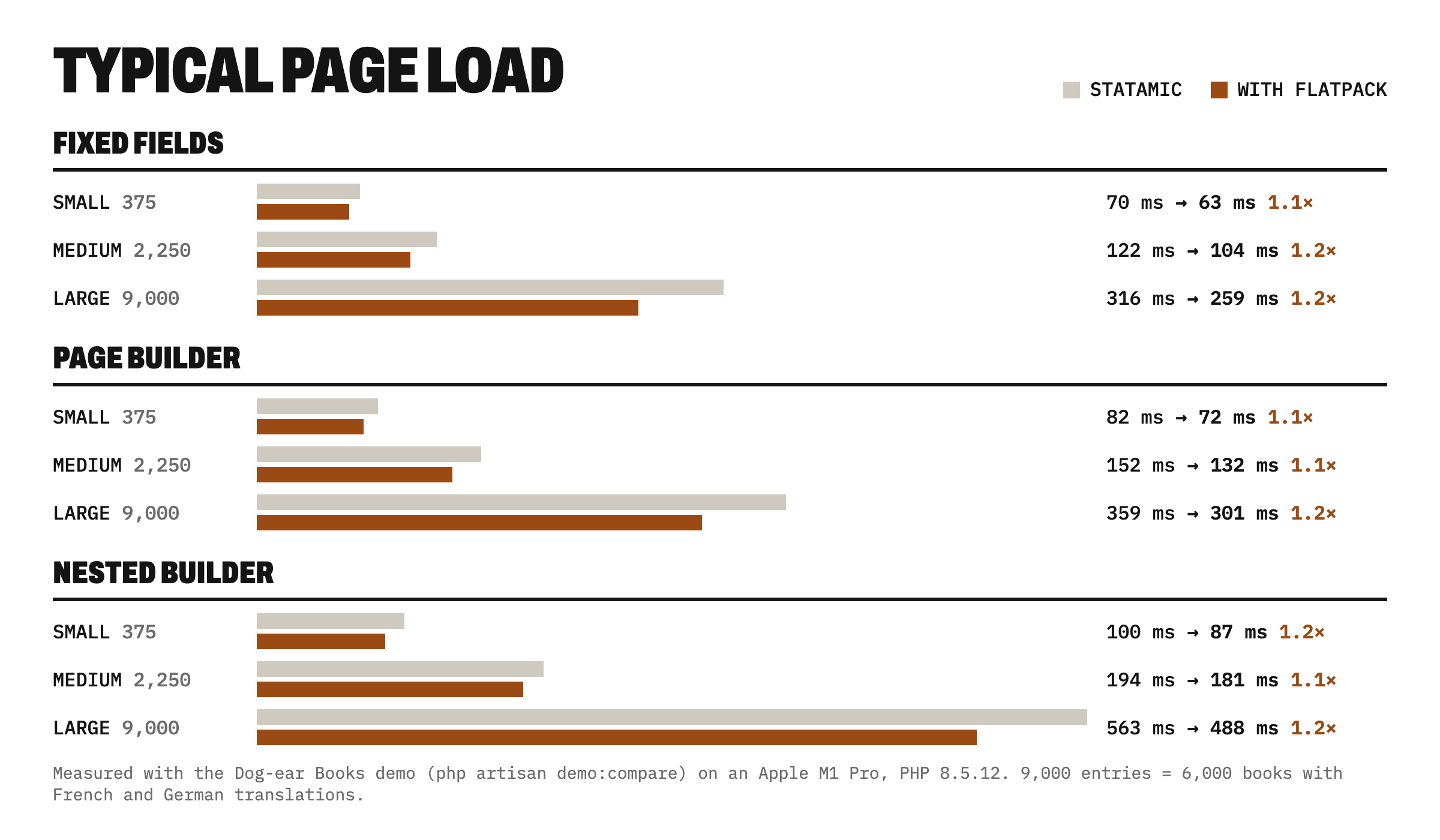
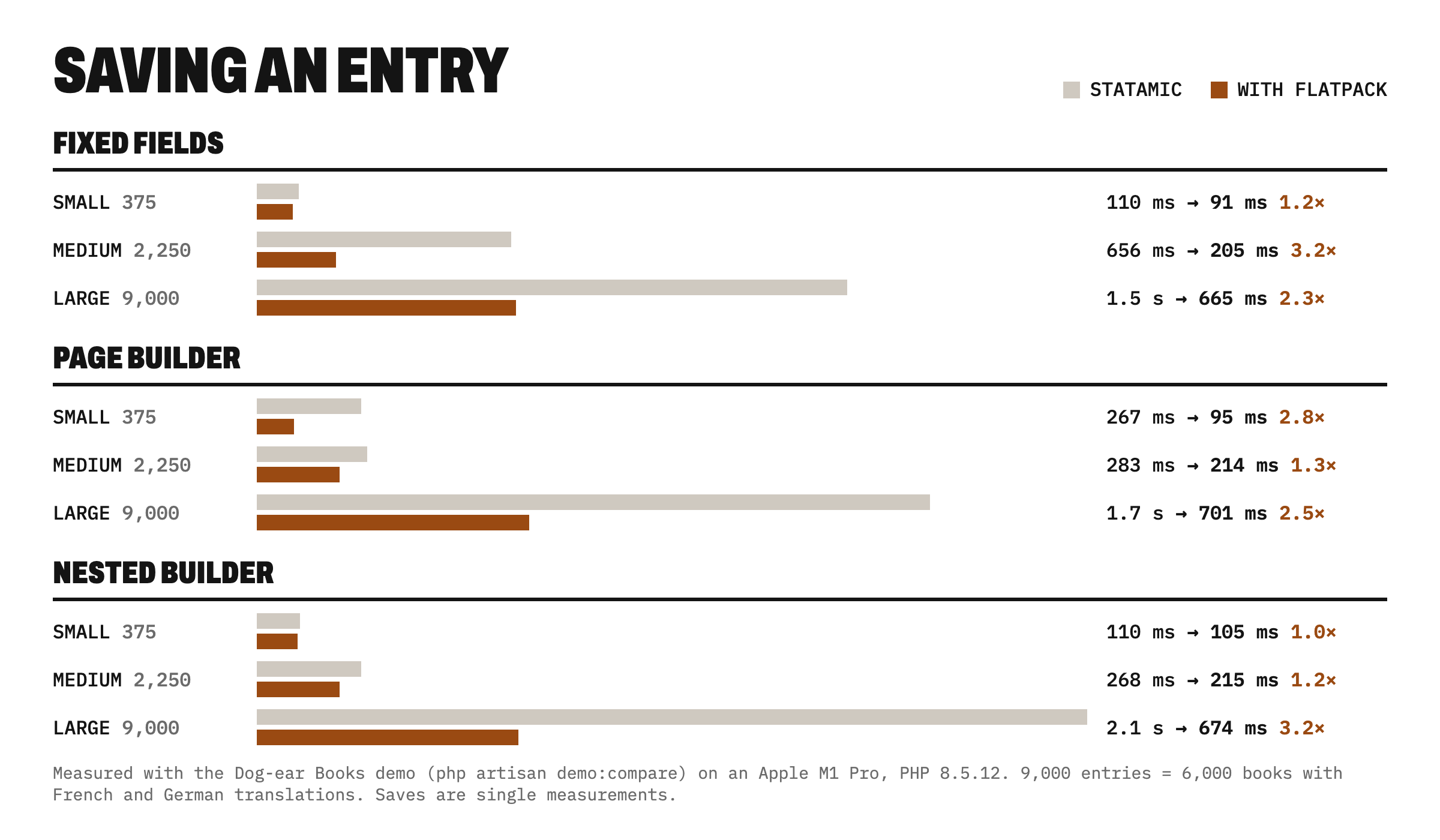
Measured with the Dog-ear Books demo, a made-up bookshop whose content can be generated at three levels of complexity (fixed fields only, a page builder, a deeply nested page builder) and several sizes. Each combination was run on plain Statamic and with Flatpack, on an Apple M1 Pro with PHP 8.5 and Statamic 6.40. Entries include French and German translations.
| Content | Entries | Build | Build memory | Typical page | Save |
|---|---|---|---|---|---|
| Fixed fields, small | 375 | 946 ms → 784 ms | 78 MB → 74 MB | 70 ms → 63 ms | 110 ms → 91 ms |
| Fixed fields, medium | 2,250 | 5.0 s → 4.0 s | 142 MB → 134 MB | 122 ms → 104 ms | 656 ms → 205 ms |
| Fixed fields, large | 9,000 | 22.1 s → 17.2 s | 376 MB → 307 MB | 316 ms → 259 ms | 1.5 s → 665 ms |
| Page builder, small | 375 | 1.5 s → 894 ms | 132 MB → 72 MB | 82 ms → 72 ms | 267 ms → 95 ms |
| Page builder, medium | 2,250 | 9.0 s → 4.8 s | 348 MB → 142 MB | 152 ms → 132 ms | 282 ms → 214 ms |
| Page builder, large | 9,000 | 37.3 s → 19.5 s | 1.1 GB → 363 MB | 359 ms → 301 ms | 1.7 s → 701 ms |
| Nested page builder, small | 375 | 2.6 s → 919 ms | 162 MB → 72 MB | 100 ms → 87 ms | 110 ms → 105 ms |
| Nested page builder, medium | 2,250 | 14.5 s → 4.9 s | 632 MB → 142 MB | 194 ms → 181 ms | 268 ms → 214 ms |
| Nested page builder, large | 9,000 | 67.3 s → 20.5 s | 2.2 GB → 363 MB | 563 ms → 488 ms | 2.1 s → 674 ms |
Statamic → with Flatpack. "Typical page" is the median of six kinds of page (home, a book list, a book, a journal post, an author, a subject). Saves are single measurements, so read them as a direction.
What it shows: the bigger the site and the deeper its page builders, the more Flatpack saves at build time and in memory (3.3× faster and 6× less memory for a 9,000-entry site with nested page builders). Page loads improve by 7 to 20%: most of a page's time is spent rendering templates, which Flatpack doesn't change. Your numbers will differ, so run the demo on your own machine: php artisan demo:compare --all.
Requirements
- PHP 8.2 or later
- Statamic 5.11 or later, or Statamic 6
- OPcache enabled for web requests (it is by default on Forge and Laravel Cloud; see if OPcache is off)
- Content kept in files (Flatpack does nothing for content stored with the Eloquent driver)
Flatpack suits sites on one server, and sites on several servers whose content is edited locally and deployed (the way Laravel recommends running flat-file Statamic on Laravel Cloud). It isn't a good fit for several servers whose content is edited in the live Control Panel. See more than one server.
Installation
composer require 1994/flatpack-statamic
Then, in your deploy script, replace the Stache warm with a Flatpack build:
php please flatpack:build # instead of stache:warm, stache:refresh or stache:clear
flatpack:build clears and warms the Stache itself, and also pre-parses large fields so first visits are fast, so remove the old Stache commands rather than running both. Everything else in your deploy (config caching, search indexes, static caching) stays as it is. After a git pull on a server outside a deploy, php please flatpack:refresh updates only what changed.
On Laravel Cloud it goes in build commands, not deploy commands. See deployment for a full Forge example, Laravel Cloud, several servers, and zero-downtime deploys.
Documentation
Everything is in docs/: how it works, configuration, deployment, the commands, the Control Panel utility, and troubleshooting.
Tested against Statamic
Every change runs a parity suite on Statamic 5 and 6: a fresh site with three languages, structured pages, large page builders, dated posts, taxonomies, navs and globals, run once on plain Statamic and once with Flatpack. Reads, saves (byte for byte), rebuilds and files changed on disk must all match. See testing.
Support
Email hello@1994.co.uk, or open an issue on GitHub.
Licence
Flatpack is free and open source, under the MIT licence.