
kz370 / krayin-multi-tenancy

A multi-tenancy package for Krayin CRM.
Requires
- php: ^8.1
- illuminate/database: ^10.0|^11.0
- illuminate/routing: ^10.0|^11.0
- illuminate/support: ^10.0|^11.0
Requires (Dev)
None
Suggests
None
Provides
None
Conflicts
None
Replaces
None
README
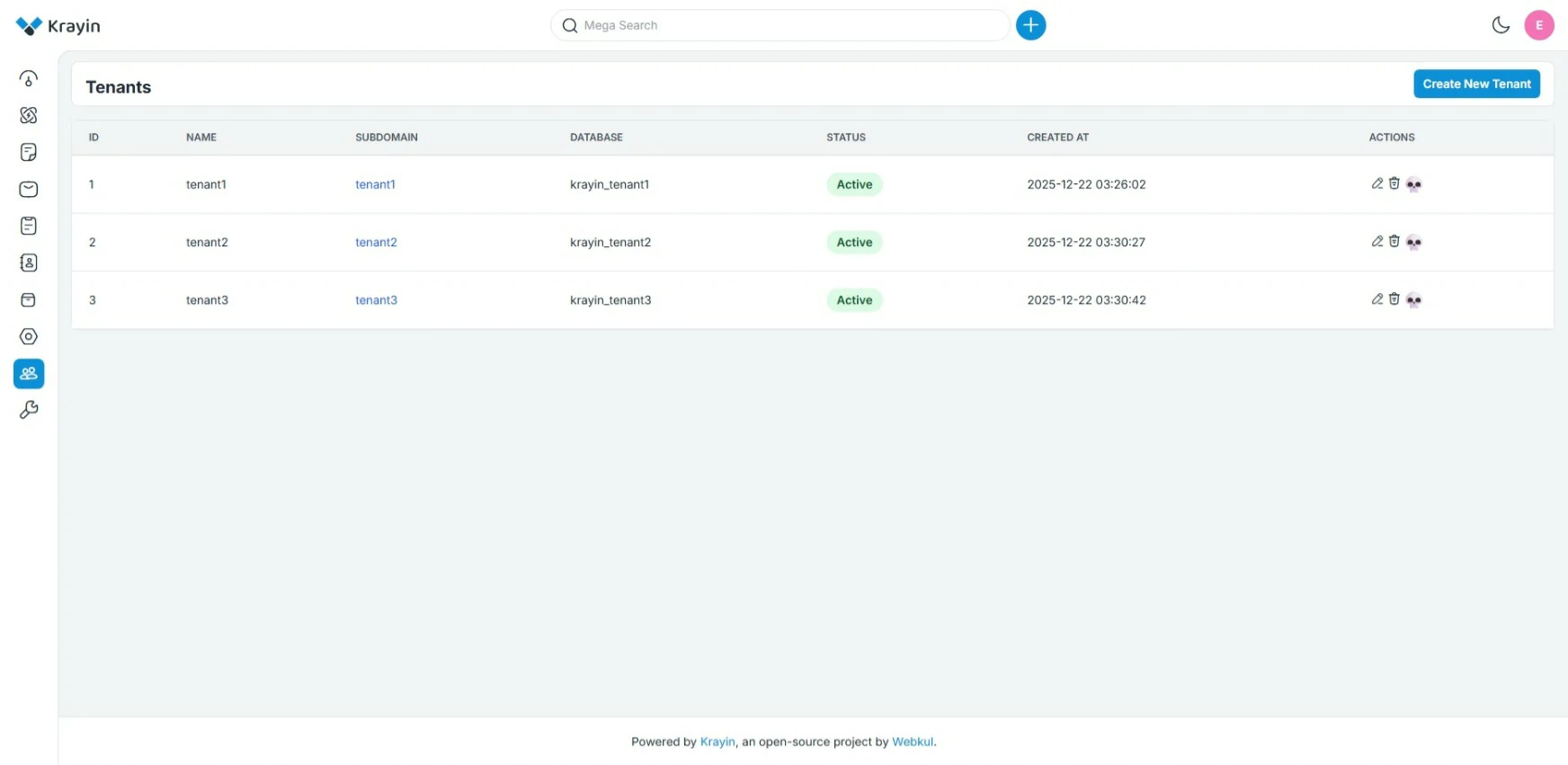
A multi-tenancy extension for Krayin CRM. This package enables Database-per-Tenant architecture, allowing you to host multiple isolated organizations on a single Krayin installation.
Installation
-
Install via Composer:
composer require kz370/krayin-multi-tenancy
-
Publish Config & Migrations:
php artisan vendor:publish --tag=krayin-multi-tenancy-config
php artisan vendor:publish --tag=krayin-multi-tenancy-migrations
-
Environment Setup: The package automatically uses your primary database connection (
DB_DATABASE) as the "Landlord" (Central) database.Ensure your database user (in
.env) has CREATE DATABASE permissions, as the package automatically creates new databases for each tenant.Variable Default Description DB_CONNECTIONmysqlThe default connection. DB_LANDLORD_DATABASENULLOptional. Defaults to your main DB_DATABASE. -
Setup Landlord Database: Run the migrations and the Krayin installer to set up the main system tables (including the
tenantstable).php artisan migrate php artisan krayin-crm:install
🔐 Database User Permissions (Required)
This package automatically creates a new database for each tenant.
Before using it, ensure that the database user configured in your .env file has permission to create databases.
Minimum Requirement
Your database user must have the CREATE DATABASE privilege.
If this permission is missing, tenant creation will fail.
Recommended (Safer) Permission Setup
For better security, it is strongly recommended to use a dedicated database user that can only manage tenant databases matching a specific naming pattern.
For example, if your tenant databases use a prefix like:
krayin_
You can grant permissions only for those databases:
GRANT ALL PRIVILEGES ON `krayin_%`.* TO 'krayin_tenant_user'@'%';
FLUSH PRIVILEGES;
This ensures:
- The user cannot access unrelated databases
- Only tenant databases managed by this package are affected
- Reduced risk in case of credential exposure
Using a Dedicated Tenant Database User (Optional)
You may optionally configure a separate database user exclusively for tenant management:
DB_USERNAME=krayin_tenant_user
DB_PASSWORD=strong_password_here
This user should only have privileges for tenant databases (using the prefix rule above), while your main application database can remain protected.
Summary
- ✅
CREATE DATABASEpermission is required - 🔒 Prefix-based permissions are recommended
- 🛡 Dedicated database users improve overall security
Configuration
You can customize behavior in config/multi_tenancy.php.
| Option | Key | Default | Description |
|---|---|---|---|
| Menu Visibility | show_menu |
true |
Show/Hide "Tenants" in the admin sidebar. |
| Database Prefix | database_prefix |
'krayin_' |
Prefix for generated tenant DBs (e.g., krayin_client1). |
| Landlord Connection | landlord_connection_name |
'landlord' |
Internal connection name for the central DB. |
Usage
1. Create a Tenant
- Log in to the Landlord Admin Panel (your main domain, e.g.,
app.com). - Navigate to Tenants in the sidebar.
- Click Add Tenant and enter:
- Name: The internal name for the tenant (e.g., "Acme Corp").
- Subdomain: The prefix for their URL (e.g.,
acme->acme.app.com). - Admin Details: The initial login credentials for the tenant's administrator.
- Hit Save.
- System Action: The package creates a new database
krayin_acme, runs all migrations, and seeds the admin user.
- System Action: The package creates a new database
2. Access a Tenant
- Navigate to the tenant's subdomain (e.g.,
http://acme.localhostorhttp://acme.app.com). - Log in with the Admin Email and Password defined during creation.
- All data created here (Leads, Persons, Settings) is essentially invisible to other tenants.
Important Notes
- Wildcard Subdomains: For production, ensure your DNS is configured to handle wildcard subdomains (
*.yourdomain.com) pointing to your server. - Local Development: If testing locally, you must add subdomains to your
/etc/hostsfile (e.g.,127.0.0.1 client1.localhost) or use a tool like Laravel Valet or Laragon that handles this automatically. - Database User: The MySQL user configured in your
.envmust have privileges to create and drop databases.
Artisan Commands
Use these commands to keep tenant databases up to date with your code.
| Command | Description |
|---|---|
php artisan tenants:migrate |
Run migrate on all active tenant databases. |
php artisan tenants:migrate 5 |
Run migrate on a specific tenant (ID: 5). |
php artisan tenants:migrate --fresh --seed |
Destructive: Wipe and re-seed all tenant databases. |
Troubleshooting
1. 404 Not Found on Tenant Subdomain
- Localhost: Ensure you have added the subdomain to your hosts file.
- Windows:
C:\Windows\System32\drivers\etc\hosts - Mac/Linux:
/etc/hosts - Entry:
127.0.0.1 client1.localhost
- Windows:
- Production: Ensure you have a Wildcard DNS A-Record (
*.yourdomain.com) in your domain registrar pointing to your server's IP address.
2. "Access Denied" during Tenant Creation
- The package tries to create a new SQL database automatically.
- Ensure the
DB_USERNAMEin your.envfile has theCREATE DATABASEpermission. - Fix: Grant full privileges to your database user or ensure they can create new databases.
3. Migrations applied to Landlord but not Tenant
- Running
php artisan migrateONLY updates the Landlord (Central) database. - To update tenant databases (e.g., if you added a new column to
leads), you must run:php artisan tenants:migrate
4. Admin Login Failed on Tenant
- Users are isolated. An admin account created on the Landlord (Main Domain) does not exist on the Tenant database.
- Use the specific credentials you defined in the "Admin Details" section when you created the Tenant.