
jamesil / nova-google-polygon

A Laravel Nova Google polygon field.
Requires
- php: ^8.2
- illuminate/support: ^12.0|^13.0
- laravel/nova: ^5.0
Requires (Dev)
- friendsofphp/php-cs-fixer: ^3.8
- laravel/framework: ^12.0
- nunomaduro/collision: ^8.9.1
- pestphp/pest: ^3.8
- phpunit/phpunit: ^11.5.50
Suggests
None
Provides
None
Conflicts
None
Replaces
None
README

Draw and edit map areas — coverage zones, delivery boundaries, geofences — directly in your Laravel Nova admin, then query them in PHP. Polygons are stored as plain {lat, lng} JSON, so your data stays simple and portable.
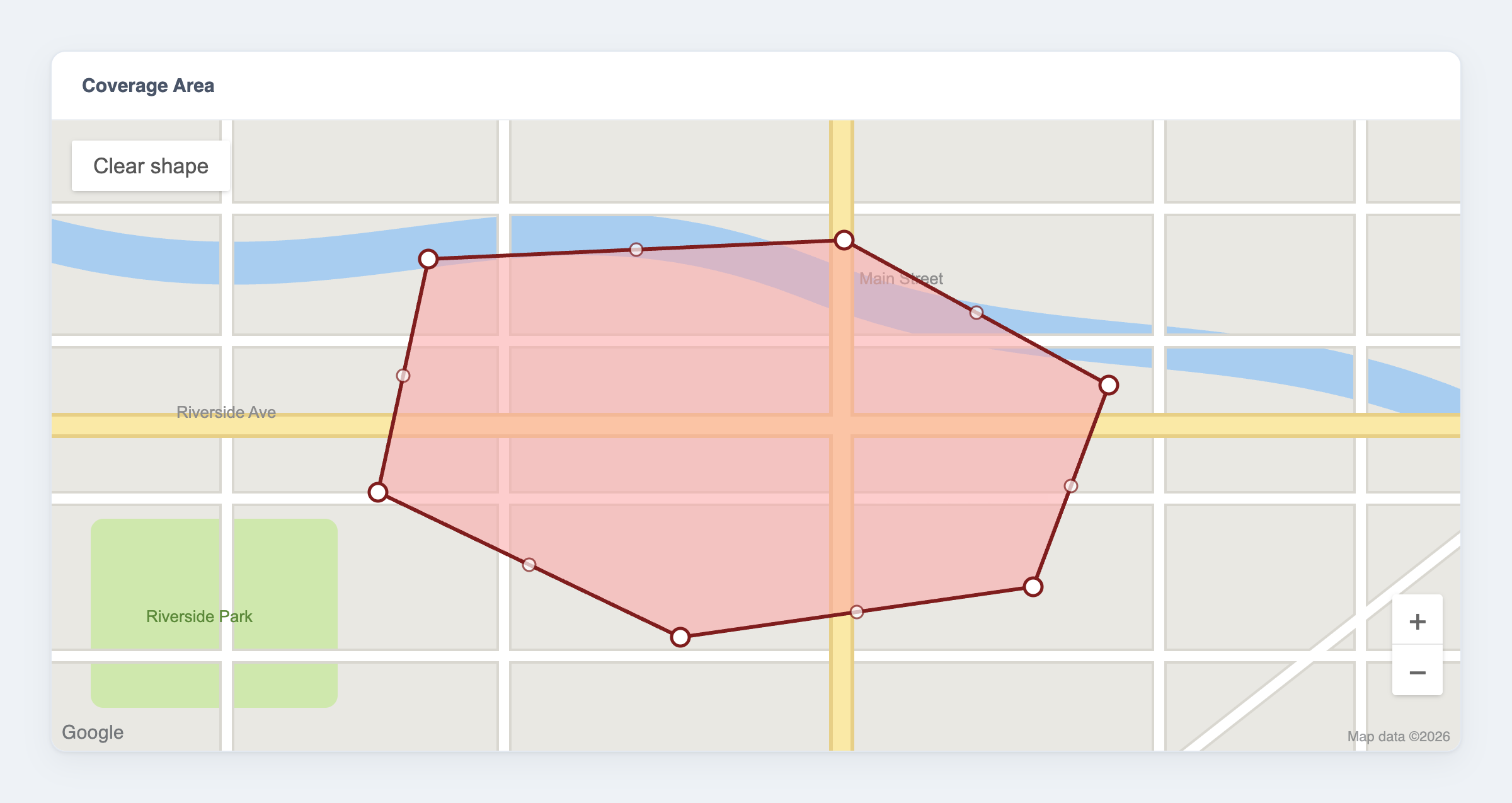
Features
- ✏️ Draw and edit polygons on an interactive Google Map, right inside Nova
- 📍 Add, move, and delete vertices — mouse or touch
- 🗄️ Stored as plain
{lat, lng}JSON; cast to a richPolygonobject with Eloquent - 📐 Geofencing helpers: point-in-polygon (
contain()), bounding box, and coordinate bounds - 🌍 Configurable default map centre
Requirements
| Package | Laravel | Laravel Nova | PHP |
|---|---|---|---|
2.x |
12.x | 5.0+ | 8.2+ |
2.x |
13.x | 5.8+ | 8.3+ |
1.x |
9.x – 11.x | 4.x or 5.x | 8.1+ |
You also need a Google Maps API key with the Maps JavaScript API enabled.
The main branch tracks the 2.x line (Laravel 12/13). The 1.x branch is the maintenance line for Laravel 9–11. Laravel 13 requires Nova 5.8.0 or newer.
Important
Versions ≤ 2.0.1 and ≤ 1.1.0 no longer work — Google removed the Maps JavaScript API drawing library they relied on (details). Use 2.1+ (Laravel 12/13) or 1.2+ (Laravel 9–11), which draw with Terra Draw instead. Your stored data is unchanged, so upgrading is drop-in.
Installation
composer require jamesil/nova-google-polygon:^2.0
For Laravel 9–11, require the 1.x line instead:
composer require jamesil/nova-google-polygon:^1.0
Configuration
Add your Google Maps API key to .env. The default map centre is optional (it only sets where a brand-new, empty map opens):
NOVA_GOOGLE_POLYGON_API_KEY=your-google-maps-api-key
NOVA_GOOGLE_POLYGON_CENTER_LAT=48.858361
NOVA_GOOGLE_POLYGON_CENTER_LNG=2.336164
To change the defaults in code, publish the config file (optional):
php artisan vendor:publish --provider="Jamesil\NovaGooglePolygon\FieldServiceProvider"
Warning
Restrict your API key. It is sent to the browser to load the map, so anyone can read it. In the Google Cloud Console, add HTTP-referrer restrictions (your Nova domain) and enable only the Maps JavaScript API.
Usage
1. Add the field
use Jamesil\NovaGooglePolygon\GooglePolygon;

public function fields(Request $request)
{
    return [
        ID::make()->sortable(),
        Text::make('Name'),

        GooglePolygon::make('Coverage Area', 'coverage_area'),
    ];
}
The field is shown on forms and detail views (it is hidden on the resource index).
2. Store the data
The polygon is saved as JSON, so give the attribute a JSON column:
Schema::create('locations', function (Blueprint $table) {
    $table->id();
    $table->string('name');
    $table->json('coverage_area')->nullable();
    $table->timestamps();
});
Add the AsPolygon cast so the attribute reads and writes as a Polygon object:
use Jamesil\NovaGooglePolygon\Casts\AsPolygon;

class Location extends Model
{
    protected $casts = [
        'coverage_area' => AsPolygon::class,
    ];
}
The column holds an array of points:
[
  { "lat": 48.858361, "lng": 2.336164 },
  { "lat": 48.859361, "lng": 2.337164 },
  { "lat": 48.857361, "lng": 2.338164 }
]
3. Draw and edit on the map
Drawing (empty map):
- Click to place each vertex.
- Finish by clicking the first point again, or pressing Enter.
- Escape cancels the shape you're drawing.
Editing (a polygon exists):
- Drag a vertex to move it.
- Click a midpoint — the fainter handle on an edge — to insert a vertex.
- Right-click a vertex to remove it (a polygon keeps at least 3).
- Clear shape (the button on the map) removes the polygon so you can start over.
Touch devices work the same way — tap to place vertices and drag the handles. If the handles vanish after you click elsewhere on the map, click the polygon to select it again.
4. Work with a polygon in PHP
With the cast in place, the attribute is a Polygon you can query — ideal for geofencing:
use Jamesil\NovaGooglePolygon\Support\Point;

$location = Location::find(1);

// Is a coordinate inside the zone?
$location->coverage_area->contain(new Point(48.8585, 2.3370)); // true / false

// Bounds
$location->coverage_area->getBoundingBox();
$location->coverage_area->getMinLatitude();
$location->coverage_area->getMaxLatitude();
You can also build a polygon directly:
use Jamesil\NovaGooglePolygon\Support\Polygon;

$polygon = new Polygon([
    ['lat' => 48.858361, 'lng' => 2.336164],
    ['lat' => 48.859361, 'lng' => 2.337164],
    ['lat' => 48.857361, 'lng' => 2.338164],
]);
Example: taxi pickup zones
Store a drawable pickup area per zone, then find which zone a rider falls in:
use Jamesil\NovaGooglePolygon\Casts\AsPolygon;
use Jamesil\NovaGooglePolygon\Support\Point;

class PickupZone extends Model
{
    protected $casts = [
        'pickup_area' => AsPolygon::class,
        'active' => 'boolean',
    ];

    public function covers(float $latitude, float $longitude): bool
    {
        return $this->active
            && $this->pickup_area
            && $this->pickup_area->contain(new Point($latitude, $longitude));
    }

    public static function forLocation(float $latitude, float $longitude): ?self
    {
        return static::where('active', true)->get()
            ->first(fn (self $zone) => $zone->covers($latitude, $longitude));
    }
}
API reference
Polygon
| Method | Description |
|---|---|
contain(Point|array $point): bool |
Whether the point is inside the polygon (even-odd ray casting). A point on a vertex is inside; points on an edge follow a half-open convention (the minimum-latitude and minimum-longitude edges are inclusive, the opposite edges exclusive). |
pointOnVertex(Point|array $point): bool |
Whether the point sits exactly on a vertex. |
getBoundingBox(): array |
The four [lat, lng] corners of the bounding box. |
getMinLatitude() / getMaxLatitude(): float |
Latitude bounds. |
getMinLongitude() / getMaxLongitude(): float |
Longitude bounds. |
getPoints(): Point[] |
All vertices. |
setPoints(array $points): Polygon |
Replace the vertices. |
Point
| Method | Description |
|---|---|
new Point(float $lat, float $lng) |
Create a point. |
Point::fromArray(array $input): Point |
From ['lat' => …, 'lng' => …] or [$lat, $lng]. |
toArray(): array / toJson(): string |
Serialise the point. |
Limitations
- One polygon per field — no multi-polygons or holes.
- The map is a fixed 500px tall and auto-fits to an existing polygon; zoom is automatic.
Testing
composer test
Credits
- James Embling
- Based on the original work by YieldStudio
License
The MIT License (MIT). See LICENSE.md.