
devdojo / refine

A developer-only Chrome extension and Laravel package for live-editing Blade templates directly in the browser
Requires
- php: ^8.1
- illuminate/support: ^10.0|^11.0|^12.0
Requires (Dev)
- orchestra/testbench: ^8.0|^9.0
- phpunit/phpunit: ^10.5
Suggests
None
Provides
None
Conflicts
None
Replaces
None
This package is auto-updated.
Last update: 2026-09-14 17:44:32 UTC
README
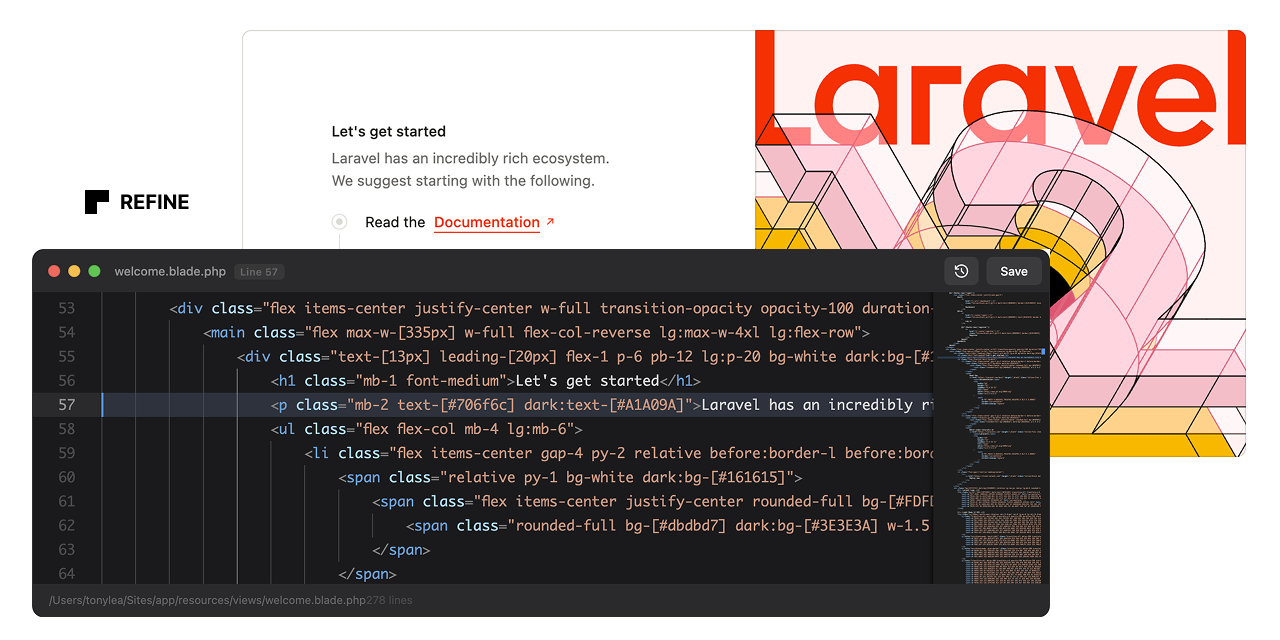
Refine Your Blade Views
Refine is a live Blade editor. It enables instant, in-browser editing of Blade templates. Right-click any element, click "Edit Code", and modify the source code directly.
Warning
This is still actively being developed so there may be a few issues. I have tested this with Blade Includes and Components; however, more testing is needed for Livewire and Volt.
Features
- One-Click Editing: Right-click any element and edit its Blade source instantly
- Automatic Source Tracking: Automatically instruments Blade views with source metadata
- Zero Configuration: Works out of the box after installation
- Smart DOM Traversal: Finds the originating Blade file even in nested components
- Instant Saves: Write changes directly to disk and hot-reload affected regions
- Backup System: Automatically backs up files before making changes
- Dev-Only: This package should not be installed in production.
Installation
Step 1: Install the Laravel Package
composer require devdojo/refine --dev
The package will auto-register via Laravel's package discovery.
Step 2: Load the Chrome Extension
Download the code from this repo and put the extension folder somewhere permanent on your computer. This could be your Documents folder or a folder in your home directory.
- Open Chrome and navigate to
chrome://extensions/ - Enable "Developer mode" (toggle in top-right corner)
- Click "Load unpacked"
- Navigate to the extension** folder you saved to your computer
- Select the folder and click "Open"
Step 3: Verify Installation
- Start your Laravel development server (
php artisan serveor Valet/Herd) - Visit any page in your application
- Open the browser console - you should see: "Refine: Content script loaded and ready"
- Visit
http://your-app.test/refine/status- you should see a JSON response confirming Refine is enabled
Usage
- Right-click any element on your page
- Click "Edit Code" from the context menu
- Edit the Blade source code in the floating editor
- Press Cmd/Ctrl+S or click Save to write changes
- Page auto-reloads to show your changes
Keyboard Shortcuts
Cmd/Ctrl + S- Save changesEscape- Minimize editorTab- Insert 4 spaces (proper indentation)
How It Works
Backend (Laravel)
- Blade Instrumentation: A Blade compiler hook automatically injects
data-sourceattributes into rendered HTML elements containing the view path and line number - API Endpoints: Two endpoints handle fetching source code and saving changes
- File Resolution: Automatically resolves view paths to absolute file paths
- Cache Clearing: Runs
php artisan view:clearafter saves to ensure changes are reflected
Frontend (Chrome Extension)
- Context Menu: Registers a "Edit Code" option in the right-click menu
- DOM Traversal: Finds the nearest parent element with a
data-sourceattribute - API Communication: Fetches source code from Laravel and sends updates back
- Floating UI: Renders a dark-themed code editor overlay with save/cancel actions
Configuration
Publish the configuration file:
php artisan vendor:publish --tag=refine-config
This creates config/refine.php where you can customize:
- Enabled State: Force enable/disable Refine
- Route Prefix: Change the API route prefix (default:
/refine) - Middleware: Add additional middleware to Refine routes
- Instrumentation: Customize which HTML tags get source attributes
- Backups: Configure automatic backup behavior
Security
Refine is strictly for local development. It includes multiple safety layers:
- Only activates when
APP_ENV=local - Middleware blocks all requests in non-local environments
- Routes only register when enabled
- Extension only works on localhost/
.testdomains
Never deploy Refine to production. Install it as a dev dependency only.
Architecture
Package Structure
vendor/devdojo/refine/
├── extension/              # Chrome extension (load this folder)
│   ├── manifest.json      # Extension configuration
│   ├── background.js      # Service worker for context menu
│   ├── content.js         # Content script with DOM logic & UI
│   └── icons/             # Extension icons
├── src/
│   ├── RefineServiceProvider.php
│   ├── Http/
│   │   ├── Controllers/
│   │   │   └── RefineController.php
│   │   └── Middleware/
│   │       └── RefineMiddleware.php
│   └── Services/
│       └── BladeInstrumentation.php
├── config/
│   └── refine.php
└── composer.json
API Endpoints
GET /refine/status
Returns Refine status and version.
GET /refine/fetch?ref={encoded}
Fetches source code for a given reference.
Response:
{
  "success": true,
  "data": {
    "file_path": "/path/to/file.blade.php",
    "view_path": "components.alert",
    "line_number": 12,
    "full_contents": "...",
    "total_lines": 45
  }
}
POST /refine/save
Saves updated source code.
Request:
{
  "ref": "encoded-source-reference",
  "contents": "updated file contents"
}
Response:
{
  "success": true,
  "message": "File saved successfully"
}
Supported Blade Features
- Standard Blade views
- Blade components (x-component syntax)
- Nested components and partials
- Layout inheritance
- View composers and creators
Troubleshooting
"No source reference found" error
Cause: The clicked element doesn't have a data-source attribute.
Solutions:
- Ensure
config('refine.enabled')returnstrue - Check that
APP_ENV=localin your.envfile - Clear view cache:
php artisan view:clear - Verify the element's parent tags are in the
target_tagsconfig array
Extension not loading
Solutions:
- Check Chrome's extension page for errors
- Reload the extension after making changes
- Check browser console for JavaScript errors
Changes not reflecting
Solutions:
- Hard refresh the page (Cmd/Ctrl + Shift + R)
- Clear view cache:
php artisan view:clear - Check file permissions on the view file
- Verify the backup directory is writable
CSRF token errors
Solutions:
- Ensure your layout includes
<meta name="csrf-token" content="{{ csrf_token() }}"> - Or include
@csrfin a form on the page
Limitations
- Only works on local development domains (localhost, *.test)
- Requires the CSRF token to be present in the page
- Cannot edit compiled PHP files, only Blade templates
- Page reload required to see changes (no true hot-reload)
Roadmap
Future enhancements being considered:
- Syntax highlighting in the editor
- Line number gutter
- Find and replace
- Multiple file tabs
- Diff view before saving
- Undo/redo history
- Component preview
- Hot module replacement (no page reload)
Contributing
This is an initial release. Contributions, bug reports, and feature requests are welcome.
License
MIT License. This is a developer tool provided as-is with no warranties.
Credits
Created by DevDojo for the Laravel community.